iPhone vs Android: Where a Downloaded Reel's Audio Actually Lands
What each phone hands you
The two platforms do not agree on what a recording is called. An iPhone gives you .m4a out of Voice Memos and the Files app, .mov from a screen recording, and .mp4 for video you saved. Android gives you .m4a or .mp4 from most newer recorders, .ogg or .opus from others, and .3gp or .amr from older ones. We made one 20-second narration, put it in eight of those containers, and uploaded all eight:
- iPhone shape, .m4a, 295,093 bytes: 200 in 3.24 seconds, 322 characters, 59 words
- iPhone shape, .mov, 295,144 bytes: 200 in 2.60 seconds, the same 322 characters
- iPhone shape, .mp4 audio only, 295,113 bytes: 200 in 2.54 seconds, the same 322 characters
- Android shape, .ogg with Opus inside, 75,058 bytes: 200 in 2.96 seconds, the same 322 characters
- Android shape, .opus, 75,058 bytes - the same audio, different ending: 400 in 0.05 seconds
- Android shape, .3gp with AAC inside, 152,637 bytes: 400 in 0.07 seconds
- Android shape, .amr from an older recorder, 32,038 bytes: 400 in 0.05 seconds
- Android shape, .mkv with the AAC track copied straight over, 297,593 bytes: 400 in 0.05 seconds
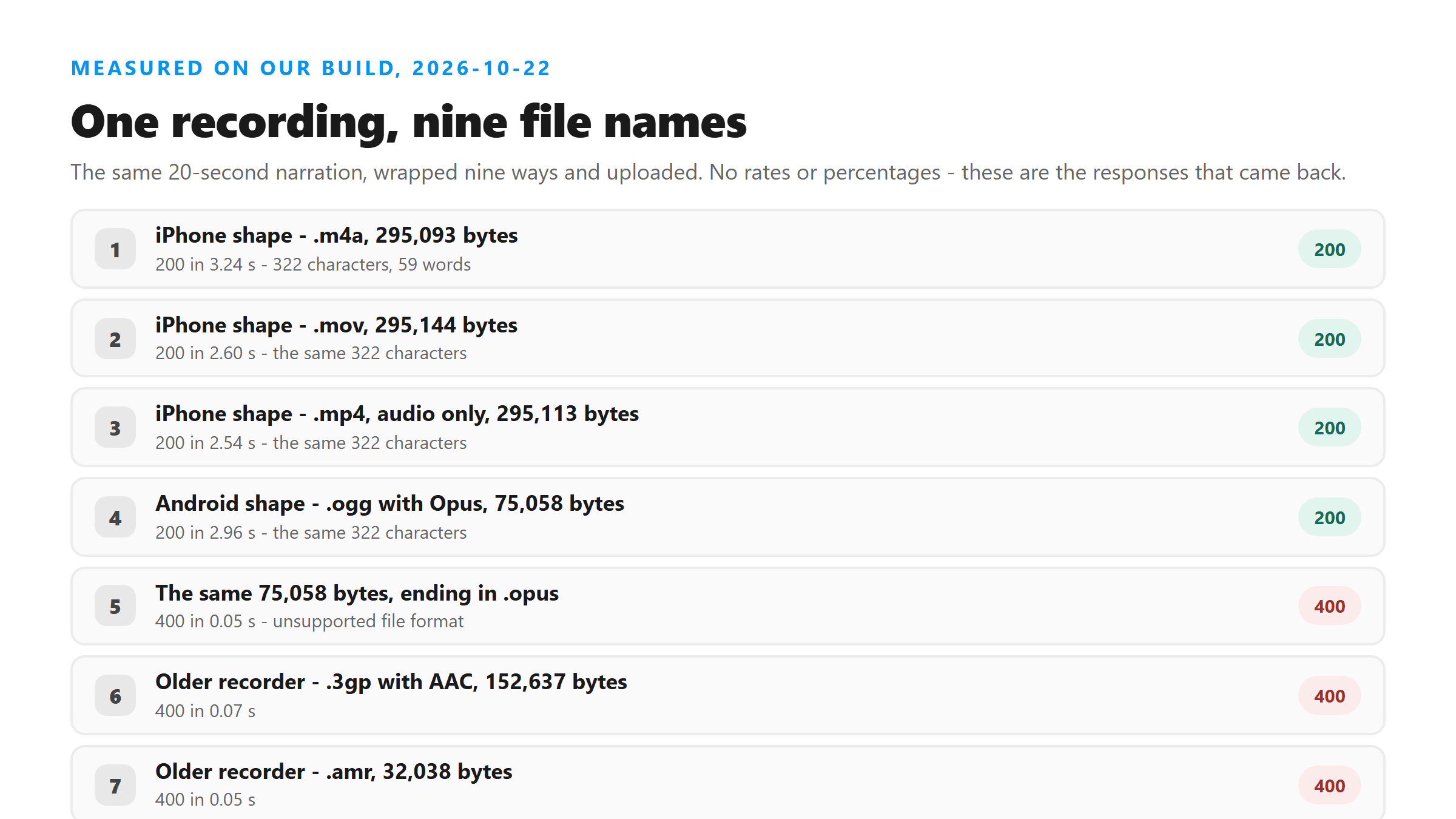
Every one of the four refusals said the same thing: Unsupported file format. Please select MP3, WAV, M4A, AAC, OGG, FLAC, MP4, MOV, or WEBM. All four came back in under a tenth of a second, which tells you the file never went anywhere - the name was read, the name was not on the list, and the request stopped there.
The check reads the name, not the bytes
So the practical rule is short. If your phone or your downloader produces something ending in .opus, .3gp, .amr or .mkv, rename it or re-wrap it before you upload. Changing .opus to .ogg costs nothing and needs no re-encode, because the audio inside is already what the endpoint expects. Do not invent an ending for a file you do not understand, though - a .3gp holding AMR-NB has to be converted, not renamed, because the codec itself is not on the list either.
Three more names we tried
We ran the same AAC audio from the 20-second clip under three more names to see how far the rule goes:
- track.aac, 295,093 bytes: 200 in 2.81 seconds, the same 322 characters - AAC is on the list
- UPPER.M4A, the same bytes with the ending in capitals: 200, the same 322 characters - the check ignores case
- The same file with no ending at all: 400 in 0.05 seconds
So the list is nine endings long - MP3, WAV, M4A, AAC, OGG, FLAC, MP4, MOV and WEBM - it is matched on the file name, and it ignores case. Anything outside it stops in under a tenth of a second, and when it stops, nothing has been uploaded. Your phone picked the name when it saved the file, and that choice is the one thing standing between you and the transcript.
Where the text lands, and where it does not
This is the part people get wrong, and it is worth being precise about it. The transcript comes back inside the response to your upload. There is no file waiting for you afterwards. We checked by sending a plain GET to the same address, and it returned 404 Not found. The response itself has six fields - success, transcript, language, engine, fileSize and fileName - and none of them is an id, a link or a result page.
That means the copy you keep is the one your browser saves when you hit Copy, TXT, SRT or VTT. Those buttons build the file on your device from the text already in the page. On an iPhone that text goes wherever your browser puts downloads, which is the Files app for most people; on Android it goes to the same place your other downloads go. If you close the tab before you save, it is gone, and no amount of asking will bring it back, because there is no copy on our side to fetch.
Getting the audio off each phone
Both phones can hand you a Reel with the picture still attached, and the picture is most of the file. In the 20-second clip we used here, the audio stream is 296,876 bytes out of 16,318,601 - 1.8% of the file, and it is the only part that carries words. If you want the audio on its own before you upload, the steps are on the instagram audio download page, including the one ffmpeg command that pulls it out untouched.
- iPhone: share the Reel to the Files app, or use a converter app to export audio only, then upload that file
- Android: save the Reel, open it in Files, and use a converter or your recorder app to export the audio track
- Either phone: if the file ends in .opus, .3gp, .amr or .mkv, re-wrap or convert it first
- Either phone: save the TXT, SRT or VTT before you close the tab - there is no copy kept for you
What is the same on both phones
Everything after the upload. Once the file is in, the platform it came from stops mattering. Our response returns the text as one block with no timestamps, no speaker labels and no line breaks, on both an .m4a from an iPhone and an .ogg from an Android. The failure modes are shared too: music over the voice still breaks the words, silence still comes back with invented text, and a clip with no speech still returns something. The phone decides what the file is called and where it sits. It does not change what comes out the other end.
Got a Reel you want as text? Upload the file and download the transcript as TXT, SRT, or VTT →
Renaming gets you past the file-name check, but a .3gp or an .amr also needs the audio converted, and a phone will not do that for you. Wondershare UniConverter opens those files on a desktop and writes them out as .mp3 or .m4a, which are the shapes that upload cleanly here. It does not transcribe - the words still come back from this page.
FAQ
My Android recorder saves .opus files. Can I upload one?
Not under that name. We sent the same 75,058 bytes twice: as .ogg it came back 200 in 2.96 seconds with 59 words, and as .opus it came back 400 in 0.05 seconds. Rename it to .ogg and it should go straight through, since the audio inside is already fine.
Is there a copy of my transcript I can get back later?
No. The response has six fields and none of them is an id or a URL, and a plain GET to the endpoint returns 404 Not found. Save the TXT, SRT or VTT while the page is open, because that is the only copy.
Does an iPhone screen recording work?
Yes, it carries the .mov ending and it is on the accepted list - ours came back 200 in 2.60 seconds. Watch the size, though: a screen recording is the heaviest file most people ever try to send, and the audio pulled out of it is a fraction of the bytes.