What to Do When the Instagram Transcript Comes Back Empty
In most cases the transcript is not empty at all - it is one or two words long. We ran eighteen uploads through our own endpoint on 2026-09-26. Eight seconds of silence came back as you. Thirty seconds of silence came back as you you. A 440 Hz tone came back as you, and pink noise came back as nd. The one input that fails outright is a video with no audio track, which returns HTTP 500. So before re-uploading, check that the file actually carries speech, and treat any one-word transcript as a failed run rather than a short quote.
Three different things get called an empty transcript
When someone says a transcript came back empty, one of three things actually happened. They have different causes and different fixes, so telling them apart is the first step.
- A hard error. The run never produced text. We return HTTP 400 for a zero-byte file or an unsupported container, and the model layer returns HTTP 500 when there is no audio track to decode.
- A near-empty transcript. HTTP 200 with one or two tokens in it -
you,you you,nd. This is what silence and music actually produce, and it looks like a result. - A truncated transcript. HTTP 200 carrying the first word or two of real speech. A 0.5-second clip of our test audio returned
Hello; a 0.15-second clip returnedyou.
What we measured on our own endpoint
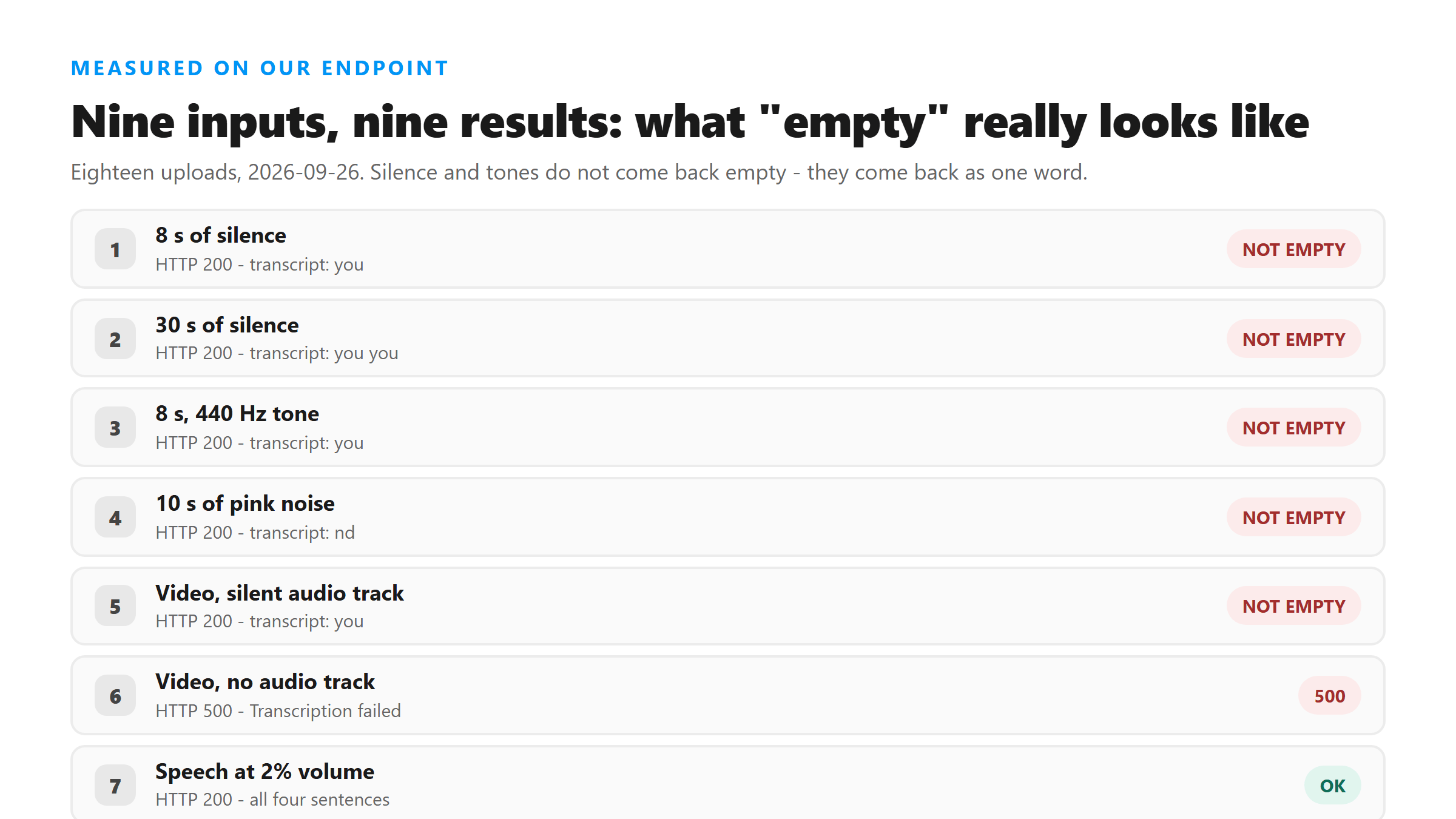
Eighteen uploads, run on 2026-09-26 against the same /api/transcribe route this site uses, on Cloudflare Workers AI with @cf/openai/whisper. Every line below reproduced on repeat runs.
- 8 seconds of digital silence - HTTP 200, transcript
you(three runs, 0.66 to 1.01 s) - 30 seconds of digital silence - HTTP 200, transcript
you you, 1.15 s - 8 seconds of a 440 Hz tone - HTTP 200, transcript
you(two runs) - 10 seconds of pink noise - HTTP 200, transcript
nd, 1.47 s - MP4 with a silent audio track - HTTP 200, transcript
you, 3.62 s - MP4 with no audio track - HTTP 500, "Transcription failed. Please try another supported file." (three runs)
- Speech at 2% of original volume - HTTP 200, the full four-sentence transcript, 1.10 s
- Speech resampled to 8 kHz - HTTP 200, four sentences with one word changed, 9.98 s
- Zero-byte file - HTTP 400, "Please select a non-empty audio or video file.", 0.04 s
Start here: does the file actually carry a speech track?
The only input in our batch that failed hard was a video container with no audio stream at all. That is also the most common real-world cause we can think of, because screen recordings made with sound muted produce exactly that file.
- Check with
ffprobe -i yourfile.mp4 -show_streams -select_streams a. No output means there is no audio stream, and transcription has nothing to work from. - Play the file back before you upload it. Ten seconds of listening saves a full re-upload cycle.
- Re-record a muted screen capture rather than trying to repair it. If the audio was never captured, no setting on our side can recover it.
- Be suspicious of downloads from third-party save services. Some strip the audio track, and the file still opens and plays as video.
Quiet audio is not the problem
We expected low volume to be a cause and it was not. A clip dropped to 2% of its original volume returned every sentence correctly. Speech resampled down to 8 kHz still returned four sentences, with one word changed, though it took nearly ten seconds instead of one. Low level and low sample rate cost you a little accuracy and a lot of time. They do not produce an empty result.
If the file is long, cut it
Length is a separate failure mode with different symptoms. In an earlier round of testing on this endpoint, 5-minute chunks succeeded three times out of three at roughly 40 to 48 seconds each, while 10-minute uploads succeeded once in four and 15- and 30-minute uploads failed outright. If a long file returns nothing, split it rather than re-uploading it whole.
When the real problem is that you never had a file
Sometimes the transcript is empty because nothing ever reached the transcriber. Instagram does not allow outside tools to fetch Reel media programmatically: a browser fetch is refused by a cross-origin-resource-policy: same-origin header, yt-dlp returns an empty media response without session cookies, the oEmbed endpoint needs an OAuth token and returns no video URL without one, and unauthenticated GraphQL calls come back HTTP 400. A URL-paste tool that hands you nothing has failed before transcription began. Save the audio or video to your device first, then upload that file.
What we do with the file you upload
Your file is posted to /api/transcribe over an encrypted connection, held in memory while the model runs, and discarded as soon as the response is sent. There is no account, no stored copy, and no use of your media for training. The practical consequence for an empty result: there is nothing on our side to retry from, so keep your local file and re-upload it once you have fixed the input.
FAQ
Why did I get the word "you" instead of an error message?
Because the run did produce text. Our endpoint only returns the empty-result error when the model hands back an empty string, and a single-token output passes that check. In eighteen test uploads we never triggered that error path - we got 400s, 500s and 200s, never the empty-string case. Treat a one-word transcript as a failed run.
Can I use a one-word transcript as a quote?
No. In our tests that output came from silence, a pure tone and noise - none of which contain speech. Treating it as a quote would put words in someone's mouth that were never said.
My recording is quiet. Do I need to boost the volume first?
Not for an empty result. A clip at 2% volume returned every sentence correctly in our test. Boosting can help accuracy on a genuinely quiet recording, but it will not rescue a file that has no speech in it.
How do I know whether my screen recording captured sound?
Run ffprobe and look for an audio stream, or just play the file with the sound on. A video with no audio track is the one input in our batch that returned a hard failure, so this check is worth doing before anything else.
Do you keep my file so I can retry?
No. The file is processed in memory and discarded after the response. Keep your own copy and upload it again after you have fixed whatever was wrong with the input.