What Audio You Actually Capture When You Screen-Record a Reel
What we measured today
- One reference clip: a 10.2-second, 29-word recording whose transcript we know word for word.
- Each variant was uploaded to our own /api/transcribe and scored by word-for-word alignment against that reference, so every score below is x out of 29 - not an accuracy percentage.
- The engine is the same one that answers every request on this site: @cf/openai/whisper, running on Cloudflare Workers AI.
- Room acoustics were produced with ffmpeg (echo, pink noise, band limiting, level changes) rather than a real room. That is stated again at the bottom of this page, because it is the main limit on what these numbers mean.
Two capture paths, two very different files
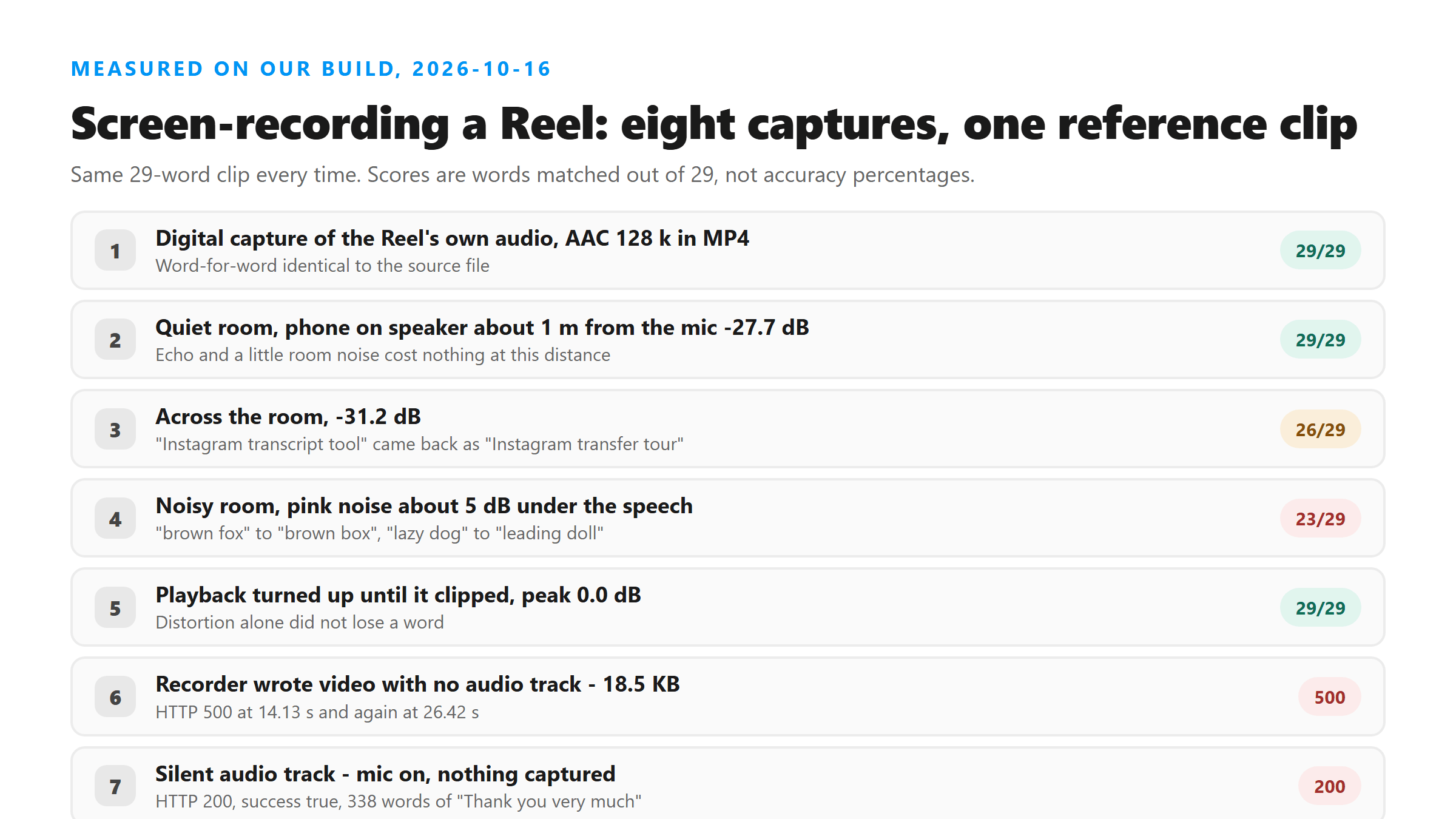
A screen recorder can take sound in one of two ways. It can read the audio the phone is already playing - a digital copy, exactly the bytes the app decoded. Or it can listen through the microphone, which means the sound has travelled from a speaker, across a room, into a mic, through the recorder's own compression. We tested both. The digital path kept all 29 words: the same clip written as AAC 128 kbps inside an MP4 came back word-for-word identical to the original file. The microphone path did not, and the gap widened with distance and noise.
The room is what changes the transcript
- Reference clip, no room at all: 29 of 29 words, mean level -21.1 dB.
- Quiet room, phone on speaker about a metre from the mic: 29 of 29, mean level -27.7 dB. A close, quiet room cost us nothing.
- Across the room, more echo, more level loss: 26 of 29, mean level -31.2 dB. The model returned "Instagram transfer tour" for "Instagram transcript tool".
- Noisy room, pink noise about 5 dB under the speech: 23 of 29. "transcript tool" became "transfer tool", "brown fox" became "brown box", "lazy dog" became "leading doll".
- Playback turned up until it clipped (peak 0.0 dB): 29 of 29. Overdriven playback did not cost us a word in this test.
- Every one of those failures came back with success: true. The response has no field that says "this audio was difficult".
Fixes we tried, in the order of what they actually did
- Noise reduction (afftdn, -30 dB) on the across-the-room capture: back to 29 of 29. This was the only thing that recovered the lost words today.
- Turning the level up 4x: 26 of 29, no change.
- Loudness normalisation: 26 of 29, no change.
- Band limiting to 100 Hz - 8 kHz: 25 of 29, slightly worse.
- Re-encoding the damaged capture as AAC 64 kbps mono, which is what a phone recorder would write: 26 of 29. The recorder's own codec did not add damage.
- Same file uploaded twice: identical text both times. Retrying does not change the output, so a second run cannot be used as a check.
Three ways a screen recording fails before transcription even starts
- No audio track at all. Some recorders write a video with no audio stream when the mic is off. We uploaded one: HTTP 500, twice, at 14.13 s and 26.42 s - on a file only 18.5 KB. The error text points at file format, but the real cause is that there is nothing to hear.
- A silent audio track. Mic on, nothing captured. That one returns HTTP 200 and success: true with 338 words of "Thank you very much" repeated. It is not empty - it is fabricated, and it looks like a normal result.
- Too many bytes. A 20-second 1080x1920 recording at 8 Mbps is 21.1 MB, and it came back HTTP 503 from Cloudflare in 7.26 s, before it reached our code. The same clip at 4 Mbps (11.6 MB) went through twice, at 11.02 s and 11.15 s.
What a screen recording costs in bytes and minutes
- Recording runs at real time. A 60-second Reel takes 60 seconds to capture, before you have anything to upload.
- 20-second 1080x1920 clips, measured: 500 kbps is 1.65 MB (200 in 3.87 s), 1 Mbps is 3.18 MB (200 in 4.47 s), 2 Mbps is 6.00 MB (200 in 6.96 s), 4 Mbps is 11.64 MB (200 in 11.02 s and 11.15 s), 8 Mbps is 21.08 MB (HTTP 503 in 7.26 s).
- Our measured rates: about 145-159 KB per second at 1 Mbps, 300 KB/s at 2 Mbps, 582 KB/s at 4 Mbps. Extrapolating arithmetically, a 60-second recording at 6 Mbps - a common phone default - would be roughly 52 MB. That last figure is arithmetic from our own rates, not a file we uploaded.
- Copying the audio track out of the video without re-encoding: 0.17 s from 11.6 MB, 0.26 s from 8.7 MB, 3.48 s from 21.1 MB.
- The extracted audio uploaded and transcribed: 315 KB in 5.85 s and 2.94 s; a 60-second 937 KB track in 8.11 s, 5.77 s and 7.83 s.
- The text from the 21.1 MB video that Cloudflare rejected and the text from the 11.6 MB video that went through were identical - 321 characters, same words. The video bitrate carried no information the model used.
What the response still does not tell you
- Six fields: success, transcript, language, engine, fileSize, fileName. That is the whole response.
- language comes back as "unknown" on every run we made, including the clean ones.
- Zero line breaks in the output - one block of text, no paragraphs.
- No timestamps, no speaker labels, no confidence score, and no warning field. A transcript that came from a microphone across a noisy room is indistinguishable from one that came from a digital capture.
A checklist before you transcribe a screen recording
- Confirm the file actually has an audio stream. If it does not, you get HTTP 500, and the wording of the error will send you looking at the format instead.
- Play the first two seconds. If you hear nothing, do not trust the result - a silent track produces fluent invented text, not an empty one.
- Pull the audio out before uploading. Stream copy, no re-encode: 0.17 s to 3.48 s in our tests, and it removes the size ceiling entirely.
- If the words look wrong and the audio came from a microphone, run noise reduction once. It was the only step that recovered words today.
- Treat a single HTTP 500 as retryable. Today an 85 KB file, a 171 KB file and a 1.8 MB file each failed once and succeeded on the next attempt, unchanged.
Why we do not fetch the Reel for you
Screen recording exists because the direct routes are blocked. We have measured those routes too: Instagram serves its pages with cross-origin-resource-policy: same-origin, refuses to be framed, and its public embed endpoint answers 404 or redirects without a token. There is no server-side path that gets us the audio. That is why every page on this site takes a file, and why the quality of that file - digital copy or microphone across a room - ends up deciding what your transcript says.
What we could not test today
- The room effects were simulated in ffmpeg, not recorded in a real room with a real phone on a real table. The direction of the result should hold; the exact word counts should not be quoted as a property of your room.
- We did not test the built-in recorders on current iOS or Android versions, so this page makes no claim about which captures internal audio on which device.
- We did not test a Reel whose audio is mostly music, or speech in more than one language, in combination with microphone capture. Those are separate failure modes measured on other pages.
Got a Reel you want as text? Upload the file and download the transcript as TXT, SRT, or VTT →
The fix for both failures on this page is the same step: pull the sound out of the recording before you upload. Wondershare UniConverter extracts the audio to MP3 or M4A and drops the video track — 315 KB instead of 21 MB, and no size ceiling to hit.
FAQ
Is a screen recording good enough to transcribe?
If the recorder captures the audio digitally, yes - we got 29 of 29 words. If it captures through a microphone, expect loss: 26 of 29 across a room, 23 of 29 with background noise in our tests. Either way, copy the audio track out of the video before uploading; the video bitrate adds bytes and no information.
Why does my screen recording come back as an error instead of an empty transcript?
Two different causes. If the recorder wrote no audio stream at all, our API answers HTTP 500 - we saw it twice, at 14.13 s and 26.42 s, on an 18.5 KB file. If the track exists but is silent, you get HTTP 200 with success: true and fabricated text; ours returned 338 words of "Thank you very much". Neither case produces an empty result.
How big is a screen recording of a Reel?
Measured on 20-second 1080x1920 clips: 1.65 MB at 500 kbps, 3.18 MB at 1 Mbps, 6.00 MB at 2 Mbps, 11.64 MB at 4 Mbps, 21.08 MB at 8 Mbps. The 21.08 MB file was rejected by Cloudflare with HTTP 503 before it reached our code. At our measured rate of roughly 145-159 KB per second at 1 Mbps, a 60-second recording at 6 Mbps would land near 52 MB - that last number is arithmetic, not an upload we ran.
Can I fix a bad screen-recording transcript after the fact?
Noise reduction was the only step that helped in today's tests: it took the across-the-room capture from 26 of 29 words back to 29 of 29. Raising the level, normalising loudness, and band limiting did nothing or made it slightly worse, and re-uploading the same file returns identical text. If the file has no audio stream, there is nothing to fix - record again with the microphone on.