How to Transcribe an Instagram Story
Why there is no story link to paste
A Reel has a permanent URL. A story does not survive the day it was posted, and the platform does not expose it to unauthenticated requests the way a post or a Reel is exposed. We checked this morning rather than repeating it from memory: an unauthenticated request to the public embed endpoint, with a story URL, did not return media or metadata. It ended at a redirect to the login page with HTTP 429. The same request with a post URL ended in the same place, so today's result says the endpoint was refusing us before it ever looked at the URL - it does not prove that story URLs are treated differently from post URLs, and we are not going to claim that. What we can say is that nothing came back that a transcript tool could use.
So the file has to come from you
That leaves two honest sources. If it is your own story, save it from your archive before it ages out. If it is someone else's, the only thing you can capture is what plays on your screen, which means a screen recording - and a screen recording is a video file, which is where the next problem starts.
What we measured today on 15-second files
A story segment is capped at 15 seconds, so that is the length that matters. We took one 15-second recording of speech and encoded it into the shapes a story actually arrives in, then uploaded each to our own endpoint. Every time is end to end and includes the upload:
- Audio only, MP3 64 kbps mono, 121,004 bytes: HTTP 200 in 2.04 s and 1.65 s - 235 characters
- Audio only, M4A 128 kbps stereo, 239,262 bytes: HTTP 200 in 1.92 s - same 235 characters
- Audio only, M4A 256 kbps stereo, 391,534 bytes: HTTP 200 in 1.12 s - same 235 characters
- Video, 1080x1920 at 500 kbps, 1,390,029 bytes: HTTP 200 in 1.79 s - same 235 characters
- Video, 1080x1920 at 1 Mbps, 2,650,683 bytes: HTTP 200 in 2.73 s and 3.87 s - same 235 characters
- Video, 1080x1920 at 1.2 Mbps, 3,116,239 bytes: HTTP 500, twice, at 2.75 s and 2.08 s
- Video at 1.5 Mbps (3,758,350 B), 1.8 Mbps (4,511,572 B), 2 Mbps (4,976,530 B), 4 Mbps (9,607,673 B): HTTP 500, two attempts each
- Video at 6 Mbps, 13,813,580 bytes - a realistic screen recording: HTTP 500 at 7.80 s and 5.81 s
- A 15-second video with the audio track removed, 2,406,198 bytes: HTTP 500, twice
The size line, in units a story cares about
A screen recording made at a normal phone bitrate does not fit under that line. Ours came out at 13.8 MB for 15 seconds. It got our own HTTP 500 rather than being stopped by the platform in front of us, which is worth knowing: the request reached us and was refused by size, so re-encoding will fix it. Files in the tens of megabytes get stopped earlier, by the edge, and no amount of re-encoding on the phone changes that until the file is smaller.
Pull the audio out and the problem disappears
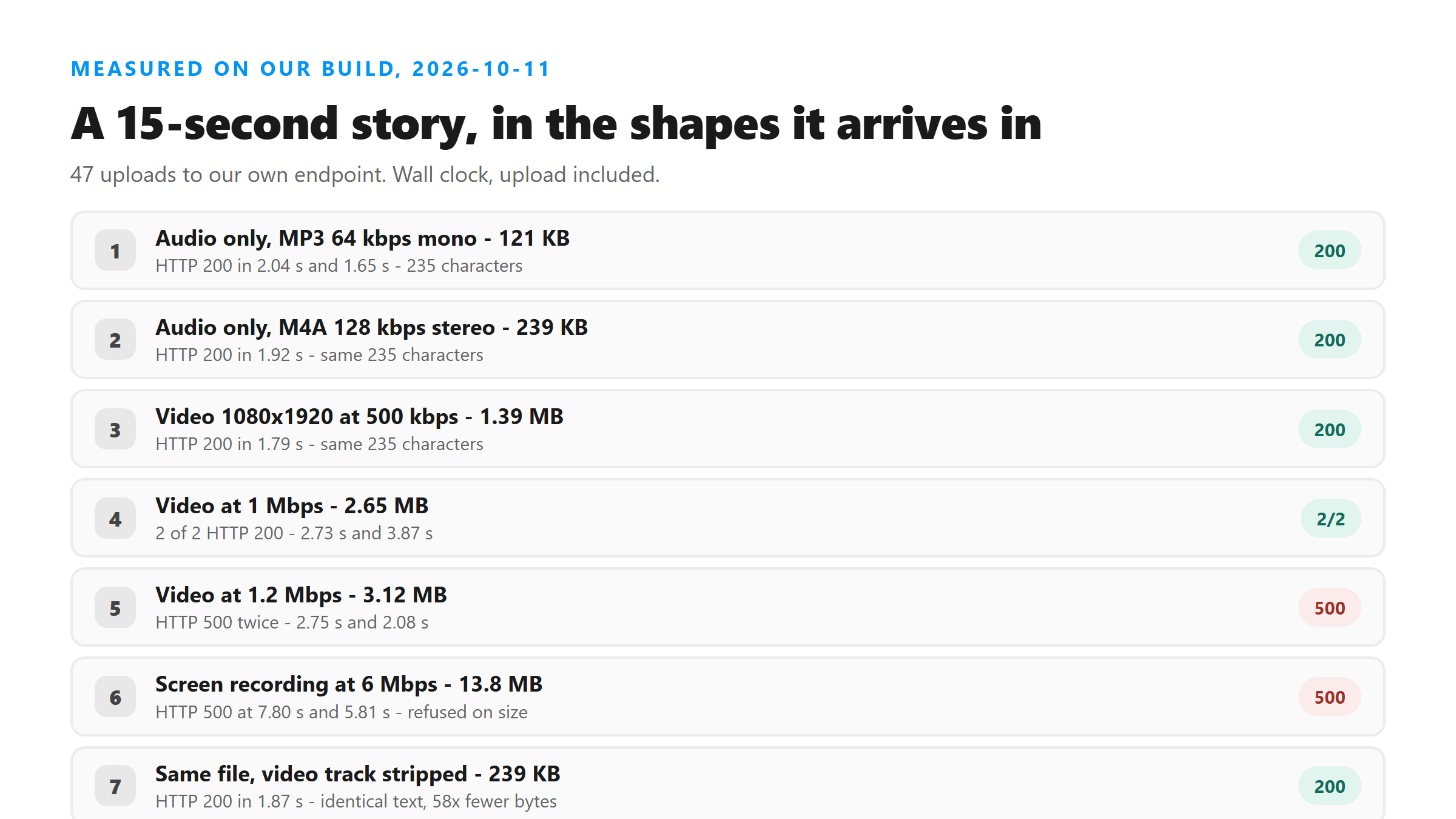
We took the 13.8 MB file, stripped the video track, and uploaded the result: 238,892 bytes, HTTP 200 in 1.87 seconds. The text was identical to what the 2.65 MB video returned - 235 characters, same words, same punctuation. The video track contributed nothing to the transcript and cost 58 times the bytes. If you have ffmpeg, that is one command: ffmpeg -i story.mp4 -vn -c:a aac -b:a 128k story.m4a. If you do not, any converter that can export audio-only from a video does the same thing.
A silent story does not come back empty
The practical consequence: a story with no narration - a photo with a caption, a text slide, a boomerang with the sound off - will not fail. It will hand you back a word or a sentence that was never spoken. If your transcript is one or two words long, or if it reads like a phrase looped to fill the duration, the cause is almost always the source having no speech in it. Check the file by playing it before you blame the tool.
Music stickers are not the problem you expect
Stories usually have a music sticker, so we tested the shape of one: a steady three-note chord bed at a level comparable to the voice. A file with the music bed and no speech at all came back with one character: "I". The same bed mixed under actual speech at equal level returned the full 235 characters, complete and correct, twice. A steady bed is not what breaks a story transcript. What breaks it is dense, wide-band noise sitting on top of quiet speech, which we covered separately in the music-heavy piece. If your story transcript is wrong, look at how loud the voice is relative to everything else, not at whether there is music.
Short slides work, and they are fast
Story slides are often only a few seconds long, so we checked the bottom of the range. One second of speech, 8,972 bytes, returned HTTP 200 with 15 characters in 0.21 seconds. Three seconds, 25,100 bytes, returned 47 characters. Five seconds, 40,940 bytes, returned 82 characters. Fifteen seconds returned 235. Short files are dominated by fixed overhead rather than by length, so a five-slide story costs about the same wall clock as one long one, and there is no minimum length to worry about.
How long a whole story takes
We ran ten 15-second story clips back to back, one after another, no batching: ten out of ten returned HTTP 200, the whole run took 21.1 seconds, the average clip took 2.11 seconds, and the slowest single clip took 5.17 seconds. A twenty-slide story would be about 42 seconds and a forty-slide story about 84 seconds - both straight arithmetic from the measured average, not something we ran. The honest spread matters more than the average: individual clips ranged from 1.30 to 5.17 seconds for identical input.
The sequence that works
- Capture the story before it expires - screen recording for someone else's, archive download for your own
- Export the audio track instead of the video if you can; 239 KB instead of 13.8 MB, same text
- If you must keep video, encode under about 1.4 Mbps so a 15-second clip stays under 2.5 MB
- Keep the original filename or note the order - the response has no timestamps, so the filename is the only thing that tells you which slide a sentence came from
- Play the file once before uploading; if there is no speech in it, expect a one-word result and do not read it as a failure of the tool
- Upload one slide per request; there is no queue and no job id, every request is complete when it returns
Checklist for when it comes back wrong or empty
- HTTP 500 within a few seconds: the file is too large, not the wrong format. Re-encode smaller or strip the video track.
- HTTP 500 on a file you know has no audio track: expected. A video with silence encoded in it is fine; one with no audio stream at all is refused.
- One or two words back: the source probably has no speech. Play it and listen before anything else.
- A long, fluent paragraph you do not recognise: that is a fabrication, not a bad decode. It happens on silence and on heavily masked speech, and nothing in the response flags it.
- Right words, wrong order, or everything in one block: the response has no line breaks and no timestamps. You will have to split it yourself.
- Re-uploading the same file gives the same text, every time. Repeating a request is not a fix for wrong words.
What happens to the file
The file is posted over an encrypted connection to our transcribe endpoint, held in memory while the model runs, and dropped when the response goes back to you. There is no account, no stored copy, and no reuse of your audio for training. The response we saw today was 381 bytes containing six fields - success, transcript, language, engine, fileSize and fileName - and the engine field names the model directly. Language came back as unknown on every file, there is no confidence score, and there are no timestamps, so the text you get is the whole product.
Got a Reel you want as text? Upload the file and download the transcript as TXT, SRT, or VTT →
A story capture is almost always a screen recording, and that is the file this page keeps refusing. Wondershare UniConverter converts it to an audio-only MP3 or M4A on your machine — 239 KB instead of 13.8 MB, and the transcript comes back the same.
FAQ
Can I transcribe an Instagram story by pasting its link?
Not with our tool, and we would be suspicious of any tool that claims otherwise. A story has no public URL that returns media to an unauthenticated request. When we tried the public embed endpoint with a story URL this morning, the request ended at a redirect to the login page with HTTP 429 rather than returning anything usable. You need a file you captured yourself.
How long can a story clip be?
A story segment is capped at 15 seconds by the platform, and that length is comfortable for us: 15 seconds of audio-only came back in about two seconds. There is effectively no lower limit either - a one-second clip returned 15 characters in 0.21 seconds.
Why did my story transcript come back as a single word?
Because the source had no speech in it. We uploaded 15 seconds of silence seven times and got the three-character word "you" six times. A music sticker with no narration produced a one-character result. Silent sources do not fail - they return a short, confident guess, and nothing in the response marks it as a guess.
Will the music sticker ruin the transcript?
Usually not. A steady chord bed mixed under speech at equal level returned the full, correct text in our test. Dense wide-band sound sitting on quiet speech is the case that degrades output, and that is about levels rather than about music.
Do I need an account or app to transcribe a story?
No account, no login, no app and no extension. You upload a file, the text comes back in the same response, and there is nothing to retrieve later - a follow-up request to the same endpoint returns not found.