Instagram Audio Download: Get the Audio Out First
What a Reel file costs you to upload
A Reel you save to your phone is a video file. The speech sits in one audio track inside it, and that track is a small part of the bytes. Everything else is picture. We built 1080x1920 clips at 6 Mbps with a narration track, uploaded each one whole, and timed them against our own endpoint:
- 0.5 seconds, 1,155,311 bytes: 200 in 2.20 seconds, 9 characters back
- 1 second, 1,297,523 bytes: 200 in 1.53 seconds, 18 characters back
- 2 seconds, 2,057,395 bytes: 200 in 2.30 seconds, 35 characters back
- 4 seconds, 3,598,943 bytes: 200 in 2.87 seconds, 51 characters back
- 8 seconds, 6,596,999 bytes: 200 in 5.29 seconds, 137 characters and 26 words
- 20 seconds, 16,318,601 bytes: 503 in 5.63 seconds on the first try, then 200 in 27.31 seconds on the retry, same file
- 20 seconds at 720x1280 and 2 Mbps, 5,461,607 bytes: 200 in 11.50 seconds, then 200 in 5.55 seconds
Two things show up in that list. The bytes climb with the picture: at 6 Mbps, our files run at about 0.8 MB per second, so a 60-second Reel lands near 49 MB by arithmetic from our own 20-second file. And the cost is not steady. The 16.3 MB upload was refused once at the edge in 5.63 seconds with a 17-byte body, which means it never reached our code, and the same file then took 27.31 seconds when it did get through. Big video files are slow and they are the ones that get stopped before they arrive.
The same five clips with the picture removed
Then we ran ffmpeg -vn -c:a copy on each clip. That copies the audio track out without touching it, so the sound is bit-for-bit what the downloader gave you. Here is the same content, video against audio, same five clips:
- 2 seconds: video 4,895,315 bytes, 3.43 seconds; audio 32,914 bytes, 0.83 seconds. Both 38 characters, 8 words.
- 4 seconds: video 5,376,690 bytes, 3.87 seconds; audio 55,364 bytes, 0.98 seconds. Both 51 characters, 11 words.
- 8 seconds: video 6,596,999 bytes, 5.29 seconds; audio 120,440 bytes, 1.43 seconds. Both 137 characters, 26 words.
- 12 seconds: video 10,617,457 bytes, 18.19 seconds; audio 176,919 bytes, 1.90 seconds. Both 195 characters, 35 words.
- 20 seconds: video 16,318,601 bytes, 27.31 seconds; audio 295,093 bytes, 3.10 seconds. Both 322 characters, 59 words.
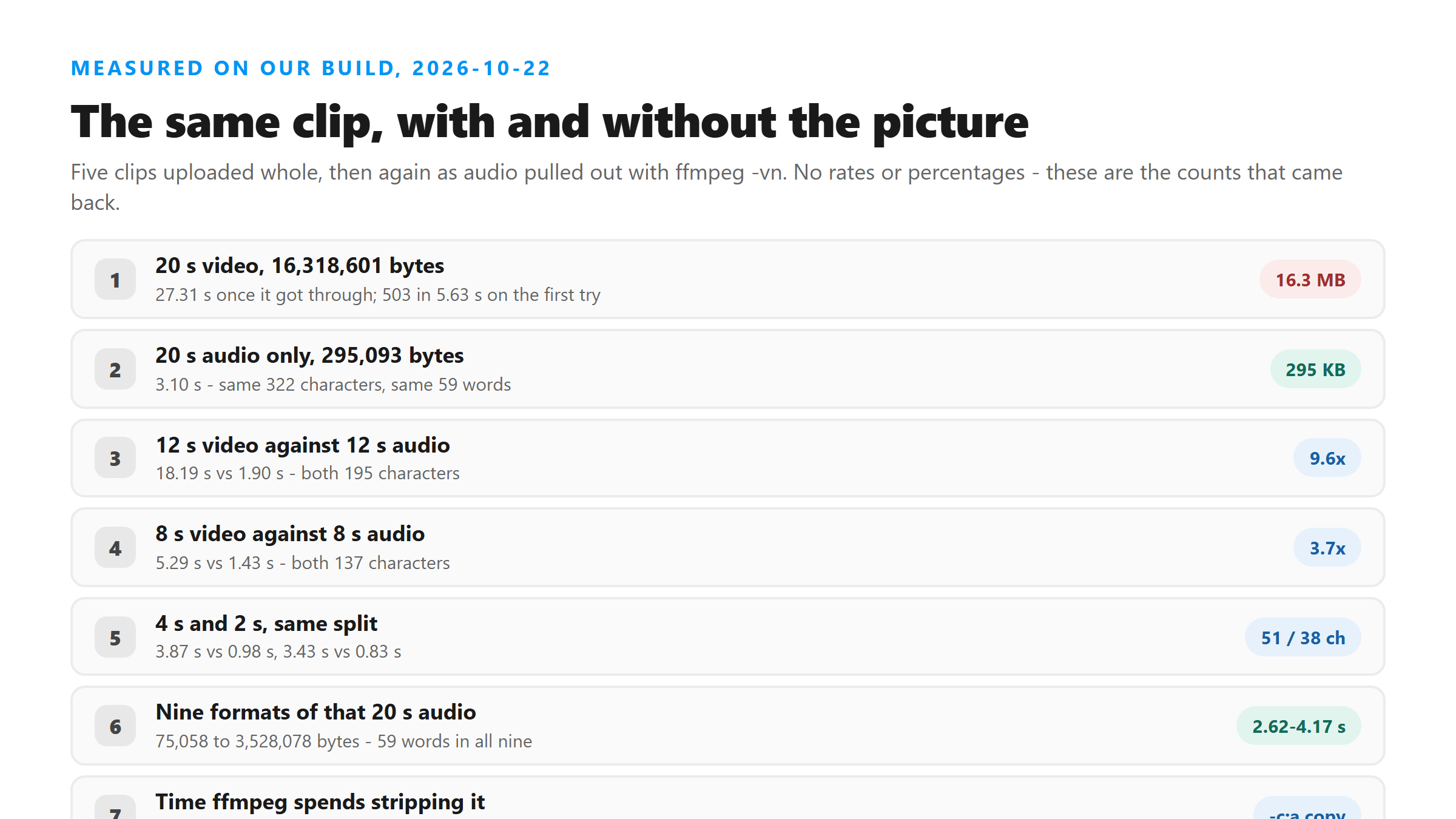
The words come back the same every time, because the model never saw the picture. At 20 seconds you pay 27.31 seconds for 16.3 MB and get 59 words, or 3.10 seconds for 295,093 bytes and get the same 59 words. That is 55 times fewer bytes and roughly nine times less waiting. The strip itself is cheap: 0.14 seconds on the 8-second clip, 0.22 on the 20-second one, 0.38 on the 12-second one, never more than half a second on anything we ran.
Pick a format, not a quality
Once the audio is out, you can leave it alone or re-encode it. We took the 295,093-byte track from the 20-second clip and made eight more versions of it, then uploaded all nine:
- AAC 128 kbps .m4a (the track as downloaded): 295,093 bytes, 3.10 seconds, 322 characters, 59 words
- AAC 64 kbps .m4a: 152,734 bytes, 3.30 seconds, 324 characters, 59 words
- MP3 128 kbps: 321,134 bytes, 3.27 seconds, 322 characters, 59 words
- MP3 64 kbps: 160,638 bytes, 2.62 seconds, 322 characters, 59 words
- Opus 32 kbps .ogg: 75,058 bytes, 3.31 seconds, 322 characters, 59 words
- AAC 64 kbps, 16 kHz mono: 169,725 bytes, 2.96 seconds, 322 characters, 59 words
- WAV 16 kHz mono: 640,078 bytes, 3.38 seconds, 322 characters, 59 words
- WAV 44.1 kHz stereo: 3,528,078 bytes, 4.17 seconds, 322 characters, 59 words
- FLAC: 1,458,813 bytes, 3.19 seconds, 324 characters, 59 words
The size across those nine runs spans 47 times, from 75,058 bytes to 3,528,078 bytes. The time spans 1.55 seconds, from 2.62 to 4.17. The words are 59 in all nine. The only difference anywhere in the text is one word: seven of them write "opens at 6" and two write "opens at six", which is why those two are 324 characters instead of 322. Same audio, one digit spelled two ways. If you want the smallest file that still worked, it was Opus at 32 kbps, 75,058 bytes, 3.31 seconds.
The two commands that do it
You need ffmpeg on your machine and the file you already downloaded. Both of these run locally, and neither one uploads anything:
- ffmpeg -i reel.mp4 -vn -c:a copy audio.m4a - pulls the audio track out untouched, fastest and keeps every bit the downloader gave you
- ffmpeg -i reel.mp4 -vn -ac 1 -ar 16000 -c:a aac -b:a 64k audio.m4a - re-encodes to 16 kHz mono at 64 kbps, about half the size
- ffprobe -i reel.mp4 - tells you what is in the file before you decide, including the audio bitrate
- ffmpeg -i reel.mp4 -t 20 -c copy short.mp4 - trims without re-encoding, if the clip is long and you only need part of it
Copy mode is the one to reach for first. It took 0.14 to 0.38 seconds on our clips and it does not touch the sound, so you cannot make the transcript worse by running it. Re-encode only when you need the bytes down, and check the result the same way we did: run it twice and compare the word count. We did find cases where a re-encode changed the shape of the output, and that is its own page - the short version is that a repeated block in the middle of the text means the file fought the model, not that the audio was unclear.
What you do not lose by dropping the picture
Our endpoint takes a file and returns text. It reads the audio track and nothing else. The response has six fields - success, transcript, language, engine, fileSize and fileName - and there is no timestamp, no speaker label and no frame reference anywhere in it. Sending the video cannot add any of those, because the model never looks at the picture. You also keep the same failure modes: a clip with music over the voice still comes back wrong, and a clip with no speech at all still returns text you did not ask for. Those come from the audio, so stripping the video neither helps nor hurts them.
Where the bytes go on a real Reel
Our 20-second file is 16,318,601 bytes total. Broken apart, the video stream is 16,009,521 bytes and the audio stream is 296,876 bytes. The part that carries every word you want is 1.8% of the file. The other 98.2% is picture that gets read, decoded and thrown away. That is the whole argument for pulling the audio out first: you are paying to ship 16 MB of picture so the model can listen to 296 KB of sound.
- Audio stream in our 20-second 1080x1920 file: 296,876 bytes, 1.8% of the file
- Video stream in the same file: 16,009,521 bytes, 98.2% of the file
- Subtitle or caption streams in it: zero, so the captions you saw in the app are not in the download
When to keep the video file
Keep it on your own disk. You will want it if you ever need to check a quote against the picture, or if the transcript looks wrong and you want to listen yourself. Just do not upload it. Extract, upload the audio, and keep both files. If you are on a phone and have no ffmpeg, a converter app on the device will do the same job: open the video, export audio only, then send that file.
Got a Reel you want as text? Upload the file and download the transcript as TXT, SRT, or VTT →
If you would rather not open a terminal, Wondershare UniConverter takes the Reel file you already saved and writes out just its audio, in the formats that upload cleanly here. That is the whole job - it hands you a smaller file, and the words still come back from this page.
FAQ
Does extracting the audio change the words I get back?
Not in our runs. All five clips came back with the same character and word counts both ways, 322 characters and 59 words on the 20-second one. Across nine re-encoded versions of that audio, all nine returned 59 words, and the only difference was one digit written as 6 in seven of them and as six in two.
What happens if I upload the whole Reel anyway?
It works up to a point. Our 16.3 MB file got through on the second try in 27.31 seconds and failed once at the edge with a 503 in 5.63 seconds before it reached our code. Smaller files were reliable: everything under 7 MB in our ladder came back 200 on the first try, in 1.53 to 5.29 seconds.
How small can the audio file get before it breaks?
Opus at 32 kbps was the smallest we sent, 75,058 bytes for 20 seconds, and it returned all 59 words in 3.31 seconds. Going below that is where we saw trouble on other pages, and the trouble looks like extra words rather than missing ones.
Do I need a downloader that offers MP3?
No. The audio track in a downloaded Reel is already encoded, usually AAC, and -c:a copy moves it out without re-encoding. A downloader that hands you an MP3 has already done one extra conversion you did not ask for.