How Long Does an Instagram Transcript Take?
On our build, a 60-second Reel comes back in about 10 seconds and a 5-minute clip in about 48 seconds — roughly 0.16 seconds of processing for every second of audio, or about six times faster than realtime. An hour does not go in as one file: a 10-minute upload returned HTTP 500 after 96.6 s and again after 68.0 s in our test. Cut it into 5-minute pieces instead, and an hour costs about 11 minutes of machine time — twelve chunks at a measured average of 53.6 seconds each — plus your own splitting time.
How we measured this
Every number on this page comes from a real upload to our own endpoint on 2026-09-29, timed end to end with the clock starting before the file leaves this machine and stopping when the response body is fully read. That means upload time is included, not just model time. We took one short voice recording, looped it into clips of 10, 30, 60, 120, 300 and 600 seconds, re-encoded each to 16 kHz mono MP3, and posted each length three times. File sizes were 30,464 / 90,512 / 180,476 / 360,512 / 900,512 / 1,255,076 bytes. We report the median of the three runs, and we show the spread, because the spread turned out to matter.
The numbers
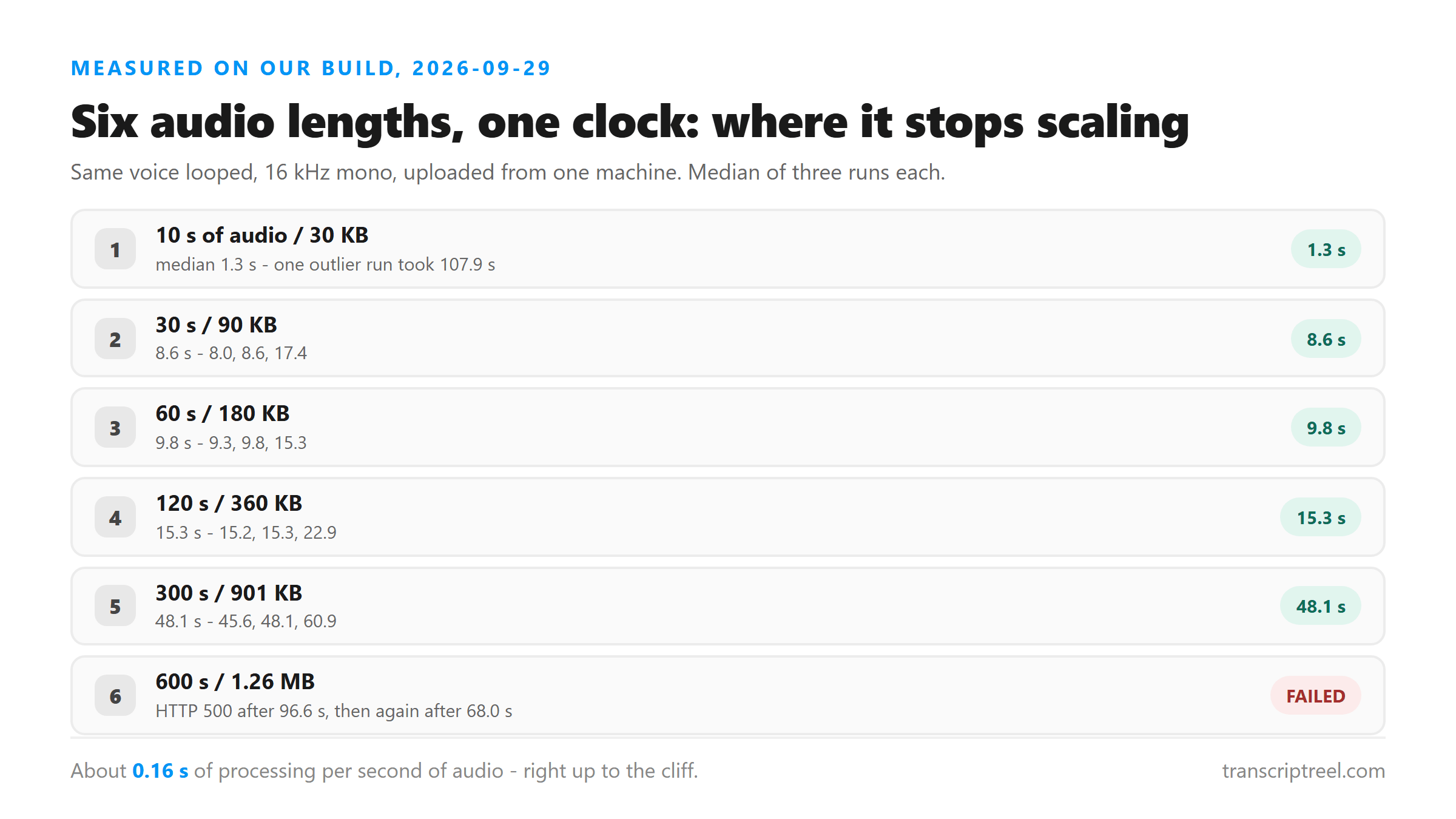
Median wall-clock time by audio length:
- 10 seconds (30 KB): 1.3 s — runs of 1.11, 1.34 and 107.87 s. Two fast, one absurd.
- 30 seconds (90 KB): 8.6 s — runs of 8.01, 8.58, 17.42 s.
- 60 seconds (180 KB): 9.8 s — runs of 9.28, 9.79, 15.31 s.
- 120 seconds (360 KB): 15.3 s — runs of 15.18, 15.25, 22.87 s.
- 300 seconds (901 KB): 48.1 s — runs of 45.63, 48.08, 60.91 s.
- 600 seconds (1.26 MB): failed both times — HTTP 500 after 96.6 s, then after 68.0 s.
The shape of the curve
From one minute upward the relationship is close to linear: 60 s of audio costs 9.8 s, 120 s costs 15.3 s, 300 s costs 48.1 s. That works out to about 0.16 seconds of wall clock per second of audio, roughly six times faster than realtime. Below one minute the fixed costs take over — the file still has to be uploaded, decoded and queued — which is why a 10-second clip and a 30-second clip can land in the same few-second band. If you are transcribing a single 20-second Reel, do not expect the ratio to hold; expect a few seconds.
Where it stops: the ten-minute wall
Ten minutes is where our run fell over. The 1.26 MB file was accepted, held for 96.6 seconds, and then returned HTTP 500 with a generic failure; the retry was rejected after 68.0 seconds. This is not a hard limit we can quote — in an earlier round of testing on 2026-09-25, a 10-minute file succeeded once out of four attempts at 87.1 s. Across both sessions that is one success in six. Treat ten minutes as the zone where it sometimes works, not as a supported length. Much longer files fail differently and faster: a 30-minute upload in that same earlier round was refused in 2.65 seconds, which looks like a size ceiling rather than a timeout. Two different walls, two different symptoms.
Five minutes is the length we would bet on
The 300-second file succeeded nine times out of nine — three times in the scaling run and six times back to back afterwards. That is the length we would plan around. It is also the length that keeps a failure cheap: if chunk four of twelve dies, you re-run chunk four, not the whole job.
What an hour actually costs
We did not send a real hour — we sent six 5-minute chunks one after another and timed the whole batch. Six chunks took 321.6 seconds end to end (45.09, 45.02, 66.47, 55.32, 48.34, 61.29 s), an average of 53.6 seconds per chunk, for 30 minutes of audio in 5 minutes and 22 seconds of machine time. Twelve chunks is arithmetic on that measured average, not a measurement of its own: about 643 seconds, a little under 11 minutes, to get through an hour of audio. Add the time you spend splitting the file and pasting twelve results together, which for most people is the slower half of the job.
How to split it
- Cut on the audio, not by re-encoding:
ffmpeg -i long.mp4 -f segment -segment_time 300 -c copy -reset_timestamps 1 chunk_%03d.mp4— this is the command we verified on a 15-minute file, which produced three playable chunks. - Upload the chunks one at a time. There is no batch endpoint and no queue: each request is handled on its own, and there is nothing to check back on later.
- Keep the chunk order in the filenames. Nothing downstream will reassemble them for you.
- If a chunk fails, retry that chunk alone. A 500 on one piece does not tell you anything about the other eleven.
Why one tiny file took 107 seconds
The 10-second file returned in 1.11 s, then 1.34 s, then 107.87 s — seventy times slower than the run before it, on a byte-identical upload. We have no model-side explanation we can prove, so we are not going to invent one; the plausible causes are cold-start and queueing somewhere between this machine and the worker. The practical lesson is about your own expectations: judge the tool on a median, not on a single attempt. If one upload is slow, retry before concluding anything, and do not quote a single lucky run as the tool's speed.
What we are not going to claim
You will see tools advertising an hour of audio in two or three minutes. We are not going to publish a number like that, for the same reason we do not publish an accuracy percentage: we have no measurement behind it, and a speed figure nobody can reproduce is just a slogan. What we can stand behind is the table above — one machine, one afternoon, real uploads, spread shown. It will drift as the network and the platform change, and when it drifts we will re-run it rather than keep quoting this page.
One thing worth knowing about where the time goes
Your file is posted to /api/transcribe over an encrypted connection, decoded and processed in memory, and discarded as soon as the response goes back out. There is no account, no stored copy and no training use. A consequence of that design is that nothing is queued for later and nothing is cached: if the same clip goes up twice, it is transcribed twice, and both times cost real seconds.
FAQ
Can I upload an hour-long Reel as one file?
Not on our build. Across two rounds of testing (2026-09-25 and 2026-09-29) a 10-minute file succeeded once in six attempts, and longer files were rejected outright. Split into 5-minute chunks.
Does a bigger file always take longer?
Duration, not file size, is what dominates past about a minute. Our 300-second file was 901 KB and took 48.1 s; a much higher-bitrate 5-minute file would be larger but should land in a similar time band, because the model hears decoded audio, not bytes.
Why is my 20-second Reel taking longer than 0.16 x 20 = 3 seconds?
Because of fixed overhead: upload, decode and queueing cost a few seconds no matter how short the clip is. That floor is why short files do not follow the same ratio as long ones.
Is there a background queue so I can upload and come back later?
No. There is no queue, no job id and no email when it is done, because nothing is stored server-side. Each upload is answered in the same request.
Will these numbers be the same for me?
The shape should be, the exact seconds will not be. Your network adds to the upload leg, and the spread we measured on identical files was wide. Treat the table as a range with a floor, not a promise.