Transcribe an Instagram Video: What Changes From Audio
The picture gets thrown away first
The first thing that happens to an MP4 is not transcription. The audio track gets decoded, the video track gets dropped, and a mono signal goes to the model. You can see the split in the timing. A 15.5 MB 4K file carrying 37 seconds of speech took 24.9 seconds end to end. A 297 KB audio file carrying the same 37 seconds took 5.6 seconds. Same words out, very different bill.
Five containers, one transcript
We cut one recording - 36.96 seconds, 100 words - into every shape a Reel ends up in on a phone, then uploaded each shape twice. Every one came back HTTP 200 with the identical transcript:
- 16 kHz mono MP3 at 64 kbps, 296,684 bytes - 538 characters, 5.56 s and 5.63 s.
- 44.1 kHz stereo AAC at 128 kbps, 588,397 bytes - the same 538 characters, 5.73 s and 6.31 s.
- 16 kHz mono WAV, 1,182,798 bytes - the same 538 characters, 5.98 s and 6.08 s.
- 720x1280 H.264 video with AAC 128k, 813,854 bytes - the same 538 characters, 5.52 s and 6.30 s.
- 1080x1920 H.264 video with AAC 192k, 1,489,804 bytes - the same 538 characters, 5.46 s and 5.95 s.
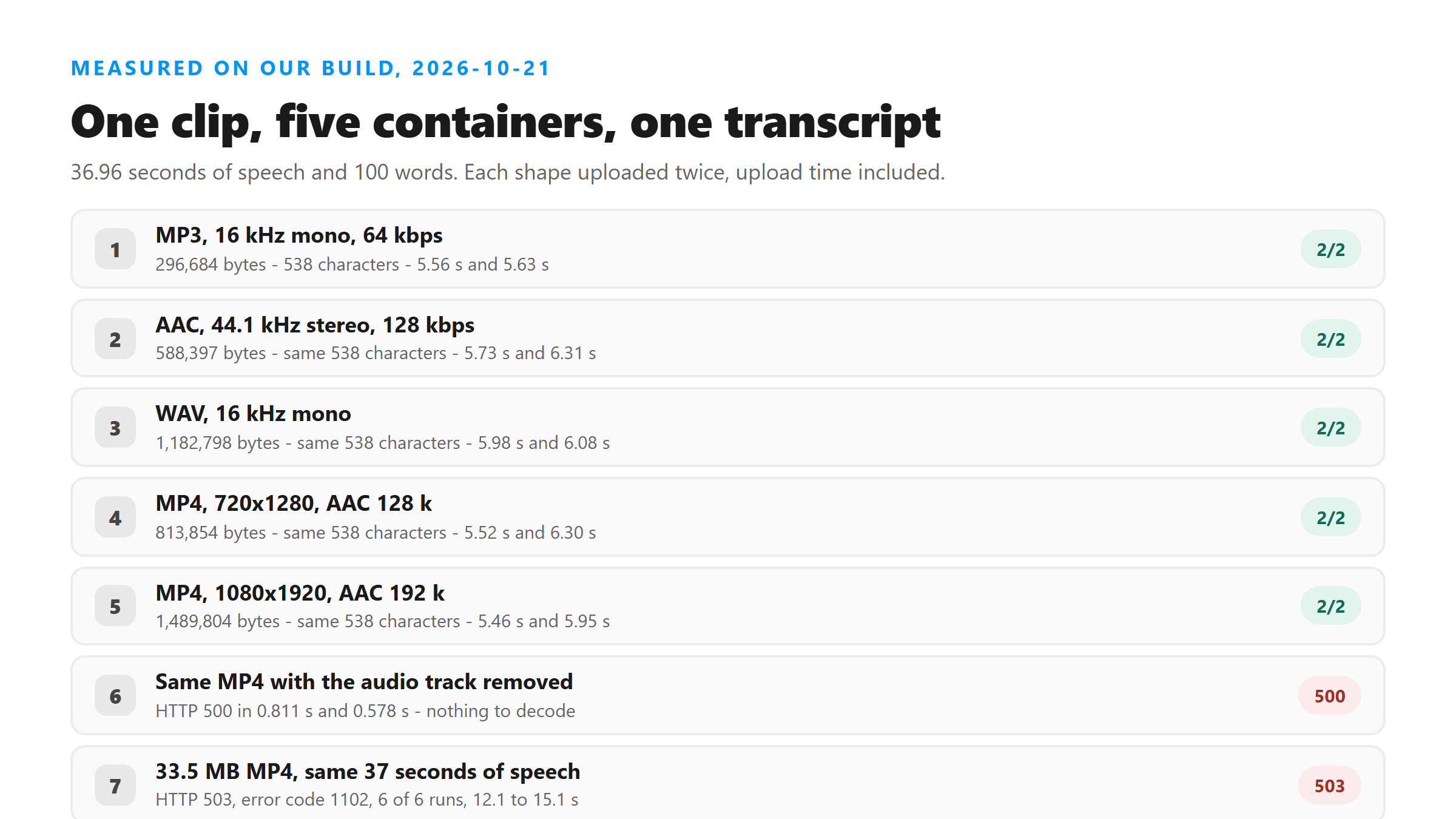
Not one word moved between the smallest file and the largest. The WAV is four times the MP3 and buys you nothing. The 1080p video is five times the MP3 and buys you nothing either - you pay for pixels that get discarded before the model runs.
A video with no sound fails in 0.58 seconds
The one shape that does not work is a video whose audio track is missing. We rendered 37 seconds of 720x1280 H.264 with the audio stripped, 170,395 bytes, and sent it twice. Both came back HTTP 500 with the body "Transcription failed. Please try another supported file." in 0.811 s and 0.578 s. That is the failure you get from a screen recording where the microphone never opened, and it fails fast because there is nothing to decode.
So when a tool says unsupported file about a video you can hear in your gallery, check for a stream first. Run ffprobe -v error -show_streams yourclip.mp4 and look for an audio stream before you re-record anything. A video can play sound through your headphones while the file itself carries only a video track. A cast, a screen share, or a player that adds audio at playback time will all do that.
A video that opens on silence loses nothing
Reels often start with two or three seconds of nobody talking. We pushed it further: a 48.96-second file with 12 seconds of silence in front and the clip starting at 00:12. It returned 542 characters and 100 words, every sentence present, in 5.1 seconds. Nothing was skipped at the front and nothing was invented for the quiet opening.
The punctuation moved, though. One sentence came back with a comma where the earlier uploads had a full stop, which is why the count reads 542 here and 538 above. Compare words when you are checking two runs, not characters.
Words burned into the frame stay in the frame
This is the part people get wrong when they upload a video instead of audio. We built a video whose frames carry a full poster of text - a dozen lines of numbers - and whose audio says one short sentence. The response was 51 characters and 10 words: exactly that sentence, zero characters from the picture, in 1.39 seconds.
The model reads sound, not pixels. On-screen hooks, the auto captions creators burn in, sticker text, a title card held for three seconds - none of it lands in your transcript. If the words you need exist only as pixels, this route cannot get them for you, and no upload size will change that.
Long video holds up better than long audio
Because the video track never reaches the model, a long video is not automatically a long job - only the audio counts. A 12-minute file, 720 seconds and 7,389,364 bytes at a deliberately low bitrate, came back HTTP 200 in 123.4 seconds with 9,901 characters and 1,838 words. The 8-minute version, 480 seconds and 4,929,259 bytes, came back in 52.4 seconds with 6,468 characters and 1,200 words.
One caveat belongs here. Both long files repeat the same recording over and over, and the word count falls short of a straight multiplication. 13 passes of a 100-word clip gave 1,200 words. 20 passes gave 1,838. Repeats collapse rather than duplicate, which is the same behaviour we measured on repeated voice notes. A real 12-minute monologue does not repeat itself, so treat this as the length ceiling and not as an accuracy score.
Where the size wall actually is
A 37-second video works at 15.5 MB. It does not work at 33.5 MB. We sent that same 33.5 MB file six times. All six came back HTTP 503 with the body "error code: 1102", in 12.1 to 15.1 seconds. No partial transcript. No message about the file being too big. Just a platform error after the decode started.
So for video, plan around 15 MB and be suspicious above 30. It is why a two-minute download from a 4K source can fail while an identical two-minute audio export sails through. If a big video keeps dying at around 13 seconds with no explanation, cut it down or pull the audio out. Resizing the picture does more for you than shortening the clip.
What still does not come back
A successful video upload returns six fields: success, transcript, language, engine, fileSize and fileName. No duration, no timestamps, no speaker labels, no line breaks. language came back as "unknown" on every call in this run, video and audio alike, so do not plan around getting a detected language out of a Reel.
If you need chapter marks, build them from the audio yourself. If you need to know who spoke, know it before you upload. A video adds nothing here - the extra track is not extra information.
The short version that actually saves you time
Export the audio, skip the video, and keep the file small. You lose no words and you cut the upload. The only case where the video file is the right thing to upload is when you can't extract audio. That means a phone, no converter, and a download that already handed you an MP4. Upload that MP4 as it is. It works, it just costs seconds you did not have to spend.
Got a Reel you want as text? Upload the file and download the transcript as TXT, SRT, or VTT →
Every measurement on this page points the same way: the video track costs bytes and buys no words, and above roughly 30 MB the upload dies before a transcript comes back. Wondershare UniConverter pulls the audio out on your own machine and writes it at a size that clears the wall — it does not transcribe, the words still come back from here.
FAQ
Does uploading a video instead of audio change the transcript?
No. We uploaded one 36.96-second recording in five containers - MP3, AAC, WAV and two MP4 sizes - twice each. All ten came back with the same 538 characters and 100 words. Only the file size and the wait changed, from 5.5 to 6.3 seconds for the small files up to 24.9 seconds for a 15.5 MB 4K video.
Why does a video file fail with "unsupported file"?
Usually because there is no audio track in it. A 37-second MP4 with the audio stripped came back HTTP 500 with that exact message in 0.578 and 0.811 seconds. Run ffprobe -v error -show_streams on the file and confirm an audio stream exists before you re-record anything.
Can it read captions or text that is visible in the video?
No. A video whose frames carried a dozen lines of text, with one short sentence on the audio, returned 51 characters - just the sentence, nothing from the picture. Text baked into the frames never reaches the model.
How long a video can I upload in one go?
We got a 12-minute, 720-second file through in 123.4 seconds, and an 8-minute file in 52.4 seconds. Length counts only through the audio track, so a long video is not penalised for its pixels.