Instagram Transcript for Marketers: Repurposing Reel Scripts
Yes. Save the Reel, pull the audio out of it, and upload that file — the text that comes back is yours to paste into a draft. Two things shape the work: it is one Reel per upload, and a full Reel video is far too big. In our test today a 60-second 1080x1920 export was 44.7 MB and was refused before it reached our code; the audio taken from that same file was 569 KB and came back in 12.6 seconds with the same wording. What you receive is one continuous block of plain text: no timestamps, no speaker labels, no paragraph breaks.
What you actually receive
We read the response again today. It carries six fields: success, transcript, language, engine, fileSize and fileName. Everything a marketer would want on top of the words is absent, and there is no setting that turns it on.
- No timestamps. Nothing in the response ties a sentence to a moment in the video, so a pull quote cannot be checked against the clip without replaying it.
- No speaker labels. Two people talking come back as one block of prose. An interview Reel has to be split by hand.
- No paragraph breaks. The 2,373-character transcript for our 60-second clip today contained zero line breaks — one unbroken paragraph.
- No hashtags, no hook, no structure. Those live on screen and in delivery. Neither one survives into the text.
What a batch costs, measured today
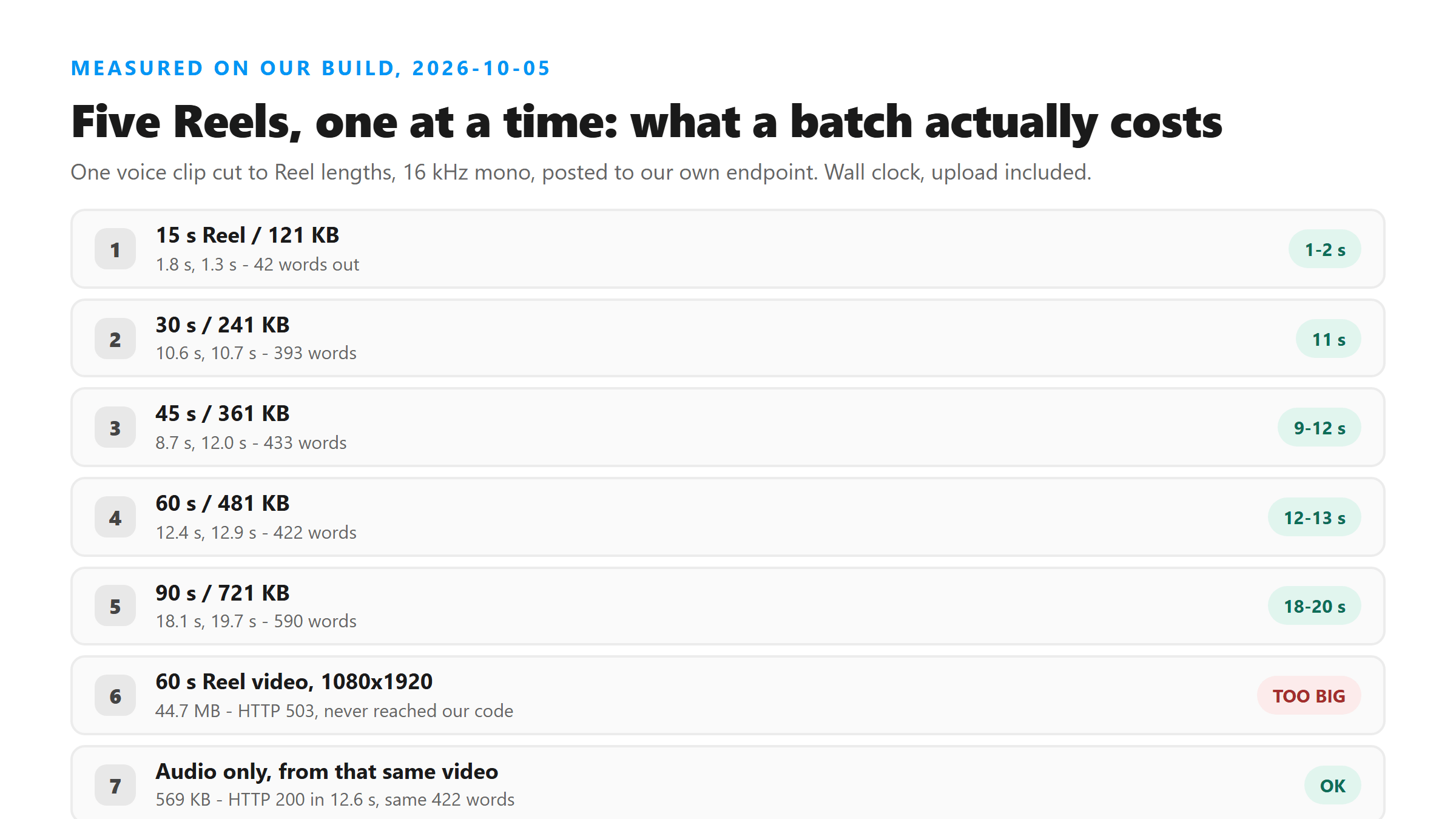
We cut one voice clip to five Reel lengths, encoded at 16 kHz mono, and posted all five to our own endpoint twice, back to back. Wall clock, upload included:
- 15 seconds / 121 KB: 1.8 s and 1.3 s
- 30 seconds / 241 KB: 10.6 s and 10.7 s
- 45 seconds / 361 KB: 8.7 s and 12.0 s
- 60 seconds / 481 KB: 12.4 s and 12.9 s
- 90 seconds / 721 KB: 18.1 s and 19.7 s
The machine is not the bottleneck
Both full passes finished in 51.5 s and 56.5 s — an average of 10.8 s per Reel across ten uploads, and every one of the ten returned HTTP 200. Twenty Reels is therefore about three and a half minutes of processing, which is arithmetic from these ten runs and not one measured twenty-file job. The time you will actually spend is downloading each Reel and copying the text out, and that part is on you.
Do not read the word counts as a benchmark
One caveat on the word counts we print: our test clip is one sentence looped, so the model returns more words than the audio contains, and the count does not rise cleanly with length — 45 seconds produced more words than 60 seconds. Treat the numbers as a shape, not as a words-per-Reel benchmark for natural speech.
Upload the audio, not the Reel
This is the step that decides whether the afternoon works. A 60-second vertical video is a large file; the speech inside it is not.
- The full 1080x1920 export, 60 seconds: 44.7 MB. Refused with HTTP 503 and error code 1102 after 12.8 s — the request never reached our code.
- The audio from that same file: 569 KB. HTTP 200 in 12.6 s.
- Same 422 words both times. The picture was never part of the text.
The one command that fixes it
ffmpeg -i reel.mp4 -vn -c:a aac -b:a 128k reel.m4a — that produced the 569 KB file above, about 78 times smaller than the video, with identical wording out. If you would rather not touch a command line, a screen recording with the Reel playing is usually small enough to get through, but it also captures whatever music is playing under the voice, and music is the one thing that quietly degrades a transcript while the response still says success.
One Reel at a time, and why
The upload field on our page takes a single file. There is no multi-select, no folder drop, and no queue. That is a decision, not a missing feature.
- A batch tool has to hold your files somewhere while the queue runs. The moment we do that we are storing audio, and everything we say about retention stops being true.
- There is no URL field either. Instagram blocks third-party access to Reel media, so a paste-a-link box would be decoration. You download the Reel yourself.
- No account means no history. When the tab closes the text is gone unless you copied it. Keep your own folder of transcripts.
Turning one transcript into a post
- Strip the audio first. It is the step that decides whether the upload succeeds at all.
- Upload one Reel, copy the text out immediately, and save it under a name you will recognise — there is no dashboard to search later.
- Add the structure yourself. Headings, subheads and paragraph breaks are all missing, and a single 2,000-character paragraph is not something you can publish as-is.
- Fix proper nouns on the first pass. Brand names, product names and people are what the model gets wrong, and a wrong brand name in published copy is a real problem rather than a typo.
- Quote-check anything going out under someone's name. A transcript is a record of the audio, not a verification of it, and we publish no accuracy figure for exactly that reason.
Where this is the wrong tool
If the Reel is music-led, if the argument lives on screen rather than in speech, or if two people talk over each other, the transcript will not carry it — and the response will not warn you, because difficult audio still comes back with success: true. For interview and panel clips, budget more time for attributing lines than for transcribing them.
FAQ
Can I transcribe a whole month of Reels at once?
No. The upload takes one file at a time and there is no batch path. In our test today each Reel took about 10.8 seconds on average, so twenty Reels is roughly three and a half minutes of processing, but that figure is arithmetic from ten runs and the download-and-copy work is yours.
Why was my Reel video rejected?
Size, almost always. A 60-second 1080x1920 export was 44.7 MB in our test and came back HTTP 503 before it reached our code; the ceiling we measured sits between 3.18 MB and 3.35 MB. Extract the audio with ffmpeg -vn and the same clip is about half a megabyte.
Will the transcript have timestamps so I can pull a quote from a moment?
No. The response has no timing field, which is also why the SRT and VTT files this page can generate are built without real cue points. If you need captions that stay in sync, align the text in a subtitle editor.
Can I paste a Reel link instead of downloading it?
No. Instagram blocks third-party access to Reel media, and we will not route through unofficial downloaders. Save the Reel to your device, strip the audio, and upload the file.