Instagram Transcript for Podcasters: Reels Into Show Notes
Yes. Export the audio, cut it into five-minute chunks, transcribe each one, and paste the text into your show-notes draft. What comes back is the words and only the words: across the 19 uploads we ran today, every transcript arrived with zero timestamps, zero speaker labels and zero paragraph breaks. The words are the raw material; the timestamps, the chapter markers and the structure are still yours to add. Below is exactly what we measured, and the chunk sizes that actually get through.
What a podcaster actually gets back
The response is the same shape for a 15-second Reel and for a five-minute chunk of an episode. Six fields, and the model is named in one of them so you can check it independently:
success,transcript,language,engine,fileSize,fileName— nothing else came back on any call, in any of the 19 uploads we ran today.enginereadsCloudflare Workers AI (@cf/openai/whisper)on every successful response. We name it because you should not have to take an unnamed "AI" on faith.- Zero newlines. We counted them: the five-minute chunk came back as 10,423 characters in one unbroken run, not one line break in it.
- Zero timestamps — no
00:00, no millisecond cues, nothing you can turn into a chapter marker. - No speaker labels. Two hosts on one microphone come back as one wall of text with no indication of who said what.
What we measured today: 19 uploads
All of it ran this morning against our own /api/transcribe endpoint, timed end to end with the upload included. The speech is one short clip looped to length, so treat the word counts as a shape, not as a natural-speaking-rate benchmark.
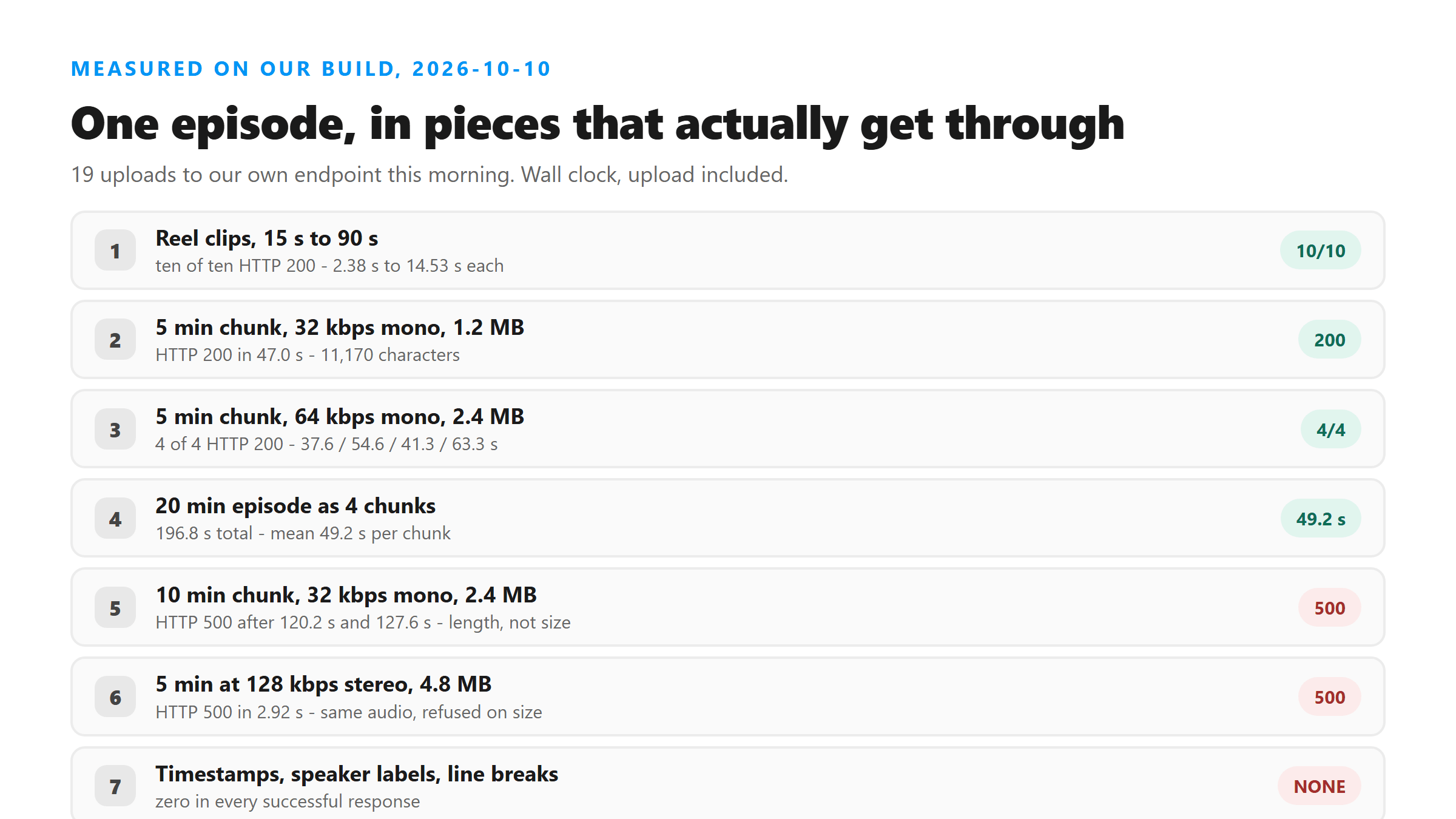
- Reel-shaped clips, 16 kHz mono MP3, two runs each: 15 s / 121 KB in 2.78 s and 2.38 s; 30 s / 241 KB in 10.68 s and 7.42 s; 45 s / 361 KB in 12.73 s and 13.99 s; 60 s / 481 KB in 14.15 s and 11.56 s; 90 s / 721 KB in 14.53 s and 12.05 s. Ten of ten returned HTTP 200 — eight minutes of Reel audio in about 102 seconds of wall clock.
- Five-minute chunk at 32 kbps mono, 1.2 MB: HTTP 200 in 47.0 s, 11,170 characters / 2,025 words.
- Five-minute chunk at 64 kbps mono, 2.4 MB: four runs, 37.63 / 54.58 / 41.30 / 63.32 s, all HTTP 200, all returning the same 10,423 characters / 1,886 words.
- A 20-minute episode as four five-minute chunks: 196.8 seconds of wall clock end to end, mean 49.2 s per chunk. No chunk failed.
- Ten-minute chunk at 32 kbps mono, 2.4 MB: HTTP 500 after 120.2 s and again after 127.6 s. Same byte count that had just succeeded at five minutes — so this failure is about length, not size.
- Five minutes at 128 kbps stereo, 4.8 MB: HTTP 500 in 2.92 s. Identical audio, identical duration, rejected in under three seconds. That one is size.
Two separate ceilings decide your chunk size
They look like one problem and they are not, which matters because the fix for each is different:
- The size ceiling sits between 3.18 MB and 3.35 MB, measured earlier this month with a byte ladder. Cross it and the refusal is fast — 2.9 s and 3.1 s in today's runs, before any processing.
- The length ceiling is softer and slower. A 10-minute chunk at 2.4 MB, comfortably under the size ceiling, still failed twice, after 120 s and 128 s. Ten minutes in one upload is not a reliable bet at any bitrate we tested.
- Five-minute chunks at 64 kbps mono clear both. That is 2.4 MB, roughly 70 percent of the size ceiling, and it returned four out of four today.
- A WAV export will not get you far. Stereo 44.1 kHz 16-bit PCM is about 176 KB per second, so a straight WAV export spends the entire size budget in roughly 18 seconds of audio. That figure is arithmetic from our measured ceiling, not a new upload test — but it is why the export format matters more than the episode length.
- Export AAC or MP3, mono, 64 kbps and the same 18 seconds of audio costs you about 144 KB instead.
A workflow that fits a real episode
This is the sequence that survived every ceiling we hit today:
- Export audio only, not video. A full-screen recording spends the whole byte allowance in seconds; the audio pulled out of the same file is a few hundred kilobytes and returns the same words.
- Cut it into five-minute pieces without re-encoding:
ffmpeg -i episode.m4a -f segment -segment_time 300 -c copy -reset_timestamps 1 chunk_%03d.m4a. Copy keeps the audio bitstream untouched, so you are not feeding the recogniser a second generation of compression. - Keep the chunk filenames. Because the transcript has no timestamps, the filename offset is the only positional information you will have.
chunk_002starts at 10:00, and that is how you reconstruct approximate chapter marks later. - Paste each chunk into your draft in order and add your own headings while the episode is still fresh. The transcript will not do the structuring for you — it is one unbroken paragraph per chunk.
- Budget about a minute per five-minute chunk. The four-chunk run today averaged 49.2 s; the slowest single chunk was 63.3 s. A 60-minute episode is twelve chunks, roughly 10 minutes of waiting — an arithmetic extrapolation from today's mean, not a timed run.
The parts of show notes this tool does not produce
Stated plainly, because finding this out after an hour of transcription is annoying:
- Timestamps and chapter markers. The response carries no timing data at all. Our SRT and VTT export writes one cue with zero duration, because splitting the text evenly would mean inventing numbers. Real timings need a subtitle editor.
- Speaker labels. No diarization, and no way to request it.
- Paragraphs. Zero newlines, every time. All the segmentation is yours.
- History. The file is POSTed to
/api/transcribeover TLS, processed in memory once, and discarded as soon as the response is sent. Nothing is stored, nothing is used for training, and there is no account. The trade-off is that a closed tab loses the text, so copy each chunk before you move on. - A URL you can paste. There is no link box on this site. Instagram blocks server-side fetching of its media, so a tool that promises to transcribe from a Reel URL is either asking you to log in or doing something we will not do.
Where the words need checking before you publish
Show notes go out under your name, so the cost of a wrong word is higher than in a private draft:
- Send the same chunk twice in two different encodings and diff the words. In an earlier run on this endpoint, the words that changed between encodings were exactly the ones worth checking by ear, and it costs one extra upload.
- Check every proper noun and every number by hand. Guest names, show titles and sponsor codes are the first thing to go, and there is no confidence field that flags them.
- Treat a music-heavy intro as a risk. We measured this separately: with a dense music bed at roughly the same level as the voice, roughly half the words came back wrong while the response still said
success: true. Transcribe the episode audio from before the bed was mixed in, not the finished promo Reel. - Two people talking at once is a known failure. Overlapping speech produced repeated phrases and dropped words in our earlier tests, with no warning in the response.
What this tool does with your episode file
You are uploading unpublished audio, so this is worth stating exactly. The file leaves your machine: it is POSTed to /api/transcribe over an encrypted connection, decoded into memory, handed to the model once, and discarded when the response is sent. There is no account, no stored copy, no training use, and no result you can come back to later — a GET to the same endpoint returns 404. If your episode is embargoed, the practical caution is the same as with any third-party processor: transcribe a chunk you are comfortable sending, or wait until it is public.
Got a Reel you want as text? Upload the file and download the transcript as TXT, SRT, or VTT →
Chunking an episode only helps if each chunk is in a container this tool will read. Wondershare UniConverter converts the export to M4A or MP3 on your own machine, and writes the pieces out at a bitrate small enough to clear the upload ceiling.
FAQ
Can I transcribe a whole podcast episode in one upload?
Not reliably. Two ceilings stop you: a size ceiling between 3.18 MB and 3.35 MB, which refuses in a couple of seconds, and a length ceiling that failed a 10-minute chunk after about two minutes even though the file was only 2.4 MB. Five-minute chunks at 64 kbps mono cleared both in every run we did today — four out of four, averaging 49.2 seconds each.
Does the transcript come with timestamps I can use as chapter markers?
No. The response has six fields and none of them carry timing. Across today's successful uploads we counted zero timestamps and zero line breaks in the text. Our SRT and VTT download builds a single cue with zero duration, because dividing the text evenly would mean inventing numbers. For real chapter marks, align the audio in a subtitle editor, or use your chunk filenames as approximate offsets.
Will it tell me which host is speaking?
No. There is no speaker separation and no option to request it. Two voices on one track come back as a single run of text. Overlapping speech made this worse in our earlier tests: repeated phrases and dropped words, with the response still reporting success.
Is my unpublished episode file stored anywhere?
No, but be precise about what that means: the file does leave your browser. It is POSTed to /api/transcribe over TLS, decoded into memory, processed once by the model, and discarded as soon as the response is sent. There is no account, no saved copy, and no training use, and there is no result page to come back to — a GET to the same endpoint returns 404. Copy the text before you close the tab.
Why can't I just paste the Reel URL?
Because Instagram blocks server-side fetching of its media. Every route we tested — direct fetch, the oEmbed endpoint without a token, and the unauthenticated GraphQL path — returns nothing usable, which is why this site has no URL box. Tools that do accept a link are usually asking you to log in first, and handing over your Instagram password to a transcript tool is a trade we are not willing to make.
How long does a 60-minute episode take?
About 10 minutes of waiting, if you cut it into twelve five-minute chunks. That is arithmetic from today's mean of 49.2 seconds per chunk, not a timed 60-minute run, and the slowest chunk we saw was 63.3 seconds, so budget closer to 12 or 13 minutes.