Why a 30-Second Screen Recording Is 24 MB
Five recordings, weighed
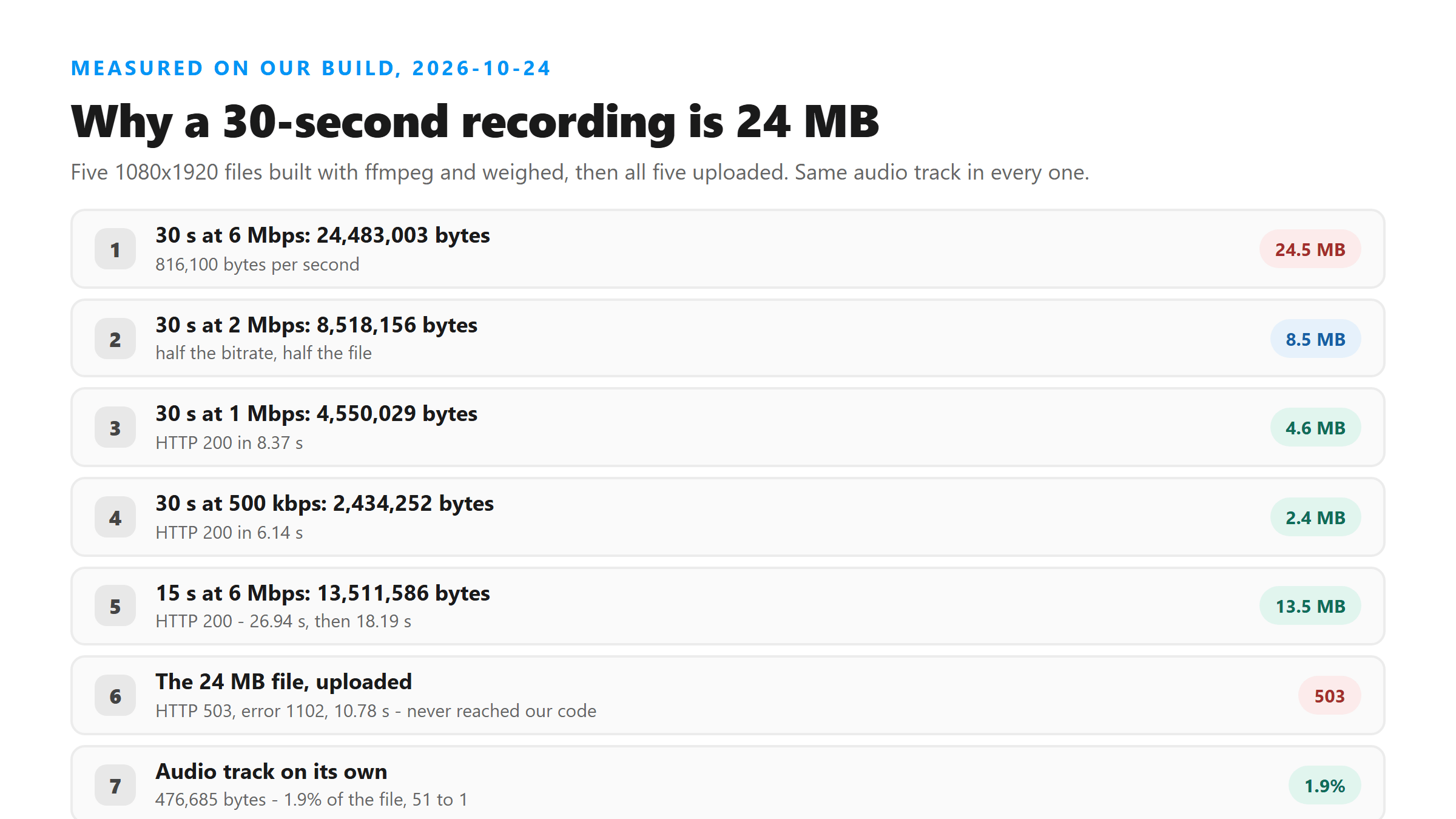
A screen recorder writes a picture file and hangs a sound track on the side. To see how the split actually falls, we built five 1080x1920 files with ffmpeg today, all with the same 128 kbps stereo audio, and read the byte count off each one.
- 30 seconds at 6 Mbps: 24,483,003 bytes - 816,100 bytes per second
- 30 seconds at 2 Mbps: 8,518,156 bytes
- 30 seconds at 1 Mbps: 4,550,029 bytes
- 15 seconds at 6 Mbps: 13,511,586 bytes
- 30 seconds at 500 kbps: 2,434,252 bytes
Halving the picture bitrate roughly halves the file, and halving the length roughly halves it too. Those two knobs are the whole story, which is why the fix is so simple. There is no third knob: the audio track was 476,685 bytes in every 30-second file and 239,262 bytes in the 15-second one, no matter what the picture was doing.
Where the bytes go
In the 24 MB file, the picture accounts for 24,006,318 bytes and the sound for 476,685. That is 98.1% picture, 1.9% sound, a ratio of about 51 to 1. Nothing about a voice is expensive to store. A 1080x1920 frame at 30 fps is, because there are 900 of them and each one is two million pixels.
If you got your file from an instagram reel download rather than a screen recording, the same split holds. The words you want are the cheap part, and they are the part you are least likely to think about.
What the upload did with each one
We sent all five to our own endpoint and timed them end to end, upload included.
- 2,434,252 bytes: HTTP 200 in 6.14 seconds
- 4,550,029 bytes: HTTP 200 in 8.37 seconds
- 8,518,156 bytes: HTTP 200 in 11.68 seconds
- 13,511,586 bytes: HTTP 200 in 26.94 seconds, and 18.19 seconds on a second run
- 24,483,003 bytes: HTTP 503, error 1102, after 10.78 seconds
Four of the five went through. The ceiling today sits somewhere between 13.5 MB and 24.5 MB; we did not pin it down, and we are not going to guess a number in between. The 503 is Cloudflare's, not ours - the request never reached our Worker. Our own failure looks different: HTTP 500 with the text "Transcription failed. Please try another supported file." If you see 1102, the file was refused on the way in, before anything read a single byte of it.
One line, 51 times smaller
Drop the picture and keep the sound track exactly as it was encoded: ffmpeg -i recording.mp4 -vn -c:a copy out.m4a. Our 24,483,003-byte recording became a 476,685-byte .m4a with no re-encoding, so nothing in the audio changed. Uploaded on its own it returned HTTP 200 in 6.75 seconds, and again in 5.88 seconds, with the same words as the big file would have given.
That is the whole fix. You are not compressing anything and you are not losing quality you can hear. You are deleting 24 MB of picture that the transcription was never going to read.
The strip itself is free
We timed that one line on all five files. Pulling the audio out took 0.19 seconds on the 2.4 MB recording, 0.20 seconds on the 4.6 MB one, 0.35 seconds on the 8.5 MB one and 0.19 seconds on the 24 MB one. It does not re-encode, so the size of the picture barely matters - ffmpeg copies the audio stream straight out and leaves.
Set that against the upload you avoid. The 24 MB file spent 10.78 seconds being refused. The 476 KB file spent 5.88 seconds coming back with a full transcript. Stripping the picture costs you a fifth of a second and saves you the refusal.
If you would rather record smaller
You can also fix this before the file exists. A 30-second recording at 500 kbps came out at 2,434,252 bytes and uploaded fine in 6.14 seconds. At 1080x1920 that looks soft, but a soft picture costs a transcriber nothing.
- Drop the recording bitrate before you start - 30 seconds at 500 kbps was 2.4 MB instead of 24.5 MB
- Record shorter clips; the size is close to linear in length
- Or leave the settings alone and strip the picture afterwards with -vn
What to check afterwards
Look at the file size before you upload, not the duration. Two 30-second files sat 22 MB apart today, and only the big one was refused. If your recorder lets you pick a bitrate, that number times the length tells you the size before you ever hit stop.
One more thing worth knowing: the recorder's own number is a target, not a promise. Our 6 Mbps files came out at 6.5 Mbps once the audio was added, because the bitrate setting covers the picture only. Budget a little slack if you are picking a setting to land under a size limit.
Got a Reel you want as text? Upload the file and download the transcript as TXT, SRT, or VTT →
A phone will not strip a picture off a recording, and most file managers stop at renaming. Wondershare UniConverter opens the file on your own machine and writes out the audio track alone, which is the 476 KB version that uploads cleanly here. It does not transcribe - the words come back from this page.
FAQ
Is 24 MB normal for a 30-second screen recording?
At 1080x1920 and 6 Mbps, yes - ours was 24,483,003 bytes. The number comes from the picture bitrate times the length, so a lower bitrate or a shorter clip gives a proportionally smaller file.
Does a bigger file transcribe better?
No. We got the same words from the 476,685-byte audio track as the 24 MB video would have produced. The picture adds bytes, not accuracy.
Why did my upload fail with error 1102?
That is Cloudflare refusing the request body before it reaches our Worker. Our own 24,483,003-byte file hit it after 10.78 seconds. Strip the audio out first and the same recording uploads fine.
Will stripping the video track change the transcript?
Not in our test. -vn -c:a copy copies the audio without re-encoding it, and the 476,685-byte file returned the same words in 5.88 seconds.