Instagram Reel Download: What the File Is Worth
What is actually inside the file
We built a 20-second 1080x1920 clip with a narration track on it, the shape a saved Reel has, and opened it up with ffprobe. Two streams, and that is the whole file:
- Stream 0: h264 video, 1080x1920, 6,403,765 bits per second
- Stream 1: aac audio, 116,199 bits per second
- Subtitle or caption streams: zero
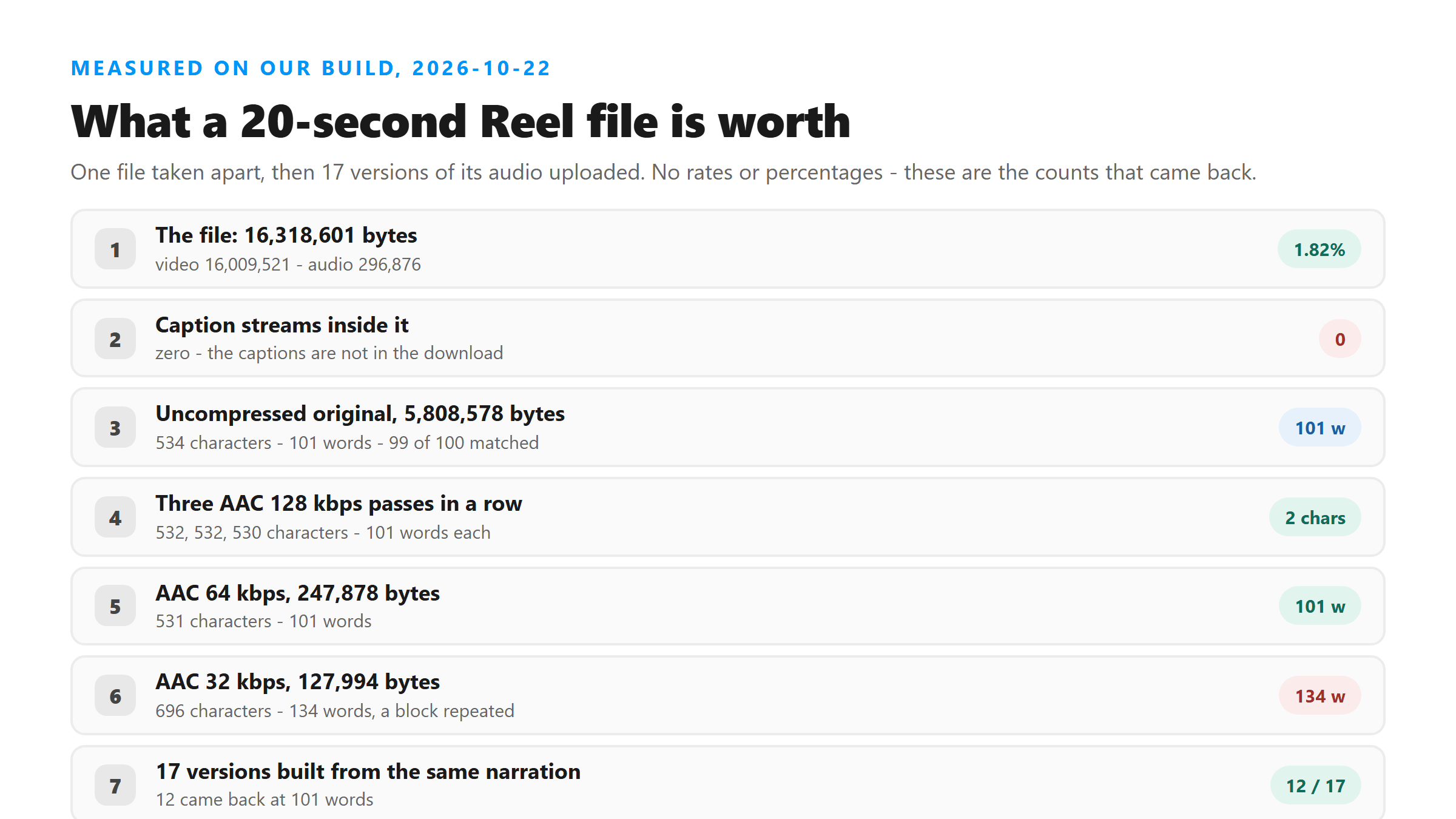
- Total: 16,318,601 bytes - video stream 16,009,521, audio stream 296,876
The audio is 1.82% of the file. It is also the only part that carries language. If you are weighing whether to keep the download after you have the text, that is your answer: the file is a picture with a thin strip of sound attached, and the sound is what you came for.
The captions are not in it
This trips people up, so it is worth saying plainly. Instagram shows captions in the app, and the Reel you save has none. Our file has zero subtitle streams, which means there is no text track to read, no matter what tool you open it with. Anything that looks like a caption in your transcript was heard by the model and written down, not read out of the file. That is why burned-in captions do not come back either - we have run that test on another page, and text drawn into the picture is invisible to a transcription model, because it is picture.
Does running it through another encoder cost you words?
A file you download has already been encoded at least once by the platform, and anything you do to it afterwards adds another pass. We took our narration and pushed it through three generations of AAC at 128 kbps, then down to 64 and 32, and compared each result against the 100-word script we recorded:
- The uncompressed 44.1 kHz stereo original, 5,808,578 bytes: 534 characters, 101 words, 99 of the 100 script words matched
- First AAC 128 kbps pass, 482,911 bytes: 532 characters, 101 words, 98 matched
- Second pass, encoded from the first, 483,958 bytes: 532 characters, 101 words, 98 matched
- Third pass, encoded from the second, 483,229 bytes: 530 characters, 101 words, 98 matched
- AAC 64 kbps, 247,878 bytes: 531 characters, 101 words, 98 matched
- AAC 32 kbps, 127,994 bytes: 696 characters, 134 words, 97 matched
Three full generations of re-encoding moved the text by two characters. The gap between the original and the first pass is one word written as a digit: the model wrote "opens at six" on the uncompressed file and "opens at 6" on every encoded one. The gap between the third pass and the 64 kbps file is one comma. If you are worried that your downloaded Reel has been compressed into uselessness, it has not - at 128 and 64 kbps the words are the same words.
Five files out of seventeen came back a third longer
The 32 kbps row above is the interesting one, and it is not about the bitrate. We built 17 versions of the same narration at different sample rates, channel counts and bitrates, and uploaded each:
- Twelve of them came back at 101 words, matching the script
- Five came back at 133 or 134 words, each with a sentence block repeated in the middle
- The five were: 44.1 kHz stereo at 32 kbps, 24 kHz mono at 64 and 128 kbps, and 44.1 kHz mono at 128 kbps
- Bitrate alone does not explain it: 48 kbps stereo was clean and 128 kbps mono was not
- Every one of the five repeated on a second upload of the same file, so it is the file, not the run
Here is what that looks like in the text. The narration says "My brother thinks I should brew at home, but the machine we bought last year is sitting in the garage and used." The 32 kbps version came back with "the machine we we bought", then finished the sentence, then started it again from "still feels fair" and ran through it a second time. The script words are still in there - 97 of 100 matched - but the model wrote 33 extra words that were never spoken. Nothing was lost. Something was added.
That is the failure mode worth knowing about, because it reads as a good transcript. It is long, it is grammatical, and every sentence in it is a sentence the speaker said. If you have ever copied a transcript that looked slightly too long, this is probably what happened. The check takes one step: count the words, divide by the seconds, and if you are getting more than about four words per second of clear speech, look for a block that appears twice. Every one of our clean files sat at 101 words for 32.9 seconds, which is 3.07 words per second.
What you get back per second of Reel
We uploaded the audio pulled out of our clips at four lengths and counted:
- 4 seconds: 51 characters, 11 words, back in 1.24 seconds
- 12 seconds: 195 characters, 35 words, back in 1.89 seconds
- 20 seconds: 322 characters, 59 words, back in 3.32 seconds
- 32.9 seconds: 534 characters, 101 words, back in 8.80 seconds
Around three words per second, and steady across the range. What you do not get is anything else. The response has six fields - success, transcript, language, engine, fileSize and fileName - with no timestamp, no speaker label and no line breaks anywhere in the text. A 20-second Reel is worth 59 words of plain text. If you need to know who said them or when, the file will not tell you, and neither will we.
What the file cannot give you
Four things people expect from a Reel file, and the file has none of them. We read the container tags on ours: major_brand, minor_version, compatible_brands and the encoder string. No author, no title, no date, no comment. We cannot speak for what the platform writes into the files it serves, because we never touch one, but it would not matter if it did - our response does not read metadata.
- Who posted it: no author field in the file, and none in the response
- When it was posted: no date in the file, and the response has no date either
- The caption and the hashtags: those live on the post, not in the media file
- When each line was said: the response has no timestamp, and the text comes back with zero line breaks
The six fields we return are success, transcript, language, engine, fileSize and fileName, and fileName is only the name your file already had. The engine field says which model ran, which is Cloudflare Workers AI running the whisper build. Everything else you might want to quote - the account, the date, the caption - has to come from the post, not from the file and not from us.
Checking your own file before you bother
Two commands tell you most of what you need, and both run on your own machine:
- ffprobe -i yourfile.mp4 - lists every stream in the file, so you can see the audio bitrate and whether any caption track came along
- ffmpeg -i yourfile.mp4 -vn -c:a copy audio.m4a - pulls the audio out untouched, which is the file worth uploading
- ffmpeg -i yourfile.mp4 -vn -ac 1 -ar 16000 -c:a aac -b:a 64k audio.m4a - re-encodes to 16 kHz mono, which was clean in both of our runs at 32 and 64 kbps
If your transcript comes back longer than you expected, do not re-upload the same file and hope. Re-encode it, 16 kHz mono is where we would start, and upload that instead. Then read it once with the word count in mind. Our endpoint does not keep the audio and does not keep the result, so each upload is a fresh run against whatever file you hand it - which is exactly why changing the file changes the answer.
Got a Reel you want as text? Upload the file and download the transcript as TXT, SRT, or VTT →
A Reel file is mostly picture, and the audio track inside it is the part worth keeping. Wondershare UniConverter opens that file on your own machine and writes the audio out on its own, so you can check the words before you decide what to do with the rest. It does not transcribe - the text comes back from this page.
FAQ
Is the audio in a downloaded Reel good enough to transcribe?
Yes, in our runs. The audio stream in our file runs at 116,199 bits per second, and re-encoding it three more times at 128 kbps changed the text by two characters. At 64 kbps it was still 101 words. The trouble we found started on specific encodes, not on all low-quality ones.
Does the download include the captions?
No. Our file has zero subtitle streams, which means there is no text track in it at all. Captions you saw in the app are not carried over, and captions burned into the picture are just pixels to a transcription model.
Why is my transcript longer than the clip sounds?
Five of the 17 versions we built came back at 133 or 134 words instead of 101, and each had a sentence block repeated in the middle. The extra text is invented. Re-encode the file to 16 kHz mono and upload that - both of our 16 kHz runs came back at 101 words.
How many words should I expect from a 60-second Reel?
Our runs came out at about three words per second of clear speech: 59 words for 20 seconds, 101 for 32.9. That rate is from our own clips and our own narration, so treat it as a shape, not a promise. Music, overlapping voices and long pauses all pull it down.