What's Inside a Saved Instagram Reel MP4
The two streams inside the file
Open a saved Reel with ffprobe and you will see one video stream and one audio stream. The command takes about a second and it works on any Reel you have already saved. The picture is H.264 at 1080x1920. The sound is AAC, usually 44.1 kHz stereo. The transcript comes out of the second one. Nothing you do to the picture changes a word, and nothing about the picture can break the upload except its size.
Six containers, one set of words
We took one 20-second clip and handed the same audio to our endpoint in six shapes. Remuxing with -c copy keeps the bytes; re-encoding changes them. The words never moved.
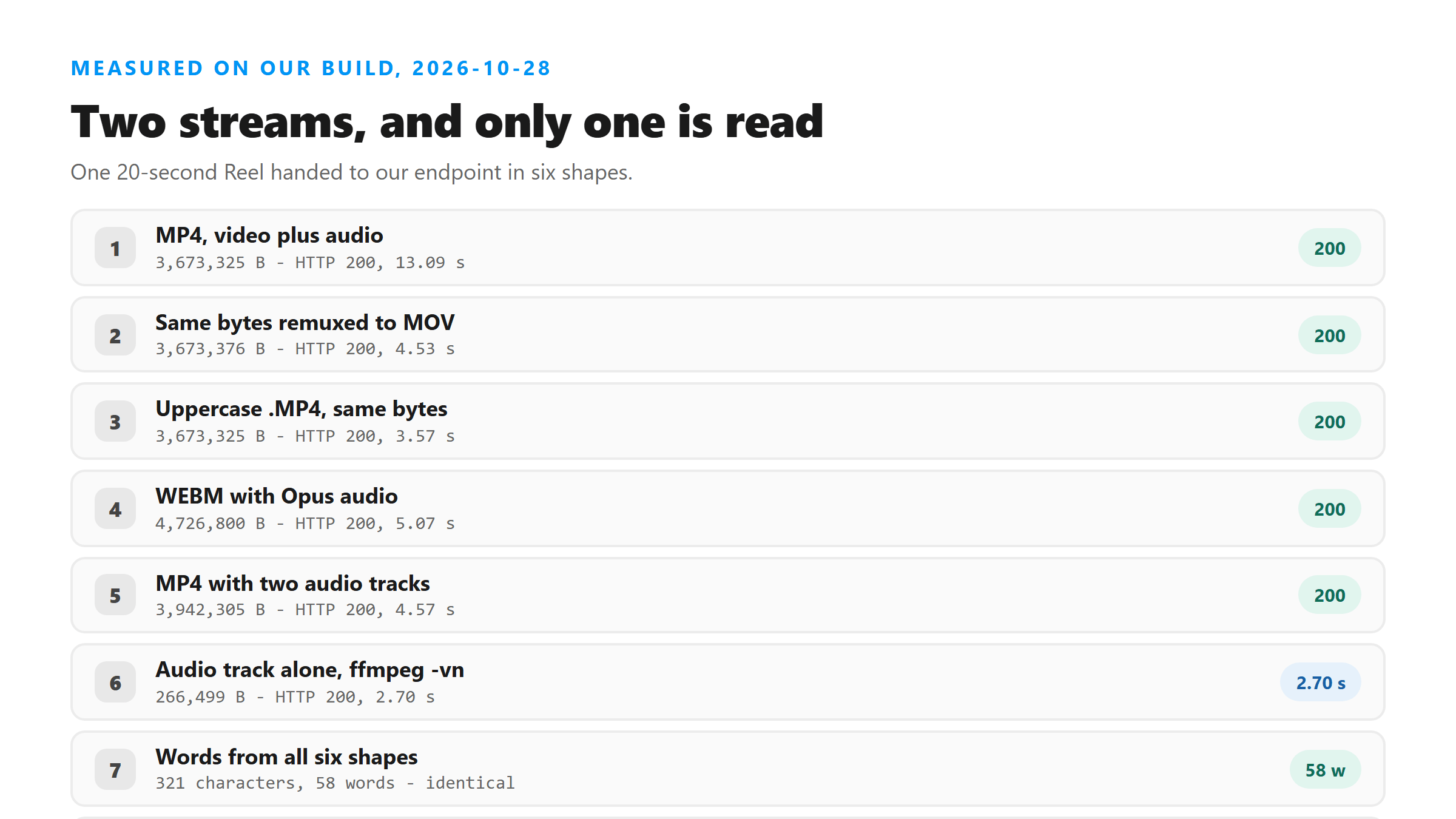
- MP4, 3,673,325 bytes - HTTP 200 in 13.09 seconds, 321 characters and 58 words.
- MOV, same bytes remuxed, 3,673,376 bytes - HTTP 200 in 4.53 seconds, 321 characters and 58 words.
- Uppercase .MP4, 3,673,325 bytes - HTTP 200 in 3.57 seconds, 321 characters and 58 words.
- WEBM with Opus audio, 4,726,800 bytes - HTTP 200 in 5.07 seconds, 321 characters and 58 words.
- MP4 with two audio tracks, 3,942,305 bytes - HTTP 200 in 4.57 seconds, 321 characters and 58 words.
- Audio track alone, pulled with ffmpeg -vn, 266,499 bytes - HTTP 200 in 2.70 seconds, 321 characters and 58 words.
Two things worth noticing in those numbers
The container does not change the output, and the timings do not behave the way you'd expect. Two files with identical bytes came back in 13.09 seconds and 3.57 seconds, so a single upload tells you nothing about how fast this runs. Run it twice before you draw a conclusion. With two audio tracks in the file, we got the same 58 words as the single-track version. The endpoint read one of them. We did not test which one.
The audio track is 7 percent of the file
That is the number that matters when you are choosing what to upload. The video track in our 20-second Reel accounted for roughly 3.4 MB; the audio was 266,499 bytes. Strip the picture with ffmpeg -i reel.mp4 -vn -c:a copy audio.m4a and you send 7 percent of the bytes and get the same transcript back. Our own run came back in 2.70 seconds instead of 13.09. Treat that gap as one observation, not a rule. Those same bytes also finished in 3.57 seconds on another run, so 13.09 was an outlier.
How to look inside your own file
Run ffprobe -v error -show_entries stream=codec_type,codec_name,sample_rate,channels -of json yourreel.mp4. You want to see one audio stream with a codec name and a sample rate. If the list has no audio entry, the upload will fail with HTTP 500. If the audio entry is there but the clip is silent, the upload will succeed and the model will invent text, so read the output before you use it.
Where that leaves you
Don't spend time converting between MP4, MOV and WEBM looking for better words - we got 58 words from all of them. Spend it on the audio track instead: check that one exists, and pull it out on its own if the file is big enough to worry about.
Got a Reel you want as text? Upload the file and download the transcript as TXT, SRT, or VTT →
The audio track is about 7 percent of the file and carries every word in it. Wondershare UniConverter opens a saved Reel on your own machine and writes that track out on its own - today that took 3,673,325 bytes down to 266,499. It does not transcribe - the words come back from this page.
FAQ
Does the container change the transcript?
No. MP4, MOV, WEBM and an uppercase .MP4 all returned the same 321 characters and 58 words from the same 20 seconds of audio.
What happens if a Reel has two audio tracks?
We built one and got the same 58 words as the single-track version, so the endpoint read one of the two. We did not test which one it picks, so don't rely on this if your clip mixes languages across tracks.
Is it worth stripping the audio out first?
It sends far less data. Our 20-second Reel is 3,673,325 bytes as an MP4 and 266,499 bytes as a bare audio track, and both returned the same words. If your file is anywhere near the size limit, that is the cheapest fix available.