What's Actually in an Instagram Reel's Audio Track
The track, read straight off the file
ffprobe tells you what's in there without decoding anything. Run ffprobe -v error -select_streams a -show_entries stream=codec_name,sample_rate,channels,bit_rate -of default=nw=1 yourfile.mp4 and you'll get four numbers back. Here's what our four files reported today.
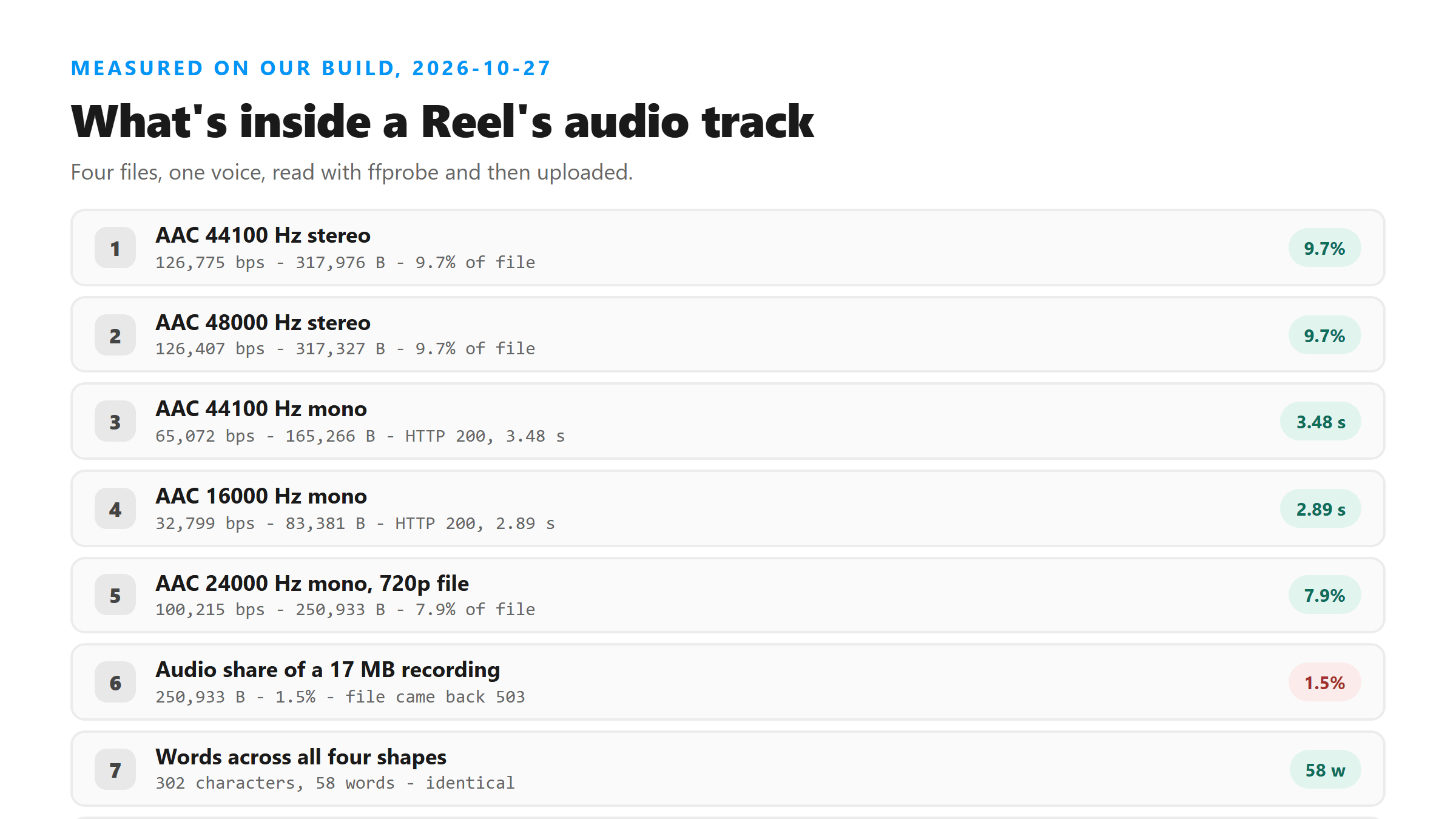
- A Reel-shaped MP4, 3,266,609 bytes: aac, 44100 Hz, 2 channels, 126775 bits per second. The audio stream alone was 317,976 bytes, 9.7% of the file.
- The same shape recorded at 48 kHz: aac, 48000 Hz, 2 channels, 126407 bits per second. Audio stream 317,327 bytes, 9.7%.
- A voice-note style M4A, 165,266 bytes: aac, 44100 Hz, 1 channel, 65072 bits per second.
- A downsampled M4A, 83,381 bytes: aac, 16000 Hz, 1 channel, 32799 bits per second.
- A 720x1280 version, 3,176,226 bytes: aac, 24000 Hz, 1 channel, 100215 bits per second. Audio stream 250,933 bytes, 7.9%.
How little of the file the sound is
The picture is the expensive part. In our 1080x1920 file the audio was 317,976 bytes out of 3,266,609, under 10%. In a 17,049,781-byte screen recording we built, the same speech track measured 250,933 bytes, which is 1.5%. That recording came back HTTP 503 from Cloudflare with error 1102 after 5.06 seconds, while the track on its own went through in 3.87 seconds with all 58 words. Same words, one sixty-eighth of the bytes, and a different outcome.
Four shapes, one transcript
We uploaded all four files. Every one returned HTTP 200 with 302 characters and 58 words, 0 line breaks, and language reported as unknown. The words were pinned; the clock wasn't. The 44.1 kHz stereo file took 5.46 seconds and the 48 kHz one took 4.43. The mono voice note came in at 3.48 seconds and the 16 kHz file at 2.89.
So don't upsample anything
The 16 kHz mono file was 83,381 bytes and returned every word the 3,266,609-byte file returned. There's no accuracy argument for a bigger audio track here, only an upload-time argument. If a tool offers to "enhance" your audio before you transcribe it, measure before you believe it: on today's files there was nothing to gain.
What a screen recording writes instead
Recorders pick their own audio settings, and they don't match a Reel's. The screen-recording-shaped file we built carried 48 kHz stereo AAC at 126,407 bits per second, against 24 kHz mono at 100,215 in our Reel-shaped one. Both returned the same 302 characters. The recording also carried a 17,049,781-byte picture with it, which is what killed the upload.
What the track doesn't carry
No timestamps, no speaker labels, no music-versus-speech split. Our response has six fields: success, transcript, language, engine, fileSize and fileName. The engine field read @cf/openai/whisper today. Everything else you might want on top of the words has to come from somewhere else, which is why keeping the original file matters.
Where the numbers move
Sample rate and channel count didn't change the words today. They moved the clock by a couple of seconds, across a 40-fold range in file size. Two other things did bite. A file with no audio stream at all failed with HTTP 500 in 2.03 seconds, and total size failed with a Cloudflare 503 at 17,049,781 bytes.
Reading your own file in ten seconds
Point ffprobe at the file and look at four things. The codec tells you whether it's AAC. The sample rate tells you how much bandwidth the audio was recorded with, and ours ranged from 16,000 to 48,000 today. The channel count tells you mono or stereo. The bit rate tells you how many bytes per second that track spends, between 32,799 and 126,775 in our files.
What we didn't measure
Every file here is one we encoded ourselves this morning, because we can't pull a Reel out of Instagram to inspect. Real Reels will land somewhere in this range, and the commands above will tell you where yours sits rather than leaving you to guess. We also didn't test damaged or clipped audio, which is a separate failure mode.
What happens to the file
It reaches our endpoint over TLS, gets decoded and transcribed in memory once, and the text returns in that same response. We don't keep the file, we don't use it for training, and there's no account tied to it.
Got a Reel you want as text? Upload the file and download the transcript as TXT, SRT, or VTT →
Reading the track takes one command, and acting on what it says takes a converter. Wondershare UniConverter opens the file on your own machine and writes the audio out at the sample rate and channel count you pick, which is how a 17 MB recording becomes a 250 KB upload. It does not transcribe - the words come back from this page.
FAQ
What format is a Reel's audio in?
AAC inside an MP4 or MOV container, in our files at 24 kHz, 44.1 kHz or 48 kHz and in one or two channels. The exact numbers depend on what recorded or exported the file, so read your own with ffprobe rather than trusting a default.
Does stereo help the transcript?
Not today. Our stereo file, 3,266,609 bytes, returned the same 302 characters as our 165,266-byte mono voice note. The stereo version took 5.46 seconds against 3.48.
How much of a Reel file is audio?
Under 10% in the files we built: 317,976 bytes of 3,266,609 in one, 250,933 bytes of 3,176,226 in another, and 250,933 bytes of a 17,049,781-byte screen recording.
Why did my Reel file fail if it has audio?
Usually size. A 6,080,611-byte file went through today in 6.74 seconds, and a 17,049,781-byte one got a 503 from Cloudflare. Pull the audio out with ffmpeg -vn and try again.