Instagram Video to MP3: What the Conversion Costs You
What we ran today
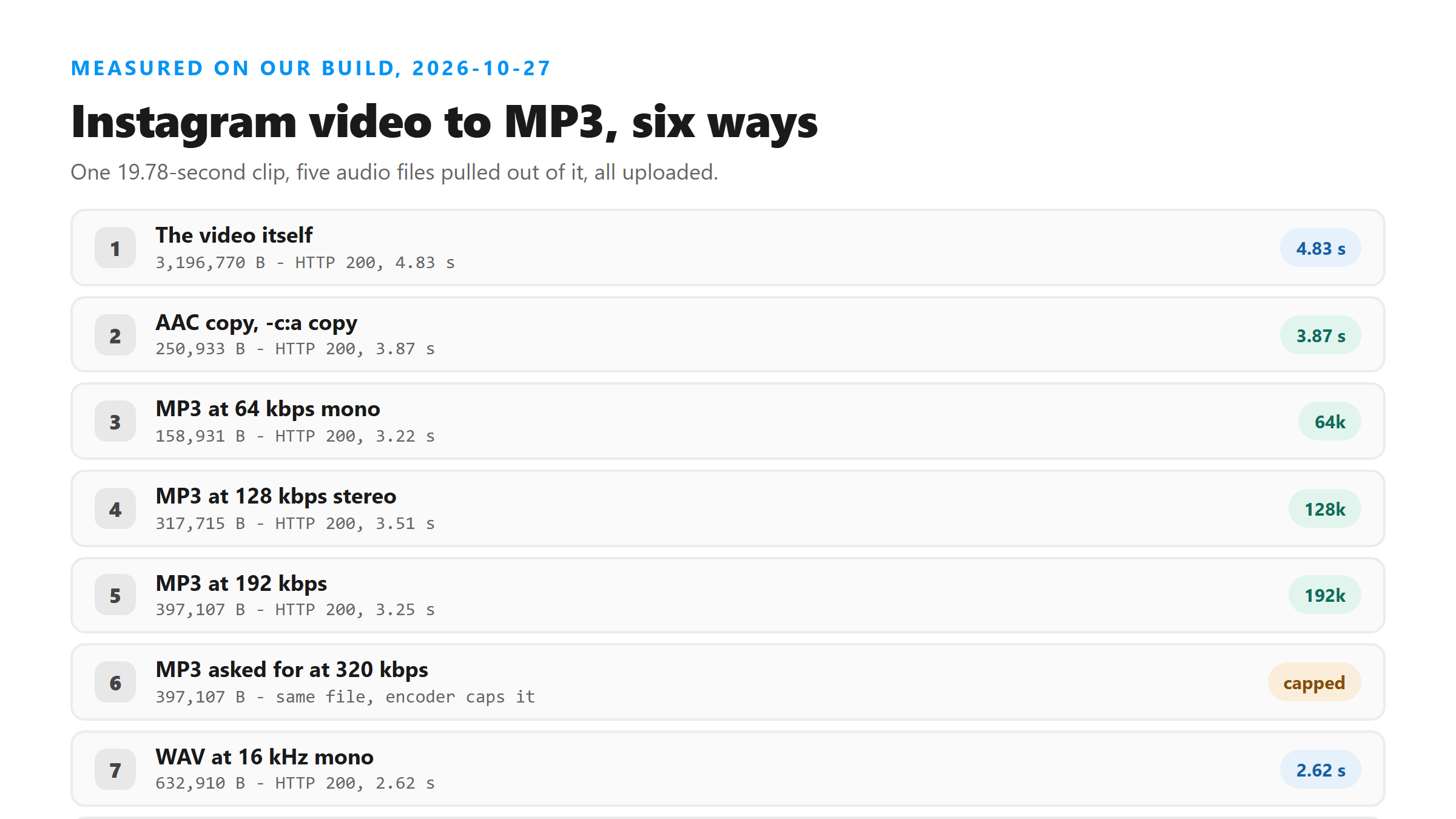
One clip, 19.78 seconds of speech, turned into five audio files with ffmpeg. Then we uploaded each one, plus the original video, to /api/transcribe and timed the round trip.
- The video itself, 3,196,770 bytes: HTTP 200 in 4.83 seconds, 302 characters, 58 words.
- AAC copy, -vn -c:a copy, 250,933 bytes: HTTP 200 in 3.87 seconds, the same 302 characters.
- MP3 at 64 kbps, mono, 158,931 bytes: HTTP 200 in 3.22 seconds, the same text.
- MP3 at 128 kbps, stereo, 317,715 bytes: HTTP 200 in 3.51 seconds, the same text.
- MP3 at 192 kbps, 397,107 bytes: HTTP 200 in 3.25 seconds, the same text.
- WAV at 16 kHz mono, 632,910 bytes: HTTP 200 in 2.62 seconds, the same text.
Where the bitrate ladder stops
We also asked for 320 kbps and got a 397,107-byte file, the same size as the 192 kbps one. Our source sits at a 24 kHz sample rate, and the encoder caps the bitrate there, so the top two rungs of that ladder are the same file. Don't pay for a setting you can't reach.
The words don't move
Six uploads, six identical transcripts: 302 characters, 58 words, 0 line breaks, language reported as unknown. The only difference from the script we recorded is one compound word, "river bank" coming back as "riverbank." Everything else matched. If a conversion changed your words, the cause is somewhere other than the bitrate.
What you actually lose
The picture, and with it your ability to check the transcript against the frame. That matters when a word is ambiguous, because our response carries no timestamps, no speaker labels and no confidence scores. You also lose the burned-in text, which we've seen the model ignore anyway, and any chance of matching a word to the moment it was said. It returns six fields: success, transcript, language, engine, fileSize and fileName. Once the video is gone, the audio file is the only evidence you have left, so keep it.
Where converting really pays
On big files. We recorded a 1080x1920 screen capture that came to 17,049,781 bytes, and it came back HTTP 503 from Cloudflare with error 1102 after 5.06 seconds, without ever reaching our code. The audio track inside it was 250,933 bytes, or 1.5% of the file, and a 250,933-byte file went through in 3.87 seconds with all 58 words. On short clips the saving is under a second and a half. On long ones it's the difference between an answer and an error page.
How to do it
Two commands cover everything here. If you only want to strip the picture and keep the audio exactly as it was, run ffmpeg -i yourfile.mp4 -vn -c:a copy audio.m4a. That's a copy, so nothing is re-encoded. If you need an actual MP3, run ffmpeg -i yourfile.mp4 -vn -c:a libmp3lame -b:a 64k -ac 1 audio.mp3. That gave us the smallest working file of the day, at 158,931 bytes.
Picking a setting without guessing
Go by what you're doing next. A 64 kbps mono MP3 is the cheapest file that kept every word today, so it's the right pick for an upload. Keep the AAC copy if you plan to edit the audio later, because it hasn't been through a lossy pass. Skip the WAV unless something downstream insists on it: 632,910 bytes for the same 58 words.
The one word that moved
Our script has 59 words in it and every upload came back with 58. The gap is "river bank" arriving as "riverbank." That's it. It showed up in the AAC copy, in all three MP3s and in the WAV, so it isn't something the conversion did. It's the model's spelling choice, and you'll see the same kind of thing on brand names and on words that aren't in its vocabulary.
What we didn't measure
These files are ours, built from one 19.78-second recording this morning, so treat the byte counts as what these settings produce and not as a promise about your clip. We also didn't test every encoder: five files, one clip, one day. The transcript results were identical across all five, and that part we'd expect to hold.
What happens to the file
It goes to our endpoint over TLS, gets decoded and transcribed in memory once, and the text comes back in that response. We don't keep the file, we don't use it for training, and there's no account attached to it.
Got a Reel you want as text? Upload the file and download the transcript as TXT, SRT, or VTT →
If MP3 is the file you need, the bitrate dial is the only one worth touching. Wondershare UniConverter converts on your own machine and shows you the size each setting writes, so you can pick the smallest file that keeps every word. It does not transcribe - the words come back from this page.
FAQ
Does converting to MP3 make the transcript less accurate?
Not in our run today. Five audio files from the same clip, from 64 kbps mono up to a 16 kHz WAV, came back with the same 302 characters and 58 words each.
What bitrate should I use?
64 kbps mono is enough. It produced the smallest file of the day at 158,931 bytes and kept every word. Going past 192 kbps bought us nothing, because the encoder capped the file at 397,107 bytes.
Why bother converting at all if the words are the same?
Size. A 17,049,781-byte recording came back 503 from Cloudflare, while the 250,933-byte audio track inside it went through in 3.87 seconds with the same 58 words.
Can I convert back to video later?
You can mux the audio onto a video track again, but you won't get the transcript's timing back. Our response has no timestamps in it, so any syncing is work you do by hand.