What the Size of a Downloaded Instagram Video Actually Changes
Five sizes, one transcript
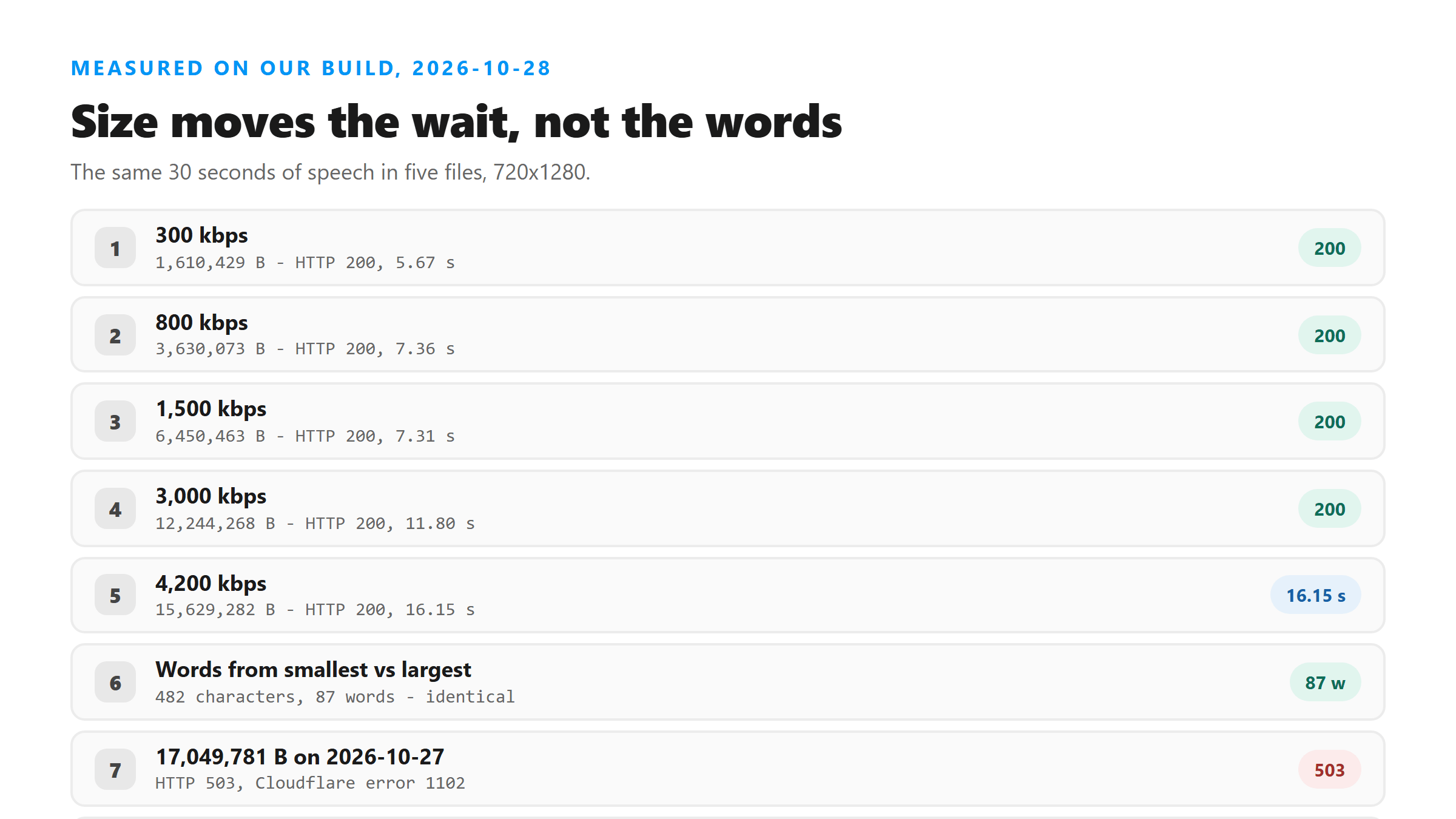
We took one 30-second audio track and built five video files around it at 720x1280, changing nothing but the video bitrate. The bitrate dial moved the file size by almost ten times. It did not move a single word.
- 300 kbps - 1,610,429 bytes, HTTP 200 in 5.67 seconds, 482 characters and 87 words.
- 800 kbps - 3,630,073 bytes, HTTP 200 in 7.36 seconds, 482 characters and 87 words.
- 1,500 kbps - 6,450,463 bytes, HTTP 200 in 7.31 seconds, 482 characters and 87 words.
- 3,000 kbps - 12,244,268 bytes, HTTP 200 in 11.80 seconds, 482 characters and 87 words.
- 4,200 kbps - 15,629,282 bytes, HTTP 200 in 16.15 seconds, 482 characters and 87 words.
So size only buys you wait time
The spread between the smallest and largest file is 14 million bytes and about 10 seconds of wall clock. The response carries the same six fields every time: success, transcript, language, engine, fileSize and fileName. None of them change with the file size. The words are byte-for-byte the same. If you are picking a download quality, pick the smallest one that keeps the audio intact, because everything else you pay for gets thrown away at the door.
Where the refusal point actually is
We did not hit it today. Every file up to 15,629,282 bytes returned HTTP 200. Earlier in the week a 17,049,781-byte file came back HTTP 503 with Cloudflare error 1102, which means the request never reached our code. So the ceiling sits between those two numbers as of this week. We are not going to pretend it is a fixed line. It has moved before. What we know is where today's uploads landed.
The failure that looks like a size problem but isn't
If your download gets refused, check for an audio stream before you blame the byte count. A video file with no audio track fails with HTTP 500 in about 2 seconds, which is fast enough to look like a rejection on size. It isn't. Run ffprobe -v error -select_streams a -show_entries stream=codec_name -of json yourfile.mp4 and see whether a stream is listed. Empty output means the file has no sound in it, and no amount of re-downloading at a lower quality will fix that.
What to do when the file is genuinely too big
Strip the picture. Run ffmpeg -i yourfile.mp4 -vn -c:a copy audio.m4a and you get the audio track on its own. In our tests that track is a small fraction of the original: 266,499 bytes out of a 3,673,325-byte clip. You upload 7 percent of the bytes and get the same words back. That is the only size fix that costs you nothing.
Where that leaves you
Download at the lowest quality that keeps the audio. Check that an audio stream exists. Only reach for the bitrate dial if you have a reason to keep the picture. And if the words you want are already typed into the caption, copy them by hand - no upload will produce them. Size is a waiting-time problem here, not a quality problem.
Got a Reel you want as text? Upload the file and download the transcript as TXT, SRT, or VTT →
Size decides the wait, not the words, but a smaller file is still the cheaper upload. Wondershare UniConverter rewrites a downloaded video on your own machine and hands you the audio track alone, which is how 15,629,282 bytes becomes a file that comes back in seconds. It does not transcribe - the text still comes from this page.
FAQ
Does a bigger video file give a more accurate transcript?
No. Five files from 1.6 MB to 15.6 MB, all carrying the same 30 seconds of speech, returned the same 482 characters and 87 words. Higher bitrate only adds bytes and seconds.
What size file gets refused?
Nothing we uploaded today was refused, up to 15,629,282 bytes. A 17,049,781-byte file was turned back with HTTP 503 on 2026-10-27, so the line is between those two numbers right now. We don't publish a hard number because it has moved before.
My upload failed in about two seconds. Is it too big?
Probably not. A fast failure with HTTP 500 usually means there is no audio stream in the file. Check with ffprobe before you re-download at a lower quality.