.3gp, .amr, .mkv: Why These Files Get Refused
Seven names that stop at the door
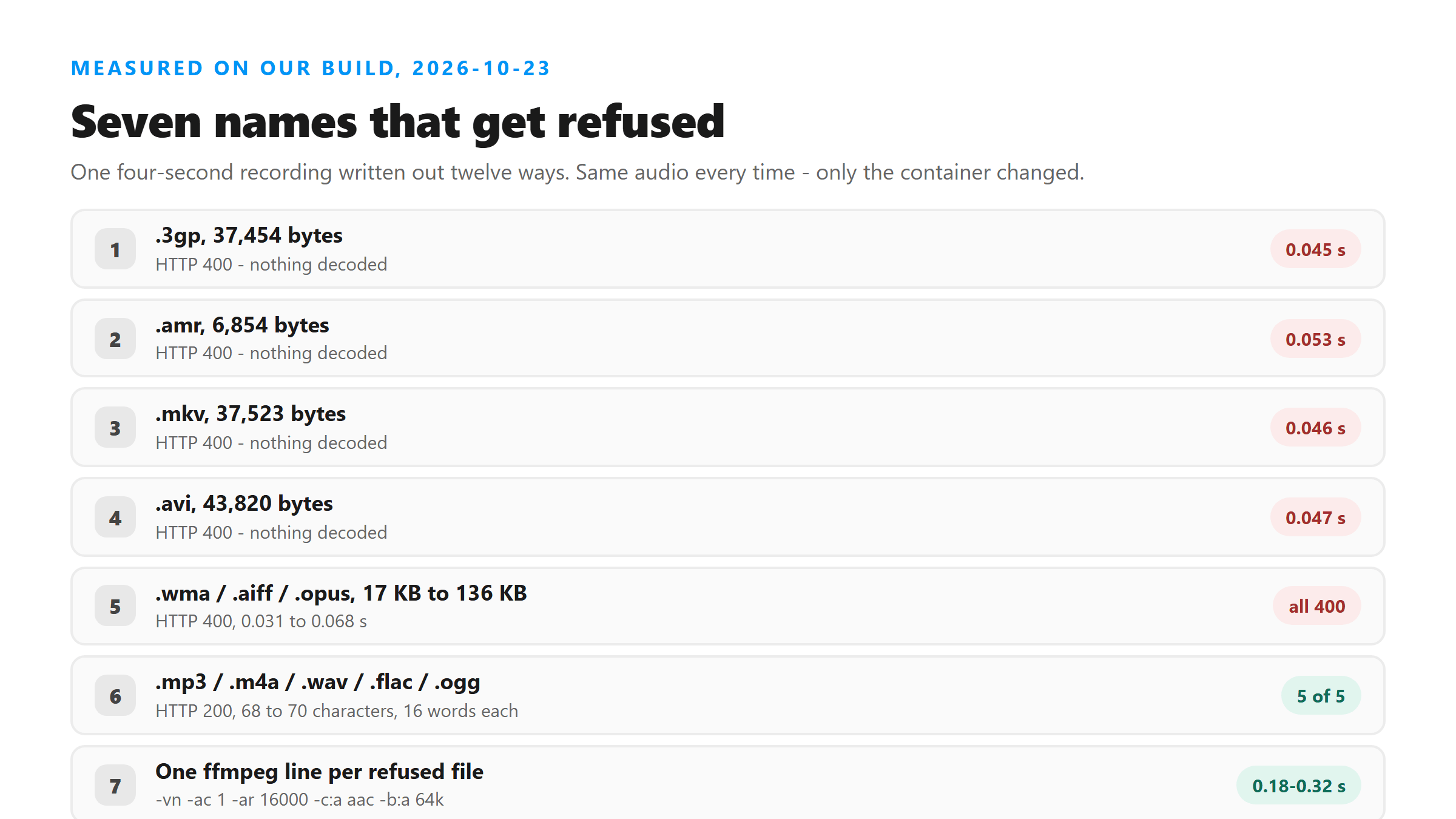
We took one four-second recording of a known sentence and wrote it out seven ways. Every one was refused, and every one was refused fast:
- .3gp, 37,454 bytes - HTTP 400 in 0.045 s.
- .amr, 6,854 bytes - HTTP 400 in 0.053 s.
- .mkv, 37,523 bytes - HTTP 400 in 0.046 s.
- .avi, 43,820 bytes - HTTP 400 in 0.047 s.
- .wma, 42,142 bytes - HTTP 400 in 0.031 s.
- .aiff, 136,214 bytes - HTTP 400 in 0.037 s.
- .opus, 17,022 bytes - HTTP 400 in 0.068 s.
Look at the times. Nothing here took longer than seven hundredths of a second, and the 6.8 KB file took about as long as the 136 KB one. That's the signature of a name check: the file never gets opened. A real decode failure takes seconds, not milliseconds - those show up as HTTP 500 further along.
Five that go through
The same recording in five other containers was accepted, each returning the same sentence:
- .mp3, 35,180 bytes - 70 characters, 16 words, 15.04 s.
- .m4a, 37,551 bytes - 68 characters, 16 words, 8.17 s.
- .wav, 136,238 bytes - 70 characters, 16 words, 13.43 s.
- .flac, 89,242 bytes - 70 characters, 16 words, 10.81 s.
- .ogg, 26,814 bytes - 68 characters, 16 words, 5.69 s.
So the accepted list is generous where it counts - lossless, lossy, open and Apple formats all work - and strict at the edges, where these seven names sit. None of the seven is exotic. They're just not on the list.
The one-line fix, timed
You don't need a converter app. One ffmpeg command does all seven, and the -vn in it is the part that matters: it throws away any video track, which is the thing making your file big in the first place.
ffmpeg -i clip.3gp -vn -ac 1 -ar 16000 -c:a aac -b:a 64k out.m4a
We ran it on each refused file and timed it. Conversion took 0.18 to 0.32 seconds each, and every output landed between 33,966 and 38,075 bytes - the 6.8 KB .amr and the 136 KB .aiff both came out around 34 to 38 KB, because the output size is set by the bitrate and the length, not by what went in.
The words come back the same
Then we uploaded all seven converted files. Every one returned HTTP 200 with 68 characters and 16 words: "We open the studio at 8 in the first batch of coffee is ready by 10." The .amr conversion came back at 73 characters and 17 words because it wrote "8 a.m." where the others wrote "8".
That last detail is worth keeping. Converted files don't change what the model hears, but the writing layer can still shift - numbers come back as digits, and a conjunction moved from "and" to "in" in every version. The container isn't the risk; the transcription is. Judge the output on words, not characters.
Where these files come from
You don't choose them, you get handed them. .3gp and .amr are what older Android phones and voice-memo apps write. .mkv is the default container for a lot of download tools. .avi and .wma come out of desktop converters that haven't been updated in years. .aiff is what some Apple tools still export. .opus shows up inside messaging apps - it's the audio half of a WebM you pulled off a chat.
None of that is your fault, and none of it is worth fighting. The name check isn't going to change, so the cheapest habit is converting on the way in. Pull the audio out first and the size problem and the format problem both disappear in one step - that's the same first move as any instagram audio download workflow.
Size is a second, separate gate
Getting past the name check doesn't mean the file will fly. We sent a 4,160,078-byte WAV - 130 seconds of 16 kHz mono, an accepted container with an accepted name - and it came back HTTP 200 in 43.16 seconds with 2,671 characters and 617 words. We found no size wall at 4.16 MB for that file, and we didn't test past it.
So don't chop a big file into pieces on reflex. Try it once first. If it comes back with a failure, then pull the audio out with that same ffmpeg line, because -vn drops the video track and that's where most of the bytes live. A refusal by name and a refusal by size are two different problems, and they need different fixes.
What to check after you convert
Three quick things, in order. Look at the size before you upload - anything you just made should be tens of kilobytes per minute of audio, not megabytes. Upload it and read the word count, not the character count, because the writing layer moves digits around. Then compare the words against what you actually hear in the clip. If a four-second sentence comes back as 200 words, the container wasn't your problem.
Convert, don't rename
The check reads the file name, so changing .amr to .m4a can slip a file past it. We'd still tell you to convert. A renamed file carries a codec that the decoder now has to deal with, and you've thrown away the one piece of information that told you what was inside. Converting writes audio the endpoint expects, at a bitrate you chose, with the video track gone.
If you're on a phone and can't run ffmpeg, most file managers will "share" or "export" a clip as .m4a, and that's the same fix. Then check the size before you upload - the ceiling that stops big files is separate from the name check, and it applies to whatever you just made.
Got a Reel you want as text? Upload the file and download the transcript as TXT, SRT, or VTT →
A phone will not rewrite a container for you, and most file managers stop at renaming. Wondershare UniConverter opens .3gp, .amr, .mkv and the rest on a desktop and writes them out as .mp3 or .m4a with the video track dropped, so the file is the size you expect before it goes anywhere. It does not transcribe - the words come back from this page.
FAQ
Which file formats get refused?
In our test, .3gp, .amr, .mkv, .avi, .wma, .aiff and .opus all returned HTTP 400. All seven in 0.031 to 0.068 seconds, which is a name check rather than a decode failure. .mp3, .m4a, .wav, .flac and .ogg were accepted.
How do I convert a .3gp or .amr file so it uploads?
ffmpeg -i clip.3gp -vn -ac 1 -ar 16000 -c:a aac -b:a 64k out.m4a. The -vn drops the video track. It took 0.18 to 0.32 seconds per file in our run and produced 34 to 38 KB files from inputs between 6.8 KB and 136 KB.
Does converting change the transcript?
The words survived. All seven converted files returned the same 16 words. One wrote "8 a.m." where the others wrote "8", so the character count moved from 68 to 73 - compare words, not characters, when you check a conversion.
Can I just rename the file to .mp3?
A rename can get past a name check, but it leaves the original codec inside and hides what the file actually is. Converting with ffmpeg rewrites the audio at a bitrate you picked and drops the video track, which is what usually makes these files too big in the first place.