Save an Instagram Reel: Why You Still Have No File
What the Save button actually does
It adds the Reel to a collection you can open inside Instagram. That is the whole feature. Nothing lands on your disk, which is why you can't find the clip afterward and why no transcriber can read it. You can still open it and watch it, and that turns out to be the useful part: play it, and record your screen while it plays. We can't test Instagram's app from here, so take that as plain product behavior. Every other number on this page came out of our own endpoint today.
Eight files, eight answers
We built these files this morning and uploaded each one to /api/transcribe. Same 19.78 seconds of speech in all of them unless the row says otherwise.
- A 1080x1920 MP4, 3,196,770 bytes: HTTP 200 in 4.83 seconds, 302 characters, 58 words.
- The same clip at 720x1280, 3,176,226 bytes: HTTP 200 in 4.70 seconds, same 302 characters.
- A 1080p version at a higher bitrate, 6,080,611 bytes: HTTP 200 in 6.74 seconds, same text again.
- A screen recording, 1080x1920, 17,049,781 bytes: HTTP 503 with Cloudflare error 1102 after 5.06 seconds. It never reached our code.
- A video with the audio track removed, 2,941,694 bytes: HTTP 500 in 2.03 seconds, "Transcription failed. Please try another supported file."
- The same 3,196,770-byte file renamed .mkv: HTTP 400 in 0.33 seconds, "Unsupported file format. Please select MP3, WAV, M4A, AAC, OGG, FLAC, MP4, MOV, or WEBM."
- The same bytes renamed .3gp: HTTP 400 in 0.33 seconds, the same message.
- A 1080x1350 PNG screenshot, 7,382 bytes: HTTP 400 in 0.18 seconds. A 0-byte file: HTTP 400 in 0.18 seconds, "Please select a non-empty audio or video file."
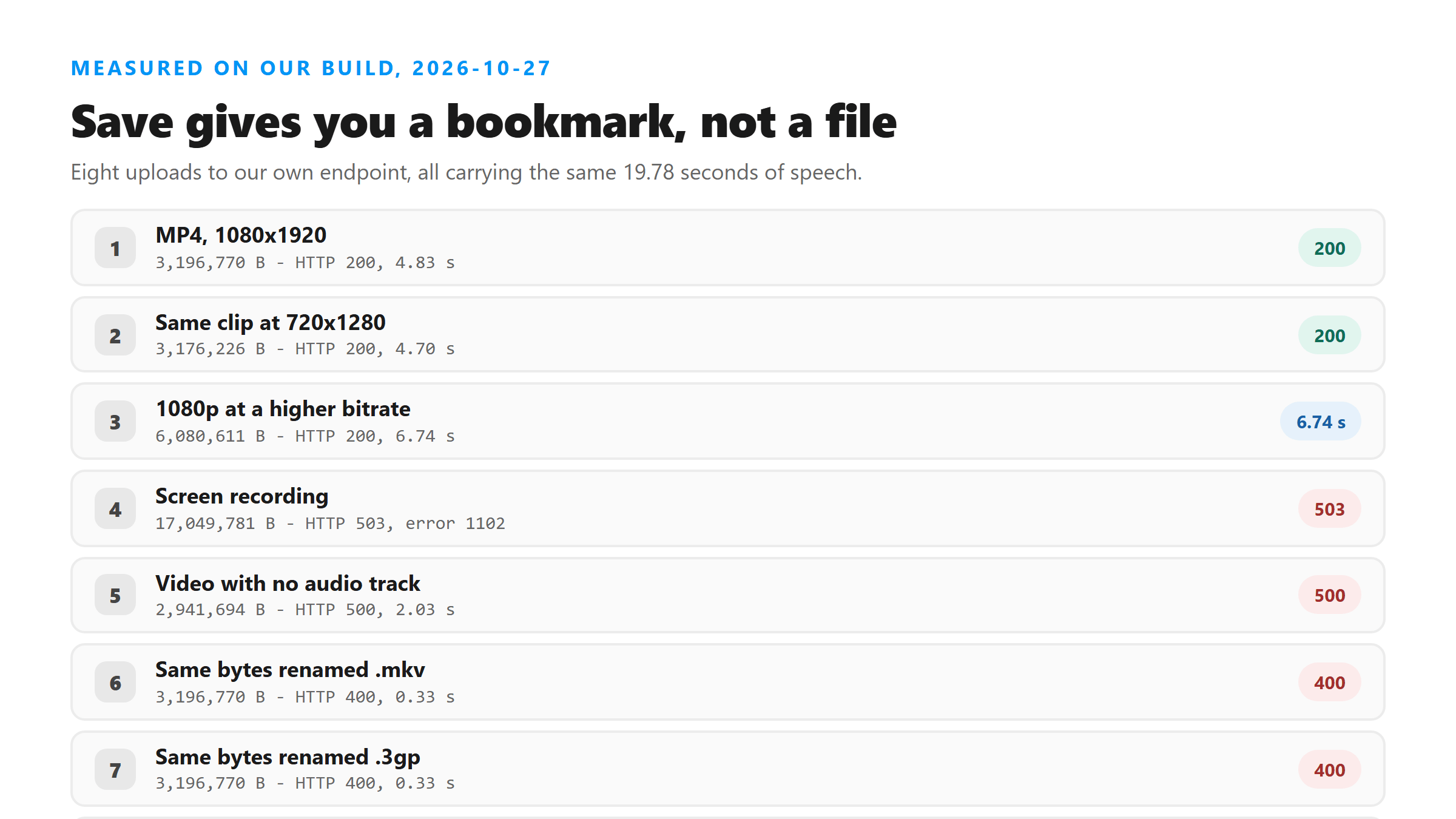
Two things stop you, and they fail at different speeds
A bad file name fails in about a third of a second, before anything gets decoded, so renaming is the whole fix. A missing audio track takes about two seconds and then blames the format, which sends people hunting in the wrong direction. The message says "try another supported file," but the file was supported. It had no sound in it.
Where a file actually comes from
You need bytes you control, and there are only three ways to get them. Nothing else in the app writes a file you can hand to a transcriber, so don't spend time looking for a fourth one.
- Your own clip. You recorded it, so it's already in your camera roll, and the app's own menu will hand it back to you.
- A screen recording. Works on every operating system, and it's the only route for somebody else's Reel.
- A file someone sent you. Already on disk, already usable.
Size is the next wall
Today a 6,080,611-byte MP4 went through in 6.74 seconds. A 17,049,781-byte screen recording didn't get to us at all: Cloudflare returned 503 with error 1102 after 5.06 seconds. The cheap fix is the one this site keeps repeating, which is to take the picture out. The audio track inside that 17 MB file was 250,933 bytes, or 1.5% of it.
Check the file before you upload it
One command tells you whether the audio track exists at all. Run ffprobe -v error -select_streams a -show_entries stream=codec_name,sample_rate,channels -of default=nw=1 yourfile.mp4. If it prints nothing, your file has no audio stream, and the upload will come back 500 no matter what you rename it to.
What comes back once it works
Six fields: success, transcript, language, engine, fileSize and fileName. The engine field reads @cf/openai/whisper today, language came back unknown, and the text arrived as one block with 0 line breaks. There are no timestamps, no speaker labels and no confidence scores in there.
How close the words were
The script we recorded has 59 words in it. All eight successful uploads came back with 58, and the difference is one compound word: we said "river bank" and got "riverbank" back. Everything else matched, word for word, in the 720p file, the 1080p file and the 6 MB file.
If a bookmark is all you have
Open the Reel, record your screen while it plays, then strip the picture off the recording with ffmpeg -i recording.mp4 -vn -c:a copy audio.m4a. On the 17 MB recording we built that way, the audio came out at 250,933 bytes and uploaded in 3.87 seconds, while the recording itself got a 503. The recording is only a bridge to a file you can actually hand over.
What we didn't measure
Every file in this page is one we built with ffmpeg this morning, not one pulled out of Instagram. Instagram's app behavior we describe as product behavior, not as a test result. The sizes and times are today's, on today's network, and they'll move around.
What happens to the file
It goes to our endpoint over TLS, gets decoded and transcribed in memory once, and the response carries the text back. The file isn't kept, it isn't used for training, and there's no account tied to it.
Got a Reel you want as text? Upload the file and download the transcript as TXT, SRT, or VTT →
Once a real file exists, its shape is what decides whether the upload lands. Wondershare UniConverter opens a video on your own machine and writes the audio out on its own, which is the gap between a 17 MB recording that gets refused and a 250 KB track that doesn't. It does not transcribe - the words come back from this page.
FAQ
Can I transcribe a Reel I saved inside Instagram?
Not from the bookmark. Save keeps a pointer inside the app, not a file. You still need a copy on disk: a recording, your own original clip, or a file someone sent you.
Why did my upload fail with 400 when the video plays fine?
The name, not the content. The endpoint checks the extension against a short list first. Our 3,196,770-byte file passed as .mp4 in 4.83 seconds and failed as .mkv and as .3gp in 0.33 seconds each, with no change to a single byte inside it.
How big can the file be?
We can't give you one number. Today 6,080,611 bytes went through in 6.74 seconds and 17,049,781 bytes got a 503 from Cloudflare in 5.06 seconds. Those are two points on a line we haven't mapped, and the second one failed before it reached us.
Does a screenshot of the Reel work instead?
No. Our 7,382-byte PNG came back HTTP 400 in 0.18 seconds. A picture has no audio track, and the words you want are in the sound, not in the frame.