How to Download an Instagram Video That Isn't a Reel
Start with a file, not a link
Feed videos - the 16:9 ones in the main grid, the long ones, the ones that aren't Reels - behave differently from Reels mostly because of size. A Reel is vertical, short and capped. A feed video can run for minutes and gets recorded or saved at whatever bitrate the phone picked.
What you can't do is hand anyone a URL and get the file back. Instagram blocks server-side fetching, which is the same reason this site asks you to choose a file instead of pasting a link. The routes that work are the copy already on your phone, a screen recording, or the file the poster sends you.
What a feed video file weighs
We rendered 1920x1080 clips with noise in the frame so the encoder had something to chew on, and muxed in a 128 kbps audio track - roughly what a phone produces.
- 15 s at 2 Mbps: 4,966,635 bytes - HTTP 200, 4.59 s, 235 characters / 42 words
- 60 s at 2 Mbps: 16,335,390 bytes - HTTP 200, 19.04 s, 806 characters / 145 words
- 60 s at 6 Mbps: 44,850,268 bytes - HTTP 503, Cloudflare error code 1102
Fifteen seconds of video cost nearly 5 MB, and a single minute cost over 16 MB. Both got through. The 6 Mbps version didn't get refused by us at all - we ran it twice and got 503 with error 1102 at 14.10 s and 17.62 s. That's Cloudflare turning the upload away before our code sees it.
Pull the audio out first
Every one of those clips is a picture you don't need plus a track you do. One ffmpeg command drops the video stream without touching the audio.
- 15 s video 4,966,635 B - 4.59 s
- its audio 204,924 B - 1.87 s, same 235 characters
- 60 s video 16,335,390 B - 19.04 s
- its audio 816,331 B - 5.71 s, same 806 characters
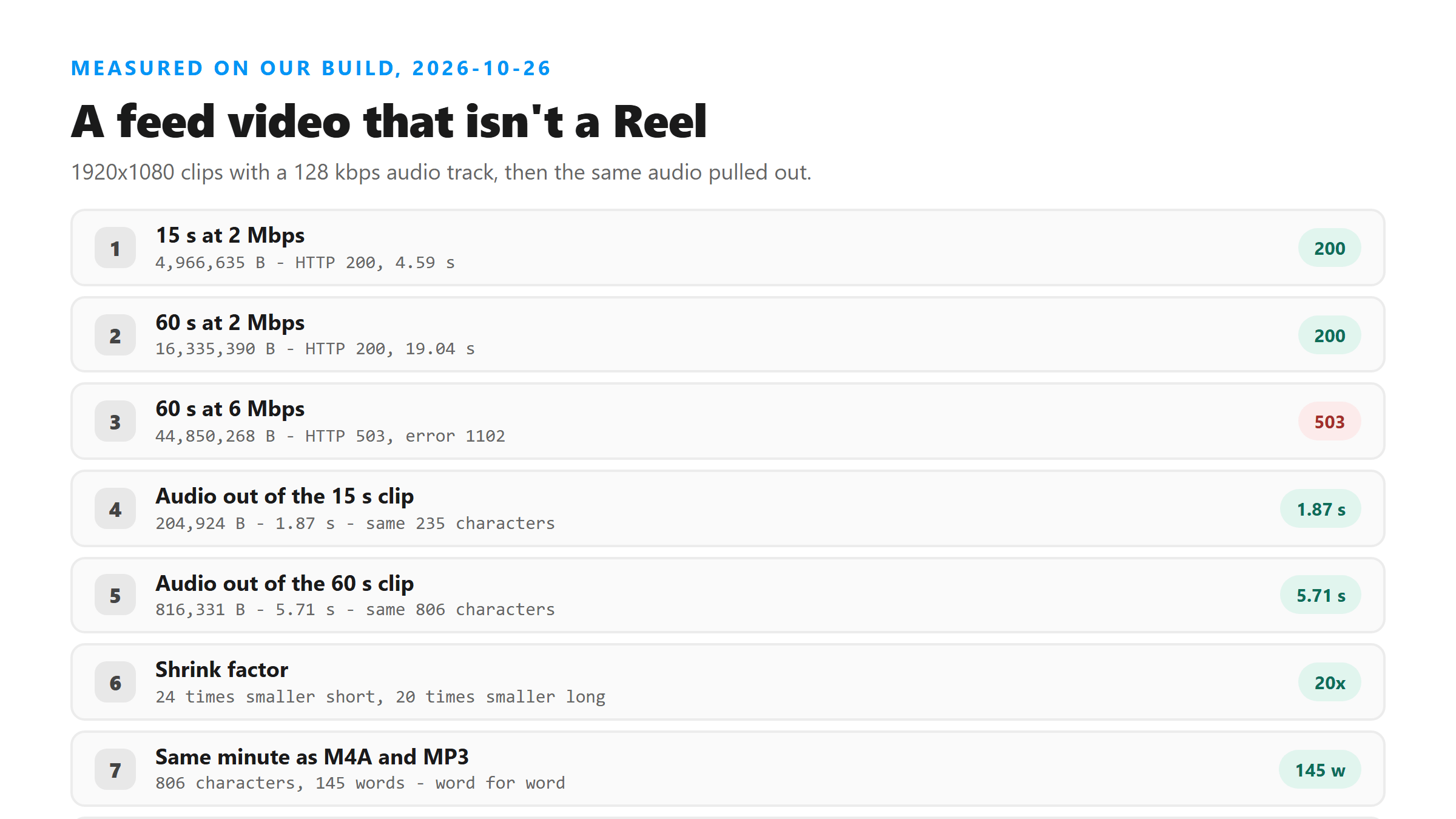
That's 24 times smaller on the short clip and 20 times smaller on the long one, with the text coming back word for word the same. The upload gets faster too - 1.87 s against 4.59 s, 5.71 s against 19.04 s - because you're sending the part that matters. On a long feed video this is the difference between a file that goes through and one that doesn't.
The container you pick changes the words
We took the same extracted minute and wrote it out three ways, then sent all three.
- M4A, 816,331 B - HTTP 200, 5.71 s, 806 characters / 145 words
- MP3 at 64 kbps mono, 481,103 B - HTTP 200, 19.94 s, 806 characters / 145 words
- OGG with Opus at 32 kbps, 231,486 B - HTTP 200, 6.62 s, 643 characters / 116 words
M4A and MP3 agreed word for word. The Opus copy lost 29 words against them, at a third of the size. Smallest isn't best here - if you're re-encoding anyway, stay at 64 kbps or above and check the word count against a second run.
How long a feed video can be
Feed videos run longer than Reels, so we pushed on length instead of size. Two audio-only files, 16 kHz mono.
- 5 minutes, 2,401,100 bytes - HTTP 200, 52.83 s, 3,288 characters / 591 words
- 10 minutes, 4,801,004 bytes - HTTP 200, 85.49 s, 5,772 characters / 1,039 words
Both finished, and both took real time - 85 seconds for the ten-minute one. Plan for that instead of watching a spinner. If a long video does fail, cutting it into five-minute pieces costs you nothing, because the text doesn't change when you split it.
What you actually get back
Every successful upload today returned the same shape, whether it was a 15-second clip or a 10-minute file.
- 6 fields in the response, language reported as unknown
- 0 line breaks - the text is one paragraph
- No timestamps, no speaker labels, no confidence scores
- Same text from the video and from its extracted audio
The engine is named in the response, so you can check what ran. What you get is words in order, and that's it. If you need the text broken into lines or timed to the video, that work is still yours.
What to do when the file is already too big
You don't have to re-record. Three moves, cheapest first.
- Drop the video stream. One command, no re-encode, 20 to 24 times smaller
- Re-encode the audio at 64 kbps mono instead of shrinking the picture
- Cut the clip into five-minute pieces if it's long
All three showed up in the numbers above: the 60-second file went from 16,335,390 bytes to 816,331 bytes and from 19.04 s to 5.71 s, with the same 806 characters at the end.
The two numbers worth remembering
Size: 16,335,390 bytes went through today and 44,850,268 bytes did not. Somewhere between those two is where Cloudflare stops you, and we didn't narrow it further.
Time: about 1.9 seconds for a short clip's audio and about 85 seconds for ten minutes. Neither is a promise - the same 61,200-byte file took 1.27 s and 12.66 s on two runs today - so treat them as a range, not a clock.
Got a Reel you want as text? Upload the file and download the transcript as TXT, SRT, or VTT →
Size, not access, is what stops a feed video: today 16,335,390 bytes got through and 44,850,268 bytes did not. Wondershare UniConverter opens the file on your own machine and writes out the audio track alone - 20 to 24 times smaller, and the same words come back. It does not transcribe - the text still comes from this page.
FAQ
Can I download an Instagram video from a link?
Not through us. Instagram blocks server-side fetching of its media, which is why this site takes a file and not a URL. Use the copy on your phone, a screen recording, or the file the poster sends.
How big is a feed video file?
Today a 15-second 1920x1080 clip at 2 Mbps was 4,966,635 bytes and a 60-second one was 16,335,390 bytes. Both uploaded. The same minute at 6 Mbps was 44,850,268 bytes and came back HTTP 503 with Cloudflare error 1102.
Should I upload the video or just the audio?
The audio. Dropping the video stream took the 60-second file from 16,335,390 bytes to 816,331 bytes, and the upload from 19.04 s to 5.71 s. The text was the same 806 characters either way.
Does the container I pick matter?
Yes. The same extracted minute gave 806 characters / 145 words as M4A and as MP3, but 643 characters / 116 words as Opus at 32 kbps. Stay at 64 kbps or above.
How long can the video be?
Ten minutes passed today - 4,801,004 bytes, 85.49 s, 5,772 characters. Five minutes took 52.83 s. If a longer one fails, split it into five-minute pieces; the text doesn't change.
Does the transcript come with timestamps?
No. Every response today had 6 fields, 0 line breaks and no timestamps, speaker labels or confidence scores.