What You Get When You Download an Instagram Post
Four post shapes, one transcript
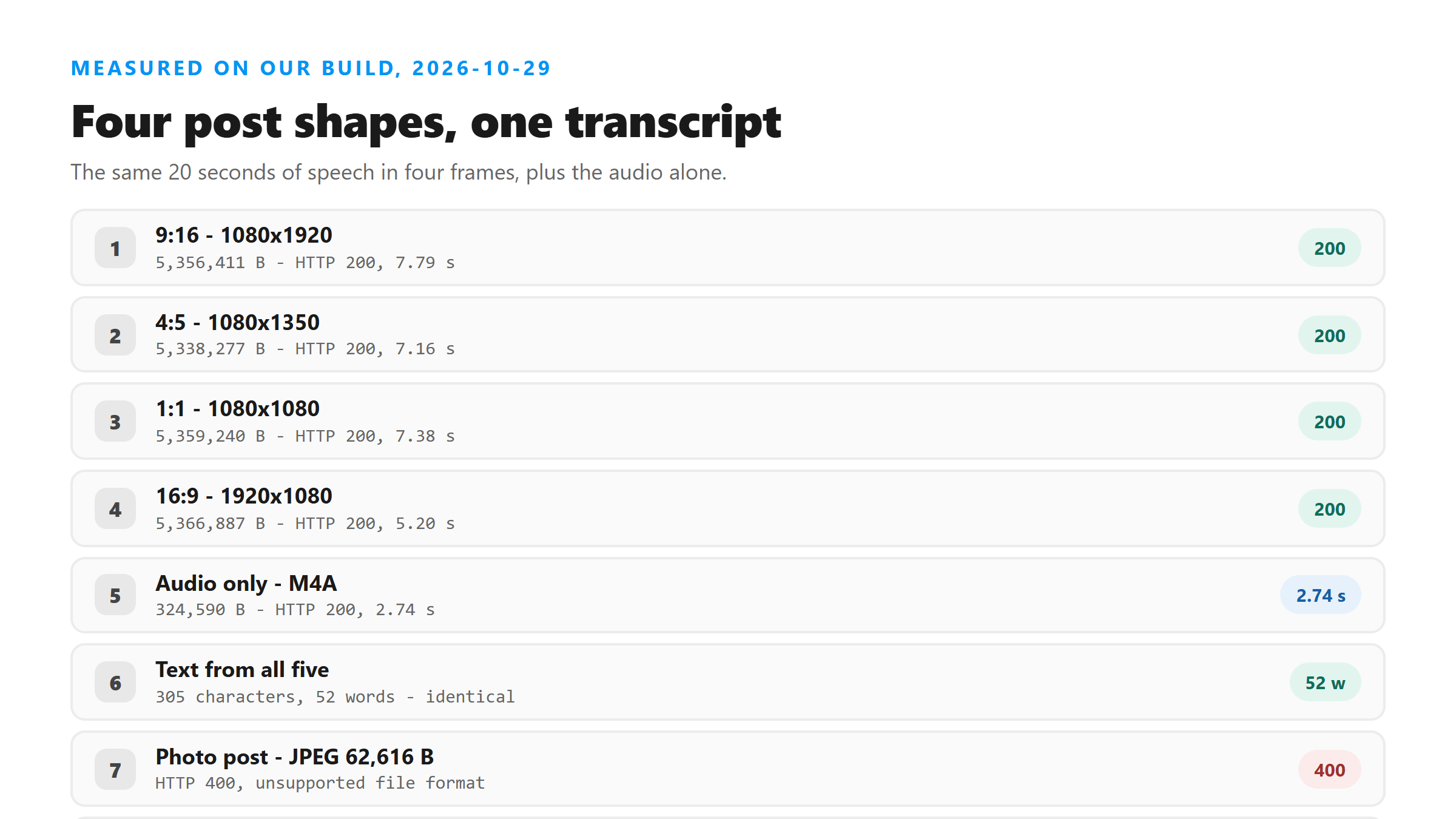
We took one 20-second audio track and wrapped it in four containers at the sizes Instagram uses. The pixels changed. The words did not move at all.
- 1080x1920 (9:16 Reel) - 5,356,411 bytes, HTTP 200 in 7.79 seconds, 305 characters and 52 words.
- 1080x1350 (4:5 feed post) - 5,338,277 bytes, HTTP 200 in 7.16 seconds, 305 characters and 52 words.
- 1080x1080 (square post) - 5,359,240 bytes, HTTP 200 in 7.38 seconds, 305 characters and 52 words.
- 1920x1080 (16:9 post) - 5,366,887 bytes, HTTP 200 in 5.20 seconds, 305 characters and 52 words.
- The same audio with no picture at all, as M4A - 324,590 bytes, HTTP 200 in 2.74 seconds, 305 characters and 52 words.
So the aspect ratio is not the problem
Four files that differ by 28,610 bytes came back with byte-identical text. The response carries six fields every time: success, transcript, language, engine, fileSize and fileName. None of them react to the picture. Transcription reads the audio stream and skips the video stream. The frame size you picked when you downloaded is work your upload paid for and got nothing back from.
Where a photo post stops
A photo post hands you an image, and an image has no audio stream. We uploaded a 62,616-byte JPEG and a 153,735-byte PNG. Both were refused in under a quarter of a second with HTTP 400. The message was the same both times: unsupported file format, pick MP3, WAV, M4A, AAC, OGG, FLAC, MP4, MOV or WEBM. That check reads the file name, not the contents, which is why the next result matters. We copied the JPEG and changed the extension to .mp4. The endpoint let it through the name check and then failed with HTTP 500 after 0.83 seconds. Renaming a photo does not give it a voice.
A carousel splits into two kinds of file
Saving a carousel gives you one file per slide, and our uploader takes one file at a time. Any slide that is a picture fails the way the photo above failed. The video slide is the one that can be transcribed. The 5,338,277-byte MP4 from the middle of a three-slide carousel came back HTTP 200 in 7.34 seconds, with the same 305 characters and 52 words. Count the video slides before you estimate how many uploads a carousel will cost you. The image slides cost you nothing, because they never get past the door.
Pull the audio out before you upload
The M4A line in the first table is the whole argument. It is 324,590 bytes against 5,338,277 for the same words, and it came back in 2.74 seconds instead of 7.16. One command does it: ffmpeg -i yourpost.mp4 -vn -c:a aac -b:a 128k out.m4a. If the file you downloaded is a video post, that command saves you about 5 MB of upload per file. It also cuts four seconds off the wait. The transcript on the other side is identical.
What to check before you upload a saved post
Run ffprobe -v error -select_streams a -show_entries stream=codec_name -of json yourfile.mp4 first. If it prints nothing, there is no audio track and no tool will find words in it. If it prints a codec name, the picture size does not matter, so stop hunting for a higher-quality download. Grab the audio track, upload that, and keep the video file only if you need it for something else.
Got a Reel you want as text? Upload the file and download the transcript as TXT, SRT, or VTT →
A post download is usually a picture, and a picture has no audio to read. Where Wondershare UniConverter helps is the video slide in a carousel: it opens that file on your own machine and writes the audio out on its own, which turns 5,338,277 bytes into about 320 KB. It does not transcribe - the words come back from this page.
FAQ
Can you transcribe an Instagram photo post?
No. A downloaded photo post is a JPEG or PNG with no audio stream, and today those were refused with HTTP 400 in under 0.25 seconds. Renaming the file to .mp4 does not help: it passes the name check and then fails with HTTP 500 and no text. If someone spoke in that post, the words live in the caption, not in the file.
Does the aspect ratio of a saved post change the transcript?
It did not today. The same 20 seconds of speech came back as 305 characters and 52 words in 9:16, 4:5, 1:1 and 16:9, with file sizes between 5,338,277 and 5,366,887 bytes. Only the wait moved, from 5.20 seconds to 7.79 seconds.
Why is the audio-only version so much faster?
Because you stop uploading picture data the model never reads. The audio track of that 20-second post was 324,590 bytes and came back in 2.74 seconds. The full 4:5 video was 5,338,277 bytes and took 7.16 seconds. Same 305 characters, same 52 words.