What to Do When the Transcript Has Wrong Words
Re-uploading the same file will not fix it. We uploaded one damaged clip to our own endpoint twice and got a byte-identical transcript, wrong words included. What does work, in this order: clean the audio before you upload it, cut the clip into short chunks, and run it twice under two different encodings — the words that come out different between the two runs are exactly the ones you need to listen to. Nothing in the response marks a wrong word for you, so the comparison is how you find them.
The response gives you no warning at all
Every run in this test came back with success:true. That includes the runs that invented the word transfer, the runs that turned brown fox into ground thoughts, and the run that produced clickground talk is done for the crazy doc. The response body is six fields, and none of them is a quality signal:
- success — true for every transcript we got, right or wrong
- transcript — the text, with no markup of any kind
- language — it reads
unknownon our endpoint - engine —
Cloudflare Workers AI (@cf/openai/whisper) - fileSize and fileName — an echo of what you sent
Retrying the same file changes nothing
We posted the identical damaged file twice. Both responses were byte-identical, including the five wrong words. This matters because retrying is the first thing everyone tries. The model is deterministic for a given input: if you send the same bytes, you get the same text. The only variable you control is the audio you send.
One damaged clip, eight versions
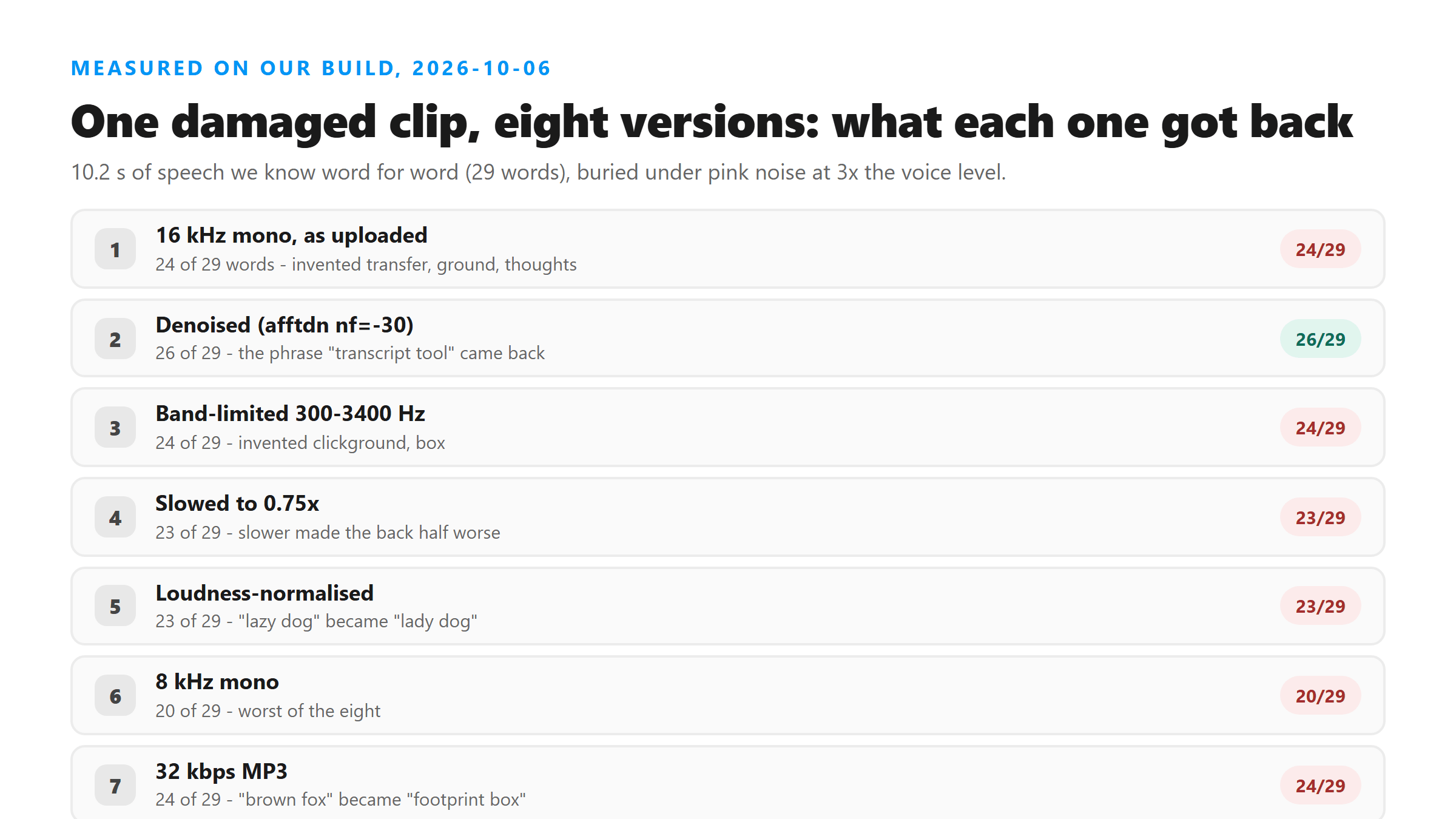
We took a 10.2-second clip of speech we know word for word — 29 words — and buried it: speech at 20% volume under pink noise at 60%, roughly three times louder than the voice. That clip went to our own /api/transcribe endpoint eight times, once per version. Below is how many of the 29 reference words each version got back.
- 16 kHz mono, as uploaded — 24 of 29. Invented: transfer, ground, thoughts.
- Denoised (afftdn, nf=-30) — 26 of 29. The phrase transcript tool came back.
- Band-limited to 300–3400 Hz — 24 of 29. Invented: clickground, box.
- Slowed to 0.75× — 23 of 29. Slower made the second half worse, not better.
- Loudness-normalised — 23 of 29. lazy dog became lady dog.
- 8 kHz mono — 20 of 29. The worst of the eight.
- 32 kbps MP3 — 24 of 29. brown fox became footprint box.
- 44.1 kHz stereo — 23 of 29. More resolution, slightly worse result.
The check that actually finds the wrong words
Line the eight transcripts up against each other and something useful falls out. Twenty of the 29 words came back the same in all eight runs — and all twenty were correct. The other nine words each came out differently in at least one run: a matched 0 of 8, brown 0 of 8, fox 0 of 8, transcript 2 of 8, jumps 3 of 8, lazy 4 of 8, quick 5 of 8, dog 6 of 8, over 7 of 8. Every one of those nine was wrong at least once.
So the practical rule is: run the file twice under two different encodings and diff the two texts. Words that agree are safe. Words that disagree are your proofreading list — listen to those few seconds and correct them by ear. On a 10-second clip each extra pass cost us between 0.8 and 2.5 seconds, so the check is close to free.
Which fixes recovered words, and which did not
Two things measurably helped. One is cleaning the audio before it is uploaded — a single denoise pass took the score from 24 to 26 of 29 and restored the phrase transcript tool, which every other version mangled. The other is cutting the clip up: the first 4-second chunk came back as Hello everyone. This is the test of the Instagram transcript tool. — sentence one, correct, including the phrase the full-file run got wrong. The middle chunk was still mangled and the last chunk was clean.
- Worked: denoise before upload.
ffmpeg -i input.mp4 -af "afftdn=nf=-30" -ar 16000 -ac 1 out.wav - Worked: cutting into short chunks. A 4-second chunk got sentence one right that the full clip got wrong.
- Did nothing: loudness normalisation, slowing the clip down, band-limiting, and re-encoding to 32 kbps MP3.
- Made it worse: dropping to 8 kHz (20 of 29) and upsampling to 44.1 kHz stereo (23 of 29).
What causes wrong words in the first place
We walked the noise up in steps on the same clip to find where it breaks. Speech at full volume with pink noise at 10% and at 20%: perfect, 29 of 29. Speech at 50% with noise at 25%: perfect. Speech at 35% with noise at 30%: perfect. Speech at 20% with noise at 30%: every word right, but the exclamation mark became a period. It was only when noise reached roughly three times the speech level that words started being replaced.
- Background noise above the voice — substitutions. Real words get swapped for other real words, so the text still reads fluently.
- Two people talking over each other — we mixed the same clip against itself delayed by 0.8 seconds and got duplicated phrases and dropped words: Hello everyone. Hello everyone. This is a test of the Instagram transcript. The quick brown fox. The quick brown fox junkie dog.
- Music under the voice — a three-tone chord at full level under the speech changed nothing: 29 of 29. One data point, not a general claim.
- Fast speech — the same clip at 1.6× speed also came back perfect.
A checklist you can run in two minutes
- Listen to the clip once with headphones. If you cannot follow the words, the model will not either — fix the audio, not the text.
- Strip the video if you have it. Uploading the audio track alone removes nothing from the text and takes a fraction of the size.
- Run a denoise pass and re-upload. It was the single biggest improvement we measured.
- Cut anything longer than a few minutes into chunks. Short chunks also scored better on the parts that were damaged.
- Re-encode the file a second way — different sample rate or bitrate — and diff the two transcripts. The differences are your error list.
- Fix those words by ear, then keep your copy. Your file is posted to
/api/transcribeover TLS, handled in memory for that one request, and discarded as soon as the response is sent; there is no copy for us to re-check for you later.
Why we still print no accuracy number
Two of the tools we track put a percentage on their front page — one says “95%+ accuracy rate”, another “Transcribe with 99% accuracy”. Neither publishes a test set, an audio condition, or a definition of what counts as an error, so there is nothing to check. We could print a number too, and it would be just as unsupported. What we can measure is narrower and more useful: on one damaged clip, which words survived eight different encodings and which did not. That is a stability measurement, not an accuracy claim, and we have shown you all of it.
Got a Reel you want as text? Upload the file and download the transcript as TXT, SRT, or VTT →
FAQ
Will re-running the same file give me a better transcript?
No. We posted the identical damaged file twice and the two transcripts were byte-identical, wrong words included. Re-run it in a different encoding instead, then compare the two texts — that comparison is what tells you where the errors are.
Does uploading a higher-quality file help?
Not by itself. In our eight-run test the 44.1 kHz stereo version scored 23 of 29 while the 16 kHz mono version scored 24 of 29, and the 8 kHz version was worst at 20 of 29. Cleaning the audio helped; raising the sample rate did not.
How do I find the wrong words if I do not have the original text?
You cannot do it from the transcript alone, because the response carries no confidence score or per-word marker. Encode the file two different ways, upload both, and diff the results. Words that disagree between the two runs are the ones to listen to and correct by hand.
Is a transcript with a few wrong words still safe to quote?
Only after you have checked it against the audio. Wrong words here were fluent substitutions, not obvious garbage, so they do not announce themselves. Play the clip while you read, fix what you hear, and keep your own copy — your file is processed in memory for one request and discarded when the response is sent.