How Accurate Is Whisper on Instagram Audio?
Our transcriber runs @cf/openai/whisper on Cloudflare Workers AI, and we are not going to print an accuracy percentage for it. A number like that needs a labelled test set of real Instagram audio, and neither we nor the tool sites that put 95% or 99% on their homepage have published one. What we can give you instead is what we measured today: 28 uploads of one 29-word read, re-encoded 16 different ways. Twelve of those variants returned every word. The four that broke did not return an error — they returned fluent, confident, wrong English with a green success flag.
The engine, named out loud
Most tools in this space say "AI transcription" and leave it there. Ours returns the model in the response body, so you can check the claim rather than take it:
- Model:
@cf/openai/whisper, run through Cloudflare Workers AI. The API response carries the stringCloudflare Workers AI (@cf/openai/whisper)in itsenginefield. - What comes back: six fields —
success,transcript,language,engine,fileSize,fileName. - What does not come back: no per-word confidence, no timestamps, no speaker labels, no alternative readings. On every run today,
languagewas the stringunknown. - What that means for you: the response cannot tell you which parts of the transcript are shaky. Nothing in the payload distinguishes a clean decode from a guess.
Why there is no percentage on this page
Two of the three competitor sites we track put 95%+ and 99% on their front page. Neither publishes the test set, the audio, or the scoring method behind those numbers, so there is no way to reproduce or dispute them. A percentage produced without a test set is marketing, not measurement.
We could invent a number too. We will not, because we cannot build the thing that would make it honest: a large, labelled collection of real Instagram audio with verified human reference transcripts. Screen recordings, phone-mic Reels, music beds and compressed downloads all behave differently, and a single tidy figure would flatten exactly the variation that decides whether a transcript is usable. What follows is narrower and checkable — one file, known text, sixteen deliberate degradations.
What we ran today
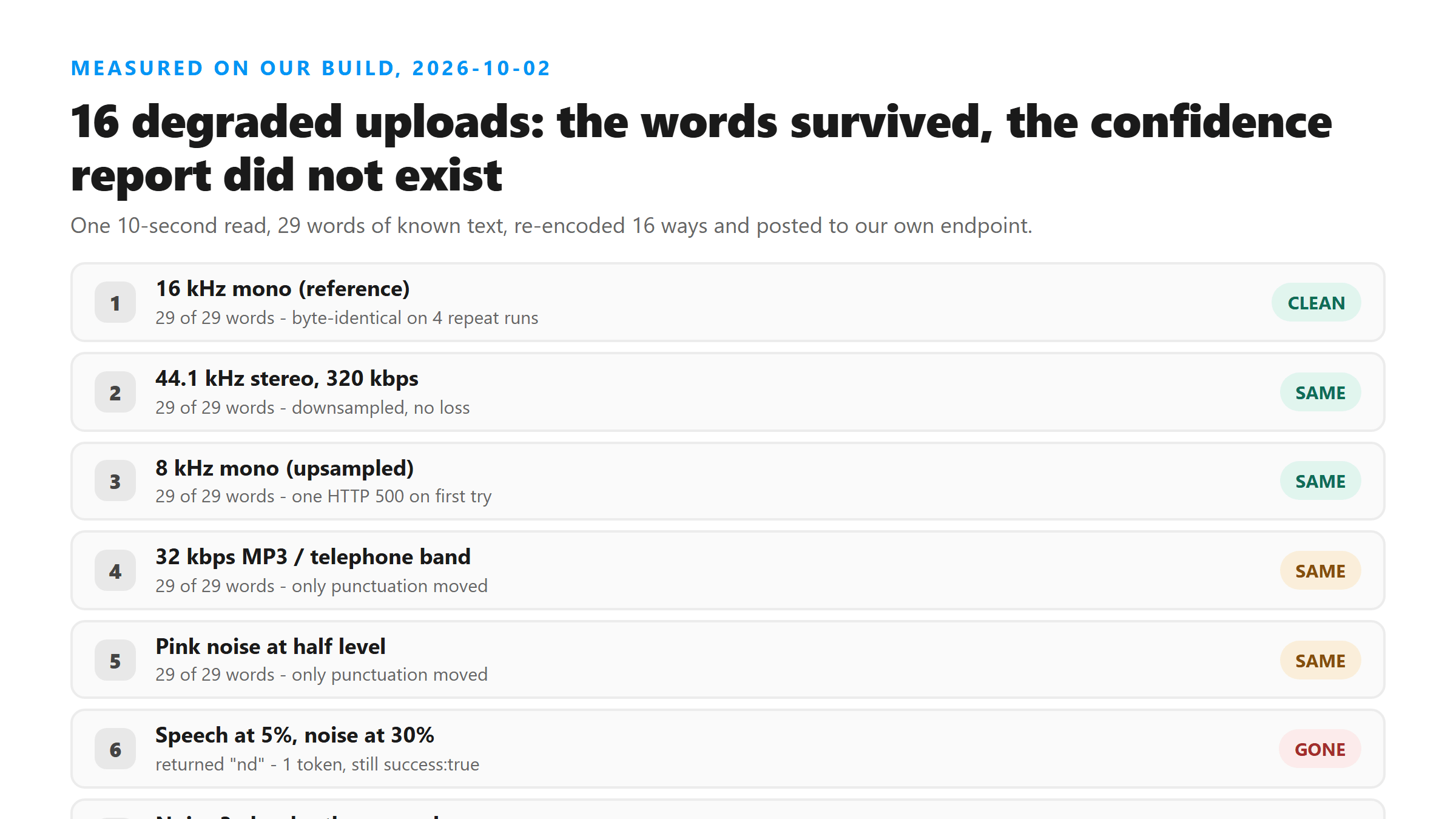
One 10.2-second read of 29 known words went through our own /api/transcribe endpoint 28 times in 16 different encodings. Every response was HTTP 200 with success:true. Timing is included where it is interesting, but this is not a speed test.
- Sample rate: 8 kHz, 16 kHz, 22.05 kHz, and 44.1 kHz stereo at 320 kbps — all returned all 29 words.
- Bitrate: a 32 kbps MP3 returned all 29 words, with two punctuation marks changed.
- Telephone band (300–3400 Hz): all 29 words, punctuation changed.
- Volume: speech dropped to 5% and to 30% — all 29 words both times.
- Speed: played back at 1.6x — all 29 words.
- Noise and music beds: pink noise at half level — all 29 words. A synthesized three-note chord at equal level — all 29 words.
What the model actually hears: 16 kHz mono
The practical reading is that sample rate is close to a non-issue for speech. What you cannot hear is not what breaks transcription — what breaks it is speech being masked by something else at a similar level.
The failure mode is not an empty transcript
None of these came back as an error. There is no confidence field, no warning flag, and no length check that would catch them: the second case returned exactly as many words as the original. If you are scanning a transcript for obvious breakage, these are the ones that get through.
- Speech at 5% with noise at 30%: the response was the single token
nd. Twenty-nine words in, one token out,success:true. Reproduced three times. - Speech at 5% with noise at 10%: 29 words returned, all in the right shape, most of them wrong — "This is a test of the Instagram transfer tool. The fifth round box comes from the village exhaust." The real sentence is "The quick brown fox jumps over the lazy dog." Identical output on two runs.
- Speech at 20% with noise at 30%: "The cookground talk jumped over the lazy job." Also stable across runs.
- Noise three times louder than the speech: 37 words of fluent invention, including "Hello, Appi. This is the site of the East of the East, and it's very beautiful." Nothing resembling that was spoken.
Same file, different answer
Repeat runs of the same degraded file were consistent — the hallucinated versions came back character-for-character identical on every retry. That stability is itself a trap, because it looks like reliability.
Across retries of an unchanged file, though, outcomes can differ. Our 8 kHz upload returned HTTP 500 with "Transcription failed. Please try another supported file." on one attempt, then returned a perfect 29-word transcript on the next two. Nothing about the file changed between attempts. If a single upload fails outright, retry it before you conclude the audio is unusable.
How to judge accuracy on your own Reel
On the input side, one thing reliably helps and one reliably does not. Getting a cleaner source file helps: upload the original download instead of a screen recording made through a phone speaker in a noisy room. Raising the sample rate, bitrate or stereo width does not help — those were the twelve variants that all came back the same.
- Read the first fifteen seconds closely. If the opening is wrong, the rest of the file is being decoded under the same conditions and will not be better.
- Check every proper noun, number and brand name. These are the first things to go, and they are the parts you are most likely to quote.
- Look for sentences that read smoothly but say nothing you remember hearing. That is the signature of a confident hallucination, and it is the failure mode above.
- If a passage matters, play that timestamp. You do not get timestamps from us, so split the file into chunks and transcribe the chunk you need to quote.
What this means if you are quoting someone
A transcript is a reading of the audio, not a record of it. If the exact wording carries consequences, treat the transcript as a finding aid and go back to the audio for the line you plan to publish. That is the same discipline we apply to our own output: we will tell you which model ran, what it returned under stress, and which parts we cannot verify — but we will not hand you a percentage that would make it look more certain than it is.
FAQ
Which Whisper model do you use?
@cf/openai/whisper, served through Cloudflare Workers AI. The model name is returned in the engine field of every successful response, so you can verify it on your own upload rather than trusting this page.
Why don't you publish an accuracy number like other sites?
Because we do not have a labelled test set of real Instagram audio, and a percentage without one cannot be checked or reproduced. We would rather publish the conditions under which our own output degrades, measured today, than a single figure that hides them.
Will uploading a higher-quality file improve the transcript?
Only if the current file has speech being masked by noise or music. Raising sample rate from 8 kHz to 44.1 kHz, or bitrate from 32 kbps to 320 kbps, changed nothing in our tests — all of them returned the same 29 words. Cleaner source audio matters; bigger audio files do not.
The transcript came back as a strange single word or a short nonsense phrase. What happened?
The model did not find speech it could decode and filled the gap instead. It still returns success:true, so the status code will not warn you. Try a louder or less noisy source: in our tests, speech at 5% volume under noise produced this, while speech at 5% volume with no noise returned every word.
Can I get timestamps to check which part of the transcript is unreliable?
Not from this tool. The response contains no timestamps, no per-word confidence and no speaker labels — six fields only. To isolate a passage, split the audio into chunks and transcribe the chunk you need.