Why Accented Speech Changes Transcript Quality
What we measured today
We built one sentence of 32 words, deliberately loaded with sounds that differ between accents of English (thin, ships, three, red rice, walk and work), rendered it with four text-to-speech voices - three US English and one Scottish English - and then made a series of modified copies of those renders. Every copy was uploaded to our own endpoint, which runs Cloudflare Workers AI (@cf/openai/whisper). We ran 36 uploads. All of them returned HTTP 200, all of them returned success, and every response carried the same six fields: success, transcript, language, engine, fileSize and fileName. The language field read unknown in all 36. There were no timestamps, no speaker labels, no confidence score and no alternative readings, and the transcript text contained zero line breaks. Wall clock for a ten-second file ranged from 0.87 s to 7.39 s including upload.
One honest caveat before the numbers
The four voices are synthetic, not recordings of human speakers with a foreign accent. That matters for how you read this: we are not measuring how the model treats a real person's accent, and we publish no accuracy percentage, because we have no labelled accented-speech corpus to score against. What the setup does isolate cleanly is the thing we care about - the words are byte-for-byte identical across all four renders, and only the acoustics change. Whatever difference shows up in the output comes from how the speaker sounded, not from what was said.
Four voices, one sentence: 32, 32, 29, 28
- US English voice, female (slt), 311 KB, 9.96 s: all 32 words back, 2.06 s
- US English voice, male (kal), 311 KB, 9.96 s: all 32 words back, 2.60 s
- US English voice, male (rms), 333 KB, 10.66 s: 29 of 32 - 'thin ships' came back as 'thinships' and 'sail' as 'sailed'
- Scottish English voice (awb), 302 KB, 9.66 s: 28 of 32 - 'thin ships' became 'thinship', 'sail' became 'sale', and 'red rice' came back capitalised as 'Red Rice'
- Repeating a file changes nothing: the Scottish render scored 28 of 32 on both runs, the clean render 32 of 32 on both, with identical text each time
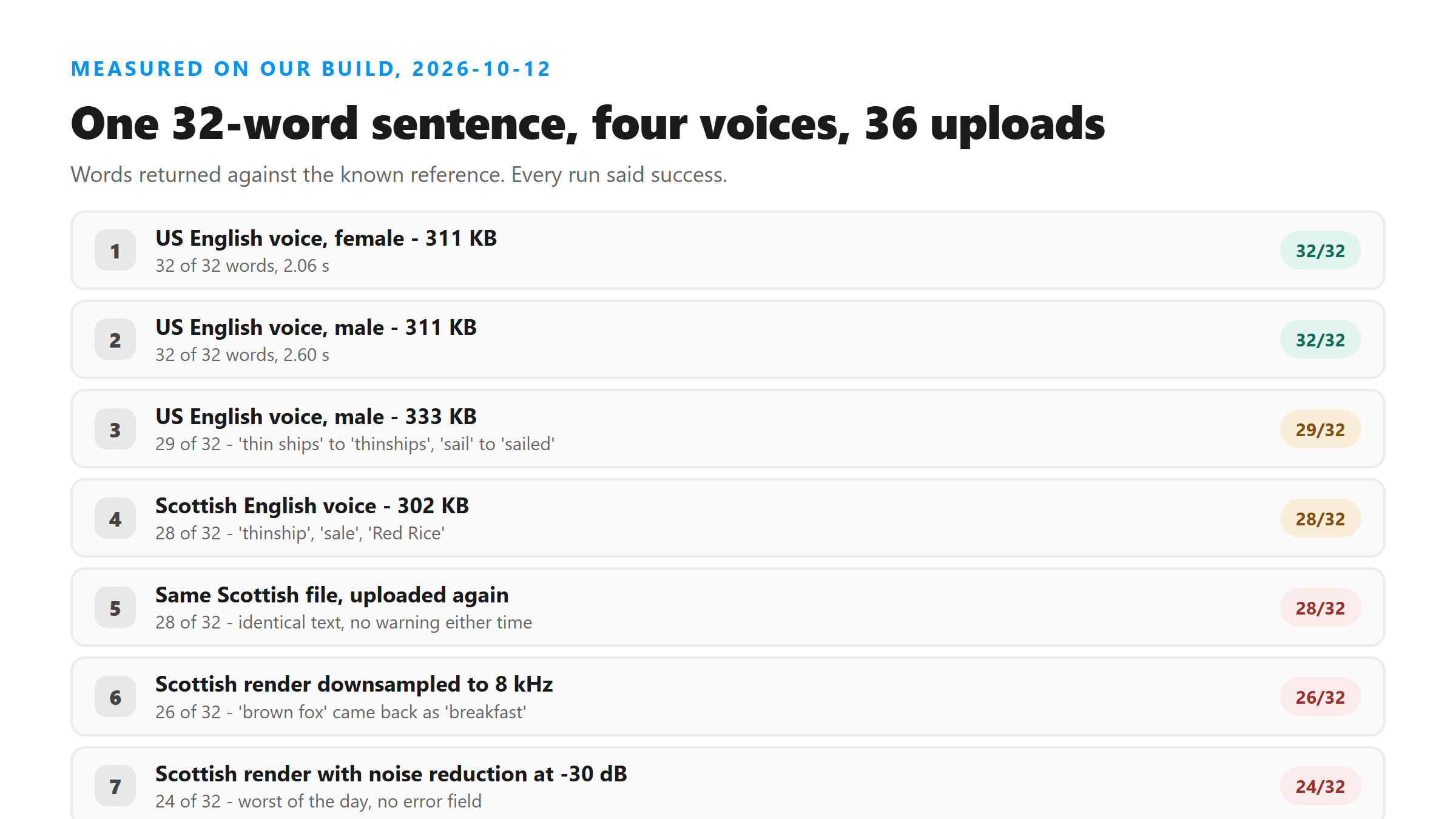
Two of the three US voices lost words too
That is the part worth holding on to. The worst render of the four was the Scottish one, but two perfectly ordinary US English voices did not agree with each other either - one scored 32 of 32, the other 29 of 32 on the same sentence. Accent is not a special failure category that switches on at some point. It is the visible far end of a range that starts with plain speaker variation, which is why a transcript that looks fine from one speaker can come back damaged from the next with no difference in the response you receive.
The errors landed on one sound cluster
Across the 33 scored runs, 20 of the 32 words never changed at all. Nine words changed at least once, and they were not spread evenly: ships (wrong in 17 of 33 runs), thin (20 of 33), sail (25 of 33), red (29 of 33), brown (30 of 33), fox (30 of 33), three (31 of 33), past (32 of 33), and the. Almost every unstable word sat in the opening five words of the sentence - 'Three thin ships sail past' - the stretch carrying the two consonant sounds that shift most between accents of English. The three error shapes we saw were a merge (two words written as one, 'thinship'), a homophone swap ('sale' for 'sail'), and a capitalisation change that turned two common words into what reads like a proper name ('Red Rice'). All three read as ordinary English, and none of them was flagged.
Slowing the audio down does not fix it
- On the clean render: 0.70x scored 32 of 32, 0.85x scored 32 of 32, 1.15x scored 31 of 32, 1.35x scored 32 of 32 - there was nothing to fix
- On the damaged render: 0.75x scored 29 of 32, 1.05x scored 27 of 32, 1.15x scored 31 of 32, 1.25x scored 29 of 32, 1.35x scored 27 of 32
- The 1.15x result repeated identically across four separate runs of the same file, so it is a real property of that file and not a lucky pass
- But the ladder is not a slope: 1.35x was the worst setting of the five, and it turned 'thin ships' into an obscene token, 'past the village' into 'pasta village', and 'brown fox' into 'breakfast'
So a speed nudge moves errors rather than removing them
This is the whole finding in one line. On the damaged render, every speed we tried landed between 27 and 31 words out of 32, and which words were wrong changed from setting to setting. Speeding the file up by 15 percent happened to be the best of the five for this particular file, and it reproduced, but the neighbouring settings on both sides were worse. That is not a fix you can carry to the next file - it is a reason to run two settings and compare, which is a different habit.
Neither does re-encoding - and denoising made it worse
- MP3 at 64 kbps, 77 KB: 29 of 32, up one word from the 28 of the original
- MP3 at 128 kbps, 153 KB: 28 of 32, unchanged
- Loudness normalisation: 28 of 32, unchanged
- High-pass filter at 100 Hz: 28 of 32, unchanged
- Noise reduction at -30 dB: 24 of 32 - the worst result of the day, and it also replaced a word with an obscenity in the final sentence
- The same noise reduction applied to the clean render cost a word there too: 31 of 32, with 'red' coming back as 'ride'
A fix that worked last time can fail this time
In an earlier test on speech buried under noise, noise reduction was the one measure that measurably helped, gaining two words. On accented speech today it cost four. Neither loudness normalisation, nor filtering, nor re-encoding to a smaller file did anything useful. If you are going to pre-process audio, test it on your own file and compare the two transcripts - do not import a fix from a different problem.
Less bandwidth hurts the unusual render more
Downsampling the clean render to 8 kHz cost one word out of 32. Downsampling the damaged render to 8 kHz cost six, and it additionally turned 'brown fox' into 'breakfast'. The same reduction in information did six times the damage, because the render whose acoustics were already unusual had less redundancy left to lose. Our transcriber works from a single-channel 16 kHz stream, so anything you do to the file before upload that narrows the signal - heavy compression, aggressive filtering, downsampling - is spent against a smaller budget when the speaker does not sound like the majority of the model's training material.
Where your file actually goes
One clarification, because it is easy to get wrong: the file does leave your browser. It is posted to our /api/transcribe over an encrypted connection, held in memory while the model reads it, and dropped when the response is returned. There is no account, no stored copy and no job you can come back and fetch later - a GET to the same path returns 404. The practical consequence for accented audio is simple: keep your original file. It is the only artefact that lets you re-check a word later, and the transcript itself carries no timestamps to find that word by.
How to check a transcript you cannot verify
- Transcribe the same file twice with one small change between the runs - 0.85x against 1.15x, or the WAV against a 64 kbps MP3 - and read the two side by side. Words that differ are your uncertainty list.
- Everything that agrees across both runs is safe: today, 20 of 32 words were identical across all 33 scored runs, stable under every voice, speed, filter and codec we threw at them.
- Read capitalised words twice. 'Red Rice' out of 'red rice' looks like a name and will survive a copy-paste into a caption or a set of notes.
- Watch for merges and homophones specifically - 'thinship' and 'sale' are both real-looking English and neither one looks like an error.
- Do not expect the response to warn you. It said success on every one of the 36 uploads, including the run that came back 24 of 32.
- Do not trust the language field either. It read unknown on all 36, so it cannot tell you whether the model heard your audio as the language you think it is.
- If a single word carries the weight - a name, a number, a quote you intend to publish - open the audio at that point and check it by ear. That is the only check with no failure mode.
What we did not measure today
Three honest gaps. The voices are synthetic, so these numbers describe acoustic variation between voices, not a real person's accent. We have no labelled accented corpus, so there is no accuracy percentage here and there will not be one until we can score against something real. And we could not build a genuine code-switched file - two languages inside one clip - with the tools available today, so that case stays unmeasured rather than answered. What we can say about it is only structural: with the language field stuck at unknown, a mixed-language file gives you no signal at all about which language the model thought it was hearing, so any non-English stretch has to be checked by ear.
Got a Reel you want as text? Upload the file and download the transcript as TXT, SRT, or VTT →
Two of the problems on this page start with the file: a container this tool will not read, and a re-encode that already threw away bandwidth the audio needed. Wondershare UniConverter converts the original once, cleanly, to MP3 or M4A — 16 kHz or higher, single channel.
FAQ
Does an accent make transcription fail?
No. Every one of our 36 uploads today returned HTTP 200 with success, including the runs that came back missing four words and eight words. Accent changes which words come out; it does not produce an error, a warning, or any field you can inspect to notice that something went wrong.
Can I fix an accented transcript by slowing the audio down?
We measured it, and no. On the damaged render, speeds from 0.75x to 1.35x all landed between 27 and 31 words out of 32, and the worst result came from the fastest setting. One setting (1.15x) scored best for that file and repeated identically four times, but it moved the errors rather than removing them, and the settings either side of it were worse.
Why does the tool not tell me which language it heard?
Because the model response does not include one. Every response we received today carried six fields, and the language field read unknown on all 36. There is no confidence score, no per-word score, no timestamps and no alternative readings, so the transcript you get is the only output there is.
Should I run noise reduction over the audio first?
Test it rather than assume it. On noisy speech in an earlier test, noise reduction gained two words and was the single useful measure. On accented speech today it cost four words and introduced an obscenity, making it the worst result of the day - and it cost a word on the clean render too. Run the file with and without, and keep whichever transcript matches the audio better.
Which file should I upload if the speaker has an accent?
Keep the signal as wide as you can: a single channel at 16 kHz or higher, and lossless rather than heavily compressed if you have the choice. Downsampling to 8 kHz cost the clean render one word out of 32 and the accented render six, so the file that sounds unusual has the least room to spare.