WAV to Text: Why the Biggest File Isn't the Best One
What WAV actually stores
That gap is the whole reason this page exists. People see a 1.8 MB WAV and assume it's the highest quality version of their recording. It's the least efficient version of the same audio.
Six sample rates, one transcript
8 kHz is telephone quality. It sounds thin and muffled to your ear. The model read all 29 words out of it anyway. Speech sits well below 8 kHz, so everything above that in these files is headroom you can't hear words in.
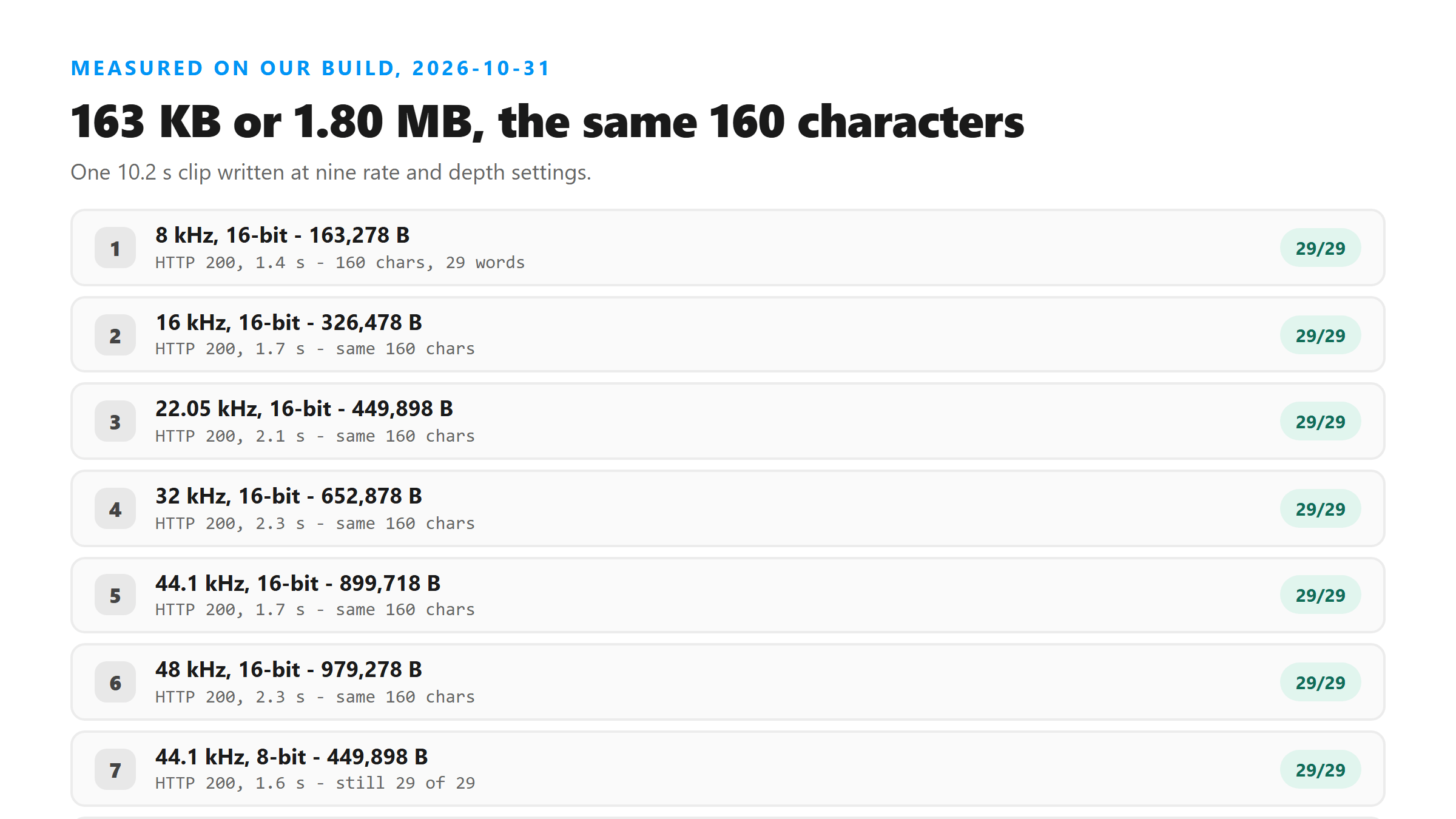
- 8 kHz: 163,278 bytes, HTTP 200 in 1.4 seconds, 160 characters, 29 of 29 words.
- 16 kHz: 326,478 bytes, HTTP 200 in 1.7 seconds, 160 characters, 29 of 29 words.
- 22.05 kHz: 449,898 bytes, HTTP 200 in 2.1 seconds, 160 characters, 29 of 29 words.
- 32 kHz: 652,878 bytes, HTTP 200 in 2.3 seconds, 160 characters, 29 of 29 words.
- 44.1 kHz: 899,718 bytes, HTTP 200 in 1.7 seconds, 160 characters, 29 of 29 words.
- 48 kHz: 979,278 bytes, HTTP 200 in 2.3 seconds, 160 characters, 29 of 29 words.
Where the bytes come from
Run that out to three minutes and the 32-bit float version is over 31 MB. That won't upload anywhere. The 16 kHz mono version of the same three minutes is about 5.8 MB, and it returned every word in our test.
Four bit depths, same result
8-bit audio is genuinely worse to listen to. It has audible quantization noise, and anyone who's edited audio will tell you not to master at 8-bit. It still gave us 29 of 29 words. The largest file in the whole test, 32-bit float at 1.80 MB, gave us exactly the same string the 163 KB file did.
- 8-bit: 449,898 bytes, HTTP 200 in 1.6 seconds, 160 characters, 29 of 29 words.
- 16-bit: 899,718 bytes, HTTP 200 in 1.7 seconds, 160 characters, 29 of 29 words.
- 24-bit: 1,349,562 bytes, HTTP 200 in 3.1 seconds, 160 characters, 29 of 29 words.
- 32-bit float: 1,799,372 bytes, HTTP 200 in 2.0 seconds, 160 characters, 29 of 29 words.
Eleven times the bytes, zero extra words
On a phone connection that difference is minutes. Against an upload ceiling it's the difference between a file that goes through and one that doesn't. Our endpoint refuses oversized files before it ever decodes audio, so the big file can fail where the small one succeeds.
Why the model doesn't care
This is the same reason turning the volume up doesn't help. These are all input-side knobs, and the failure modes that actually change a transcript are on the content side: music over the voice, a second speaker, heavy noise, or a language the model wasn't expecting.
When WAV is the right choice anyway
16 kHz mono 16-bit is our default recommendation for speech. It came in at 326 KB for a 10-second clip, it returned all 29 words, and it leaves you plenty of room if you need to send something longer.
How to shrink one without re-recording
The order matters: do any cleanup you need on the original file first, then export the small one. Once you've downsampled, you can't get the removed headroom back, and you'd be doing noise reduction on a thinner signal.
The limits of this test
What we can say firmly is the direction. Across every rate and depth we tried, from 8 kHz 8-bit up to 48 kHz 32-bit float, the model returned the same 29 words. Nothing in that range made the file bigger in a way that bought better text.
What happens to the file you send
The file does leave your browser. It goes over an encrypted POST to our endpoint, gets decoded in memory, gets processed once, and is dropped when the response is written. We store no copy, we don't keep the transcript, and you don't need an account.
Got a Reel you want as text? Upload the file and download the transcript as TXT, SRT, or VTT →
WAV is the format that eats an upload budget fastest, and the fix is a re-export, not a new recording. Wondershare UniConverter rewrites a WAV as 16 kHz mono or as a compressed MP3 and shows the size before you save, which is how 1,799,372 bytes becomes 326,478 for the same text. It does not transcribe - the words come back from this page.
FAQ
Does a higher sample rate improve a WAV transcript?
No. We uploaded the same clip at 8, 16, 22.05, 32, 44.1 and 48 kHz and all six returned the same 160 characters and 29 words. 8 kHz, which is telephone quality, was word-for-word perfect.
Does 24-bit or 32-bit audio transcribe better than 16-bit?
No. At 44.1 kHz, 8-bit, 16-bit, 24-bit and 32-bit float all returned 29 of 29 words. The 32-bit float file was 1.80 MB and the 16-bit file was 899 KB, for identical text.
What WAV settings should I use for transcription?
16 kHz mono at 16-bit is plenty. It was 326 KB for a 10-second clip and returned every word. Keep the original uncompressed if you plan to edit it, then export a small copy to upload.
Why was my large WAV rejected?
Oversized files are refused before any audio is decoded. Uncompressed audio grows fast: our 10-second clip ranged from 163 KB to 1.80 MB depending only on rate and depth, and all of them produced the same transcript.