MP4 to Text: What the Video Track Costs You
Why people send video to a text tool
Short answer: you're paying in bytes and seconds, not in accuracy. The audio track is the only part that reaches the model.
Six bitrates, one transcript
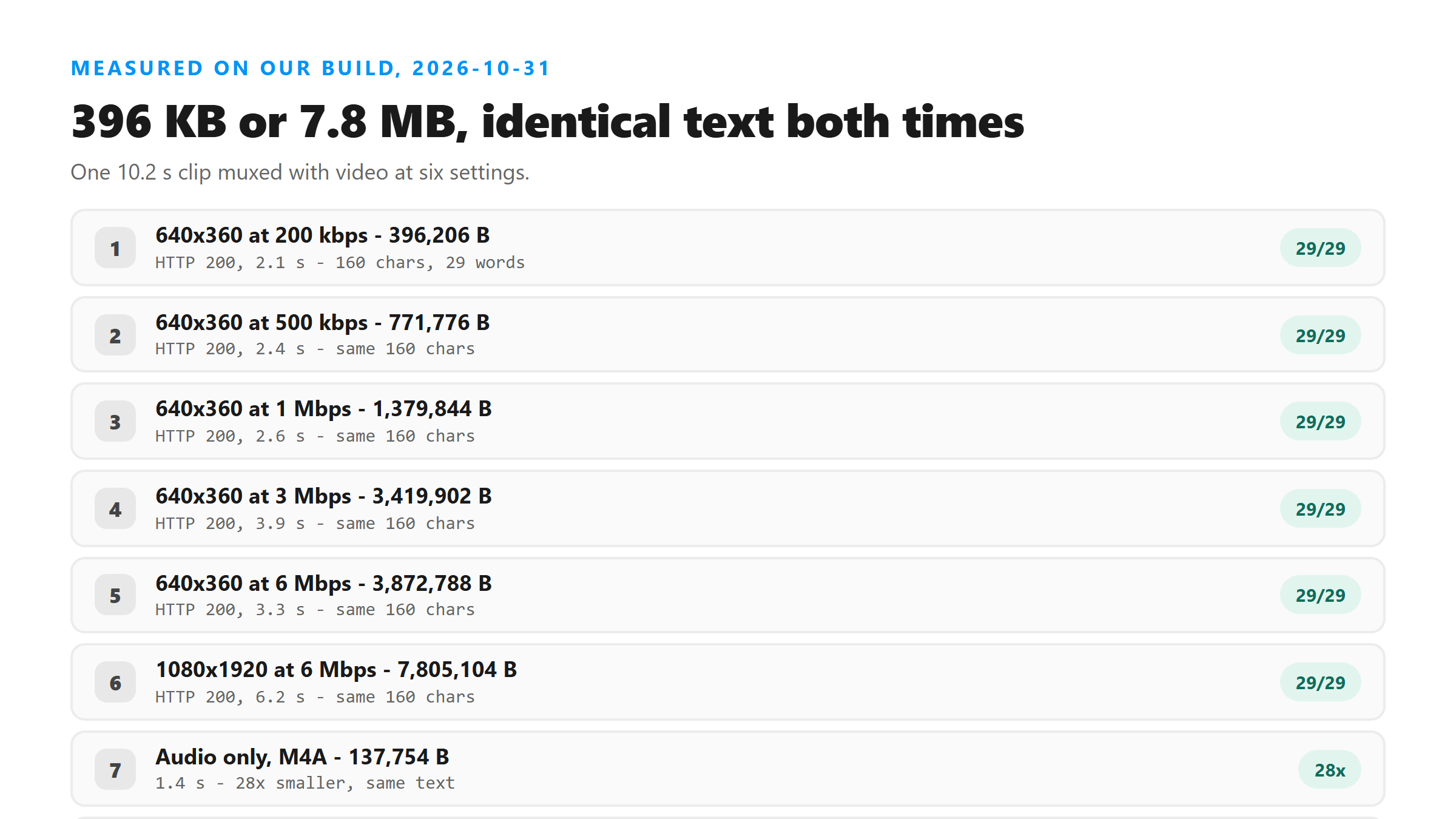
From 396 KB to 7.8 MB, a twenty-fold change in file size, the transcript didn't move by one character. If you're re-exporting at a higher video bitrate to get a better transcript, stop. The video settings have no path to the text.
- 640x360 at 200 kbps: 396,206 bytes, 2.1 seconds, 160 characters, 29 of 29 words.
- 640x360 at 500 kbps: 771,776 bytes, 2.4 seconds, 160 characters, 29 of 29 words.
- 640x360 at 1 Mbps: 1,379,844 bytes, 2.6 seconds, 160 characters, 29 of 29 words.
- 640x360 at 3 Mbps: 3,419,902 bytes, 3.9 seconds, 160 characters, 29 of 29 words.
- 640x360 at 6 Mbps: 3,872,788 bytes, 3.3 seconds, 160 characters, 29 of 29 words.
- 1080x1920 at 6 Mbps: 7,805,104 bytes, 6.2 seconds, 160 characters, 29 of 29 words.
What the picture actually costs
That gap is the whole cost of the picture. On a phone connection it's the difference between a file that sends and one that stalls. Near an upload limit it's the difference between a 200 and a refusal, because files that are too big get turned away before any audio is decoded. In an earlier test on this site, a 24 MB screen recording never reached our code at all and came back HTTP 503.
A file with no audio fails after the upload
That error is confusing if you don't know why it happened. The format was fine. There was nothing to listen to. If a clip you recorded in a muted app or a screen recording with the wrong input selected comes back with a 500, check whether the file has an audio stream at all before you try anything else.
The file name decides, not the contents
So the check happens on the name before anything is decoded. That cuts both ways. It's why a renamed file can slip through with contents the endpoint wasn't built for, and it's why a perfectly good file with an unusual extension gets refused. If you get a 400 on a file you know is fine, rename it to .mp4 rather than re-encoding it.
When to just send the MP4 anyway
The rule of thumb we'd use: anything under a few megabytes, upload it directly. Anything over that, pull the audio first. You'll get the same text either way, and you'll spend a lot less time watching an upload bar.
The limits of this test
We also haven't tested every container people run into. The pattern we've seen is that the endpoint reads the extension first, so if you get a 400, the extension is the first thing to look at, not the codec inside.
What happens to the file
Your MP4 leaves the browser over an encrypted connection, gets decoded in memory, and the audio track is the only part that's processed. The file is dropped when the response goes out. We keep no copy, we don't store the transcript, and you don't need an account.
Got a Reel you want as text? Upload the file and download the transcript as TXT, SRT, or VTT →
The picture is dead weight on a transcript upload, and taking it out is one export setting. Wondershare UniConverter strips the video track and writes the audio out as MP3, which is the shape that came back in 1.4 seconds against 6.2 for the 7,805,104-byte file. It does not transcribe - the words come back from this page.
FAQ
Does video quality affect the transcript?
No. We uploaded the same 10.2 seconds of speech at video bitrates from 200 kbps to 6 Mbps, from 396 KB to 3.87 MB, and all of them returned the same 160 characters and 29 words. Only the audio track reaches the model.
Should I convert MP4 to MP3 before transcribing?
If the file is big, yes. The audio-only version of our test clip was 137,754 bytes and returned in 1.4 seconds, against 3.87 MB and 3.3 seconds for the highest-bitrate video, with identical text. Under a few megabytes, sending the MP4 directly is fine.
Why did my MP4 come back with HTTP 500?
Most often it has no audio stream. We uploaded a 10,051-byte video-only MP4 and got HTTP 500 with 'Transcription failed'. The format passed the check, but there was nothing to transcribe.
Why is my .m4v or .mkv refused when .mp4 works?
The endpoint checks the file name, not the contents. We copied a working .mp4 byte for byte, renamed it .m4v, and got HTTP 400. A .mov with the same stream returned 200. Renaming to .mp4 is usually all you need.
How large an MP4 will go through?
A 7.8 MB vertical file at 6 Mbps went through in 6.2 seconds in our test. Files that are too large are refused before any audio is decoded, and in an earlier test a 24 MB screen recording came back HTTP 503 without reaching our code.