Voice to Text: How Fast Can the Speech Be Before the Words Break
The clip and the seven speeds
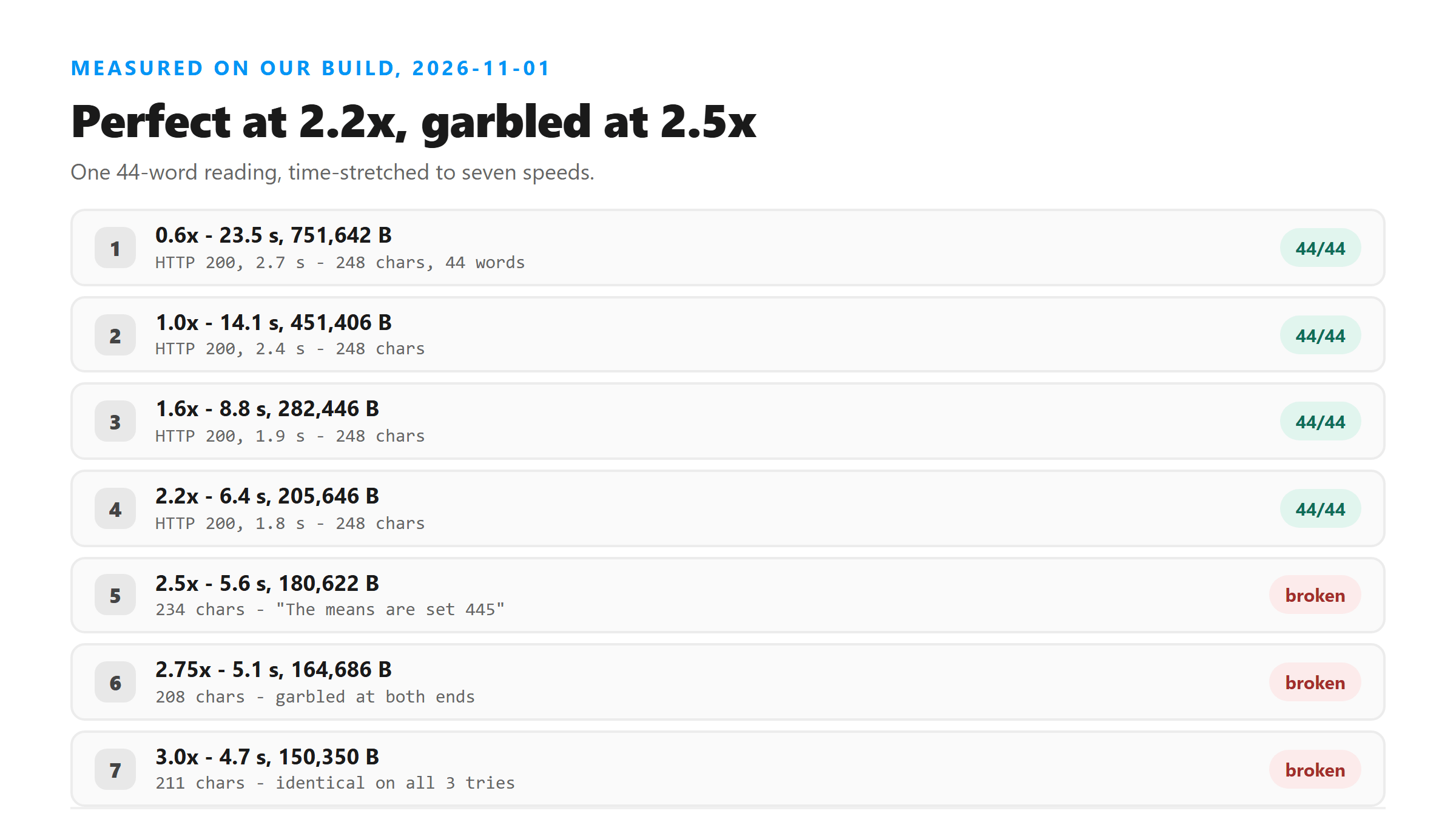
One script, four sentences, 44 words, read by a synthesized US voice and written as 16 kHz mono WAV. At 1.0x it runs 14.1 seconds and 451,406 bytes. We used a time-stretch filter to rebuild the same audio at 0.6x, 1.6x, 2.2x, 2.5x, 2.75x and 3.0x, then uploaded all seven files to our own endpoint. The words don't change when you stretch audio - only how fast they arrive.
- 0.6x: 23.5 seconds, 751,642 bytes.
- 1.0x: 14.1 seconds, 451,406 bytes.
- 1.6x: 8.8 seconds, 282,446 bytes.
- 2.2x: 6.4 seconds, 205,646 bytes.
- 2.5x: 5.6 seconds, 180,622 bytes.
- 2.75x: 5.1 seconds, 164,686 bytes.
- 3.0x: 4.7 seconds, 150,350 bytes.
How we stretched the audio
We used a time-stretch filter rather than resampling, so the pitch stays put and only the timing changes. That matters: if we'd sped the file up by resampling instead, the voice would have gone up an octave at 2.0x and the test would have measured something else entirely. Time-stretching is what a podcast app does when you hit 1.5x, and it's what your editor does when you stretch a clip to fit. Each of the seven files holds the same 44 words in the same order - only the seconds they occupy change.
One number worth keeping: at 1.0x this script runs 14.1 seconds for 44 words, about 187 words a minute. That's faster than most people speak, so the speeds below 1.0x are the ones closest to natural conversation, and everything from 1.6x up is faster than any real talker manages.
Why anyone speeds up a recording
Two reasons, and only one of them is good. The good one is listening time: a 23.5-minute recording at 2.0x is under twelve minutes, and if you're the one checking the transcript against the audio, that matters. The weak one is file size. Our 0.6x file was 751,642 bytes and the 3.0x file was 150,350 - five times smaller - but this endpoint accepts files up to a few megabytes, so shaving a few hundred kilobytes off a short clip buys you nothing. Speed costs accuracy, and past a point it costs accuracy you won't notice.
Everything up to 2.2x came back word for word
The slow version first. At 0.6x the clip drags - 23.5 seconds for 44 words, which is about 112 words a minute, slower than anyone actually talks. It returned 248 characters in 2.7 seconds with all 44 words. The only difference from the clean file was punctuation: "in the main conference room, bring the printed agenda" with a comma where the 1.0x run had a period.
Then the fast end. 1.6x returned 248 characters in 1.9 seconds. 2.2x returned 248 characters in 1.8 seconds - 44 words squeezed into 6.4 seconds, which works out to roughly 412 words a minute, and every word was right. If you're doubling the speed of a recording to skim it, the transcript doesn't care.
- 0.6x: 248 characters, 44 words, 2.7 seconds.
- 1.0x: 248 characters, 44 words, 2.4 seconds.
- 1.6x: 248 characters, 44 words, 1.9 seconds.
- 2.2x: 248 characters, 44 words, 1.8 seconds.
- Across those four runs the only variation was a single comma.
2.5x is where the words go
Three-tenths of a step later it breaks. The 2.5x file returned 234 characters in 2.0 seconds, and the first sentence came out as "The means are set 445 in main conference room" instead of "The meeting starts at 4.45 in the main conference room". Everything after that was fine - "Bring the printed agenda and the budget sheet from last quarter" survived intact. The damage landed on the first few words and stopped there.
2.75x made it worse. That run returned 208 characters and opened with "Let me start at 445, the main officer, bring the current agenda", and closed with "short summary to team 4c plot tonight". It also took 82.3 seconds to come back, against 2 seconds for everything else - we ran it once, so treat that number as an outlier, but it's what we saw.
- 2.5x: 234 characters, opening sentence garbled, rest intact.
- 2.75x: 208 characters, garbled at both ends, 82.3 seconds to return.
- 3.0x: 211 characters, garbled throughout.
Sentence by sentence at 2.5x
We read the 2.5x transcript against the script line by line. Two of the four sentences survived untouched, one lost its opening clause, and one lost two words. That pattern is why a quick skim of the result won't save you - most of it is right.
- Said: "The meeting starts at 4.45 in the main conference room." Got: "The means are set 445 in main conference room,"
- Said: "Bring the printed agenda and the budget sheet from last quarter." Got the same, word for word.
- Said: "If the projector fails we will move to the smaller room downstairs." Got: "If projector fails, we will move to the smaller room downstairs,"
- Said: "Send a short summary to the team before 6 o'clock tonight." Got: "set a short summary to the team before 6 o'clock tonight."
Sentence by sentence at 3.0x
At 3.0x all four sentences were damaged. The shape of each one survived - the model still produced four clauses with roughly the right rhythm - and that's exactly what makes it dangerous. Skimming it, you'd read a meeting note. Only a close read shows there's no meeting in it.
- Said: "The meeting starts at 4.45 in the main conference room," Got: "The means are set for full time in the main convert room,"
- Said: "bring the printed agenda and the budget sheet from last quarter." Got: "bring precision up and a bus sheet from last quarter."
- Said: "If the projector fails we will move to the smaller room downstairs," Got: "If rejected fail, we will move the small room downstairs,"
- Said: "Send a short summary to the team before 6 o'clock tonight." Got: "set short summary to the team before 6.5."
Numbers go first
Watch what happens to the two numbers in the script across the three fastest speeds. "4.45" was written correctly at 0.6x, 1.0x, 1.6x and 2.2x. At 2.5x it became 445. At 2.75x it became 445 again, then the closing "6 o'clock tonight" turned into "4c plot tonight". At 3.0x the 4.45 was gone entirely and the closing time was reduced to 6.5. Numbers are the least predictable thing in a stretched clip because they're short, dense, and easy to hear as something else.
If your recording contains times, prices, order numbers or addresses, those are the first things to check after the transcript comes back - at any speed.
The same broken file gives the same broken text
We uploaded the 3.0x file three times in a row. All three returned 211 characters, and the text was identical each time - 1.8 seconds, 2.2 seconds, 1.6 seconds. That's useful in one way and dangerous in another. You can't fix it by resending and hoping for a better roll, but you also can't detect it by comparing two runs, because they'll agree with each other.
So the way to catch this isn't repetition. It's knowing the speed of your file and reading the first sentence twice.
What to do with a recording you want to speed up
If you're speeding audio up to cut upload time, 2.0x is a comfortable ceiling - it sits below the point where we saw anything move, and it halves your file. If you're transcribing something that was already recorded fast, don't speed it up at all. And if you get a transcript back that reads oddly at the start, slow the file down and send it again rather than trying to guess what was said.
- Speeding up to save time: stay at or under 2.0x.
- Already-fast recording: leave the speed alone.
- Odd first sentence: re-export at normal speed and re-run.
- Anything with numbers in it: check every number against the audio.
One more thing that's easy to miss: a person who talks fast is not the same problem as a file that's been sped up. Time-stretching squeezes consonants together in a way real speech doesn't, and it's the consonants that carry the difference between "meeting" and "means are". If your speaker is simply quick, leave the file alone and expect a normal result.
The limits of this test
One voice, one script, one language, 44 words, seven speeds. Synthesized speech has cleaner consonants than a real fast talker, so a human reading quickly may break earlier than 2.5x. We also haven't tested speed changes on accented speech or on a clip with background noise, and we've only sampled the range between 2.2x and 2.5x at the endpoints - the real break could be anywhere in that gap.
What happens to your file
Your file leaves the browser. It goes to /api/transcribe over an encrypted connection, gets decoded in memory, and the audio is processed there. When the response goes out, the file is dropped. We keep no copy, we don't store transcripts, we don't train on what you send, and there's no account tied to it.
Got a Reel you want as text? Upload the file and download the transcript as TXT, SRT, or VTT →
Speed is reversible, and that is the useful part. Wondershare UniConverter opens a recording on your own machine and rewrites it at the speed you pick, so a clip you pushed to 2.5x to skim can go back to normal before you upload it. It does not transcribe - the words come back from this page.
FAQ
undefined
undefined
undefined
undefined