Stereo to Mono Before You Transcribe: What the Second Channel Does
What we sent and what came back
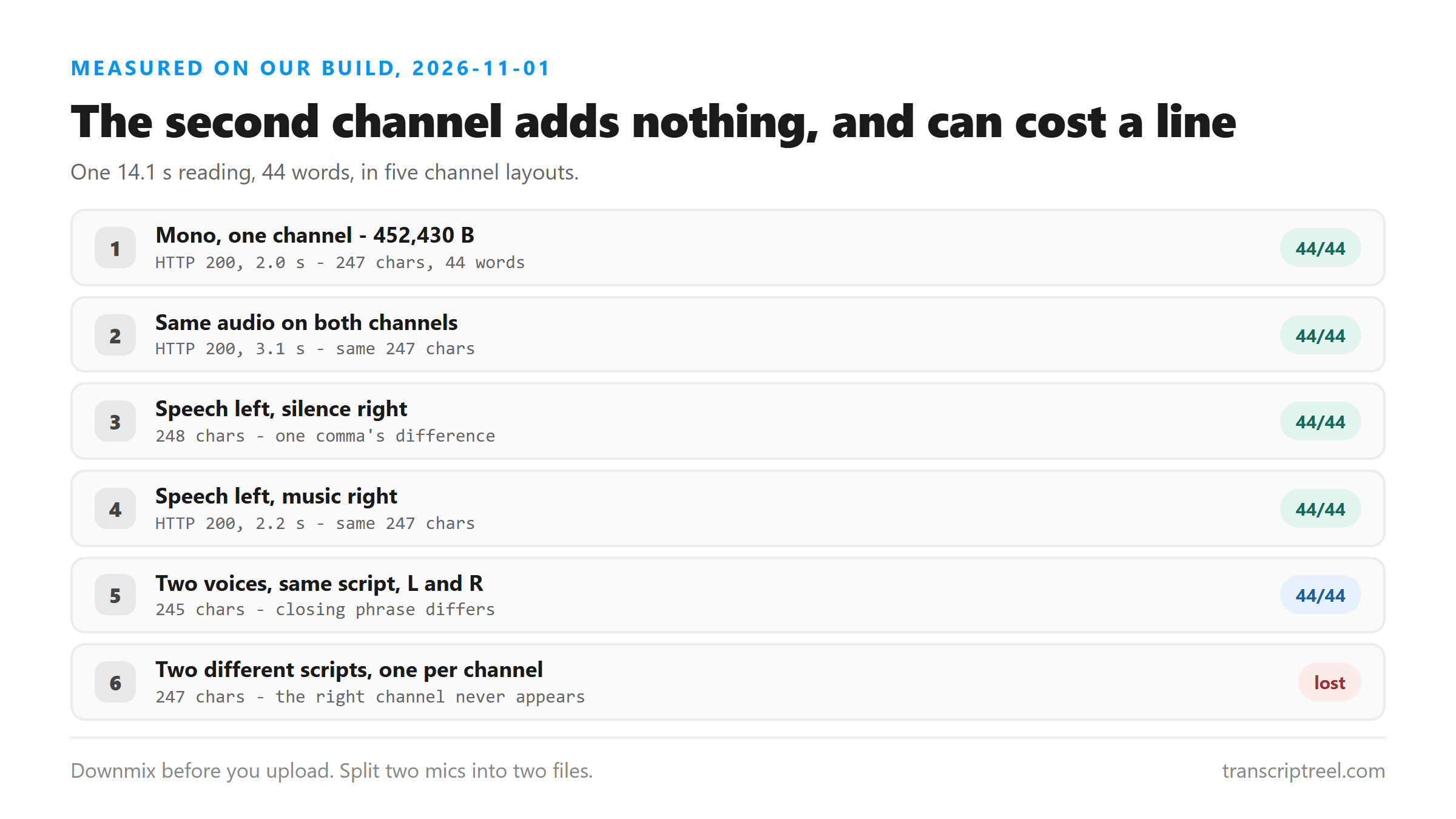
One script, four sentences, 44 words, read by a synthesized US voice at 16 kHz. The mono upload returned 247 characters in 2.0 seconds. Everything below is the same script in different channel layouts, uploaded to the same endpoint on the same day. All five returned HTTP 200 and success: true, and the language field said unknown on every one.
How we built the five files
All five files are 14.1 seconds of 16 kHz audio. The first is one channel. The second writes the same samples to both. The third puts the speech on the left and a stream of zeros on the right. The fourth keeps the speech on the left and puts a synthesized three-note chord on the right at matched level. The fifth puts two different voices on the two channels - first the same script on both, then two sentences on the right that appear nowhere on the left. Nothing but the channel layout changes between runs.
What stereo costs you in bytes
The mono file is 452,430 bytes. Every stereo version of the same audio is 904,782 - exactly double, because you're storing the same samples twice or storing a second channel you don't need. This endpoint takes files up to a few megabytes, so doubling a 450 KB file doesn't put you anywhere near the limit. It's waste rather than risk, and downmixing removes it for one click.
Duplicating one channel changes nothing
The first check is the one people worry about most: does a stereo copy of a mono recording confuse anything? No. We took the mono file and wrote the same samples to both channels. It came back 247 characters - the same text as the mono original - in 3.1 seconds. If your editor exports stereo when you expected mono, the words you get are the words you'd have gotten anyway.
- Mono, one channel: 247 characters, 44 words, 2.0 seconds.
- Same audio on both channels: 247 characters, 44 words, 3.1 seconds.
- The stereo file is twice the size and buys nothing.
A silent or musical second channel is ignored
Next we put the speech on the left only and filled the right with digital silence. That came back 248 characters - one more than the clean run, and the extra character was a comma after "fails". Then we put a synthesized three-note chord on the right at the same level as the speech. That came back 247 characters, word for word the same as the mono file. A second channel carrying something that isn't speech doesn't cost you a word.
- Speech left, silence right: 248 characters, 44 words, 2.4 seconds.
- Speech left, music right: 247 characters, 44 words, 2.2 seconds.
- The one-character difference between those two is a comma, not a word.
Two channels, two different voices, same script
Now the case where both channels carry speech. We put one voice on the left and a second voice on the right, both reading the same four sentences for the full clip. The transcript came back 245 characters - shorter than the mono run, not longer. The difference was at the end: "before it's 6 o'clock" instead of "before 6 o'clock tonight". Same four sentences, one phrase rendered differently. Two people saying the same thing at the same time didn't produce a doubled transcript.
That result is worth sitting with. If you'd hoped to get both channels written out, this is the answer: you get one version of the words, not two.
Two channels, two different scripts - one disappears
The last upload is the one that should worry you. We kept the four-sentence script on the left and put a second voice with two completely different sentences on the right - a line about a catering order and a line about chairs. The transcript came back 247 characters and contained none of it. Not a fragment, not a garbled version. Nothing. The four sentences on the left came back word for word, and the two sentences on the right were never mentioned.
- Left channel: four sentences. Right channel: two different sentences.
- Result: 247 characters, the left channel's four sentences only.
- No error, no truncation warning, no sign that anything was left out.
So downmix before you upload
Convert to mono in your editor and upload that. It takes one click in most tools, it halves the file size, and it removes the one failure we found here - a channel full of speech you'll never see written down. If you have a recording where two mics caught two people, make two files instead: split the channels, save each as mono, and send them as two uploads. You'll get both sides of the conversation, one file at a time.
- Single speaker: downmix to mono, upload, done.
- Two mics, two speakers: split the channels and upload each as its own mono file.
- Music or room tone on one side: harmless, but mono is still cheaper to send.
If you have ffmpeg installed, both moves are one line. Downmix with ffmpeg -i in.wav -ac 1 out.wav. Pull one channel out with -af "pan=mono|c0=c0" for the left and -af "pan=mono|c0=c1" for the right, then upload the two results separately. Most editors do the same thing from a menu, and it's worth doing before you upload rather than after you read a transcript that's missing half a conversation.
The limits of this test
Two synthesized voices, one script, one length, five channel layouts. Real stereo recordings have level differences and phase differences between the channels that we didn't reproduce, and we didn't test a channel that's mostly speech with a little overlap at the edges. We also can't tell you from this test which channel the endpoint kept - we only know that one of them made it through and the other didn't.
What happens to your file
Your file leaves the browser. It goes to /api/transcribe over an encrypted connection, gets decoded in memory, and the audio is processed there. When the response goes out, the file is dropped. We keep no copy, we don't store transcripts, we don't train on what you send, and there's no account tied to it.
Got a Reel you want as text? Upload the file and download the transcript as TXT, SRT, or VTT →
Mono is one export setting, and it is the safe one. Wondershare UniConverter rewrites a stereo file as single-channel audio and shows the size before you save, which halves a 904,782-byte file and keeps you from losing a channel of speech you never saw written down. It does not transcribe - the words come back from this page.
FAQ
undefined
undefined
undefined
undefined