Audio to Text Converter: What You Actually Get Back
The output is text, not a document
That distinction matters more than it sounds. A converter that promises a document has to decide where to break lines, how long each caption stays on screen, and how many characters fit. We make none of those decisions, which is also why the text never disagrees with itself between runs.
The same file, three times
The two-second spread in timing is queueing, not processing. Nothing about the text changed. If you upload a file twice and get two different transcripts from us, the file changed, not the model.
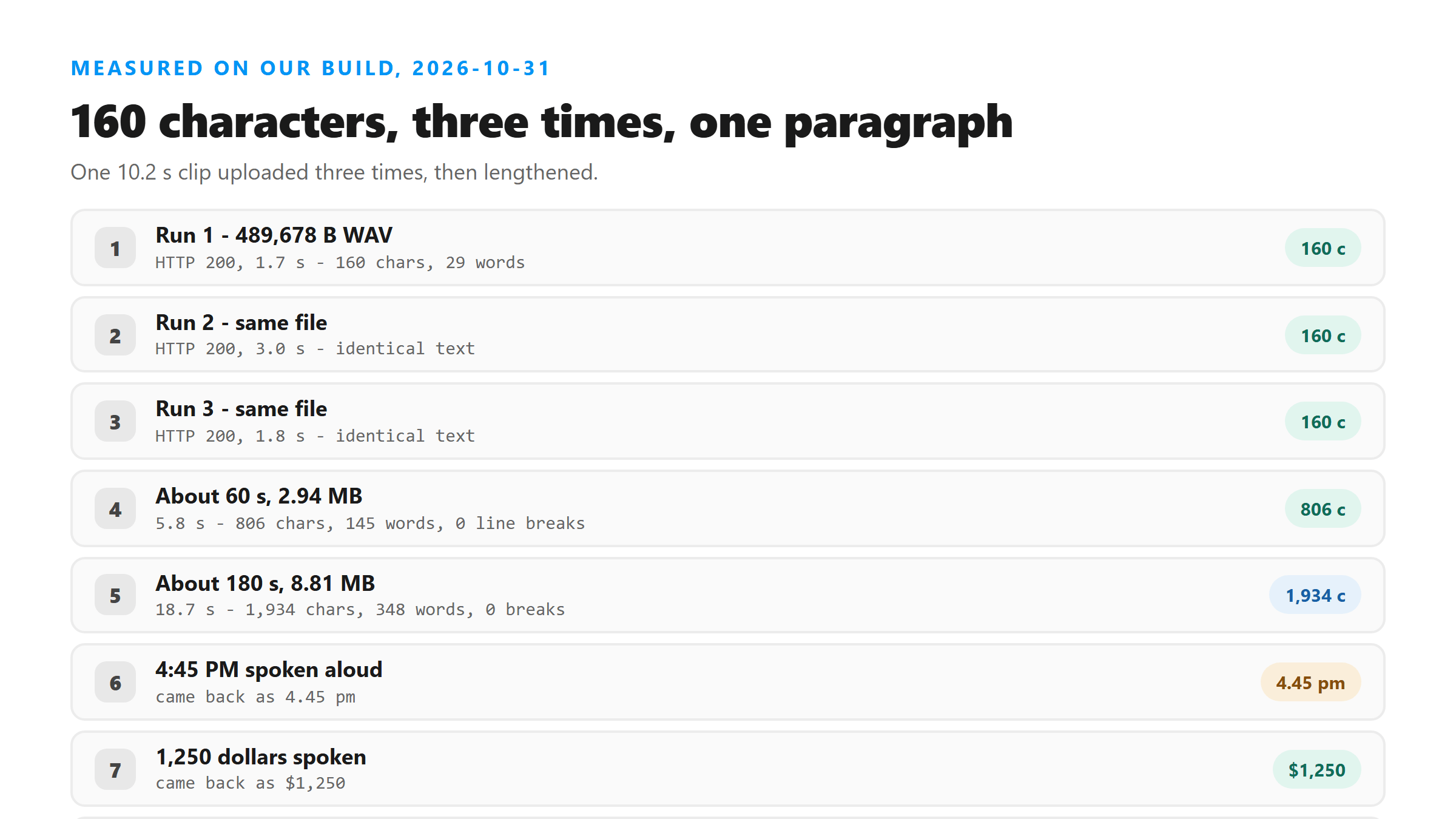
- Run 1: 160 characters, 29 words, returned in 1.7 seconds.
- Run 2: 160 characters, 29 words, returned in 3.0 seconds.
- Run 3: 160 characters, 29 words, returned in 1.8 seconds.
- All three strings were identical, including punctuation and capital letters.
- The language field read unknown on all three, so don't use it to decide what language a file is in.
Longer files don't change the shape
Three hundred and forty-eight words in one paragraph is not what most people expect. There is no speaker change anywhere in the output, even though the source repeats the same voice, and there is no marker where the loop restarts. If you need speaker labels, our transcript won't give them to you and no setting will turn them on.
- 10.2 seconds: 160 characters, 29 words, zero line breaks, 5.8 seconds to return at 2.94 MB.
- About 60 seconds: 806 characters, 145 words, zero line breaks.
- About 180 seconds: 1,934 characters, 348 words, zero line breaks, returned in 18.7 seconds at 8.81 MB.
Numbers come back as digits, but not as you said them
Three separate things happened there. The date and the dollar amount survived. The time of day lost its colon and gained a period, and PM lost its capitals. The phone number gained hyphens you didn't ask for. And the letter-by-letter code was heard as a word, because a model listening for speech has no reason to think you were spelling.
- We said: The meeting is on March 3, 2026 at 4:45 PM and it costs 1,250 dollars.
- We got: The meeting is on March 3, 2026 at 4.45 pm and it costs $1,250.
- We said: Call 555 123 4567 and use the code A 7 B 9 to reach the second floor.
- We got: Call 555-123-4567 and use the Coda 7B9 to reach the second floor.
- We said: Send the file to NASA and ASAP please, then ask Dr. Chen on Main Street.
- We got: Send the file to NASA and ASAP Please, then ask Dr. Chen on Main Street.
Why spelled-out codes fail
The practical fix is boring: read the numbers back against the audio before you trust them. Anything that matters legally or financially should be checked by ear, because the transcript will look perfectly fluent whether it's right or wrong.
Capital letters get guessed too
So treat capitalisation as a suggestion. If you're quoting someone in an article or a legal document, you have to verify the spelling of names yourself.
What the raw response contains
The last part matters if you're building something on top of it. A GET to the same endpoint returns 404, and the response carries no URL you can fetch later, so there's no result page to come back to. Whatever you do with the text, do it when it arrives. Combined with the metadata, that's about 313 bytes on top of the transcript itself.
Three expectations that don't match the output
None of these are bugs you can report. They're the shape of what a speech model returns, and they'll look the same on any tool built on one.
- Expecting paragraphs. A 180-second file came back as 348 words in one block with zero line breaks. The model doesn't know where your topics change.
- Expecting timings. There's no per-word or per-sentence timing anywhere in the response, so you can't build captions from it without doing the alignment yourself.
- Expecting the numbers to be right. Dates and amounts usually survive, but 4:45 PM became 4.45 pm and a spoken code of A 7 B 9 became Coda 7B9. Anything you'd quote needs checking by ear.
What you'd have to add yourself
Four things are missing from every transcript we return, and none of them are settings you can flip. Knowing which ones you need saves you a wasted upload.
- Timings. There is no per-word or per-sentence timing in the response. Caption files need them, and you'd have to align the text yourself.
- Speaker labels. The output doesn't say who's talking, and won't split turns.
- Paragraph structure. Everything arrives as one paragraph regardless of length.
- Confidence scores. We don't publish an accuracy number, and the response carries no per-word confidence, so there's no signal about which words are shaky.
Where the converter label stops
If what you actually wanted was a caption file with timings, start from the text and build the file, or use a tool built for captions. Going in expecting a document is how people end up thinking the converter broke.
What happens to the file you sent
Your file does leave the browser. It goes over an encrypted POST to our endpoint, gets decoded into memory, gets processed once, and is dropped when the response is written. We keep no copy, we don't store the transcript, and you don't need an account. The response is 313 bytes of metadata plus the text, with no id and no URL you can fetch later.
What to do with the text once you have it
None of that is hard, and none of it is optional if the text is going somewhere that matters. The converter saves you the typing, not the proofreading.
- Save it straight away. There's no result page and no stored copy, so if you close the tab the text is gone.
- Split it yourself. Paste it into an editor and break it where the topic changes. At 348 words in one block, nobody will read it as it arrives.
- Read the numbers out loud against the audio. This is the one check that catches real errors, because the text is fluent whether it's right or wrong.
- Fix the names. Capitalisation and proper nouns are guessed, so a surname you care about needs verifying by ear.
The limits of what we measured
We also only tested files we uploaded directly. Nothing here says anything about a tool that pulls audio from a link, because that's a different pipeline with different failure points.
If the text looks wrong
Two failure modes account for most bad output, and they look different. A file with no speech at all comes back with invented text that reads smoothly, so fluency is not evidence. A file with music or a second voice can pull words from the wrong source. In both cases, re-uploading the same file won't help: the same input gives the same text, every time.
Got a Reel you want as text? Upload the file and download the transcript as TXT, SRT, or VTT →
A converter only helps if the file gets past the door first, and the door reads the file name. Wondershare UniConverter opens a .m4v or a .mkv on your own machine and rewrites it as MP4 or MP3 with the audio kept, which is the shape that went through in every test on this page. It does not transcribe - the words come back from this page.
FAQ
Does an audio to text converter give me timestamps?
Ours doesn't. The response is the transcript text plus metadata, with no per-word or per-sentence timing. We uploaded a 180-second file and it came back as 1,934 characters in one paragraph with zero line breaks, so length doesn't change that.
Will I get the same transcript if I upload the same file twice?
Yes. We uploaded one 10.2-second WAV three times and got 160 characters and 29 words each run, identical character for character. Timing varied between 1.7 and 3.0 seconds, but the text didn't move.
How does the transcript write numbers?
As digits, with the model's own formatting. In our test, March 3, 2026 and 1,250 dollars survived, 4:45 PM became 4.45 pm, and 555 123 4567 became 555-123-4567. Read numbers back against the audio before you rely on them.
Does it mark who is speaking?
No. There are no speaker labels and no turn splitting, so a conversation arrives as one continuous block of text. You'd have to add speakers yourself.
What file types can I send?
The endpoint accepts MP3, WAV, M4A, AAC, OGG, WEBM, FLAC and MP4, and it checks the file name, not the contents. A .m4v with the same bits as a working .mp4 got a 400 in our test, while a .mov with the same stream got a 200.