Remove Background Noise From Audio: Where the Words Start to Slip
Six mixes, one 10-second clip
Every file here is the same 10.2-second recording, mono at 16 kHz, 326,478 bytes as a WAV. The only thing we changed was how much pink noise we mixed into it. We measured each mix with ffmpeg's volumedetect so the levels are read off the file, not guessed.
- Clean speech, no noise: mean volume -18.1 dB, HTTP 200 in 2.35 seconds, 160 characters, 29 words.
- Noise 20 dB below the speech: -18.1 dB, HTTP 200 in 2.10 seconds, 160 characters, 29 words.
- Noise 10 dB below the speech: -17.7 dB, HTTP 200 in 1.88 seconds, 160 characters, 29 words.
- Noise 5 dB below the speech: -16.9 dB, HTTP 200 in 1.95 seconds, 160 characters, 29 words.
- Noise equal to the speech: -15.1 dB, HTTP 200 in 1.84 seconds, 168 characters, 29 words.
- Noise 5 dB above the speech: -11.9 dB, HTTP 200 in 2.17 seconds, 165 characters, 28 words.
- Noise 10 dB above the speech: -7.8 dB, HTTP 200 in 2.09 seconds, 184 characters, 33 words.
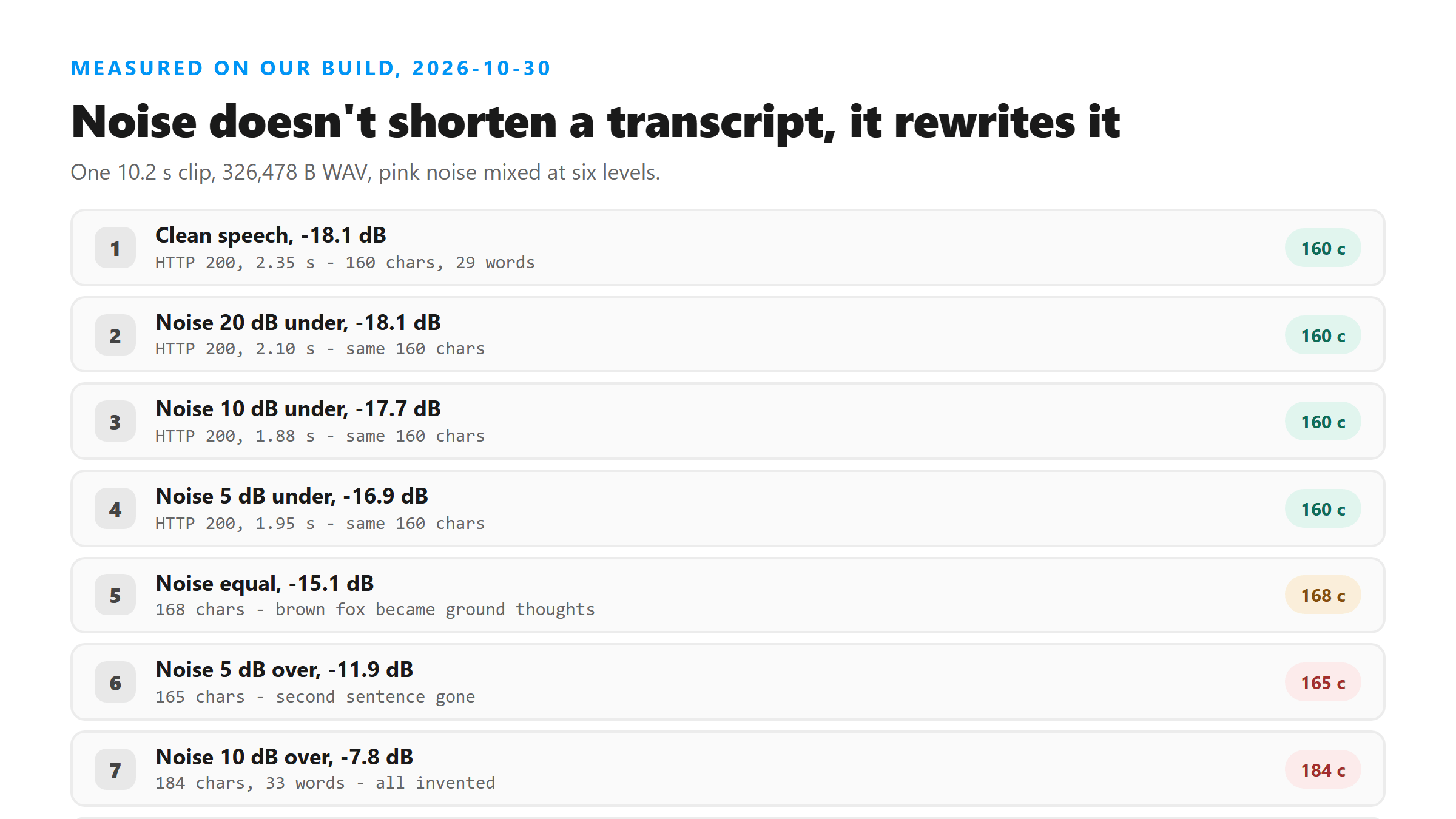
Nothing moves until the noise is close to the voice
That's the good news, and it's worth knowing before you spend an hour cleaning a file that didn't need it. Noise you can hear is not the same as noise the model hears.
Equal loudness is where words start changing shape
Read that carefully, because it shows how the failure works. The sentence is still a sentence. The grammar holds up. Nothing looks broken, and a reader who doesn't have the audio in front of them won't catch it.
Below the voice, the model starts writing its own sentences
That repeat at the end is the tell. When the model can't hear a signal it starts looping a phrase back on itself, and "special edition" shows up three times in one sentence. If you ever see a transcript repeat a phrase like that, the audio was the problem, not the tool.
The text gets longer as it gets worse
So don't use length as a health check. An empty transcript is obvious, and a short one looks suspicious, but a long one looks fine while being mostly wrong. The only real check is playing the audio and reading along.
Cleaning the file afterwards didn't bring the words back
Both filters made the file quieter and cleaner to our ears. Neither one recovered a single word of the original sentence. Once the model has lost the signal, cleaning the audio afterwards is too late.
What to do with a clip that sounds bad
And when you do upload something noisy, read the first sentence against the audio before you use any of it. If the opening line is wrong, the rest almost certainly is.
Noise with no voice in it at all
Two things follow from that. The endpoint doesn't reject an audio file for having no speech in it, and it doesn't limit itself to the language you expected. If you hand it a clip where the voice is buried, you won't get an empty result - you'll get a confident line of text in whatever language the model reaches for.
What we didn't measure
These files are ours, built with ffmpeg this morning from one 10.2-second recording and one pink noise source. We tested one speaker, one language and one kind of noise. Real rooms have music, other voices and clipped peaks, and we didn't test any of those. We also tested two ffmpeg filters, not the denoise button in every editor on the market. The shape of the result should hold - noise doesn't remove words, it replaces them - but the exact level where it starts will move with your clip.
What happens to the file you upload
It goes to /api/transcribe over an encrypted connection, gets decoded in memory, and is dropped as soon as the response is written. We don't keep it, we don't train on it, and there's no account to attach it to. That's also why a noisy file can't be re-read later: once it's gone, the only copy is yours.
Got a Reel you want as text? Upload the file and download the transcript as TXT, SRT, or VTT →
No converter puts words back once noise has taken them, and we measured that: the worst file came back invented after two different denoise filters. What Wondershare UniConverter can do is the file around the words - open a WAV that is too heavy to send and write out a smaller MP3, which is how our 326,478-byte test file stays under the size gate. It does not transcribe - the words come back from this page.
FAQ
Does background noise make a transcript shorter?
No, and that's what makes it hard to spot. Our clean 10.2-second clip came back 160 characters and 29 words. The version with noise 10 dB louder than the speech came back 184 characters and 33 words. Invented sentences don't end where the real ones did, so the bad version was longer than the good one.
At what point does noise start changing the words?
In our test, nothing changed while the noise sat 5 dB or more below the speech. The first wrong words showed up when noise and speech carried the same energy, where "quick brown fox" became "quick ground thoughts". By 10 dB above the speech the output was entirely invented.
Can I denoise the file after recording and fix it?
Not in our test. We ran the worst mix through ffmpeg's afftdn and anlmdn filters and uploaded both. They came back with 185 and 200 characters, and both were still invented text, just different invented text. Cleaning helps before the upload, not after the words are already wrong.
How do I tell if a transcript came from noisy audio?
Look for a phrase that repeats inside one sentence. Our worst file wrote "Welcome to our special edition of the special edition of this video", with the same phrase three times. That loop is the model filling silence with guesswork, and it's a reliable sign the audio was the problem.