How to Make Audio Louder: What -6 dB to -60 dB Does to a Transcript
Ten versions of the same 10 seconds
The base file is a 10.2-second recording, mono at 16 kHz, 326,478 bytes as a WAV. We used ffmpeg's volume filter to make each copy, then read the level back off every file with volumedetect so the numbers are measured, not intended.
- Untreated: mean volume -18.1 dB, HTTP 200 in 2.35 seconds, 160 characters, 29 words.
- -6 dB: -24.2 dB, HTTP 200 in 1.81 seconds, 160 characters, 29 words, identical text.
- -12 dB: -30.2 dB, HTTP 200 in 1.95 seconds, 160 characters, 29 words, identical text.
- -18 dB: -36.2 dB, HTTP 200 in 2.32 seconds, 160 characters, 29 words, identical text.
- -24 dB: -42.2 dB, HTTP 200 in 1.82 seconds, 160 characters, 29 words, identical text.
- -30 dB: -48.1 dB, HTTP 200 in 1.62 seconds, 160 characters, 29 words, identical text.
- -40 dB: -58.1 dB, HTTP 200 in 2.22 seconds, 160 characters, 29 words, identical text.
- -50 dB: -68.1 dB, HTTP 200 in 2.28 seconds, 160 characters, 29 words, identical text.
- -60 dB: -78.0 dB, HTTP 200 in 2.03 seconds, 160 characters, 29 words, identical text.
- -30 dB then amplified back up: HTTP 200 in 2.07 seconds, 160 characters, 29 words, identical text.
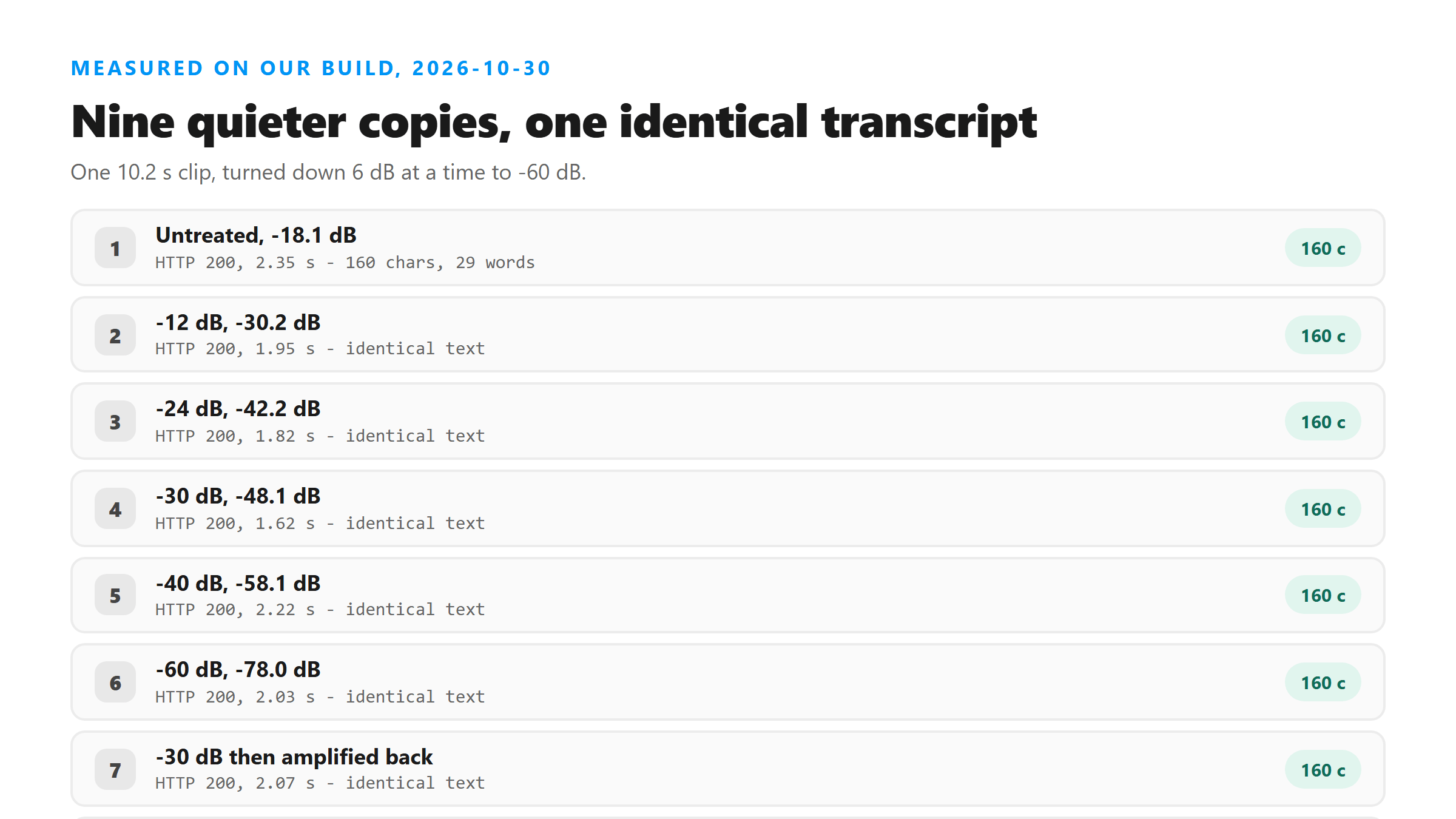
Sixty decibels down and the words didn't move
We can't tell you from the outside why that holds. What we can tell you is what we saw: nine quieter copies, one amplified copy, and no change in a single word.
Pushing it into clipping didn't help or hurt
Turning a file up does cost you something, though: it raises the noise floor along with the voice. If the room was loud, amplification makes both louder, and that's the case where the text does start to drift.
The one level that broke it was no level at all
That's the failure mode worth remembering. A silent file doesn't come back empty and it doesn't error out. It comes back with a wall of polite nonsense, and it takes eight times longer to produce it. If you get a transcript that reads like a broken loop, check whether the file has audio in it before you check anything else.
Quiet Spanish, same result
So the finding isn't about the speaker or the words. A voice at a normal level and a voice barely above the floor came back the same in both clips we tried.
When turning it up is still worth doing
What it doesn't do is buy you accuracy here. If your transcript came back wrong, the level is close to the last place to look. Check the noise in the recording first, and check whether the file had audio in it at all.
Check your own file in ten seconds
To make a quiet file listenable, use ffmpeg -i quiet.wav -af loudnorm -ar 16000 out.wav. That normalizes to a broadcast-style target without guessing at a gain number. Keep the original - you may want the unprocessed file if the normalized one clips.
What ffmpeg calls silence isn't what the model calls silence
And that file still returned all 160 characters correctly. So a tool telling you your audio is silent doesn't settle the question. Upload it once and read what comes back; if the text is right, the level was fine no matter what the meter said.
What we didn't measure
These are our own files: one English clip, one Spanish clip, both synthetic speech, cut and leveled with ffmpeg this morning. We tested 16-bit WAV and 64 kbps MP3, and we didn't test 8-bit or heavily compressed audio where the noise floor sits higher. We also didn't test what happens when you upload through a phone on a bad connection - that's a network problem, not a level problem. The numbers are today's, from our endpoint.
What happens to the file you upload
It's posted to /api/transcribe over an encrypted connection, decoded in memory, and dropped when the response goes back to you. We don't store it, we don't train on it, and you don't need an account. That's also why we can't re-run a file for you - once the response is sent, the audio is gone.
Got a Reel you want as text? Upload the file and download the transcript as TXT, SRT, or VTT →
Level turned out not to matter here, so the reason to touch it is your own ears. Wondershare UniConverter opens a quiet recording on your own machine and raises the level on a slider, then writes a new file you can actually listen back to while you check the text. It does not transcribe - the words come back from this page.
FAQ
Do I need to make a quiet recording louder before transcribing it?
Not for our endpoint. We turned one clip down in 6 dB steps to 60 dB below the original and uploaded every version. All of them came back with the same 160 characters and 29 words, and the -60 dB copy measured -78.0 dB. A -24 dB Spanish clip came back the same as its untreated version too.
Will turning the volume up make the transcript more accurate?
No. We pushed one copy 20 dB into clipping and it returned the same 160 characters as the untreated file. Turning a file up raises the noise floor along with the voice, so in a loud room it can make things worse rather than better.
Why did my silent file come back with words in it?
Our 10 seconds of digital silence came back HTTP 200 in 17.93 seconds with 1,829 characters and 338 words, all of them "Thank you very much." The model fills an empty signal with guesses instead of returning nothing, so a silent file produces invented text rather than an empty result.
What should I check if my transcript is wrong?
Check the noise before you check the level. In our tests, level made no difference across a 60 dB range, while noise at or above the level of the speech changed words and then replaced whole sentences. Also confirm the file has an audio stream at all with ffprobe.