MP3 to Text: What 32 kbps to 320 kbps Does to the Words
How we built the ladder
We scored each result by aligning it against the known text word by word, so a result of 28 slash 29 means exactly one of the 29 words came back different. We're not quoting an accuracy percentage, because we don't publish one.
The eight uploads
The jump from 48 kbps to 192 kbps more than triples the file, from 61.7 KB to 205 KB, and the transcript does not move by one character. If you're exporting at 320 kbps because you think it reads better, it doesn't. You're paying in upload time for nothing.
- 32 kbps: 41,228 bytes, HTTP 200 in 1.4 seconds, 162 characters, 28 of 29 words.
- 48 kbps: 61,724 bytes, HTTP 200 in 1.3 seconds, 160 characters, 29 of 29 words.
- 64 kbps: 82,220 bytes, HTTP 200 in 1.7 seconds, 160 characters, 29 of 29 words.
- 96 kbps: 123,308 bytes, HTTP 200 in 1.8 seconds, 160 characters, 29 of 29 words.
- 128 kbps: 164,396 bytes, HTTP 200 in 1.6 seconds, 160 characters, 29 of 29 words.
- 192 kbps: 205,484 bytes, HTTP 200 in 1.7 seconds, 160 characters, 29 of 29 words.
- 256 kbps: 205,484 bytes, HTTP 200 in 1.4 seconds, 160 characters, 29 of 29 words.
- 320 kbps: 205,484 bytes, HTTP 200 in 2.5 seconds, 160 characters, 29 of 29 words.
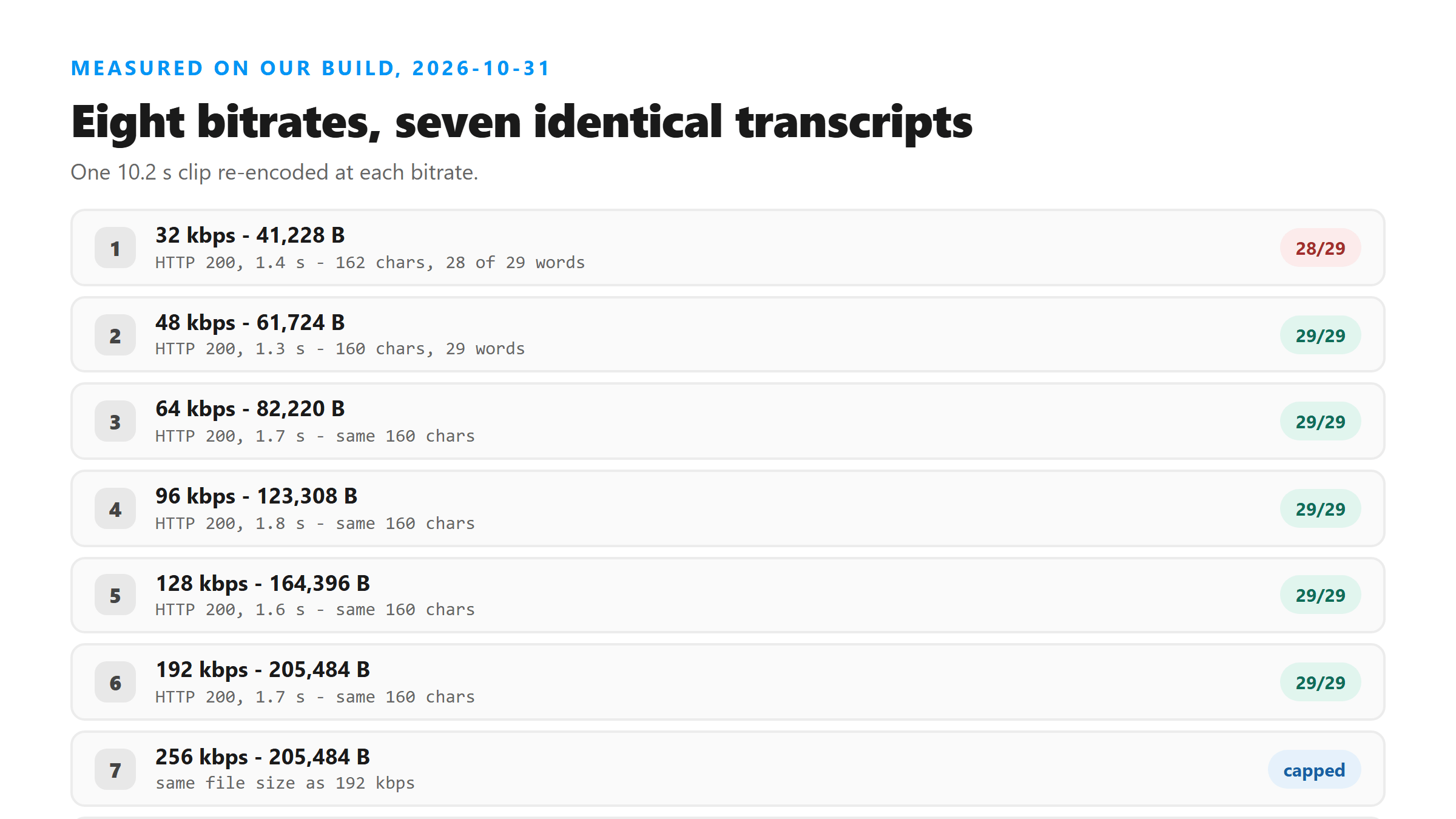
192, 256 and 320 came out the same size
It's worth knowing because it means the top of our ladder isn't really three data points. The real ceiling on this clip sits somewhere around 160 kbps of actual payload. If your clip is 44.1 kHz stereo, your numbers will look different, and that's fine, the shape of the result won't.
Where the bottom actually breaks
Notice how harmless that looks. Nothing in the output announces a problem. There's no warning, no lower-case fragment, no missing punctuation. Read it quickly and you'd never catch it. That's the argument for not squeezing files down to the smallest setting you can find.
The one word that moved
Everything else in the file survived, including the pangram in the middle, which is the part with the most unusual words in it. The model didn't struggle with 'quick brown fox'. It slipped on the most common word in the English language, because that's the slot where the encoder had thrown away the most detail.
- 48 kbps and up: Hello everyone. This is a test of the Instagram transcript tool. The quick brown fox jumps over the lazy dog. Welcome to our channel and thank you for watching.
- 32 kbps: Hello everyone. This is the test of the Instagram transcript tool. The quick brown fox jumps over the lazy dog. Welcome to our channel and thank you for watching.
- Two characters apart, 162 instead of 160, and one word wrong out of 29.
Why 'a' became 'the'
This is also why you can't fix it by turning the volume up, or by running the file through a second encode. The information isn't in the file anymore. Once it's gone at 32 kbps, every later step is working from the same loss.
What to actually set
That matters on a phone connection and it matters against any upload size limit. Our own endpoint will refuse a file that's too big before it ever looks at the audio, so a smaller file with the same words is strictly better.
How the size adds up on a longer clip
That arithmetic is the practical argument. A longer clip at a high bitrate is the one that walks into an upload limit and gets refused before any audio is decoded. The same words at a third of the size go straight through.
Bitrate is not the variable people think it is
So spend your effort on the recording, not the export settings. One clean take at 64 kbps beats a noisy take at 320 kbps every time.
The limits of this test
We also only changed the bitrate. We didn't change the encoder, and different encoders spend their budget differently at the same nominal rate. If your export tool offers a constant or a variable bitrate mode, the variable one usually does better at the same file size.
What happens to the file
Your MP3 leaves the browser over an encrypted connection, gets decoded into memory, gets processed once, and is discarded when the response goes out. We keep no copy and you don't need an account. The response carries the text plus about 313 bytes of metadata, with no id and no link you can fetch later.
Got a Reel you want as text? Upload the file and download the transcript as TXT, SRT, or VTT →
Bitrate is the one export setting worth checking before you upload, and it lives in the save dialog, not in a player. Wondershare UniConverter rewrites an MP3 at a bitrate you pick and shows the file size before you commit, which is how 205,484 bytes becomes 82,220 for the same 160 characters. It does not transcribe - the words come back from this page.
FAQ
Does a higher MP3 bitrate give a better transcript?
Not above about 48 kbps. We uploaded the same 10.2-second clip at eight bitrates. Everything from 48 kbps to 320 kbps returned the same 160 characters and 29 words, while the file grew from 61.7 KB to 205 KB. Only the 32 kbps version lost a word.
What bitrate should I use for speech?
64 kbps mono is a safe floor and 128 kbps is more than enough. Both were word-for-word identical to the 320 kbps version in our test, and 64 kbps came in at 82 KB for a 10-second clip.
Why did 192, 256 and 320 kbps produce identical file sizes?
The encoder hit its ceiling for 24 kHz mono audio. All three files came out at exactly 205,484 bytes, so the top of our ladder is really one data point, not three.
Can I fix a bad low-bitrate transcript by re-encoding at a higher bitrate?
No. The detail is gone from the file already. Re-encoding gives you a bigger file with the same missing information, and our endpoint returns the same text for the same input every time.