Trim Audio File: What Cutting One Clip Into Three Does to the Transcript
One clip, four ways
The source is a 36.4-second English recording, mono at 16 kHz, encoded to 64 kbps MP3 for upload. We cut it three ways with ffmpeg and uploaded each version, plus the whole file as a control.
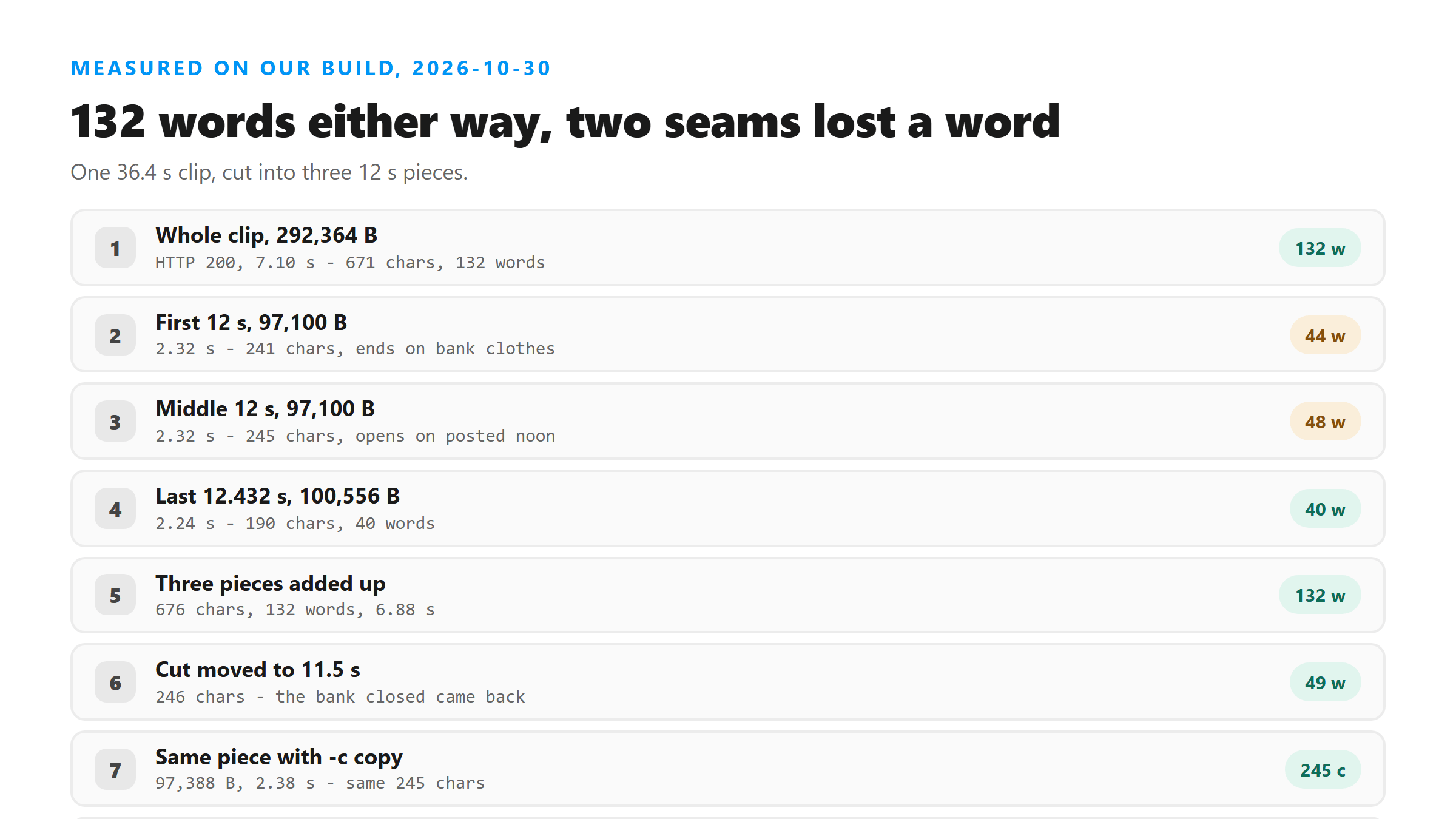
- Whole clip, 36.432 seconds, 292,364 bytes: HTTP 200 in 7.10 seconds, 671 characters, 132 words.
- First 12 seconds, 97,100 bytes: HTTP 200 in 2.32 seconds, 241 characters, 44 words.
- Middle 12 seconds, 97,100 bytes: HTTP 200 in 2.32 seconds, 245 characters, 48 words.
- Last 12.432 seconds, 100,556 bytes: HTTP 200 in 2.24 seconds, 190 characters, 40 words.
- Three pieces added up: 676 characters, 132 words, 6.88 seconds of upload time.
The word count survives, the seams don't
What it does cost is one word per seam. The first piece ends "which felt generous until he remembered the bank clothes", and the original sentence runs "until he remembered the bank closed at noon on Saturdays". The second piece then opens with "posted noon on Saturdays", which is what the tail of "closed" sounds like on its own. Two cuts, two mangled words, and both of them sit exactly where the scissors went.
Half a second earlier fixed it
The rule is simple: cut in the gap between sentences, not in the middle of one. If you can't find the gap by ear, pull the cut back half a second. You'll pick up a little silence, and silence costs you nothing - we measured that too.
Stream copy and re-encode came back the same
So use -c copy when you can. It's faster on your machine and it doesn't cost you anything at the endpoint, as long as you're fine with the cut landing a frame or two off from where you asked.
Silence in front of the clip is free
That's the answer to "should I trim the dead air off the start?" You don't have to for accuracy. Do it for speed and file size if you're uploading on a phone, but a little lead-in silence won't change the text.
Stripping silence out saved 1.28 seconds
Don't read too much into the size difference; that run only removed 0.1 seconds of audio. The time gap is consistent with what we see across lengths, and it's the reason trimming a long recording down to the part you need is worth the one command.
Numbers can change shape between runs
We're telling you this so you don't chase it. If you're pulling numbers out of a transcript - prices, dates, counts - read them against the audio. The model decides how to write a number each time, and it doesn't always decide the same way.
What three uploads cost you instead of one
The real cost isn't bytes or seconds, it's that you now have three transcripts to join. Budget for that: paste them into one document in order, then read across each join to catch the word the cut ate. With three pieces that's two seams to check, and it takes under a minute.
What we didn't measure
One English clip, one synthetic voice, four cuts. We didn't test cutting a file with music under the speech, or a clip with two speakers where a seam can split an exchange between them. We didn't push past three pieces, so we can't tell you what twenty cuts would do. These files are ours, built with ffmpeg today, and every number here came off our own endpoint.
What happens to each piece you upload
Each piece is a separate upload to /api/transcribe, sent over an encrypted connection, decoded in memory and dropped when the response goes back. We don't keep it and we don't stitch the pieces together for you, so joining three transcripts into one is your job - and it's easier if your cuts landed between sentences.
Got a Reel you want as text? Upload the file and download the transcript as TXT, SRT, or VTT →
Cutting a clip is three commands in ffmpeg, or one drag if you would rather not type them. CapCut opens the long recording on your own machine and writes out just the part you picked, which is how a 292,364-byte file becomes the 97,100-byte piece you actually need. It does not transcribe - the words come back from this page.
FAQ
Does cutting a long audio file into pieces lose words?
Not in total. Our 36.4-second clip returned 132 words whole, and the three 12-second pieces returned 44, 48 and 40 - 132 again. What you lose is the word sitting on each cut: ours turned "closed" into "clothes" at one seam and into "posted" at the next.
Where should I cut a clip before transcribing it?
In the gap between sentences. When we moved a cut from 12.0 seconds to 11.5 seconds, the piece came back with one more word and opened with "the bank closed at noon on Saturdays" instead of "posted noon on Saturdays". Half a second of extra silence is cheaper than a mangled word.
Should I remove the silence at the start of a recording?
It saves time, not accuracy. A file with 8 seconds of silence pasted on the front came back with the same 132 words as the original. A file run through silenceremove came back with the same 671 characters in 5.82 seconds instead of 7.10.
Is it better to re-encode or copy the stream when trimming?
Copy, if you can. We cut the same 12 seconds twice: the re-encoded piece was 97,100 bytes and the -c copy piece was 97,388 bytes at 12.032 seconds. Both returned 245 characters and 48 words, the same text. The copy is faster to make on your machine.