Voice Note to Notes App: The Two-Step Route
What each step costs, measured
A voice note you saved by screen recording is a video file. Everything in it except the audio track is bytes you are paying upload time for. We built one - 15 seconds, 1080x1920, 6 Mbps, with a noisy picture so it compresses like a real recording rather than like a black frame - and sent it two ways.
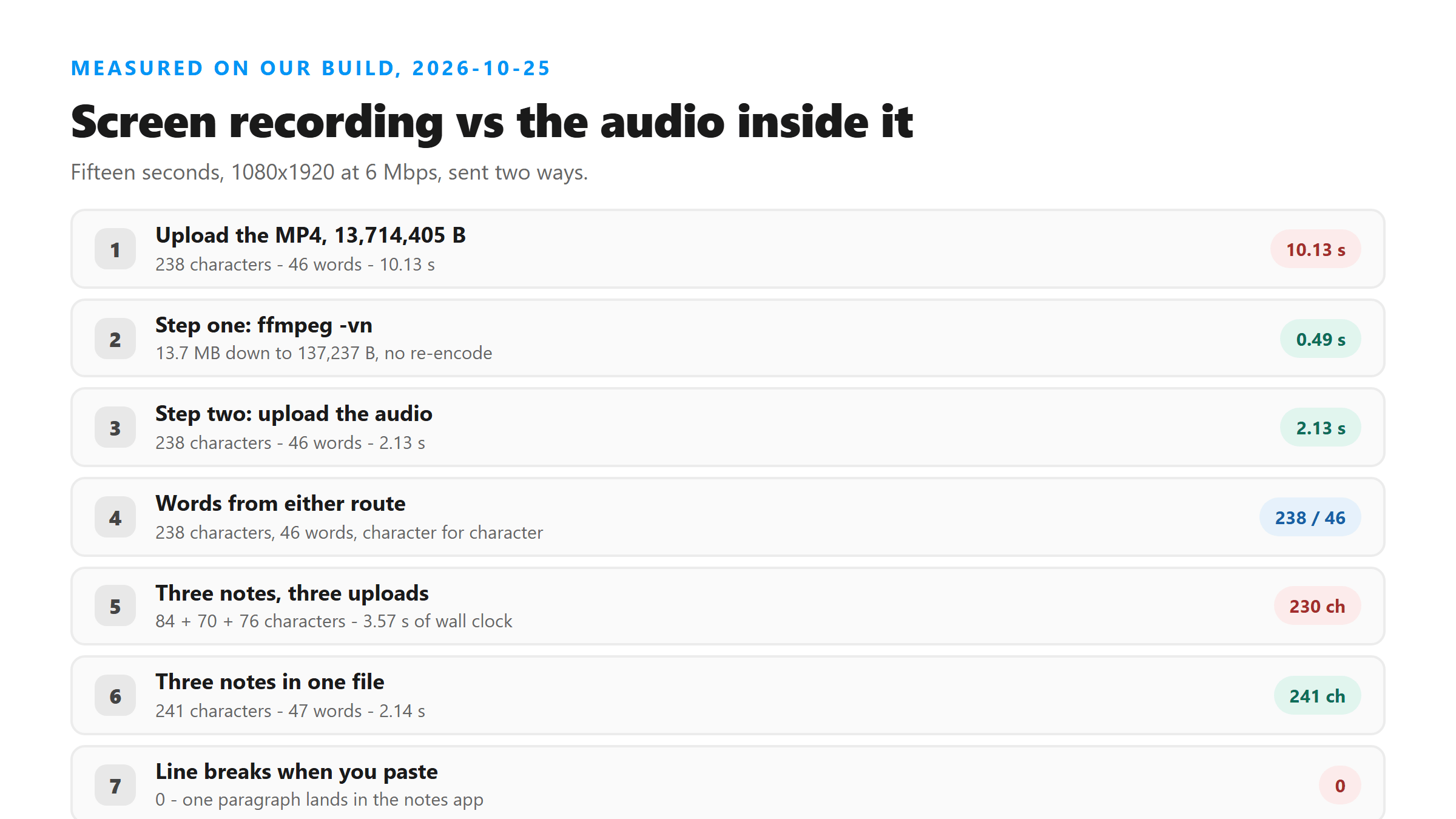
- One step - upload the MP4, 13,714,405 B: 238 characters, 46 words, 10.13 s
- Step one - ffmpeg -vn, 13,714,405 B to 137,237 B: 0.49 s
- Step two - upload the audio, 137,237 B: 238 characters, 46 words, 2.13 s
Same 238 characters, 46 words, both ways. The two-step route cost 2.62 seconds against 10.13. That gap is pure picture: the video is 100 times the size and the model never looks at a single frame of it.
Why the picture costs so much
Screen recordings are big because they are pictures. Ours was 15 seconds at 6 Mbps, which is 13.7 MB, and a voice note you want the words from is audio. The audio track inside that same file was 137,237 bytes. Strip it and you keep every word the model can use.
There is a second reason that shows up on longer notes. Our endpoint turns files away past roughly 3.2 MB, and a phone screen recording spends that budget in about four seconds. A recording of a two-minute voice note will not upload at all, while its audio track sits around 1 MB and goes through.
Step one: take the picture off
One ffmpeg command does it, and you keep the audio exactly as it was encoded.
ffmpeg -i recording.mp4 -vn -c:a copy audio.m4a
The -vn flag drops the video stream and -c:a copy skips a re-encode, which is why it finished in 0.49 seconds on a 13.7 MB file. Re-encoding would have worked too, but it costs time and can shave the tail - see the last section.
Step two: upload the audio
The 137,237-byte track went up in 2.13 seconds and came back as the same 238 characters the video produced. This is also the step that keeps working as the note gets longer. Our endpoint refuses files past roughly 3.2 MB, and a screen recording burns through that in about four seconds at 6 Mbps. Fourteen seconds of audio at 64 kbps is 125 KB.
Several notes: one file or several?
If you have three short notes, send them as one file. We cut three 5-second notes out of a longer message at 0, 10 and 20 seconds and sent them two ways.
- Three separate uploads, 44,396 + 45,884 + 44,759 B: 84, 70 and 76 characters (230 total), 1.38 + 1.16 + 1.03 = 3.57 s
- One concatenated file, 15.12 s, 137,189 B: 241 characters, 47 words, 2.14 s
One file was faster and gave back more text - 241 characters in 2.14 seconds against 230 in 3.57. Each of the three separate uploads pays its own fixed cost, and the concatenated file also kept words that the individual cuts dropped.
What lands in your notes app
One paragraph. The transcript has no newline characters, so pasting it gives you a single block. We measured what the three download buttons build from today's 241-character result, in a real browser:
- TXT: 241 bytes, 1 line
- SRT: 274 bytes, 4 lines
- VTT: 280 bytes, 5 lines
Use TXT. The SRT and VTT files wrap the same text in one cue that runs 00:00:00,000 to 00:00:00,000, so pasting one into a note gets you a timestamp line and four extra lines of nothing. Our response carries no timing data, so there is nothing real to put in those numbers.
Two cuts that will bite you
Both showed up today. Slices start mid-sentence: our second 5-second note, cut at 10 seconds, opened with "yet I want to look at the menu first" because the slice began inside the previous sentence. And the tail gets trimmed: a 15.04-second M4A ended with its last two words, while the 15.00-second MP4 muxed from it did not.
So when you cut a note out of a longer recording, start a beat before the first word you want and end a beat after the last one.
Got a Reel you want as text? Upload the file and download the transcript as TXT, SRT, or VTT →
Step one on this page is a one-line command, and Wondershare UniConverter is the same job with a window around it: pull the audio out of the screen recording, drop the video track, write M4A. 137 KB instead of 13.7 MB, and the words still come back from this page — it does not transcribe.
FAQ
Do I have to upload the whole screen recording?
No, and you should not. Today a 13,714,405-byte MP4 took 10.13 seconds and the 137,237-byte audio track pulled out of it took 2.13 seconds, both returning the same 238 characters and 46 words. The picture never reaches the model.
How long does stripping the audio take?
0.49 seconds on a 13.7 MB file today, using ffmpeg -i recording.mp4 -vn -c:a copy audio.m4a. The -c:a copy part skips re-encoding, which is what keeps it that fast.
Should I send three voice notes as three uploads?
Send them as one file. Three separate 5-second uploads took 3.57 seconds and returned 230 characters total today; one concatenated 15.12-second file took 2.14 seconds and returned 241 characters.
Which download should I paste into my notes app?
TXT. Measured in a browser today, a 241-character transcript came out as 241 bytes of TXT in 1 line, 274 bytes of SRT in 4 lines and 280 bytes of VTT in 5 lines. The SRT and VTT cues are 0.000 seconds long, so they add nothing but a timestamp line.