Translate an Instagram Story to English: What Actually Works
What came back when we uploaded a Spanish story today
We took one continuous 60-second Spanish recording, encoded it the way a captured story would reach you (16 kHz mono, 64 kbps MP3, 481,217 bytes) and uploaded it. It came back as 724 characters, 155 words, in Spanish, with success true and the language field reading "unknown". Across two rounds the same file took 9.8 seconds and 22.9 seconds, and returned byte-identical text both times. Nothing in that response is English, and nothing in it is a translation.
Why: nothing in the request asks for translation
Our endpoint hands the audio to the model and nothing else - the call is the model name plus the audio, with no task parameter and no language parameter - so the model does the only job it was asked to do, which is to write down what it heard. The output language is therefore the language that was spoken, whatever that happens to be. Translation is a separate step you take afterwards, and it inherits the first step's mistakes: a word the recogniser heard wrong is a word the translator will translate wrong, and it will translate it fluently, which makes it harder to spot.
A story is 15 seconds a slide, so we cut one into four
A Reel is one file. A story is a stack of slides, each capped at 15 seconds, and if you captured it as a recording you usually end up with several short clips rather than one. We cut the same Spanish minute into four 15-second slides (121,217 bytes each) and uploaded them separately to see what that does to the text you end up translating.
Four slides against one continuous minute
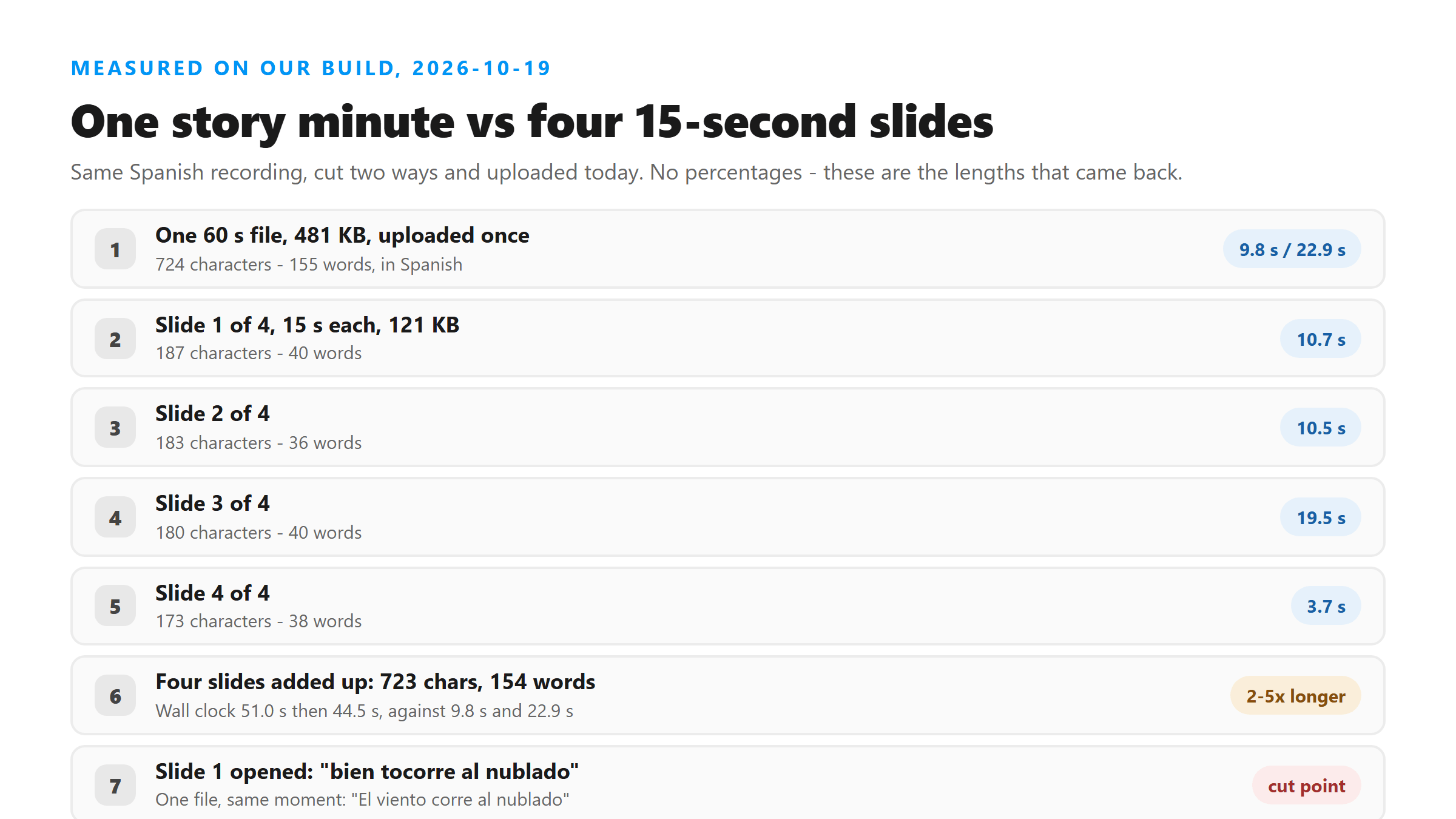
- One 60-second file: 724 characters, 155 words - 9.8 s and 22.9 s across two rounds.
- Four 15-second slides: 187, 183, 180 and 173 characters - 40, 36, 40 and 38 words - 723 characters and 154 words in total.
- Two 30-second halves: 379 and 349 characters - 728 against 724 for the single file.
- One 5-second slide: 68 characters, 13 words, and the shortest file was not the fastest - it took 19.1 seconds.
The text is the same, the wall clock is not
Chopping the minute into slides changed almost nothing about how much text you get to translate: 723 characters against 724. It changed the cost. The four uploads took 51.0 seconds end to end in the first round and 44.5 seconds in the second, against 9.8 and 22.9 seconds for the one continuous upload - two to five times longer for the same words. The other difference is at the joins. Our first slide opened with "bien tocorre al nublado" where the continuous file had "El viento corre al nublado": the words sitting on the cut are the ones the model heard least well. If you only have slides, treat the first few words of each one as the part most worth re-reading before you translate it.
The words on the screen are not in the transcript
This is the part that is specific to stories. A story routinely carries its message as text: a caption across the top, a sticker, a poll question, a "link in bio" line, a price. None of that is speech, so none of it can come out of a transcript. We checked it rather than assuming it.
What the on-screen test returned
- We built a 15-second 720x1280 story slide (236,071 bytes) with two large captions burned into the picture and the same Spanish speech on the audio track.
- It came back in 10.47 seconds: 190 characters, 42 words, all of it the spoken Spanish.
- We searched the output for the on-screen words - the Spanish offer line and the all-caps English line - and none of them appeared. Not one.
So translating the transcript cannot translate a story
If the thing you wanted in English was written on the slide rather than spoken, the transcript does not contain it and no amount of translating will produce it. Those words have to come off the screen instead: read them yourself, or run the screenshot through an OCR or image translator. This is also why a story transcript is often shorter than people expect - the recording you captured had a lot more on it than anybody said out loud.
A story with text and no speech does not come back empty
We uploaded the same slide again with the audio replaced by 15 seconds of silence (113,911 bytes). It did not come back empty and it did not come back as "no speech detected". It returned success true, 1,829 characters and 338 words of invented English - one phrase repeated 111 times, another repeated 29 times - after 21.94 seconds. If a story slide has no voice on it, what you get back is not a translation waiting to happen; it is noise with the shape of a sentence. Before you paste anything into a translator, read the transcript in its own language once and check that it is actually about something.
How much text you are actually translating
For scale: our 60-second Spanish recording produced 155 words, and a single 15-second story slide produced about 40 - one or two sentences. That is thin material for any translator, because it carries almost no surrounding context for an ambiguous word to be resolved against. Translating the whole recording as one block gives the translator more to work with than translating four slides separately, which is one more reason to upload the full capture when you have it.
The order that actually works
- Capture the story yourself. There is no story URL to paste anywhere - Instagram offers no download button for someone else's story and no public endpoint that returns its media without a session - so a screen recording, or your own story pulled from the archive, is where the file comes from.
- Export audio, not video. A vertical screen recording burns through the upload size ceiling in seconds; the same words as a 16 kHz audio file are a fraction of the size.
- Upload the whole recording in one piece if you have it. You get the same text for a fraction of the wall clock, and the joins are the parts that come back worst.
- Read it in the language it was spoken in. Check the first words of each slide, and check any numbers - spoken numbers are rewritten more often than ordinary words.
- Then translate the text, in whatever translator you trust.
- Then do the on-screen text separately, by eye or with an image translator.
What happens to the story file
The file does leave your browser: it is posted to /api/transcribe over an encrypted connection, decoded in memory, transcribed once, and discarded as soon as the response is written. Nothing is written to disk, there is no result you can fetch later and no account holding a history. If you need the text again you run the file again, which is why it is worth keeping the audio you captured rather than only the transcript you got from it.
Got a Reel you want as text? Upload the file and download the transcript as TXT, SRT, or VTT →
The file you captured is usually the problem, not the words: a vertical screen recording of a story is far larger than this endpoint accepts, and a story you own only as video has to become audio first. Wondershare UniConverter opens that recording on your own machine and writes out an audio-only file in the size range that uploads cleanly. It does not translate - the words come back in the language they were spoken in, and the translating happens after.
FAQ
Does this tool translate a story into English?
No. It returns the words in the language that was spoken. Every upload we ran today came back in Spanish with the language field reading unknown. Translating that text is a second step you take in a translator of your own.
Can I upload all of a story's slides at once?
No - one file per request. The upload control on the page takes a single file and there is no URL field to fall back on, so four slides means four uploads. That costs two to five times the wall clock of one continuous upload for the same amount of text.
Will translating the transcript fix words the recogniser got wrong?
No. Translation inherits them, and it inherits them fluently, which makes them harder to see. Check the transcript in its own language first, especially the first words of each slide and any spoken numbers.
Why does the language field say unknown?
Because the request never asks the model to identify a language. The call passes the audio and nothing else, so no language is detected, declared or returned - including on the responses that came back entirely in Spanish.
My story is text with no speech. What will I get?
Not the text. On-screen words are not speech and cannot appear in a transcript. In our test a silent slide returned success true with 338 words of invented English rather than an empty result, so treat anything that comes back from a silent slide as unusable.