Transcript vs Caption File: SRT, VTT and TXT Explained
A transcript is the words. A caption file is the words plus a start and end time for every line. Reel transcript tools that advertise SRT output are promising the second thing, and a text-only pipeline cannot produce it, because timing is not carried in the text. Our endpoint returns the words and nothing else. Below: the exact fields we return, what the TXT, SRT and VTT buttons on our page actually write, and where the timing has to come from if you need real subtitles.
A transcript is text. A caption file is text plus timing.
This is the whole difference, and it is the one most tool pages blur. A transcript answers "what was said". A caption file answers "what was said, and when, and for how long". The second answer is a strictly larger object: you can always throw timing away, but you cannot recover it from words that were never stamped. That is why a page that says "download SRT" is making a stronger claim than a page that says "download transcript", and why you should check what is actually inside the file before you build a workflow on it.
What our endpoint returns: six fields, none of them a timestamp
We ran a real upload against our own endpoint on 2026-09-28. The file was a 10.2-second MP3. The JSON that came back contained exactly six top-level fields:
success- truetranscript- 160 characters, 29 words, one continuous stringlanguage- reported by the model when it is confidentengine- the model identifier, so you can check it independentlyfileSize/fileName- echoed back so you can confirm which file was read
There is no timestamp in that response, and that is deliberate
The speech-to-text model we call can be asked for more than text. Our worker reads two fields from its output - the text and the language - and ignores everything else. We do not reconstruct word or segment timings, and we do not guess them. So the honest description of our output is: words, in order, with no clock attached.
What that means for the three download buttons
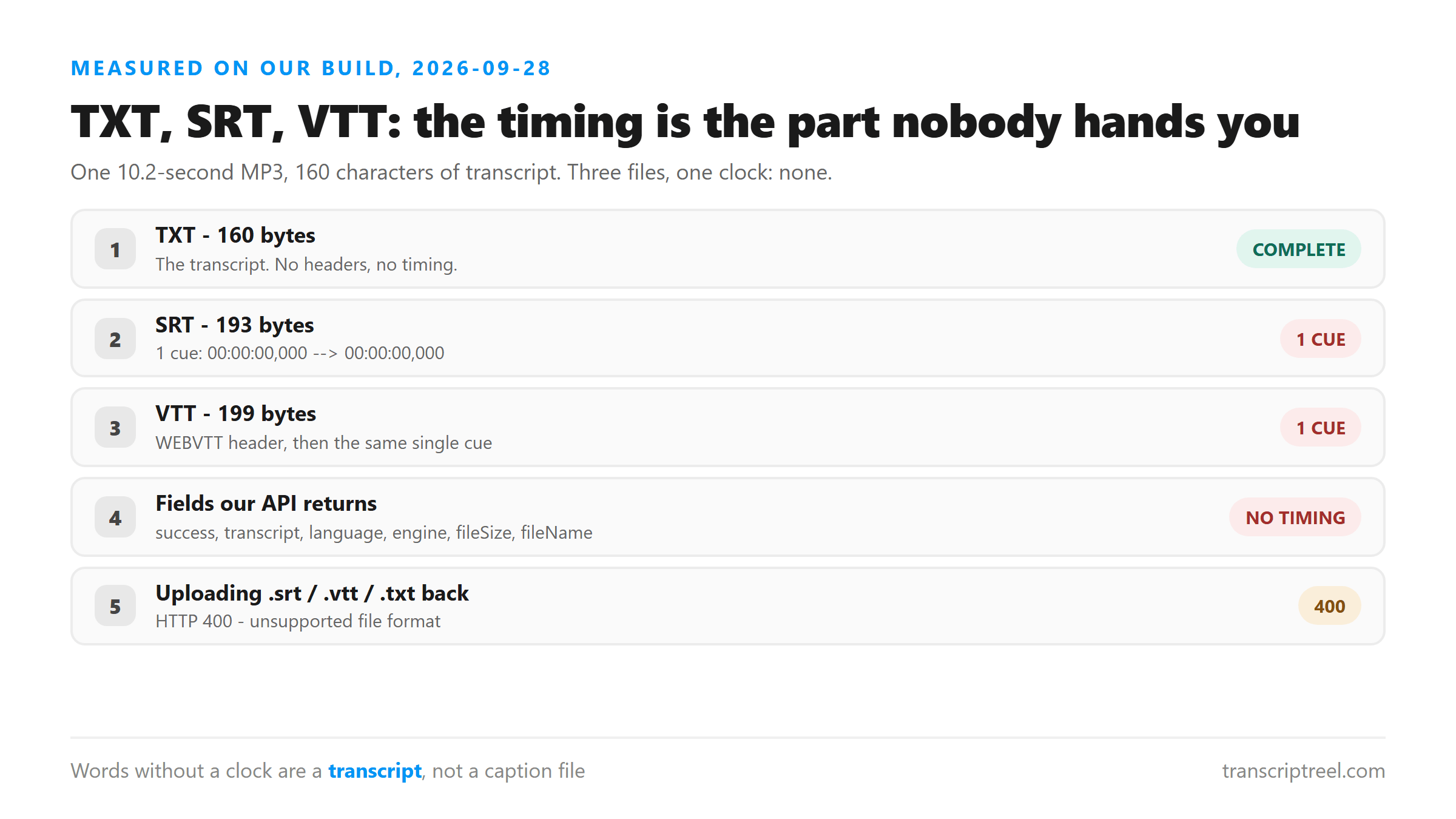
Our page offers TXT, SRT and VTT. All three are generated in your browser from the same string of words, and here is what each one actually contains, measured on that same 10.2-second clip:
- TXT - 160 bytes. The transcript and nothing else. No headers, no indices, no timing. This is the format we can produce completely.
- SRT - 193 bytes. A valid SRT header line,
00:00:00,000 --> 00:00:00,000, then the entire transcript as one cue. Structurally it is an SRT file. Functionally it is one subtitle that appears for zero seconds. - VTT - 199 bytes. A
WEBVTTline, then the same single cue with the same zero-length span.
We would rather show you that than fake the timing
A zero-length cue is a useless subtitle, and we are not going to pretend otherwise. The alternative would be to split the transcript into evenly sized chunks and stamp them at a fixed interval. That would produce a file that looks right and is wrong: real speech is not spoken at a constant rate, and a caption that arrives two seconds after the word is worse than no caption. Every number in a caption file is a claim about when something happened. We only write down claims we can support, which is the same reason we do not publish an accuracy percentage.
What each format is actually for
- TXT: reading, searching, quoting, feeding into notes or a draft, pasting into a document. If your goal is to work with the words, this is the file you want, and it is the one we can produce without qualification.
- SRT: the format video editors and platforms expect when you import a subtitle track. It needs one numbered block per line, each with a start and end time. Use it when the file is going into a timeline.
- VTT: the web standard, used by HTML5 video through the
<track>element. It carries a header and uses a dot instead of a comma before the milliseconds. Use it when the file is going onto a web page.
How to get real captions from a transcript
Treat the transcript as the text layer, not the finished subtitle file. The timing has to come from something that can hear the audio:
- Import the video into a subtitle editor and let it align your existing text to the audio. You supply the words; the tool supplies the clock.
- Upload the video to a platform that generates its own caption track, then replace the generated words with your transcript if the wording matters.
- If the captions are going back onto the same Reel, record the timings once in an editor and reuse them. The transcript stays the same across platforms; only the container changes.
You cannot upload a caption file back in
We tested this too. Posting a .srt, a .vtt or a .txt to the transcribe endpoint returns HTTP 400 with the same message every time: unsupported file format, please select MP3, WAV, M4A, AAC, OGG, FLAC, MP4, MOV or WEBM. The endpoint takes media, not text. If you already have a caption file, you do not need us.
Where your file goes in the meantime
The file you upload is sent to our endpoint over an encrypted connection, held in memory for one pass of the model, and discarded when the response is returned. There is no account, no stored copy, and no training use. The same is true whether you download TXT, SRT or VTT - the file conversion happens in your browser, after the transcript has already come back.
FAQ
Can I get an SRT file with real timestamps from a Reel?
Not from a transcript-only tool. The words come out of the model without a clock attached. To get real timestamps, run the audio through something that can align text to sound - a subtitle editor with auto-sync, or the caption tooling on the platform you are publishing to - and use the transcript as the text it aligns.
Why not just split the transcript into even cues?
Because that invents timing. Even splitting assumes a constant speaking rate, and any pause, laugh or fast stretch pushes the cues out of sync. We would rather hand you a file that is obviously incomplete than one that looks finished and is wrong.
Is VTT better than SRT?
Neither is better; they go to different places. SRT is what video editors and most upload forms expect. VTT is the web standard used by HTML5 video. Both need a start and end time per line, so the choice only matters once you have the timing.
Why do other tools advertise SRT export so confidently?
We cannot speak to their internals, and we are not going to guess. What we can tell you is the check that settles it: download the file, open it in a text editor, and look at the timestamps. If every cue has the same start and end, or the spans are suspiciously uniform, the timing was generated rather than measured.