How to Get SRT Subtitles From an Instagram Reel
The four steps
- Get the audio into a file you control. Instagram's Save button keeps the Reel inside the app; it does not hand you a media file. A screen recording, a downloader, or the original export if the Reel is yours all produce one. Pasting a link into a transcript tool does not work - we tested that separately and it fails at the network layer, before any audio exists.
- Upload that file. MP3, WAV, M4A, AAC, OGG, FLAC, MP4, MOV and WEBM are accepted; anything else comes back HTTP 400 with the accepted list in the error text.
- Press SRT, VTT or TXT. The file is assembled in your browser from the text already on the screen - there is no second request and nothing is fetched from a server to build it.
- Open it before you rely on it. Every SRT we produced today has one cue. That is the part this page is about.
What we ran today
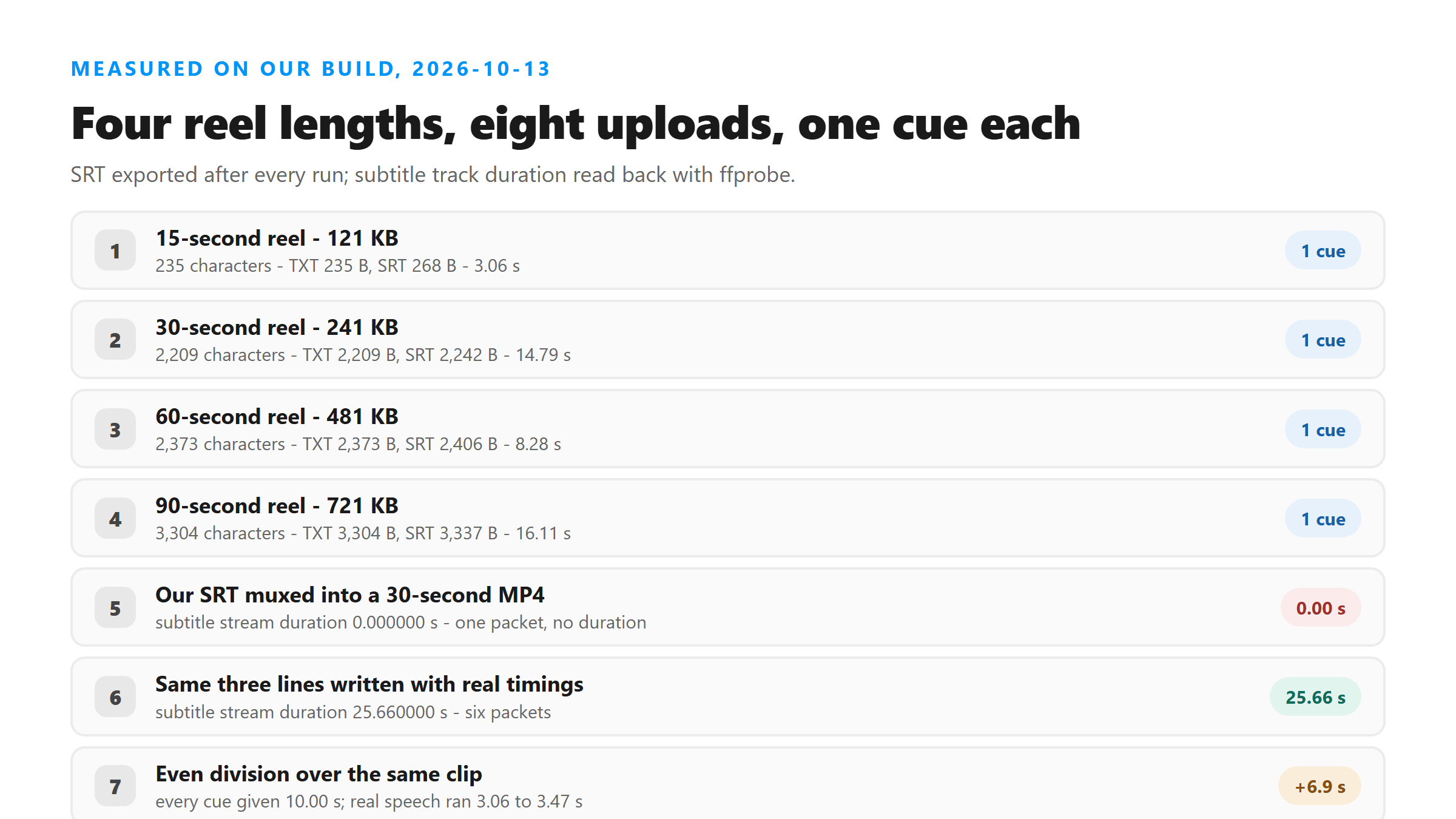
We took one piece of speech, cut it into reel-shaped lengths of 15, 30, 60 and 90 seconds at 16 kHz mono and 64 kbps, and uploaded each one twice to our own endpoint, which runs Cloudflare Workers AI (@cf/openai/whisper). All eight uploads returned HTTP 200 and success. Every response carried the same six fields - success, transcript, language, engine, fileSize and fileName - the language field read unknown in all of them, and the transcript text contained zero line breaks. There were no timestamps, no speaker labels, no confidence score and no segment list anywhere in the response. We also built a 30-second clip with three sentences placed at known positions so we could check timings against ground truth.
Four reel lengths, and the files they produced
- 15 seconds, 121 KB: 3.06 s and 5.55 s wall clock - 235 characters, 42 words - TXT 235 bytes, SRT 268 bytes, VTT 274 bytes
- 30 seconds, 241 KB: 14.79 s and 16.72 s - 2,209 characters, 393 words - TXT 2,209 bytes, SRT 2,242 bytes, VTT 2,248 bytes
- 60 seconds, 481 KB: 8.28 s and 23.93 s - 2,373 characters, 422 words - TXT 2,373 bytes, SRT 2,406 bytes, VTT 2,412 bytes
- 90 seconds, 721 KB: 16.11 s and 18.60 s - 3,304 characters, 590 words - TXT 3,304 bytes, SRT 3,337 bytes, VTT 3,343 bytes
- The wrapper costs almost nothing: SRT came out exactly 33 bytes bigger than TXT at every length, and VTT 39 bytes bigger. The file size tells you how much speech there was, not how much timing.
- One caveat on the word counts: those four files are the same sentence looped, so treat the numbers as a shape, not as a natural-speech benchmark.
Every one of those files has one cue and zero seconds
This is the thing to know before you download. Our SRT is the cue number, the line 00:00:00,000 --> 00:00:00,000, and then the whole transcript as one block. Start and end are the same instant, so the cue is never on screen. We checked that objectively rather than by eye: muxing our own export into a 30-second MP4 with ffmpeg produced a subtitle stream whose duration ffprobe reads as 0.000000 seconds, made of a single packet with no duration. The same three lines written with their real start and end times produced a subtitle stream of 25.660000 seconds. A caption track that reports zero seconds is not a caption track that needs small corrections - it is text waiting for timings.
Why we do not invent the timings
We could. Splitting the transcript evenly across the length of the clip is one line of code, and plenty of tools do it. We built a clip where we know exactly when each sentence is spoken so we could measure what that does: three sentences placed at 0.50 s, 11.00 s and 22.50 s of a 30-second piece, running 3.06, 3.47 and 3.16 seconds. Total speech: 9.69 seconds out of 30. Here is what even division does to it.
- First sentence: really runs 0.50 to 3.56. Even division puts it at 0.00 to 10.00 - it appears half a second early and stays on screen 6.95 seconds longer than it should.
- Second sentence: really runs 11.00 to 14.47. Even division puts it at 10.00 to 20.00 - one second early, and on screen 6.53 seconds too long.
- Third sentence: really runs 22.50 to 25.66. Even division puts it at 20.00 to 30.00 - two and a half seconds early, on screen 6.84 seconds too long.
- Every cue in that file is wrong at both ends, and the file looks completely normal. That is the whole objection: a fake timestamp is not a rough timestamp, it is a wrong one that nothing downstream can detect.
You can get real timings out of the audio instead
The timings are not lost - they are in the audio, and a plain piece of free software can read them back out. Running silence detection over that same 30-second clip found the six boundaries at 0.70, 3.30, 11.22, 14.34, 22.70 and 25.49 seconds against true values of 0.50, 3.56, 11.00, 14.47, 22.50 and 25.66. The largest miss was 0.26 seconds and the smallest 0.13. That is not a guess - it is measured off the waveform, and it is close enough to cut cues against by hand in a subtitle editor.
- The command: ffmpeg -i yourfile.mp3 -af silencedetect=noise=-40dB:d=0.3 -f null -
- It prints silence_start and silence_end pairs; the gaps between them are the stretches where someone is speaking.
- Drop those boundaries into any subtitle editor - the text is already in the SRT you downloaded - and you have captions with real timings.
- We do not do this automatically, because 0.26 seconds is good enough for a human to start from and not good enough for us to hand you as finished work.
Uploading the video file works, and gives the same text
You do not have to strip the audio out first, as long as the file is small enough to get through. We uploaded a 30-second 720x1280 MP4 at 2,496,731 bytes and it came back HTTP 200 in 3.61 seconds with a transcript byte-identical to the one from the audio-only version of the same clip - 166 characters, same words, same punctuation. On earlier tests on this site the upload ceiling sat between 3.18 MB and 3.35 MB, which a screen recording burns through in a few seconds, so pulling the audio out is still the safer route for anything long. One thing that does not work: handing our own SRT back to the transcriber. Both .srt and .vtt came back HTTP 400 with 'Unsupported file format. Please select MP3, WAV, M4A, AAC, OGG, FLAC, MP4, MOV, or WEBM.' - there is no route from a subtitle file to a timed subtitle file here.
What the file is still good for
- A script for a subtitle editor: paste the text, cut it against the audio, export a real SRT or VTT.
- A source for translation - translate the block, then time it in the target language.
- A caption draft you paste into the platform's own caption editor and let it align.
- Show notes, a blog draft, or a quote check: anything where the words matter and the clock does not.
Got a Reel you want as text? Upload the file and download the transcript as TXT, SRT, or VTT →
What this page leaves you with is the words, not the timing. Corel VideoStudio Pro is a desktop video editor with a speech-to-text converter that builds subtitles from your own footage, plus subtitle editing for the files you already have.
FAQ
Can I get an SRT file straight from Instagram for a Reel?
We could not verify one, and we are not going to claim there is or is not one from here - checking it needs an account and a creator-side workflow we do not have access to today. What we can tell you is what our own tool produces and exactly what is in the file, which is what this page documents.
Why is my SRT file not showing any subtitles when I play it?
Because the single cue in it runs from 00:00:00,000 to 00:00:00,000 - zero seconds on screen. When we muxed our own export into an MP4, ffprobe reported the subtitle stream as 0.000000 seconds long. The text is all there; the timing is not. Open it in a subtitle editor, cut it into cues against the audio, and export again.
Should I use SRT or VTT?
For what our tool produces, it makes almost no difference - both carry the same single zero-duration cue. SRT was 33 bytes larger than the plain text at every length we tested and VTT 39 bytes larger. Pick based on where the captions are going: SRT for most video editors and players, VTT for web players.
How many cues should a 30-second Reel have?
As many as there are stretches of speech. On our test clip, 30 seconds held 9.69 seconds of speech in three sentences, so the correct answer was three cues - not the ten a fixed two-second split would have produced, and not the one our export gives you.