Translate an Instagram Reel Transcript: What Comes Back First
The transcript comes back in the language that was spoken
We took two German recordings and two Spanish recordings - 25-second slices of spoken-word audiobooks, re-encoded to 16 kHz mono MP3 so they look like audio pulled off a phone - and uploaded each one to our own endpoint. Every one returned HTTP 200. Every one returned text in the language it was spoken in. Nothing came back in English.
- German clip, 201 KB, 25 s: returned in 2.55 s. The text was German, umlauts and German word order intact.
- German clip, 95 KB, 25 s: returned in 1.64 s. Also German, from a different passage.
- Spanish clip, 201 KB, 25 s: returned in 3.38 s. Spanish throughout.
- Spanish clip, 147 KB, 25 s: returned in 2.68 s. Spanish throughout.
- All four responses carried language: "unknown" - no signal about what had been recognised.
Why: nothing in the request asks for translation
The reason is visible in the code that runs this site. The Worker hands the model one thing - the audio bytes - and nothing else: env.AI.run('@cf/openai/whisper', { audio }). There is no task parameter and no target language. A speech model asked only for audio does what its default says: write down what was said, in the language it was said in. Translation would have to be requested, and it isn't.
This is a deliberate limit, not an oversight we plan to fix silently. A transcript that has been through two models - one to hear it, one to translate it - gives you no way to check either step against the audio. Keeping the two steps separate means the first one stays checkable.
So translation is a second step, and it inherits the first step's errors
If you want an English version of a Reel in another language, the order is: get the audio out, transcribe it, then translate the text. A translator can only work with what the transcript contains - any word the recogniser heard wrong becomes a wrong word in the translation, and nothing downstream will catch it.
What we measured today: 15 spoken number phrases
Three more lost a word rather than restyling one: "twenty units" became "plenty units", "twelve square meters" became "well square meters", and "Half of them said yes" came back as "I have of them said yes". The tally across all 15: one came back word for word, nine came back with digits or symbols that were never spoken aloud, and five changed or dropped at least one word.
- "The meeting is at fifteen forty five" came back as "The meeting is at 1545" - a time written as a bare number.
- "It costs two hundred dollars" came back as "It costs $200".
- "We need one thousand two hundred dollars" came back as "We need $1,200".
- "She was born in nineteen ninety nine" came back as "She was born in 1999".
- "The rate is three point five percent" came back as "The rate is 3.5%".
- "See you on the twenty fifth of June" came back as "See you on the 25th of June".
- "It is about ten kilometers from here" came back as "It is about 10 kilometers from here".
- "The temperature is twenty two degrees" came back as "The temperature is 22 degrees".
- "Call me at four one five five five five one two three four" came back as "Call me yet for 1-5-5-5-5-1-2-3-4".
- "Page two hundred and four" came back as "Page 200 and 4" - one number split into two.
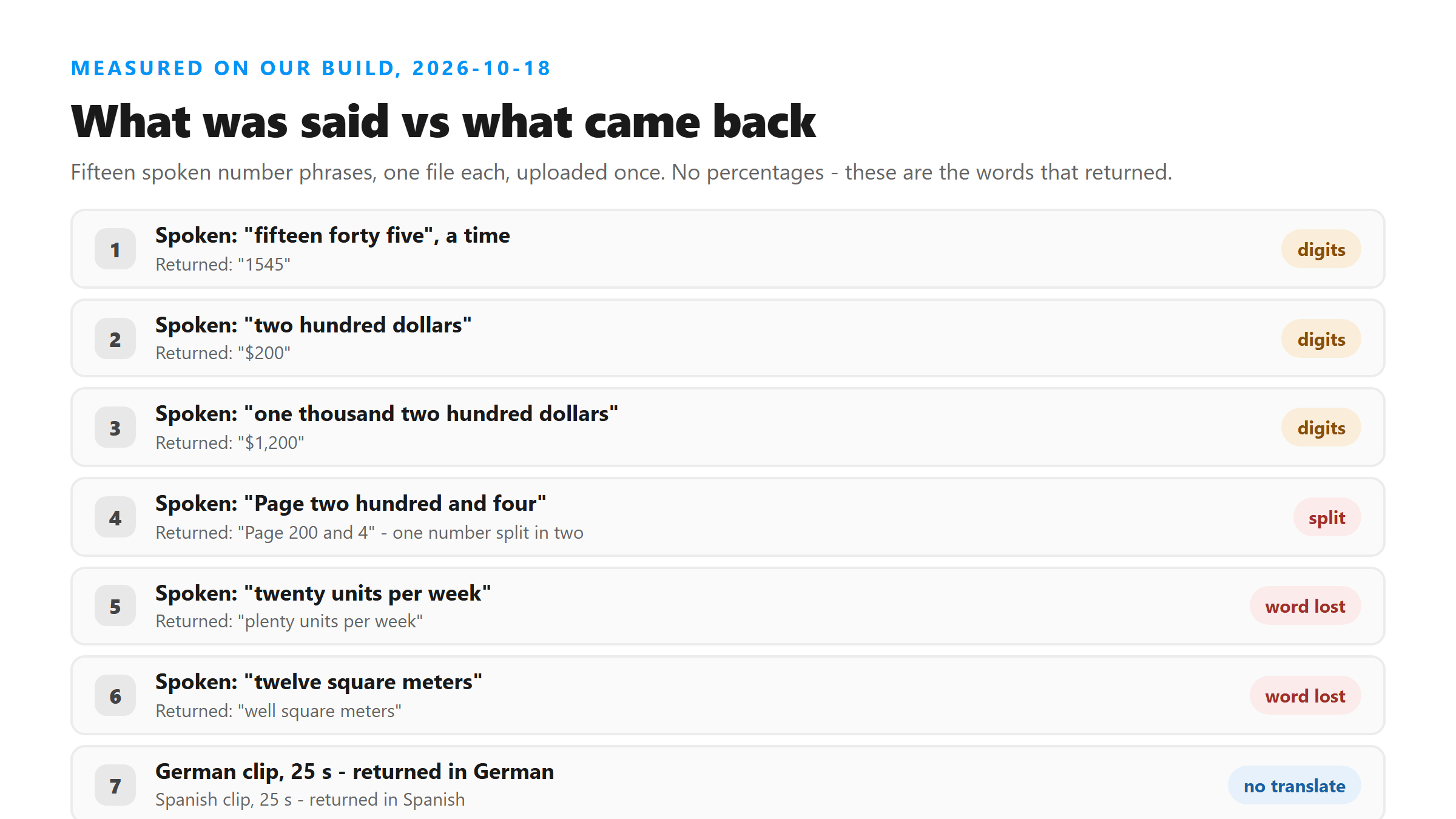
For translation this matters more than it looks. A currency symbol, a decimal separator and a date format are not universal - a figure silently restyled into one convention and then handed to a translator can come out the other side as a different amount. Check the numbers against the audio before you check anything else.
How much text you are actually translating
We also ran four lengths of English speech through the same endpoint to see what a translator would be handed. Every response was 200, and every one was a single unbroken block of text: zero newline characters, no timestamps, no speaker labels.
- 15 seconds, 121 KB: 235 characters, 42 words, 1.67 s.
- 30 seconds, 241 KB: 492 characters, 89 words, 2.80 s.
- 60 seconds, 481 KB: 806 characters, 145 words, 5.82 s.
- 90 seconds, 572 KB: 967 characters, 174 words, 5.07 s.
The order that actually works
- Get the audio out first. A Reel that arrives as full-resolution video is usually bigger than the upload this endpoint accepts; the audio track alone is a fraction of the size and gives the same words.
- Transcribe that audio. The result is in the source language, which is what you want at this stage.
- Translate the text, not the audio. Text is checkable; a model's internal translation is not.
- Check the numbers against the recording before you use them. Nine of our fifteen number phrases had been restyled before any translation happened.
What happens to the file itself
Your file is posted to /api/transcribe over an encrypted connection, held in memory for one pass of the model, and discarded when the response is sent. No account, no stored copy, nothing used for training. The text you translate afterwards is yours and never goes back through our endpoint.
Got a Reel you want as text? Upload the file and download the transcript as TXT, SRT, or VTT →
Translation starts with a file this tool will read, and a Reel that arrives as a video is usually the wrong shape and far too big to upload. Wondershare UniConverter pulls the audio track out and re-exports it as MP3 or M4A on your own machine. It does not translate anything - the words come back in the language they were spoken in, and the translating happens after.
FAQ
Does this tool translate a Reel into English?
No. We uploaded German and Spanish audio today and both came back as German and Spanish text. The request our Worker sends contains the audio and nothing else, so the model writes down what was said in the language it was said in. Translating the resulting text is a separate step you take afterwards.
Can I upload a translated transcript back to the site?
No. The endpoint takes audio and video files - .mp3, .wav, .m4a, .aac, .ogg, .flac, .mp4, .mov and .webm. Text files are not accepted, so a finished translation has nowhere to go on this site. It is yours to use elsewhere.
Why does the language field say unknown?
Because that is what the model returns on this deployment. In every upload we ran today - English, German and Spanish alike - the field read unknown, so it cannot be used to confirm which language was recognised. If knowing that matters, read the text itself.
How much text does a 60-second Reel produce?
In today's run, a 60-second file of 481 KB came back as 806 characters and 145 words in 5.82 seconds, as one block with no line breaks. The word count depends on how fast the speaker talks and should be read as a shape rather than a rule.
Will translating the transcript fix words the recogniser got wrong?
No - it will carry them across. A translator works on the text it is given, so a misheard word becomes a confidently translated misheard word. The only place to catch those is against the audio, before translation.