Voice Memo to Text: What Your Recording App Hands This Page
Eight copies of one memo
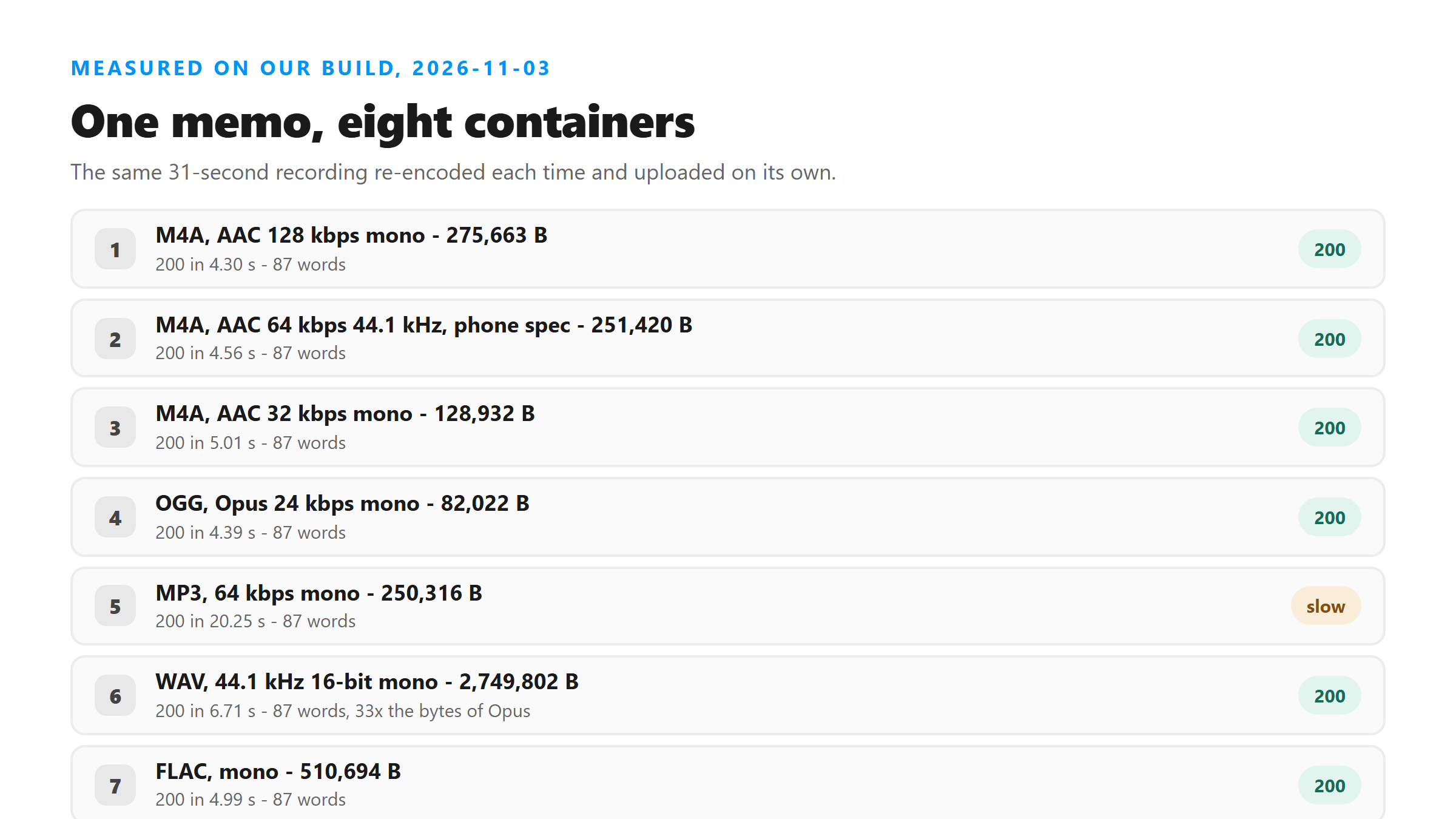
Same recording, same 31.18 seconds, re-encoded each time and uploaded on its own. The text below is what came back. Seven of the eight returned the same 87 words, and the differences between them are all in size and speed, not in accuracy.
- M4A, AAC 128 kbps mono 16 kHz - 275,663 bytes: 200 in 4.30 s, 87 words.
- M4A, AAC 64 kbps mono 44.1 kHz, the spec a phone recorder writes - 251,420 bytes: 200 in 4.56 s.
- M4A, AAC 32 kbps mono, what you get after a share re-encodes it - 128,932 bytes: 200 in 5.01 s.
- MP3, 64 kbps mono - 250,316 bytes: 200 in 20.25 s, same 87 words.
- OGG, Opus 24 kbps mono - 82,022 bytes: 200 in 4.39 s.
- WAV, 44.1 kHz 16-bit mono - 2,749,802 bytes: 200 in 6.71 s.
- FLAC, mono - 510,694 bytes: 200 in 4.99 s.
- 3GP, AAC 32 kbps 8 kHz - 137,722 bytes: HTTP 400 in 0.07 s, no text at all.
The one that gets refused
The .3gp file never reached the transcription step. It came back 400 in 0.07 seconds with this message: "Unsupported file format. Please select MP3, WAV, M4A, AAC, OGG, FLAC, MP4, MOV, or WEBM." That's an extension check at the door, not a judgment about the audio - the same AAC audio in an .m4a wrapper sailed through.
- Accepted: MP3, WAV, M4A, AAC, OGG, FLAC, MP4, MOV, WEBM.
- Refused: 3GP, in 0.07 s, with the file's contents never decoded.
This matters more than it sounds, because .3gp and .amr are still the default output of a lot of Android voice recorder apps, and old phones hand them out without asking. If your memo ends in .3gp, .amr or .mkv, the fix isn't better audio. It's putting the same audio in a container on the list above.
Size doesn't buy accuracy
The WAV copy was 33 times bigger than the Opus copy - 2,749,802 bytes against 82,022 - and both returned the same 87 words. The WAV was also slower, 6.71 s against 4.39 s. Nothing in the text improved to pay for those extra 2.6 MB.
- Opus 24 kbps: 82,022 bytes, 4.39 s, 87 words.
- AAC 64 kbps: 251,420 bytes, 4.56 s, 87 words.
- WAV 44.1 kHz: 2,749,802 bytes, 6.71 s, 87 words.
- One difference did show up: the WAV and FLAC copies ended "That is everything for now. I will record" with a period, where the lossy copies used a comma there.
How long a memo can be
Length behaves the way you'd hope. We ran the memo at three lengths, all as 64 kbps mono MP3. The words scaled with the seconds and nothing fell over, though the longest file did produce one odd block.
- 31 s - 250,316 bytes: 200 in 4.74 s, 87 words.
- 2 min - 961,100 bytes: 200 in 18.22 s, 335 words.
- 10 min - 4,801,004 bytes: 200 in 94.24 s, 1,681 words.
That 10-minute file was the same memo looped end to end, and one stretch of it came back as "Thank you very much for joining us today" repeated - text nobody said. Looped, repetitive audio is the shape that triggers that. A normal 10-minute memo won't do it, but if you see a sentence you don't recognize repeated three times, that's the tell, and the words around it are the ones to re-check.
What to do with a file that gets refused
You don't need to re-record. Any converter that can rewrite the container will do it, and the audio itself can stay exactly as it is. Keep it mono if you can - the memo is one voice, and mono halves the bytes for the same words.
- Share the memo again and pick a different format if the app offers one.
- Run it through a converter and save as .m4a or .mp3.
- Keep the sample rate at 44.1 kHz or lower; 16 kHz worked here too.
- Don't bother with WAV unless you already have one - it costs bytes and buys nothing.
What a phone recorder actually writes
The file you're holding depends on the app. iPhone's recorder writes mono AAC inside an .m4a, at 44.1 kHz and roughly 64 kbps - the second row in the ladder above. Android is less uniform, and that's where the refusals come from.
- iPhone Voice Memos: .m4a, AAC, mono - accepted, 4.56 s for a 31-second memo.
- Android, recent recorder app: .m4a or .mp3 - both on the accepted list.
- Android, older or built-in recorder: .3gp or .amr - refused, because the extension isn't accepted.
None of that is about quality. A 32 kbps AAC memo and a 24 kbps Opus memo returned the same 87 words as a 2.7 MB WAV. Choose the container to get through the door, not to chase accuracy.
One slow upload
The MP3 copy took 20.25 seconds, where every other copy finished between 4.30 and 6.71. Same audio, same 87 words, almost the same byte count as the AAC copy next to it. We saw it once, so treat it as one observation rather than a rule - but it's a reminder that the number on screen isn't only about size or length.
The one mark that moved
Seven of the copies ended "That is everything for now, I will record" with a comma. The WAV and the FLAC copies closed that clause with a period instead, which split it into two sentences. The words are identical. When you compare output across formats, expect differences of that size - a mark, not a word.
We've seen the same thing on other lossless uploads, which fits the pattern: whatever the encoder throws away at 24 or 32 kbps doesn't reach the punctuation either way. The change is small enough that it only shows up when you read two transcripts side by side.
What happens to the file
Your memo is posted to /api/transcribe over an encrypted connection, held in memory while it's processed, and dropped once the text goes back to your browser. Nothing is stored, nothing trains a model, and no account is involved. The text is also not saved for you, so copy it out before you close the tab.
- Uploaded: yes, it leaves your phone or laptop.
- Written to a disk: no.
- Kept after the reply: no.
- Account required: none.
Getting the words out
Two things are worth doing once the text is on screen. Numbers come back rewritten as digits - "the fifteenth" arrived as the 15th and "two hundred and eight dollars" as $208 - so check any figure you plan to act on. And there are no timings in the text, so if you need captions you build them from the finished text yourself.
- Check every number against the memo before you use it.
- Add paragraph breaks yourself; the model writes one block.
- Build SRT or VTT timings after, not before.
- Copy the text out - the page doesn't keep a copy for you.
Got a Reel you want as text? Upload the file and download the transcript as TXT, SRT, or VTT →
If your recorder wrote .3gp or .amr, the audio is fine - the wrapper isn't. Wondershare UniConverter rewrites the same recording as .m4a or .mp3 on your own machine, no re-recording needed, and you can keep it mono so the file stays small. It does not transcribe - upload the new file here for the words.
FAQ
Will my iPhone voice memo work?
Yes. The file a phone recorder writes is mono AAC in an .m4a wrapper, and that exact spec - 64 kbps, 44.1 kHz, 251,420 bytes for a 31-second memo - came back 200 in 4.56 seconds here. You can upload it without converting anything.
Why was my .3gp file rejected?
The endpoint checks the file extension before it reads any audio, and 3GP isn't on the list. It returned HTTP 400 in 0.07 seconds with "Unsupported file format". The list is MP3, WAV, M4A, AAC, OGG, FLAC, MP4, MOV and WEBM. Put the same audio in one of those and it goes through.
Does a bigger audio file give a better transcript?
No. A 2,749,802-byte WAV and an 82,022-byte Opus file of the same memo returned identical text. The WAV took longer, 6.71 seconds against 4.39. The only difference we saw was one comma that became a period in the lossless copies.
How long can a voice memo be?
We tested 31 seconds, 2 minutes and 10 minutes. All three returned 200: 87 words in 4.74 s, 335 words in 18.22 s and 1,681 words in 94.24 s. The size limit is what stops you - about 16 MB - not the length, so a 10-minute memo at 64 kbps fits comfortably at 4.8 MB.