Audio File to Text: What a Damaged File Does to the Transcript
The ten files
One spoken sentence, "Send the invoice to the main office before Friday morning.", written as a 128 kbps MP3 of 62,828 bytes. That's the control. Nine others are that file damaged in a specific way, plus two that aren't damaged at all - only misnamed or truncated in a different container.
- intact: 62,828 bytes.
- truncated to 60% of its bytes: 37,696.
- truncated to 25%: 15,707.
- first 200 bytes overwritten with zeros: 62,828.
- zero bytes: 0.
- 500,000 bytes of random data appended: 562,828.
- plain text saved as .mp3: 760.
- a WAV file renamed .mp3: 121,422.
- the same sentence as WAV, truncated to 40%: 48,568.
- only the first 200 bytes of the MP3: 200.
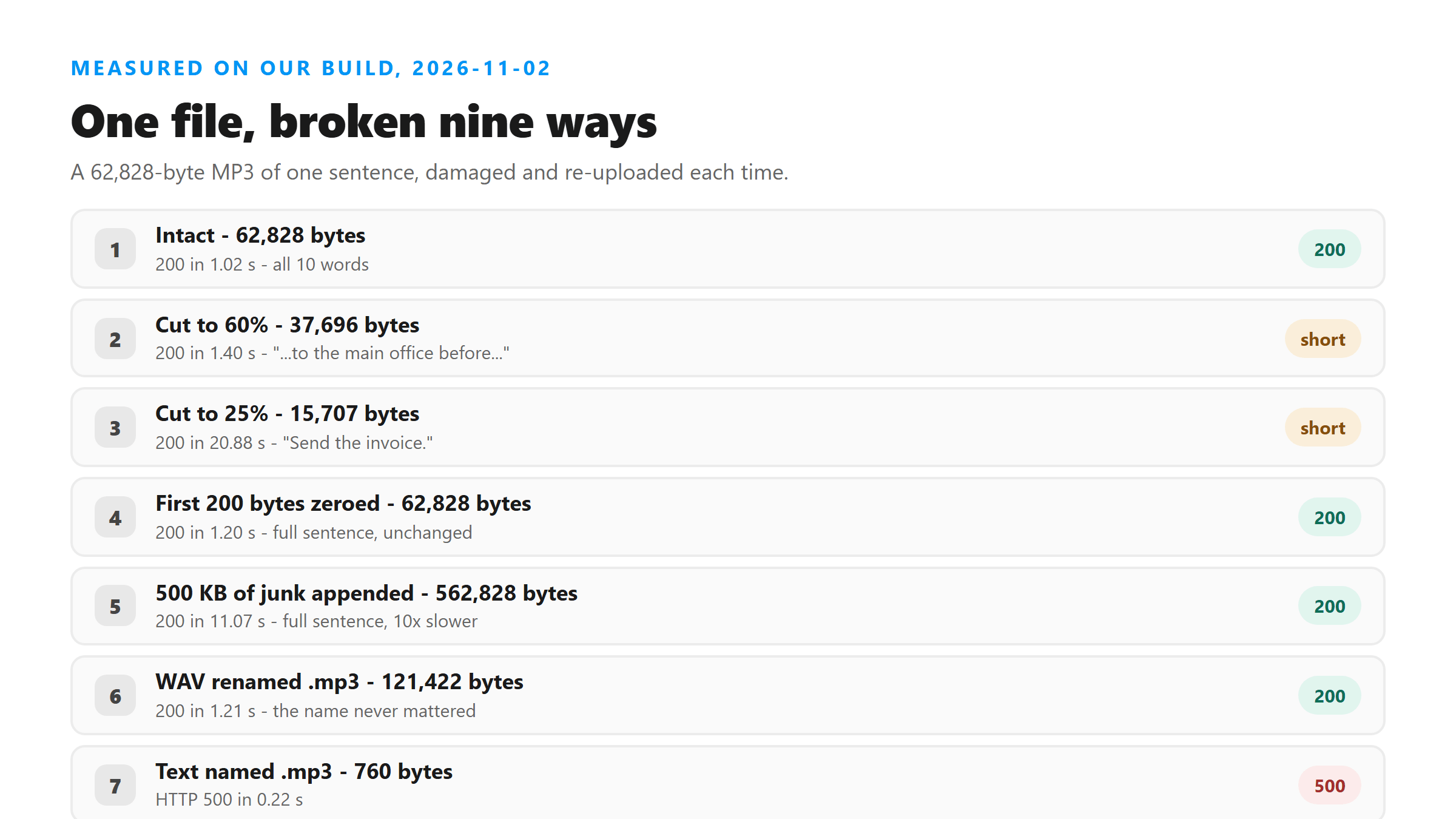
Truncation: the text just stops
A cut file doesn't error. It returns whatever words fit in the bytes that survived, then stops mid-sentence. There's no warning in the response, which makes this the easiest failure to miss if you're skimming. The WAV behaved the same way as the MP3, so this isn't about the container.
- MP3 at 60%: "Send the invoice to the main office before..."
- MP3 at 25%: "Send the invoice."
- WAV at 40%: "Send the invoice to the main..."
- intact: "Send the invoice to the main office before Friday morning."
A zeroed header doesn't matter here
We overwrote the first 200 bytes of the MP3 with zeros and got the full sentence back, identical to the control, in 1.20 seconds. An MP3 is a chain of independent frames rather than one block with a header, so the decoder resynchronizes on the next valid frame and carries on.
The same logic explains the junk on the end. Appending 500,000 random bytes left the words untouched. It did cost time: that upload took 11.07 seconds against 1.02 seconds for the clean file.
The three files that get refused
Refusals come from emptiness and from bytes that can't be read as sound. The zero-byte file never gets past the door. The other two got in on their names and then couldn't be decoded.
- 0 bytes: HTTP 400, "Please select a non-empty audio or video file."
- 200 bytes cut from the front of the MP3: HTTP 500, "Transcription failed. Please try another supported file."
- 760 bytes of ASCII text named .mp3: HTTP 500, "Transcription failed. Please try another supported file."
How long each upload took
Damage that doesn't break the words can still slow things down, and two runs were slow for no reason we could pin on the file itself.
- intact, 62,828 bytes: 1.02 seconds.
- zeroed header, 62,828 bytes: 1.20 seconds.
- WAV named .mp3, 121,422 bytes: 1.21 seconds.
- truncated to 60%: 1.40 seconds.
- 500 KB of junk appended: 11.07 seconds.
- truncated to 25%: 20.88 seconds.
- WAV truncated to 40%: 23.25 seconds.
- plain text named .mp3: 0.22 seconds, then HTTP 500.
- 200-byte sliver: 0.18 seconds, then HTTP 500.
- zero bytes: 0.14 seconds, then HTTP 400.
A wrong extension doesn't fool anything
We renamed a WAV to .mp3 and uploaded it. It came back with the full sentence in 1.21 seconds, same as the control. The endpoint goes by the bytes, not the name, so a mislabeled file that plays fine will upload fine.
By the same rule, fixing a wrong extension won't rescue a file whose contents are broken. The name was never the problem - the 200-byte sliver had the right name and still failed.
How to tell damage from a bad recording
These two look similar in the output and need different fixes, so it's worth thirty seconds to tell them apart before you re-upload.
- Plays fine, transcript stops early: the file was cut. Get the original again.
- Won't play at all: the file is broken or empty. Re-export it from the source.
- Plays, but the words are wrong: that's the audio, not the file. No re-upload will fix it.
What to check before you upload again
Run through these in order. They're cheap, and they cover every failure we saw across ten uploads.
- Play the file. If your player can't read it, neither can this.
- Check the size. A file that's 0 bytes gets a 400 before anything else happens.
- Compare against the original. Smaller than it should be means the transcript will stop early instead of failing.
- Watch how long the upload takes. Junk on the end still works - it just drags.
What happens to your file here
Your file does leave your browser. It goes over an encrypted POST to /api/transcribe, sits in memory for one pass, and is discarded the moment the response is written. We don't keep it, we don't use uploads for training, and there's no account attached to any of it.
Why truncation is worse than a clean failure
A 500 is obvious: nothing comes back, you go get the original. A truncated file hands you a transcript that looks finished and isn't. "Send the invoice." reads like a complete sentence, and the three words after it are simply gone.
If a transcript matters, compare two numbers before you use it: how long the file is, and how many words came back. Our 62,828-byte file at full length gave 10 words in 1.02 seconds. At 25% it gave 3.
Limits of this test
Ten files, one sentence, two containers. We didn't test OGG, M4A or FLAC, we didn't corrupt the middle of a file rather than the ends, and we ran every upload from the same network. The shape of the result should hold: content beats name, and partial bytes give partial words.
Got a Reel you want as text? Upload the file and download the transcript as TXT, SRT, or VTT →
Damage you can hear is damage you can usually fix, and re-encoding is that fix. Wondershare UniConverter opens a file your player chokes on and writes out a fresh MP3 or WAV on your own machine, which is what a zeroed header or junk on the end needed in our ten uploads. It does not transcribe, and it will not restore words a truncated file never carried.
FAQ
Will a truncated audio file still transcribe?
Yes, partly. Cut to 60% of its bytes, our MP3 returned "Send the invoice to the main office before...". Cut to 25%, it returned "Send the invoice." The text ends where the audio ends.
What error do I get for an empty file?
HTTP 400 with "Please select a non-empty audio or video file." It's refused before any processing happens.
Does a corrupted file header break the upload?
Not in our test. Zeroing the first 200 bytes of an MP3 returned the full sentence. MP3 frames are independent, so the decoder resyncs.
Does the file extension matter?
No. A WAV renamed to .mp3 transcribed normally, and a text file renamed to .mp3 still failed with HTTP 500. The endpoint reads the bytes.