What HTTP 422 Means When a Clip Has No Speech
What 422 is wired to
There is exactly one place in our Worker that returns 422. After the model runs, the code trims the text it got back, and if what is left is an empty string it answers: "The model returned no transcript. Check that the file contains audible speech." That is the whole condition. It is not a volume check, not a duration check, and not a format check.
So 422 needs the model to come back with literally nothing. Anything else - a real word, a wrong word, one letter - takes the success path.
Fifteen ways we tried to get it
We built clips that a person would call silent or unusable and uploaded each one. Times are end to end, upload included.
- 0 bytes, named .mp3: HTTP 400 in 0.43 s - "Please select a non-empty audio or video file."
- 0.05 s of speech: HTTP 200 - "Thank you very much" repeated
- 0.1 s of speech: HTTP 200 - "You"
- 0.2 s of speech: HTTP 200 - "Thank you."
- 0.5 s of speech: HTTP 200 - "Hello."
- 1 s of speech: HTTP 200 - "Hello everyone!"
- 3 s of a 440 Hz tone: HTTP 200 - "Thank you so much for watching."
- 3 s of white noise: HTTP 200 - "I'll see you in the next video."
- 3 s of digital silence: HTTP 200 - "Thank you very much" repeated for 1,829 characters
- 3 s of a 20 Hz tone: HTTP 200 - "Thank you for watching."
- 5 s of speech at 0.001 volume: HTTP 200 - the real sentence
- 5 s of speech low-passed at 80 Hz: HTTP 500 after 120.70 s, then HTTP 200 on a retry in 6.07 s
- 5 s MP4 with no audio track: HTTP 500 in 0.48 s, and again in 0.79 s
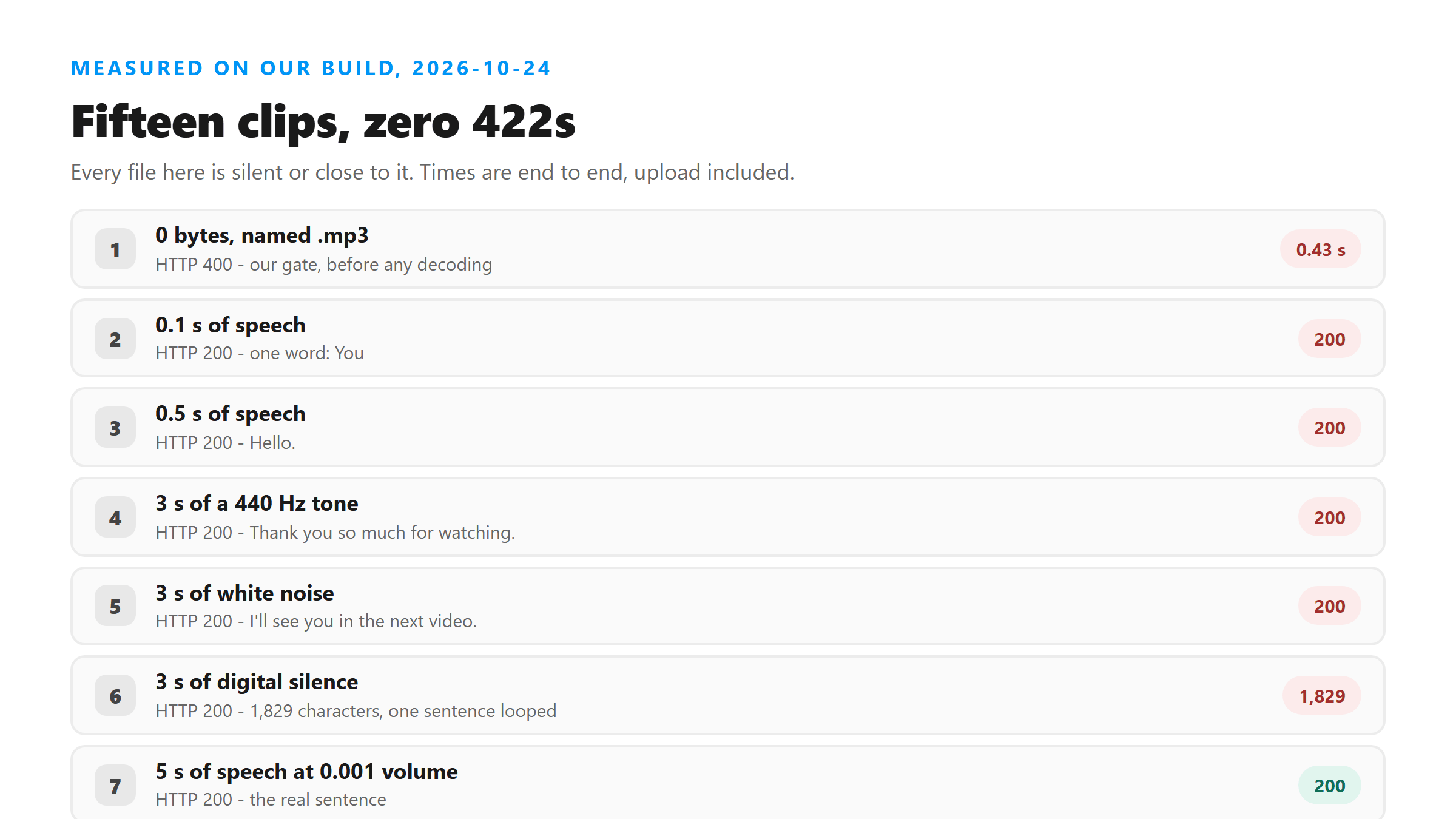
Zero 422s. Every clip that had any audio at all got a 200, and the model filled the empty space with words nobody said. A 0.1-second file came back as the single word "You". Three seconds of a plain sine wave came back as "Thank you so much for watching." Nothing in the response flags any of that as guessed.
The three codes, side by side
They come from three different places, and they do not mean the same kind of problem.
- 400 is our own gate, before any decoding. Empty file, or a file name we do not accept.
- 422 is the model returning an empty string. We could not trigger it today.
- 500 is our catch-all around the model call. A video with no audio track hit it twice in under a second.
Only one of the three is about speech at all, and it is the one you are least likely to see.
So what does a silent clip actually look like?
It looks like a successful transcript. Three seconds of pure silence returned 1,829 characters today - the same sentence, over and over, with success:true and no warning field. If you are checking whether a clip had speech in it, a 200 is not an answer.
The one test that works is arithmetic. Divide the character count by the length of the file in seconds. Real speech landed between 10 and 17 characters per second in our earlier runs. Our silent 3-second file came back at more than 600 characters per second, which is impossible for someone talking.
What to do instead of waiting for 422
Compare the transcript against the clip. Play five seconds, read those five seconds, and see whether the words are there. If the file is longer than a minute, run it through twice in two different encodings and diff the two texts - the parts that change are the parts the model was guessing at.
Got a Reel you want as text? Upload the file and download the transcript as TXT, SRT, or VTT →
Before you blame the words, check the file: a clip with no audio stream fails outright here, and a huge screen recording gets refused before it arrives. Wondershare UniConverter opens either one on your own machine and writes out a plain audio file in a container this endpoint reads. It does not transcribe - the text still comes from this page.
FAQ
Can a clip with no speech return HTTP 422?
It can, but we could not make it happen. We uploaded 15 speech-free or near-silent clips today and every one returned 200, 400 or 500. The 422 branch fires only when the model returns an empty string.
What should I do if I get a one-word transcript?
Treat it as no speech. Responses like "You" or "Thank you." came back from a 0.1-second slice and a 440 Hz tone today, both with success:true. Play the clip and confirm before you use the text.
Why does a video with no audio track fail?
It returns HTTP 500 with "Transcription failed. Please try another supported file." We saw it twice on the same file, in 0.48 s and 0.79 s. There is no sound stream for the model to read.
Is the 500 the same as a file being too big?
No. Our no-audio-track file was 4,029 bytes and failed in under a second. A size refusal from Cloudflare looks like HTTP 503 with error 1102, and it happens before the request reaches us.