Transcribe Video to Text: Why On-Screen Words Don't Count
The six files we uploaded
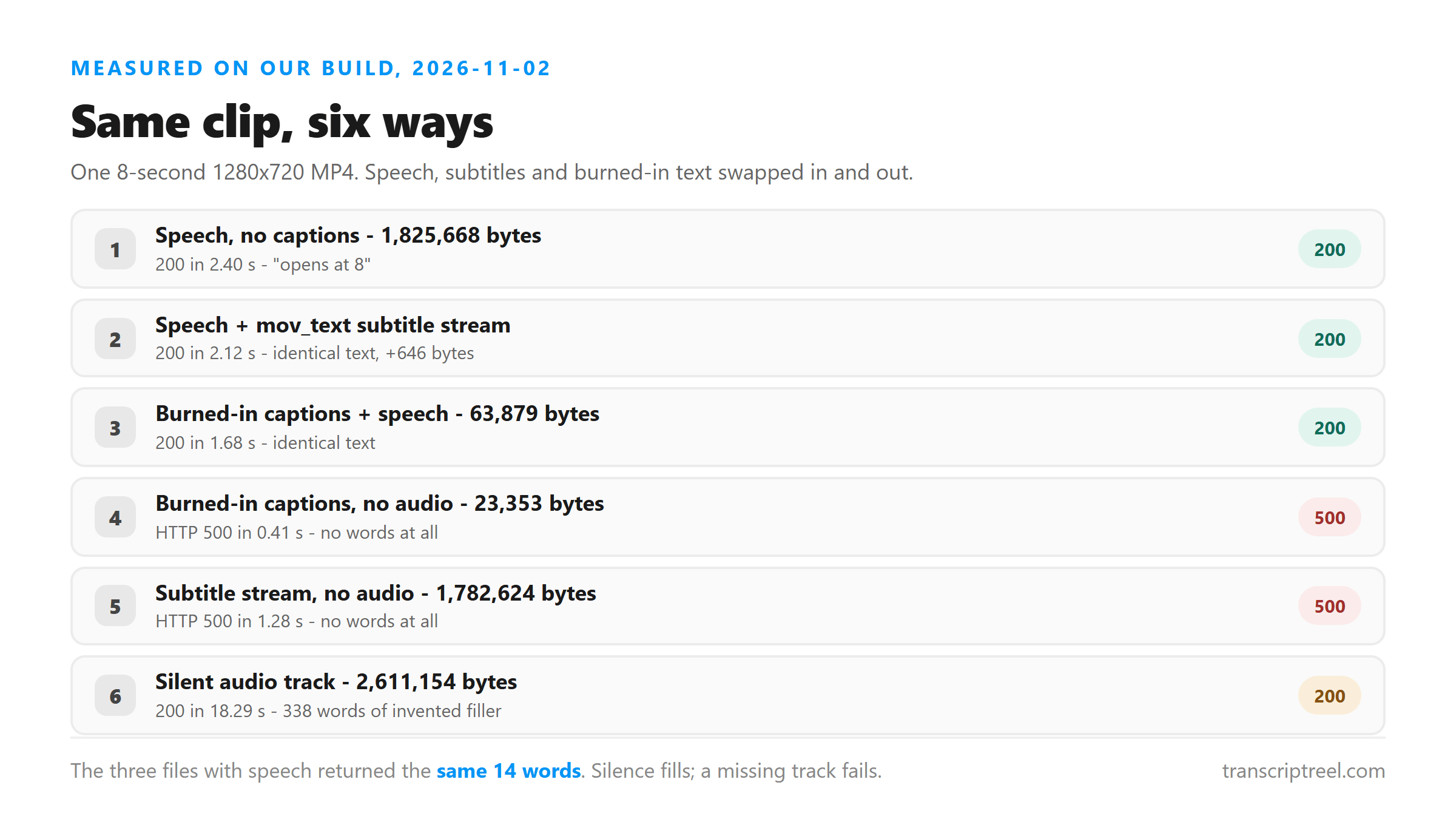
One script, two sentences, read by a synthesized US voice and written as 16 kHz mono WAV. We paired that audio with a 1280x720 test pattern at 24 fps and built six MP4s. Three carry the speech, one carries silence, and two carry no audio at all.
- a1: speech, no captions of any kind - 1,825,668 bytes.
- a2: the same video with a mov_text subtitle stream added - 1,826,314 bytes.
- a3: captions drawn into the picture, no audio track - 23,353 bytes.
- a4: the same burned-in captions, speech track kept - 63,879 bytes.
- a5: soft subtitle track, no audio track - 1,782,624 bytes.
- a6: plain picture, eight seconds of digital silence as the audio track - 2,611,154 bytes.
What the three files with speech came back with
All three returned the same string. The subtitle stream in a2 added 646 bytes to the file and changed nothing in the text. That's the useful part: a subtitle track riding inside your MP4 is dead weight here.
- a1: "The North entrance opens at 8. The parking lot fills before 9."
- a2: "The North entrance opens at 8. The parking lot fills before 9."
- a4: "The North entrance opens at 8. The parking lot fills before 9."
How long each one took
Five of the six finished in under three seconds. The two that failed were the fastest, because they never reached the model.
- a1, 1.83 MB: 2.40 seconds.
- a2, 1.83 MB: 2.12 seconds.
- a4, 64 KB: 1.68 seconds.
- a5, 1.78 MB, no audio: 1.28 seconds, then HTTP 500.
- a3, 23 KB, no audio: 0.41 seconds, then HTTP 500.
- a6, 2.61 MB of silence: 18.29 seconds.
Why burned-in text is the harder case
Burned-in captions are pixels. They're part of the picture, the same way a logo or a face is, and reading them back would take an OCR pass this pipeline doesn't run. Your upload goes to our endpoint, the audio track gets pulled out, and that audio is what reaches the model.
A soft subtitle track is closer. It's real text sitting in the container, not paint on the frame. But it isn't the kind of input the endpoint reads either, so it lands in the same place - ignored.
What happens when you take the audio out
Both files without an audio track failed, and they failed the same way. a3 had the two sentences painted across the bottom of every frame. a5 carried a properly muxed English subtitle stream with the same two lines. Neither produced a single word.
- a3 (burned-in captions, no audio): HTTP 500, "Transcription failed. Please try another supported file."
- a5 (subtitle stream, no audio): HTTP 500, "Transcription failed. Please try another supported file."
A silent track is not the same as no track
This is the part people get wrong. a6 had no speech, but it did have an audio track - eight seconds of pure digital silence. It came back HTTP 200 with 1,829 characters and 338 words, almost all of them "Thank you very much." repeated 29 times.
So silence doesn't fail. It fills. The model invents polite filler where there's nothing to hear, and you get a long transcript of a video that never said anything. Removing the track entirely gives you a clean 500 instead. If you're checking whether a video has usable audio, a short transcript isn't proof - read the words.
What's inside an MP4, and which part matters
A video file is a container with several independent streams in it, and only one of them feeds this endpoint.
- Video stream: never read. Nothing in the picture reaches the model.
- Audio stream: the only thing that gets transcribed.
- Subtitle stream: ignored, even when it's a properly muxed English track.
What to do with a video whose words are only on screen
The fix depends on which file you actually have. A mute video with burned-in captions and a mute video with a subtitle stream are two different problems, even though both fail the same way here.
- If there's a subtitle stream: pull it out with a container tool. You already have the text.
- If the words are burned in: play the video with the sound up and record the playback, or read the lines off the screen.
- If the video has speech at all: upload it as-is. The captions won't help and won't hurt.
What happens to your file here
Your file does leave your browser. It goes over an encrypted POST to /api/transcribe, gets held in memory for one pass, and is dropped as soon as the response is written. We don't keep a copy, we don't use uploads to train anything, and there's no account to tie them to.
Where this leaves the captions you already have
If you're chasing a transcript because a captions file is missing timings, start from what the platform gave you. A caption file is text someone already produced.
Running a video back through speech recognition to recover words that already sit in the container is the long way around. Our run shows the endpoint won't read those words even when they're right there.
How to check whether your video has an audio track
You don't need special tools. Open the file in any player and look at the volume meter while it plays. A moving meter means there's a track; a dead meter means there isn't one, and this endpoint will return a 500.
If the meter moves but the words look wrong, listen through headphones for ten seconds. A track can be present and useless - a laptop mic across the room, or a fan louder than the speaker. Those files succeed here and give you a transcript you can't use.
Limits of this test
Six files, one script, one synthesized voice, one container. We didn't test burned-in text in other languages, subtitle tracks in formats other than mov_text, or videos longer than eight seconds. The finding that holds across all six is the direction of the data: audio in, text out, picture ignored.
Got a Reel you want as text? Upload the file and download the transcript as TXT, SRT, or VTT →
When the words are only in the picture, what you need is the soundtrack, not the container. Wondershare UniConverter opens a video on your own machine and writes the audio out as its own file, which is the shape this endpoint reads - the picture never gets looked at either way. It does not transcribe and it cannot read burned-in captions - the words come back from this page.
FAQ
Will a transcript pick up text that's burned into the video?
No. We uploaded a clip with both caption lines painted into every frame and no audio track, and it came back HTTP 500. Reading pixels would take an OCR pass, and this pipeline doesn't run one.
Does an embedded subtitle track change the transcript?
No. The same video with a mov_text subtitle stream added returned an identical transcript, even though the file grew by 646 bytes.
Why does a video with no audio fail instead of coming back empty?
Because there's no audio for the model to run on. The endpoint returns HTTP 500 with "Transcription failed. Please try another supported file." rather than an empty string.
What happens if I upload a video whose audio is silent?
It succeeds, and that's the trap. Our silent 8-second clip returned 338 words - "Thank you very much." repeated 29 times. Check the words, not the length.