Video to Text Converter: Which Audio Track Gets Read When There Are Two
Five files, two tracks each
Every file below is 4.05 seconds of 320x240 video with two separate AAC audio streams in it. Track one says "The blue folder is on the second shelf next to the printer." Track two says "Send the invoice to the accounting team before Friday morning." Only one of those sentences ever comes back.
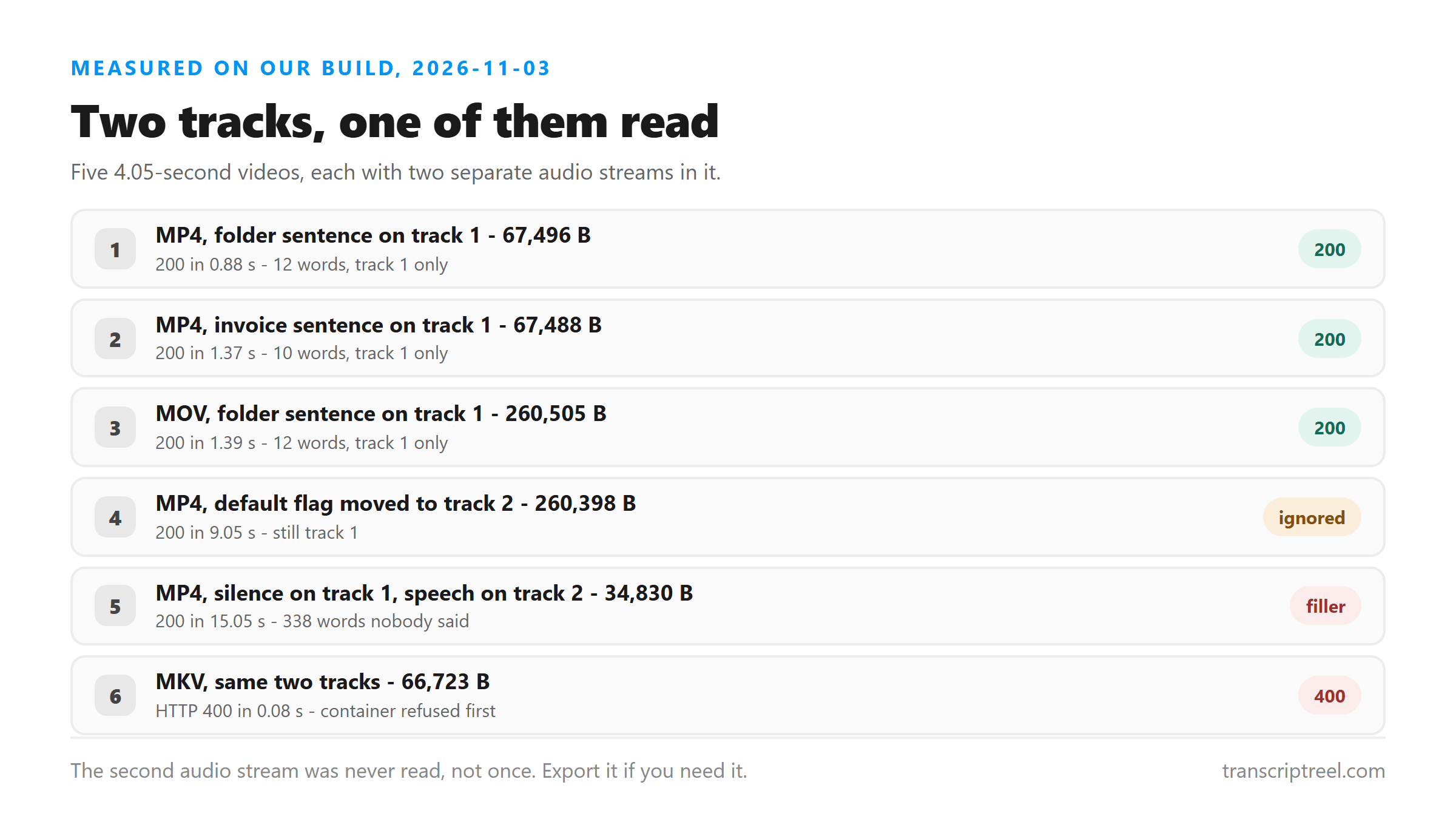
- MP4, folder first - 67,496 bytes: 200 in 0.88 s, 12 words, the folder sentence only.
- MP4, invoice first - 67,488 bytes: 200 in 1.37 s, 10 words, the invoice sentence only.
- MOV, folder first - 260,505 bytes: 200 in 1.39 s, 12 words, the folder sentence only.
- MP4, default flag moved to track two - 260,398 bytes: 200 in 9.05 s, 12 words, still track one.
- MP4, silence on track one and the invoice on track two - 34,830 bytes: 200 in 15.05 s, 338 words of filler.
The default flag doesn't decide it
Plenty of players pick an audio track by whichever stream is marked default, so we tested that. We cleared the flag on the first stream and set it on the second, then uploaded. The reply was still the 12 words from track one, and the request took 9.05 seconds - six times longer than the same file without the flag change.
- Default flag on track one: 12 words from track one.
- Default flag moved to track two: 12 words from track one.
- Conclusion: the flag is ignored. Position in the file is what counts.
So if your video came out of an editor with a commentary track first and the interview second, you don't get both and you don't get a choice. You get the commentary. The fix is to make a copy with only the track you want before you upload it.
A silent first track is worse than a missing one
This is the failure worth knowing about. We put 4.05 seconds of digital silence on track one and the invoice sentence on track two. The endpoint didn't fall through to the second track. It read the silence and filled it: 338 words came back, and they were "Thank you very much" and "I'm sorry" repeated over and over, in 15.05 seconds.
- Silent track one, speech on track two: 338 words, none of them spoken by anyone.
- Same words appeared in earlier runs on silent audio, so this is the model's filler, not your file's.
- A video with no audio track at all fails fast instead - HTTP 500 in well under a second.
The practical test is simple. If a short clip comes back with a long, polite, repeated sentence, look at the audio tracks before you look at anything else. Nothing in that text came from your file, and the sentence you wanted is sitting on a stream nothing read.
The container gets checked before the tracks
We built the same two-track file as .mkv and uploaded it. It came back HTTP 400 in 0.08 seconds, with "Unsupported file format. Please select MP3, WAV, M4A, AAC, OGG, FLAC, MP4, MOV, or WEBM." The audio was identical to the MP4 that worked. The file never got far enough for a track to matter.
- MP4 with two tracks: read, 200.
- MOV with two tracks: read, 200.
- MKV with the same two tracks: refused, 400 in 0.08 s.
The timings show the order of operations. The MKV was refused in 0.08 seconds, far too fast for any audio to have been decoded. The file with a silent first track ran 15.05 seconds before it answered, because that one was read - there was simply nothing in it.
How to get the track you want
You can't select a track on this page. There's no dropdown and no setting. The way to get a specific audio stream transcribed is to pull it out first and upload that on its own, which any desktop converter will do in a couple of clicks.
- Find out which track has the speech - most players list them under audio or streams.
- Export or remux that track alone as MP3, M4A or WAV.
- Upload the extracted audio, not the video, if the picture isn't needed.
- If you must keep the video, re-encode it with only the wanted track as MP4 or MOV.
Why a video has two tracks at all
Two audio streams are more common than people expect. A screen recorder writes your microphone on one stream and the computer's sound on another. A dubbed clip carries the original language and the dub. An editor exports a commentary track next to the interview. In each case the track you want may not be the one that comes first.
- Screen recording: microphone on one stream, system audio on the other.
- Dubbed video: original language and dub, side by side.
- Edited export: commentary, music bed, or a second camera's audio.
How to tell which track comes first
You don't need special software. Most desktop players list the streams under an Audio or Streams menu, in file order. Command-line tools print them the same way - first audio stream, then second - and that order is what decided every result on this page.
- Open the file's properties or the player's audio menu and read the list top to bottom.
- The first entry in that list is the one that gets transcribed.
- If the speech is on the second entry, export it on its own before uploading.
What we didn't test
Three things are outside these results. We used two tracks per file, not three or four, so we can't say what happens with more. Both tracks were in English, so a second language on the second track is untested. And we only tried three containers - MP4, MOV and MKV - of which MKV was refused before the tracks were read.
- More than two audio tracks: not tested.
- Two tracks in different languages: not tested.
- Containers other than MP4, MOV and MKV: not tested.
Before you upload
Two minutes of checking saves a repeat upload. Find out how many audio streams the file has, which one holds the speech, and whether the container is on the list. Then send the smallest file that carries the track you want.
- Count the audio streams - more than one means only the first will be read.
- Confirm the container is MP4, MOV or WEBM; MKV is refused in under a second.
- If the speech sits on a later stream, export it as MP3 or M4A and upload that.
- Keep the picture only if you need it - the video track adds bytes and no words.
That last point is worth repeating, because people treat audio-only as a downgrade. It isn't. Every sentence on this page came out of an audio stream, and dropping the picture never changed a word of the result.
What happens to the file
Your video is posted to /api/transcribe over an encrypted connection, decoded in memory, and dropped once the text is on its way back. Nothing is stored and nothing is used for training. There's no account, so there's no history to come back to - copy the text out while it's on screen.
- Uploaded: yes, the file leaves your machine.
- Written to a disk: no.
- Kept after the reply: no.
- Account required: none.
Got a Reel you want as text? Upload the file and download the transcript as TXT, SRT, or VTT →
Only the first audio stream gets read here, so the track you want either has to be first or has to be on its own. Wondershare UniConverter writes a video's audio out as its own MP3 or M4A file on your own machine, which is the shape this endpoint reads. It does not transcribe and it can't choose a track for you - the words come back from this page.
FAQ
Can a video to text converter read both audio tracks?
Not this one. We uploaded five two-track files and every reply contained the first track's words only. Moving the default flag to the second stream changed nothing - the first stream still came back. If you need both, export each track and upload them separately.
Why did my video come back with "Thank you very much" over and over?
Because the audio stream that got read had no speech on it. In our test a silent first track with real speech on the second produced 338 words of repeated filler in 15.05 seconds. The model fills silence with text it has learned. Extract the track that actually has the words and upload that.
Does MKV work?
No. A two-track MKV came back HTTP 400 in 0.08 seconds with "Unsupported file format". The accepted containers here are MP4, MOV and WEBM, plus the audio types MP3, WAV, M4A, AAC, OGG and FLAC. The same audio in an MP4 wrapper was read fine.
Do I lose quality if I upload just the audio?
No, and it's usually faster. The text comes from the audio stream alone, so the picture adds bytes without adding words. Our 67,496-byte MP4 and the audio-only version of the same content returned the same sentence; the video track only changes how long the upload takes.