Six Files at Once: What Our Endpoint Does Under Load
Six in a row, then six together
We made six 10-second clips, 80,972 bytes each, each with a different sentence, then uploaded them two ways. First one after another, waiting for each response. Then all six at once from six parallel connections.
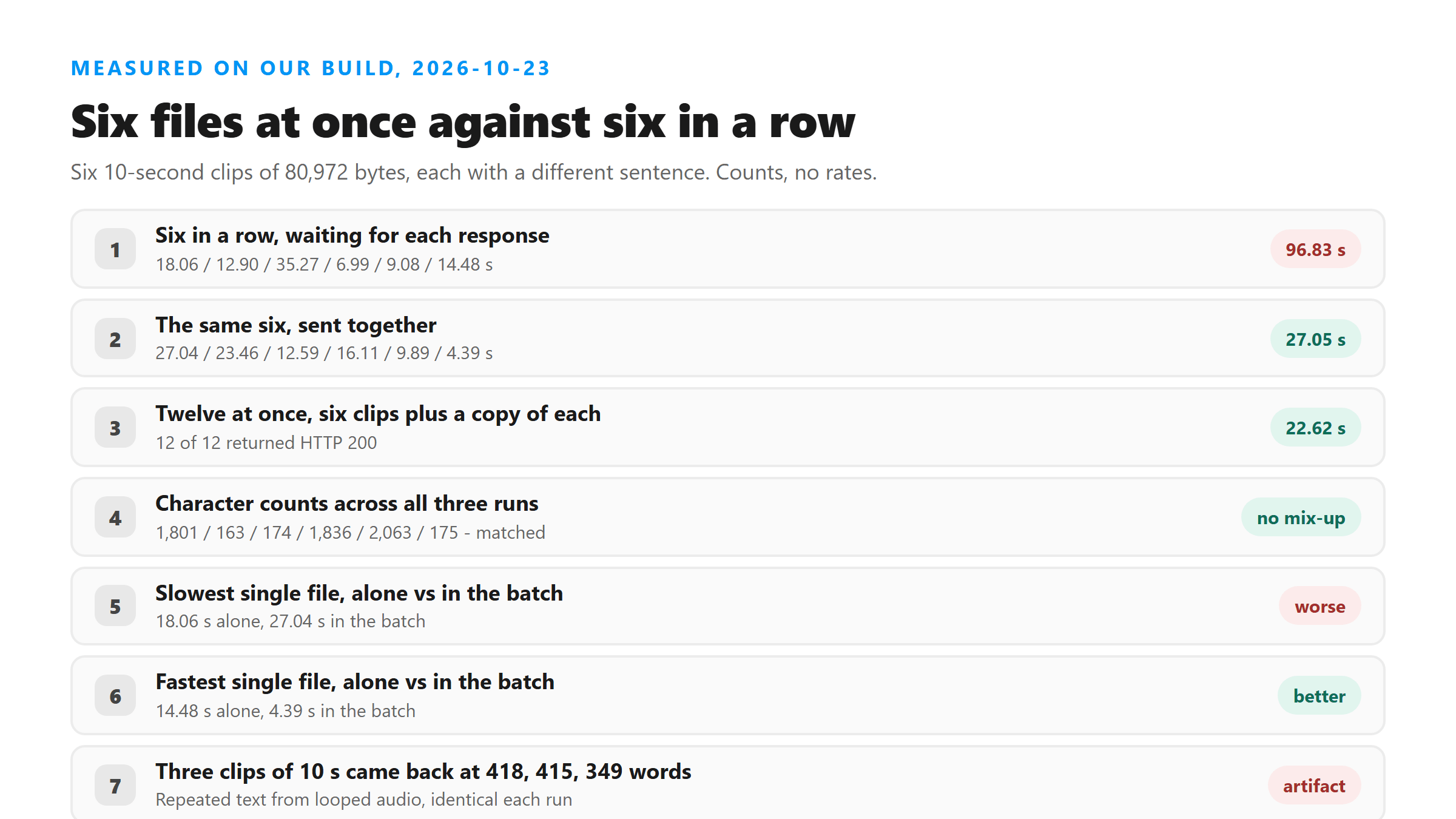
- One at a time: 18.06, 12.90, 35.27, 6.99, 9.08 and 14.48 seconds. Batch wall clock 96.83 s.
- Six at once: 27.04, 23.46, 12.59, 16.11, 9.89 and 4.39 seconds. Batch wall clock 27.05 s.
- Every one of the twelve uploads returned HTTP 200. No 4xx, no 5xx, no retry.
That's the number people ask about: 27.05 seconds against 96.83 seconds for the same six files. If you're working through a folder of clips, one at a time is the slow part, not the model.
Nothing got crossed over
The thing that would break a batch tool is mixing files up - giving you clip three's words under clip one's name. We checked the character and word counts from all three runs. They matched file by file, every time: 1,801 characters and 418 words, 163 and 32, 174 and 33, 1,836 and 415, 2,063 and 349, 175 and 33. The opening words matched too, and each one was its own sentence.
So the endpoint doesn't blend requests. Each upload carries its own file, gets its own model call, and brings back its own text. The response carries the file name you sent, which is how you can tell which is which when six come back in a different order than they went in.
The trade is per-file latency
Batching is not free. The first clip took 18.06 seconds alone and 27.04 seconds in the batch - about half again as long. Another went the other way: 14.48 seconds alone, 4.39 seconds in the batch. There's no pattern to which file gets slower, so don't plan around it.
What this means in practice: the whole batch lands sooner, but you can't promise when any single file lands. If you need one transcript right now, send that one file. If you need twenty by lunch, send twenty.
Twelve at once still came back clean
We doubled it. Twelve uploads at once - the same six clips plus a copy of each - returned 12 for 12 at HTTP 200, and the batch finished in 22.62 seconds, a little faster than the six-file run. Per-file times ran 3.64 to 22.56 seconds. Character and word counts matched the earlier runs exactly.
We didn't find a wall at twelve, and we're not going to claim there isn't one further out - we stopped at twelve, and a queue limit you haven't hit yet isn't a limit you've cleared. If you're scripting something bigger, back off and retry on a failure rather than assuming the number scales.
Why the batch is faster
A single upload spends most of its wall clock waiting: the file goes up, the model runs, the text comes back. Run six in a row and you pay that waiting six times over, back to back. Run them together and the waiting overlaps - which is exactly what the totals show, 27.05 seconds for six files against 96.83 seconds for the same six one at a time.
The part that doesn't overlap is the model itself, and that's why per-file times stretch. You're not getting six calls for the price of one; you're getting six calls in parallel instead of in a queue, and the batch finishes when the slowest one is done rather than after all six have had their turn.
Match each response to its own file
Twelve responses don't come back in the order you sent them. The response carries six fields, and one of them is the file name you uploaded - so save each result next to that name instead of trusting the order they land in. If you're scripting this, key the results on the name and sort afterwards.
If one upload fails, retry that file on its own. We saw no failures today, so this is a rule for when you do: a single retry tells you whether the file is the problem or the batch was, and it costs one upload either way. Resending all twelve to fix one bad file is the expensive move.
What we're not claiming
Three of the six clips came back far longer than a 10-second clip can hold - 418, 415 and 349 words of repeated text. That's the loop artifact: our test audio is the same short sentence on repeat, and a speech model with nothing new to hear starts repeating itself. It came back identical in all three runs, which is why the load comparison still holds, but don't read those counts as accuracy.
Two more honest limits. Each upload is still one file with its own size ceiling - a batch doesn't raise it, because every file gets decoded on its own. And the upload box on the page takes one file at a time, so six at once means six tabs or a script that posts to the endpoint directly. If you're choosing a tool rather than running your own batch, the label matters more than the throughput - see what an instagram transcript generator actually promises before you trust a queue number.
How to run your own batch
Keep the files separate and keep the names. Post each file to the endpoint, save each response next to the name you sent it, and don't sort the results - twelve parallel responses come back in whatever order they finish. If one fails, retry that one alone instead of resending the batch. And check the counts afterwards: a response that's twice as long as the clip can hold is repetition, not content.
Got a Reel you want as text? Upload the file and download the transcript as TXT, SRT, or VTT →
Six at once saves waiting, but each file still has to be small enough and in a container this endpoint reads. Wondershare UniConverter converts a folder of clips on your own machine and writes out the audio alone, which is what keeps every upload under the size gate. It does not transcribe - the words come back from here.
FAQ
Can I upload more than one file at a time?
The upload box takes one file at a time, so a batch means several tabs or a script posting to the endpoint. We measured six at once at 27.05 seconds against 96.83 seconds in a row, and twelve at once at 22.62 seconds, 12 of 12 successful.
Do files get mixed up when you send several at once?
Not in our tests. All six clips returned the same character and word counts they returned on their own - 1,801 / 163 / 174 / 1,836 / 2,063 / 175 characters - across three separate runs, including the twelve-file run.
Is there a limit to how many files I can send at once?
We got 12 for 12 at HTTP 200 and stopped there. We didn't find a wall at twelve, and we're not claiming there isn't one higher up - we didn't test past it. Retry a failed upload on its own rather than pushing more through.
Why is one file slower in a batch?
Per-file latency moves around under load with no pattern we could find. One clip went from 18.06 seconds alone to 27.04 seconds in the batch; another went from 14.48 seconds to 4.39. The batch total is what improves, not any single file.