What Free vs Paid Actually Means for Instagram Transcript Tools
Paid Instagram transcript tools rarely sell you better recognition. What they sell is everything wrapped around it: timestamps and subtitle files, speaker labels, batch processing, an API, a larger file ceiling, and a history you can come back to. The words themselves usually come off the same kind of model either way. Below is what we measured on our own build today, and the parts a free tool genuinely cannot give you.
What paid plans actually sell
Free and paid tools in this space tend to run the same family of speech models. The differences that show up on a pricing page are almost never about the recognizer:
- Timestamps and cue files: per-line or per-word timing, exported as SRT or VTT.
- Speaker labels: who said which line, which has to be produced as a separate step.
- Batch and API access: drop a folder of files, or call an endpoint from your own code.
- A higher ceiling: longer or larger files than a free upload form will accept.
- History: your uploads are kept so you can return to them. That is also a retention decision, not only a feature.
- Support and uptime: someone answers when a job fails overnight.
What we measured today: 86 uploads in one sitting
These numbers are from this morning, against our own /api/transcribe endpoint, timed end to end with the upload included. They are not an estimate of anyone else's service.
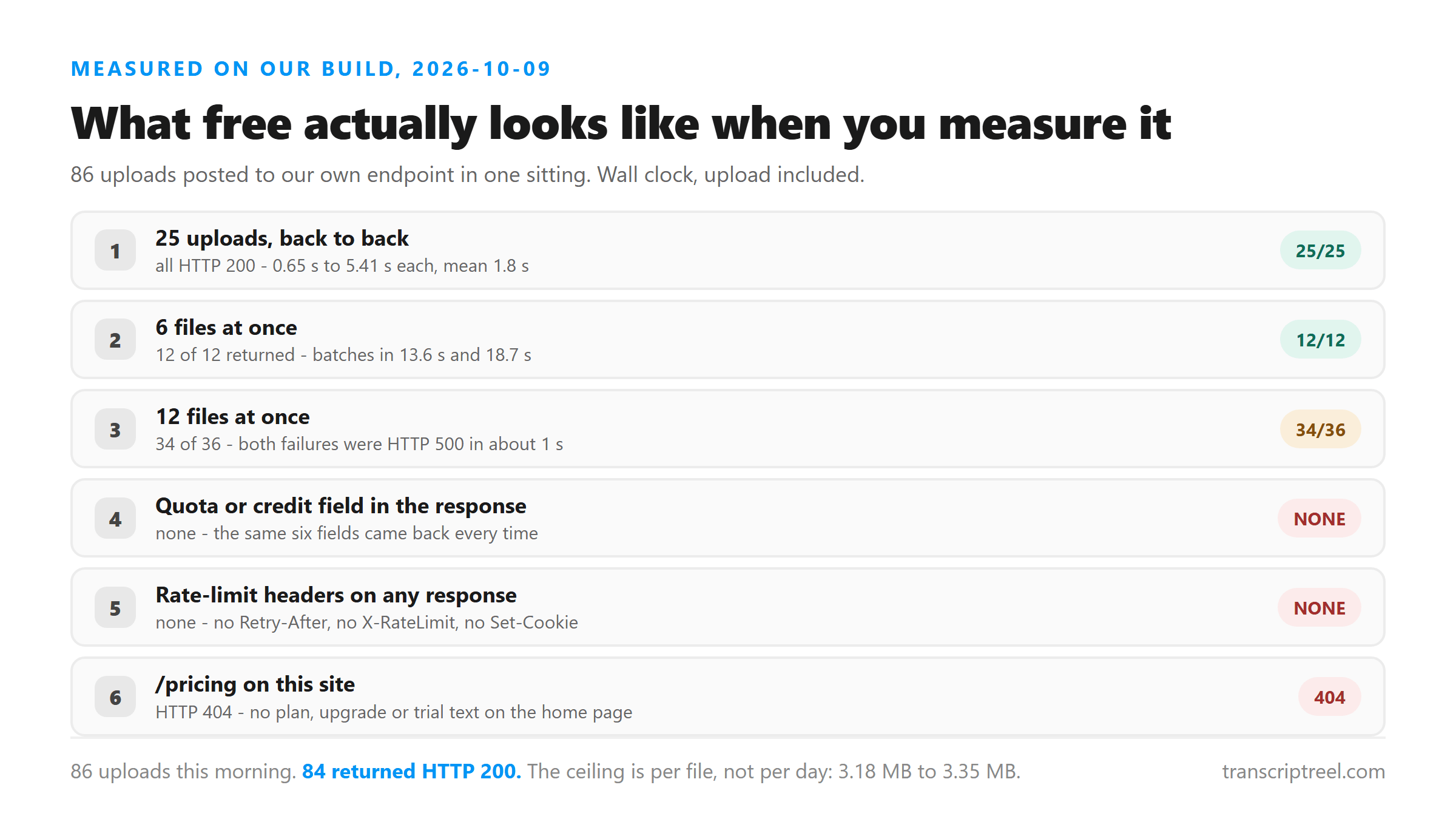
- 25 uploads back to back (10-second clip, 31 KB): 25 returned HTTP 200, between 0.65 s and 5.41 s each, mean 1.8 s. The whole burst took about 45 seconds.
- Six at once: 12 of 12 returned, batches finishing in 13.6 s and 18.7 s. Four at once: 8 of 8. Two at once: 4 of 4.
- Twelve at once: 34 of 36 across three batches. Both failures came back as HTTP 500 in about one second, which is a fast refusal rather than a timeout.
- The response never changed shape: six fields on every call, success, transcript, language, engine, fileSize and fileName. No quota field, no credits, no remaining count.
- No rate-limit headers either: no
Retry-After, noX-RateLimit-*, and noSet-Cookieon any response we kept. - Parallel runs returned identical text: the 30-second file came back as the same 2,209 characters every time it succeeded.
Where free genuinely stops
Two ceilings showed up, and neither of them is about money:
- Parallelism. Up to six files at a time was clean in our runs. At twelve, roughly one in eighteen failed. Each failure cost about a second and succeeded on retry, so the practical rule is a queue of four to six with an automatic retry.
- File size. Our own ceiling sits between 3.18 MB and 3.35 MB, measured earlier this month with a size ladder. Larger uploads return HTTP 500. A full-screen phone recording spends that budget in seconds; pulling the audio out first cuts the same clip to a few hundred kilobytes.
What we did not hit was a daily or hourly cap. There is no counter in the response to run down, and no page on this site that sells you a bigger one: /pricing returns HTTP 404, and the home page, 20,503 bytes of it, contains no instance of pricing, plan, upgrade, trial, subscribe, payment, account, or a currency symbol.
The accuracy number nobody can check
We do not publish an accuracy number for the same reason. Without a test set of our own, any figure we printed would be decoration. What we publish instead is condition and result, which you can check against your own file:
- The question to ask any tool, free or paid: measured on what audio, in what language, against what reference, on what date?
- If the answer is a bare percentage, treat it as marketing and test the tool on your own worst clip instead.
- Our own substitute: send the same file twice in two different encodings and diff the words. The words that change are the ones worth checking by ear, and no accuracy figure is needed to find them.
What this free tool does not give you, stated plainly
These are the things a paid plan elsewhere would sell you. We have no paid plan to put them in:
- Timestamps. The response carries no timing data at all. Our SRT and VTT export writes one cue with zero duration, because splitting the text evenly would mean inventing numbers. If you need real timings, align the file in a subtitle editor.
- Speaker labels. No diarization, and no way to request it.
- Confidence scores. The model is named in the response, but nothing marks which words it was unsure about.
- History. The file is POSTed to
/api/transcribeover TLS, processed in memory once, and discarded as soon as the response is sent. Nothing is stored, nothing is used for training, and there is no account. The trade is that a closed tab loses the text, so copy it before you close anything. - A batch UI. The upload takes one file at a time. There is no folder drop and no API key.
- A bigger ceiling. The size limit is not a tier we can unlock.
How to choose in one minute
- If you need the words, for quotes, notes, a draft or a caption to rewrite, free is enough. A free tool that does not keep your file is a privacy win, not a compromise.
- If you need a subtitle file with real timings, or speaker labels, free will disappoint you here. That is the one difference worth paying for.
- If you need twenty files a week, the question is not price but whether the tool has a queue, an API or history. Ours has none of the three.
- If you are choosing on accuracy claims, ignore the percentages on both sides and run your own worst clip through both tools.
- If the audio itself is the problem, music, accents, a phone speaker across a room, no plan fixes it. The fix is upstream, in the file you hand over.
Got a Reel you want as text? Upload the file and download the transcript as TXT, SRT, or VTT →
Paying for a transcript tool does not fix a file it will not read. If the recording you have is in a container this tool refuses, Wondershare UniConverter converts it to MP4 or M4A on your own machine before you upload, and the free path still works.
FAQ
Are free Instagram transcript tools actually free?
Ours is: no signup, no credit card, no watermark, and no paid tier exists on this site, since /pricing returns a 404. Other tools use "free" to mean a limited tier, so check whether the free plan caps file length, file count or export formats before you build a workflow on it.
Do paid tools produce a more accurate transcript?
Not necessarily. Paid plans in this category mostly sell timestamps, speaker labels, batch processing, an API and history. Accuracy claims on either side are usually published without a test set, so the only reliable comparison is running your own worst clip through both.
Is there a usage limit on a free Instagram transcript tool?
On ours we could not find one in the response: no quota field, no rate-limit headers, and 25 back-to-back uploads all succeeded. The ceilings we did hit were per-file size, between 3.18 MB and 3.35 MB, and parallelism, where twelve at once failed about one time in eighteen.
If my file is not stored, how do I get the transcript again?
You do not. Copy or download the text before you close the tab. Nothing is saved server-side, there is no history page and no account to sign back into, which is the trade for the file not being kept.
Should I pay for a transcript tool for client work?
Pay for what the deliverable needs: timestamps and speaker labels for subtitles, history and an audit trail for client work. If the deliverable is plain text, the money is usually better spent cleaning up the audio before you upload it.