What Your Instagram Story Archive Actually Hands You
Four story lengths, measured
Every file here is 1080x1920 with the same bitrate and the same speaker, so the only thing that changes is how long the story runs.
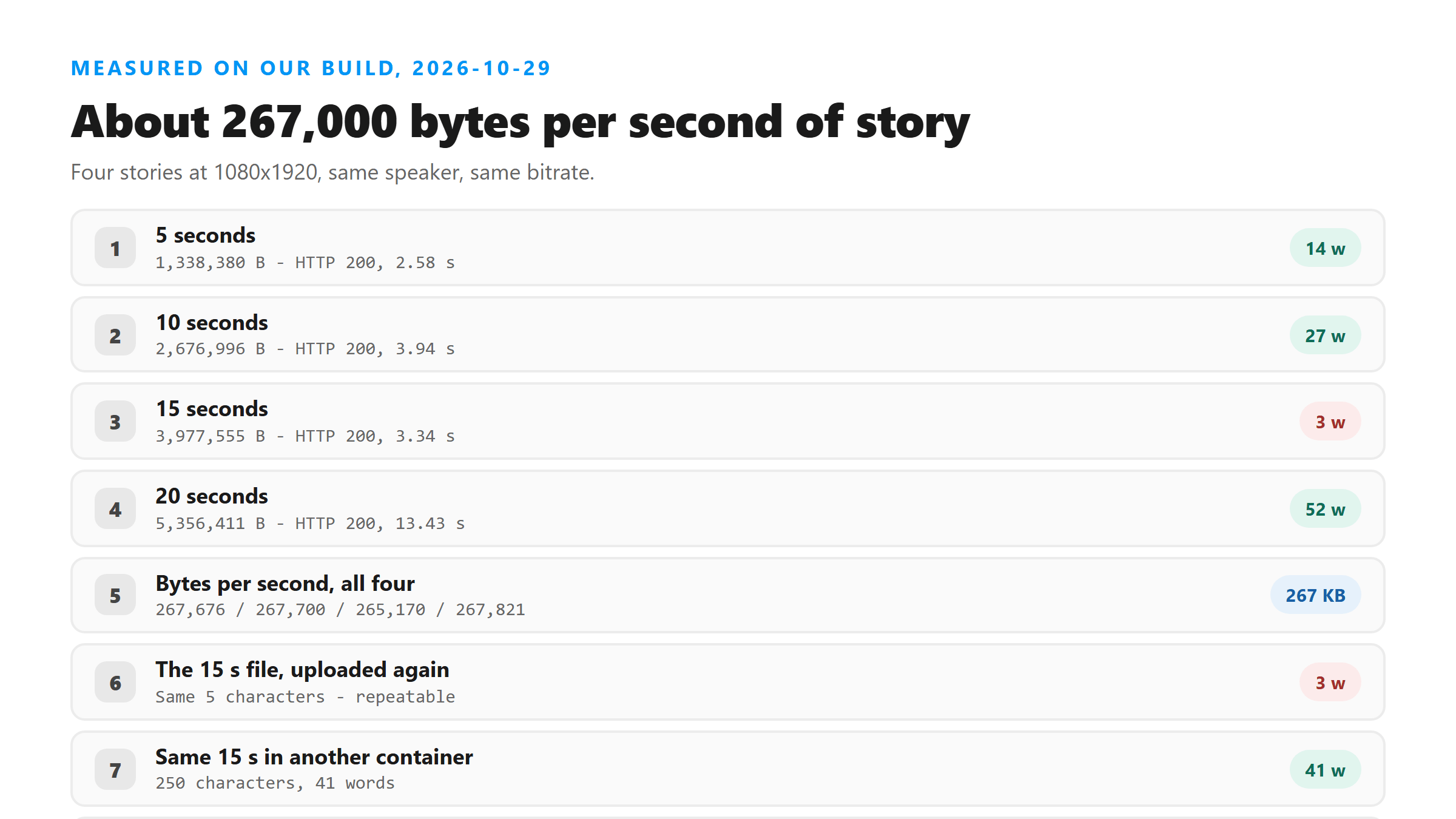
- 5 seconds - 1,338,380 bytes, HTTP 200 in 2.58 seconds, 82 characters and 14 words.
- 10 seconds - 2,676,996 bytes, HTTP 200 in 3.94 seconds, 155 characters and 27 words.
- 15 seconds - 3,977,555 bytes, HTTP 200 in 3.34 seconds, 5 characters and 3 words.
- 20 seconds - 5,356,411 bytes, HTTP 200 in 13.43 seconds, 305 characters and 52 words.
The size is predictable, and that is useful
Divide each file by its length and you get 267,676, 267,700, 265,170 and 267,821 bytes per second. That is close enough to plan with: a story costs you roughly a quarter of a megabyte per second at this bitrate. A 30-story archive of 15-second clips is about 119 MB of video on your disk. We did not upload 30 files today, so treat that as arithmetic on one measured number, not a test we ran.
The 15-second file that came back nearly empty
It returned three characters of punctuation. We uploaded the same file again, and the byte-identical copy returned the same three characters. We also re-encoded that audio four other ways, and those came back with 7, 41 and 7 words. So the short answer is not that the audio was silent: the same 15 seconds produced 41 words once it sat in a different container. Honest version is that we do not know why this particular file collapsed, and we are not going to invent a reason. What we can tell you is the practical rule: a near-empty result is not proof the story had no speech.
What a whole archive costs you
Our uploader takes one file at a time and there is no batch field on the page, so an archive is a series of single uploads. On today's timings, four stories took 23.29 seconds of wall clock end to end, an average of 5.82 seconds each. Scale that to 30 stories and you are looking at around three minutes of uploading, plus the time you spend saving each one by hand. That estimate is arithmetic from four uploads, not a 30-file run.
The wait does not follow the length
The four uploads took 2.58, 3.94, 3.34 and 13.43 seconds. The 20-second file is only 1.3 times the size of the 15-second one and took four times as long. We have watched the same thing happen on other days, where one file came back in 3.57 seconds on one attempt and 13.09 seconds on another with the same bytes. Do not plan your afternoon around a single upload. Run two or three stories first to see what today looks like, then decide how many you want to work through in one sitting.
Before you upload a story from your archive
Pull the audio track out first. The 20-second story was 5,356,411 bytes as a video. Its audio alone is a fraction of that, which is the difference between a 13.43-second upload and one that finishes in about two. Run ffprobe on the file to confirm an audio stream exists before you blame the length. If a story comes back with almost nothing in it, re-encode it once and try again before you write it off.
Got a Reel you want as text? Upload the file and download the transcript as TXT, SRT, or VTT →
A story costs about 267,000 bytes per second, and none of that picture makes it into the text. Wondershare UniConverter opens an archived story on your own machine and writes out the audio by itself, which is the cheap way to work through thirty of them. It does not transcribe - the words come back from this page.
FAQ
How big is a story file from the archive?
About 267,000 bytes per second at 1080x1920 in our test today: 1,338,380 bytes for 5 seconds, 2,676,996 for 10, 3,977,555 for 15 and 5,356,411 for 20. Your own stories will differ with bitrate, but the per-second figure was stable across all four.
Can I transcribe a whole archive at once?
No, not here. The upload field takes one file and the page has no URL input or multi-file option, so a 30-story archive is 30 separate uploads. Four stories today took 23.29 seconds total, about 5.82 seconds each; the 30-file figure is arithmetic from that, not a run we did.
A story came back with almost no text. Does that mean it had no speech?
Not necessarily. One 15-second file today returned 5 characters, and the same audio re-encoded into a different container returned 250 characters. We re-uploaded the original twice and got the identical short result, so it is repeatable per file, not random. Re-encode once before you conclude the clip was silent.