Transcribe Audio to Text: What Punctuation and Capitalization You Actually Get
Ten clips, one question each
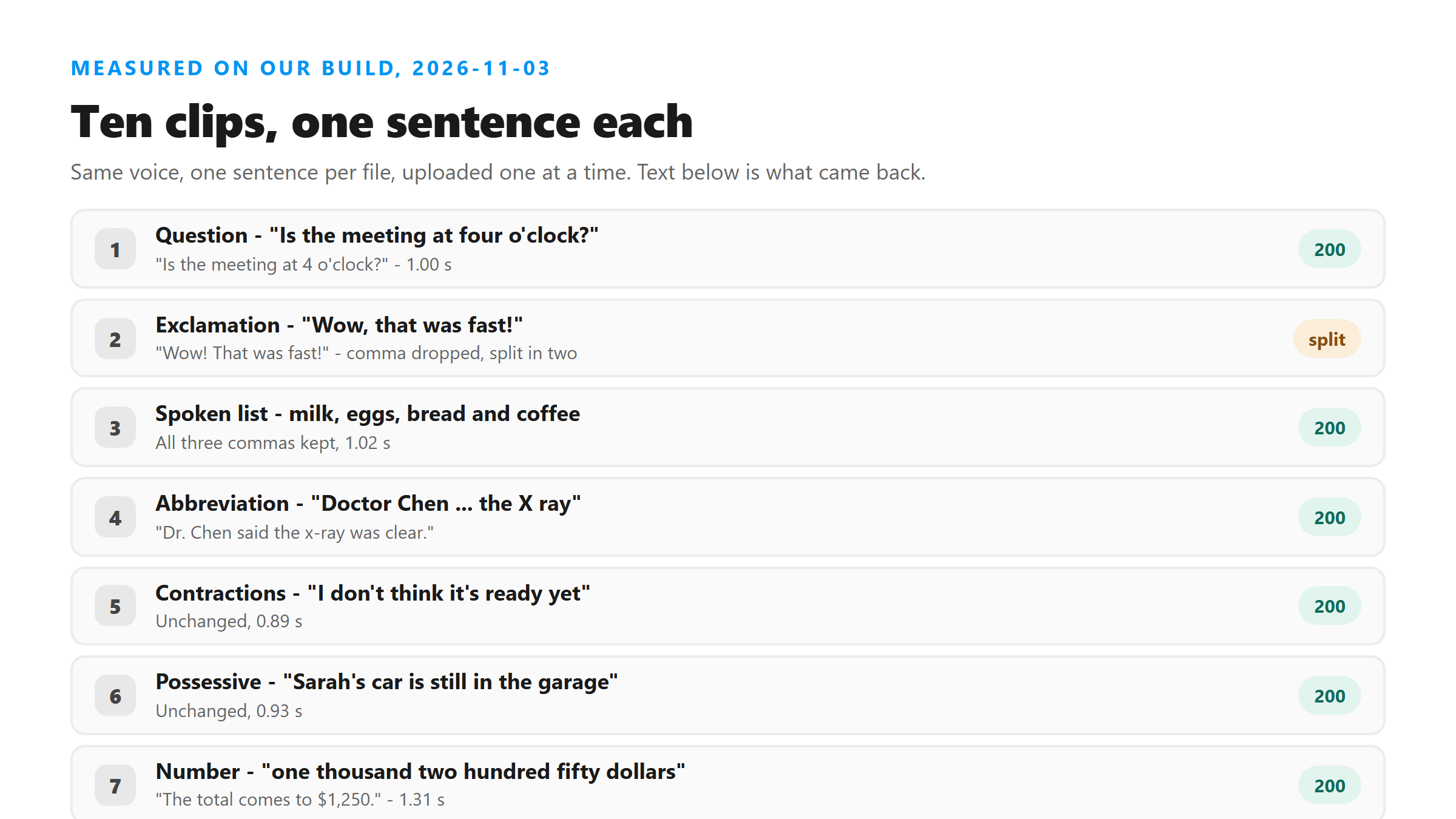
Each clip is a single sentence spoken by one voice, uploaded as its own MP3. Everything below is the exact text the endpoint returned, character for character. All ten came back 200, and nine of them came back in under 1.6 seconds. Where the text differs from what was said, both versions are shown.
- Question - "Is the meeting at four o'clock?": "Is the meeting at 4 o'clock?" in 1.00 s.
- Exclamation - "Wow, that was fast!": "Wow! That was fast!" in 0.99 s. The comma is gone and the sentence is split.
- Spoken list - "We need milk, eggs, bread and coffee": all three commas kept, period added, 1.02 s.
- Title and abbreviation - "Doctor Chen said the X ray was clear": "Dr. Chen said the x-ray was clear." in 1.24 s.
- Contractions - "I don't think it's ready yet": returned unchanged in 0.89 s.
- Possessive - "Sarah's car is still in the garage": returned unchanged in 0.93 s.
- Long number - "one thousand two hundred fifty dollars": "The total comes to $1,250." in 1.31 s.
- Two sentences - "The train leaves at nine. We should be there by ten": "The train leaves at 9. We should be there by 10."
- Proper nouns - Boston, Chicago, Maria Gonzalez, Captain Lewis and NASA Headquarters all capitalized, 1.56 s.
- Acronyms - "from the FBI and the CDC": "from the FBI in the CDC" - the word "and" came back as "in".
Your pauses don't set the punctuation
This one surprises people, so we tested it directly. We took the two-sentence clip and stretched the gap between the sentences to 0.2 s, then 1.0 s, then 3.0 s. The silence grew fifteen times over. The text did not move at all.
- 0.2 s gap: "The train leaves at 9. We should be there by 10." - 11 words, 1.13 s.
- 1.0 s gap: identical text, 1.25 s.
- 3.0 s gap: identical text, 1.48 s.
A three-second hole in the audio is the kind of pause a human transcriptionist would mark with a dash, a new line or a new paragraph. This model doesn't. It wrote the same period in the same place every time, at the same nine-word mark, and it took about a third of a second longer only because the file was longer. If you want a paragraph break, you add it after the text comes back.
That's the clearest evidence for how the punctuation is produced. There's no separate step that measures silence and drops a mark where the speaker stopped. The model writes the words and the marks together, in one pass, from what it hears. Pauses in your recording simply aren't part of the input.
A 31-second memo, counted
Short clips settle the rules but they don't show the shape of a real file. So we recorded a 31-second memo - the kind of thing you leave yourself in a phone's voice recorder - and counted every mark in it. It came back as 87 words in 5.00 seconds.
- 7 sentences, every one ending in a period. No question marks, because the memo asks no questions.
- 6 commas, and 5 of them sit after "First," "Second," "Third," "Fourth," and a street name.
- One spoken comma got promoted: "That is everything for now, I will record" came back as two sentences.
- Numbers: "the fifteenth" became "the 15th", and "two hundred and eight dollars" became "$208".
- No paragraph breaks, no speaker label, no timings - one block of text from start to finish.
That promotion is worth a second look. The speaker ran two clauses together with a comma's worth of pause, and the model heard a sentence boundary and closed the sentence with a period. The words are all still there. The shape of the paragraph is the model's, not the speaker's, and it will do this in both directions - we saw a spoken period stay a comma in the acronym clip too.
Numbers change the most
If you only remember one thing from this page, remember this one. Spoken numbers come back rewritten as digits, with currency symbols and ordinal endings added, and it happens every single time we've seen it. Say the number the way you want it to look, or fix it after.
- "nine" and "ten" in one clip: 9 and 10.
- "four o'clock": 4 o'clock.
- "one thousand two hundred fifty dollars": $1,250.
- "the fifteenth": the 15th, and "two hundred and eight dollars": $208.
The rewrite is consistent, which is what makes it easy to miss in a long document. "Two hundred and eight dollars" and "the fifteenth" both came back shorter than they were spoken, and both look correct at a glance. If the figure matters - an invoice, a date, a measurement - the audio is the only thing you should check it against.
Where the words change
Eight of the ten clips matched what was said word for word. The changes fall into three groups, and they're worth knowing because two of them don't look like errors at a glance.
- Abbreviations get rewritten: Doctor to Dr., and X ray to x-ray.
- Numbers get rewritten: nine to 9, four to 4, one thousand two hundred fifty dollars to $1,250.
- Real word errors happen too, and they read clean: "the FBI and the CDC" came back "the FBI in the CDC".
That third group is the one to watch. A swapped function word doesn't look wrong the way a missing word does - the sentence still reads like a sentence. If the text matters, a quote, a name, a figure in a document, read it against the audio once before you use it. Acronyms are the worst case, because letters spoken one at a time give the model much less to hold on to than a real word does.
How fast it comes back
Punctuation work costs nothing in time. The ten clips ranged from 0.89 s to 1.56 s, and the clip that took longest was the one with five proper nouns in it, not the one with the most marks. The 31-second memo took 5.00 s. Nothing here is slow enough to plan around.
- 2.5 s clip with contractions: 0.89 s.
- 3.0 s clip with a possessive: 0.93 s.
- 4.0 s clip with a dollar figure: 1.31 s.
- 7.0 s clip with five proper nouns: 1.56 s.
- 31.2 s memo, 87 words: 5.00 s.
What you can't change
There's no punctuation setting on this page. No checkbox for curly quotes, no option for one sentence per line, no switch to keep numbers spelled out, no place to tell it your speaker's name. What you get is one block of text with the model's own punctuation in it, and the two details people ask about most are these:
- Apostrophes come back as U+0027, the straight kind, in all four places we saw them - don't, it's, o'clock, Sarah's.
- There are no timings in the text. If you need an SRT or VTT file, you build it from the text after it comes back.
What we sent
Ten MP3 files, one sentence in each, spoken by a single synthetic voice so that nothing but the sentence changes between them. The clips run 2.5 to 7.0 seconds. Every one was uploaded on its own and every one came back 200. Where the text differs from what was said, both versions are in the list above.
- 2.5 s - "I don't think it's ready yet."
- 2.5 s - "Wow, that was fast!"
- 2.6 s - "Is the meeting at four o'clock?"
- 3.0 s - "Sarah's car is still in the garage."
- 3.1 s - "Doctor Chen said the X ray was clear."
- 7.0 s - five proper nouns in one sentence.
Capitalization, rule by rule
Capital letters come from the model's reading of the words, and it got every one we expected. It also left lowercase alone where lowercase was right, which is the part that usually goes wrong in tools that capitalize too eagerly.
- The first letter of every sentence, in all ten clips.
- Boston, Chicago, Maria Gonzalez and Captain Lewis - every proper noun in the 7-second clip.
- NASA Headquarters, including the second word of the compound name.
- Dr. at the start of the sentence it produced.
- It kept "x-ray" lowercase after shortening "X ray", and it kept every other mid-sentence word as it heard it.
Three places commas show up
Commas aren't random. Across the ten clips and the memo, they landed in three situations, and they were dropped in one.
- After an introductory word: "First," "Second," "Third," "Fourth," in the memo.
- Inside a spoken list: "milk, eggs, bread and coffee."
- Between two clauses the speaker ran together with only a short pause.
- Dropped in "Wow, that was fast!" - the sentence was split into two instead.
That fourth case is the useful one to remember. When the model hears a strong break it would rather end a sentence than put a comma in it. If you're reading a transcript and the sentence breaks feel too frequent, that's the model's preference showing, not a defect in your audio.
Reading the output like a proof
What you get back is a draft with good spelling, which is the dangerous kind - it reads finished. Three checks take under a minute and they catch nearly everything we saw on this page.
- Read every number against the audio: 9, 4, $1,250 and $208 were all rewritten.
- Read every acronym: "the FBI and the CDC" came back with the wrong small word in it.
- Read every name: Boston, Chicago and Maria Gonzalez were right here, but a name the model hasn't heard is where it slips.
- Check the sentence breaks yourself, because a pause in the audio won't produce a paragraph.
- Fix apostrophes and quote marks last, in your editor, if the style guide asks for it.
None of those checks need a setting or another tool. The point of knowing how the punctuation is produced is knowing where to look - at the numbers, the acronyms and the names. The commas are fine.
What happens to the file
Your clip is posted to /api/transcribe over an encrypted connection, held in memory while it's processed, and dropped as soon as the text goes back to your browser. Nothing is stored, nothing is used for training, and there's no account tied to it. That's also why the punctuation can't be tuned per user - there's no profile on the other end to tune it against.
- Uploaded: yes, the file does leave your browser.
- Written to a disk: no.
- Kept after the reply: no.
- Account required: none.
How to get usable text out of it
Three small habits fix most of what the punctuation gets wrong, and none of them need a setting. Say numbers the way you want them written, because "nine" comes back 9 and spelling is only for words you want spelled. Read every acronym and proper name back against the audio. Then add your own paragraph breaks where you want them.
- Say the number you want to see in the final text.
- Check every acronym, name and figure against the audio before you paste it.
- Add paragraph breaks yourself - a long pause won't produce one.
- Swap straight apostrophes for curly ones in your editor if the style guide asks for it.
- Build SRT or VTT timings from the finished text; they don't come with it.
Got a Reel you want as text? Upload the file and download the transcript as TXT, SRT, or VTT →
Punctuation comes back the way the model writes it, and there's no setting here to change it. What you can change is the file you hand over: Wondershare UniConverter rewrites a recording as mono MP3 or WAV on your own machine and shows the size before you save. It does not transcribe, and it won't touch the commas or the numbers - the text above is what this page returns.
FAQ
Does the transcript come back with punctuation?
Yes. Every clip we sent came back with a capital letter at the start of each sentence and a period at the end. Commas appeared where the sentence needed them, including in a spoken list of four items. The punctuation comes from the model's reading of the words, not from silence in the file.
Why did my exclamation mark move?
Because the model re-punctuates what it hears. Our clip said "Wow, that was fast!" with the stress on fast, and it came back as "Wow! That was fast!" - the comma was dropped and the sentence was split in two. Same words, different marks.
Are numbers written as digits or words?
Digits, almost always. "nine" came back as 9, "four" as 4, "the fifteenth" as the 15th, and "one thousand two hundred fifty dollars" as $1,250. If you need a number spelled out in the final text, change it after the upload.
Can I turn punctuation off or change the style?
No. There's no setting for it on this page. The text comes back as one block with the model's own capitalization, periods and commas. Apostrophes are the straight U+0027 character, and there are no timings in the output - you add structure yourself once the text is on your screen.
Does a long pause create a new paragraph?
No. We stretched the gap between two sentences from 0.2 s to 3.0 s and got the identical 11-word sentence back all three times, with a period in the same place. Silence doesn't reach the punctuation. Split the text yourself if you need paragraphs.