Transcribe an Interview: Two Voices, One Block of Text
What came back
Every upload in this test returned HTTP 200 and success: true. Not one of them carried a warning field, and the language field said unknown every time. Here's the shape of the response you're looking at: one string of text, no speaker labels, no line breaks, no timings.
How we built the speakers
Two synthesized US voices, one male and one female, reading the same four sentences - 45 words, 14.1 seconds at 16 kHz mono. We didn't bring in real recordings because we needed the words to stay fixed while only the speaker changed. For the three-voice run we pitched one of the readings down rather than adding a third voice, so the script stayed identical across all three files and any difference in the text would have to come from the voices themselves.
One voice, then two, then three
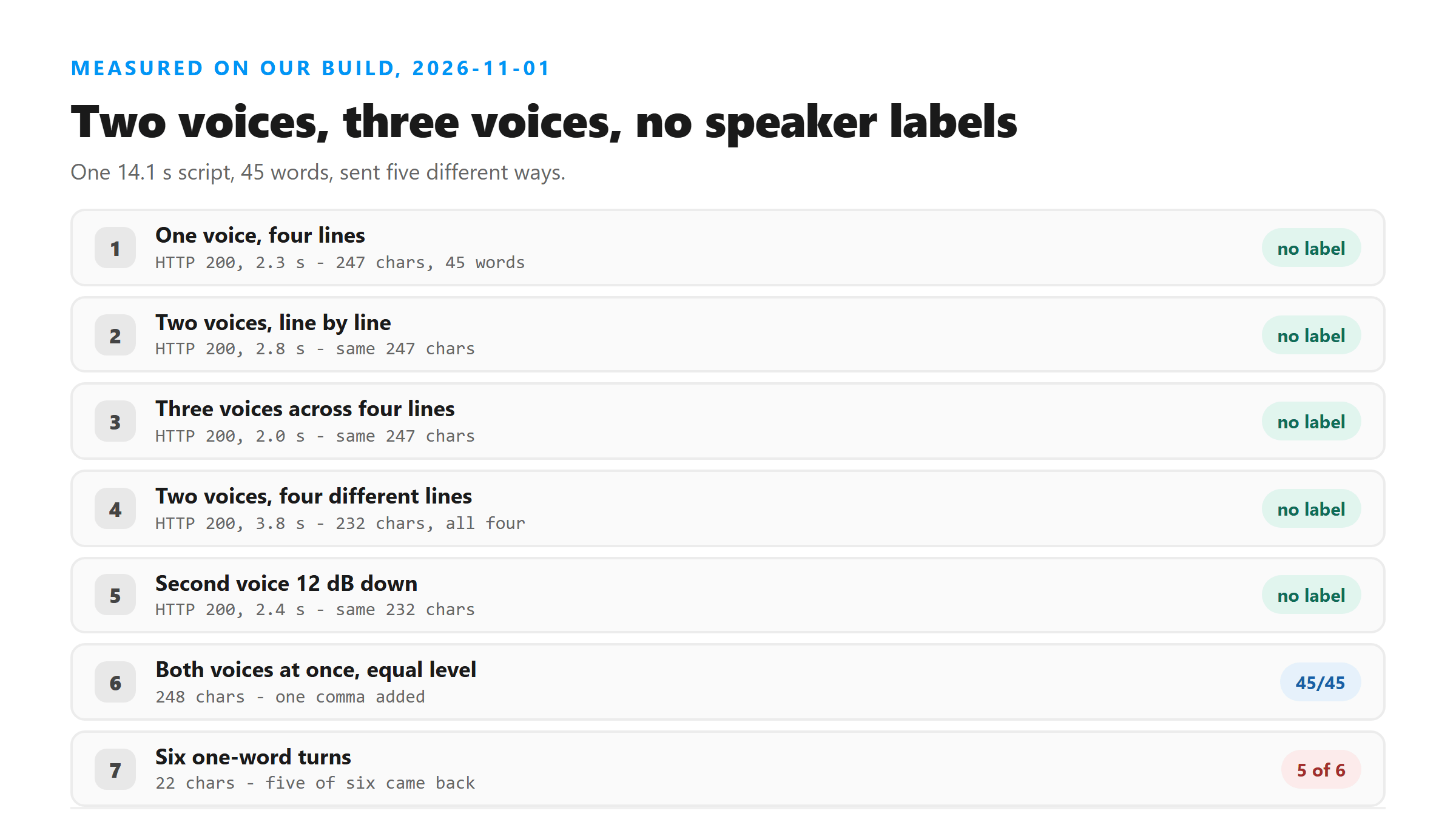
We built a 14.1-second clip from four sentences about a meeting - 45 words - and had a synthesized US male voice read it. That upload came back in 2.3 seconds with 247 characters. A female voice reading the same script came back in 2.5 seconds with the same 247 characters. Then we split the script so the two voices alternated line by line. Still 247 characters, 2.8 seconds. Then we added a third voice by pitching one of them down and built a four-line clip with three speakers. 247 characters again, 2.0 seconds.
- Single male voice, four lines: 247 characters, 45 words, 2.3 seconds.
- Single female voice, same four lines: 247 characters, 45 words, 2.5 seconds.
- Two voices alternating line by line: 247 characters, 45 words, 2.8 seconds.
- Three voices across four lines: 247 characters, 45 words, 2.0 seconds.
- The transcript never once said who was talking.
Two speakers saying different things
The first test is too easy, because both voices read the same words. So we wrote four different lines - two for each speaker - and cut them together as a real exchange: line one from the first voice, line two from the second, and so on. All four lines came back, in order, in 3.8 seconds. That run was 232 characters, shorter only because the new lines were shorter. The point stands: the model followed the conversation and wrote it down as one voice.
Then we did the version you actually run into, where one person is sitting further from the mic. We dropped the second voice 12 dB and kept the four different lines. Same 232 characters, 2.4 seconds, all four lines present in order. A quiet speaker is not the problem you'd expect it to be.
When both people talk at once
Now the hard part. We mixed the two full readings so both voices ran for the whole 14 seconds at equal level. The result was 248 characters - one more than the clean version - and the extra character was a comma. "If the projector fails, we will move" instead of "If the projector fails we will move". Same 45 words. We ran it again with the second voice pulled down 12 dB, which is closer to someone talking over the end of your sentence. Also 248 characters, same comma, same words.
- Both voices at equal level for the full clip: 248 characters, 45 words, 2.3 seconds.
- Second voice 12 dB down: 248 characters, 45 words, 2.0 seconds.
- The only change in either run was one comma after "fails".
- Neither response flagged the overlap in any way.
Short turns are where it slips
We then made the worst case we could think of: six one-word turns, alternating Yes and No between the two voices, each about half a second long. Five came back. The transcript was "Yes. No. Yes. No. Yes." - 22 characters, 2.8 seconds. Nothing in the response says a turn went missing, and with no timestamps you can't tell which one.
That's the failure mode worth remembering. A clean back-and-forth between two people who let each other finish will survive unchanged. Rapid-fire turns won't.
Why you don't get speaker labels
Speaker labels aren't a feature someone forgot to turn on. They need a second pass over the audio that decides who is talking and when - speaker diarization - and that pass isn't part of what this endpoint runs. It listens, it writes, it answers. If you want names in the text, you're adding them after.
What to do with the result
Record on one mic if you can, and let the other person finish before you start. That alone removes every problem we found here. When you do have a two-person clip, open the transcript in a text editor and put the names in yourself while the recording is still fresh in your head - it takes a couple of minutes and you'll catch the turn that got dropped. If you're quoting someone, go back to the audio and check the sentence before you send it.
- One mic, one speaker at a time: nothing to fix afterward.
- Two people with clean turns: add the names by hand.
- Fast back-and-forth: expect a missing turn, and listen to check.
Checking the transcript against the recording
Because you get no timestamps, the only way to check a quote is to play the audio and read along. Do it once, at normal speed, and fix the names as you go - "[Anna] the catering order was confirmed for Tuesday morning" takes two seconds to type and saves you from guessing later. If a turn looks missing, scrub back a few seconds rather than assuming the speaker never said it; in our one-word test the missing turn was in the middle of the clip, not at the end.
The limits of this test
Both voices here were synthesized, so they're cleaner than a phone recording in a café, and they don't have the breathing and false starts that real interviews have. We used two speakers plus one pitched-down variant, not a panel of six. And we ran one clip length, 14 seconds - long interviews have their own problems, and we haven't measured those on this page.
What happens to your file
Your file leaves the browser. It goes to /api/transcribe over an encrypted connection, gets decoded in memory, and the audio is processed there. When the response goes back out, the file is dropped. We keep no copy, we don't store transcripts, we don't train on what you send, and there's no account to tie it to.
Got a Reel you want as text? Upload the file and download the transcript as TXT, SRT, or VTT →
Two mics means two files, because one channel of a stereo upload is all that comes back as text. Wondershare UniConverter opens the recording on your own machine and writes each channel out as its own audio file, so you can send both sides of the conversation as two uploads instead of one. It does not transcribe and it adds no speaker names - the words come back from this page.
FAQ
undefined
undefined
undefined
undefined