Instagram Voice Message Transcript: What a 60-Second Note Returns
What a voice-note-shaped file actually returns
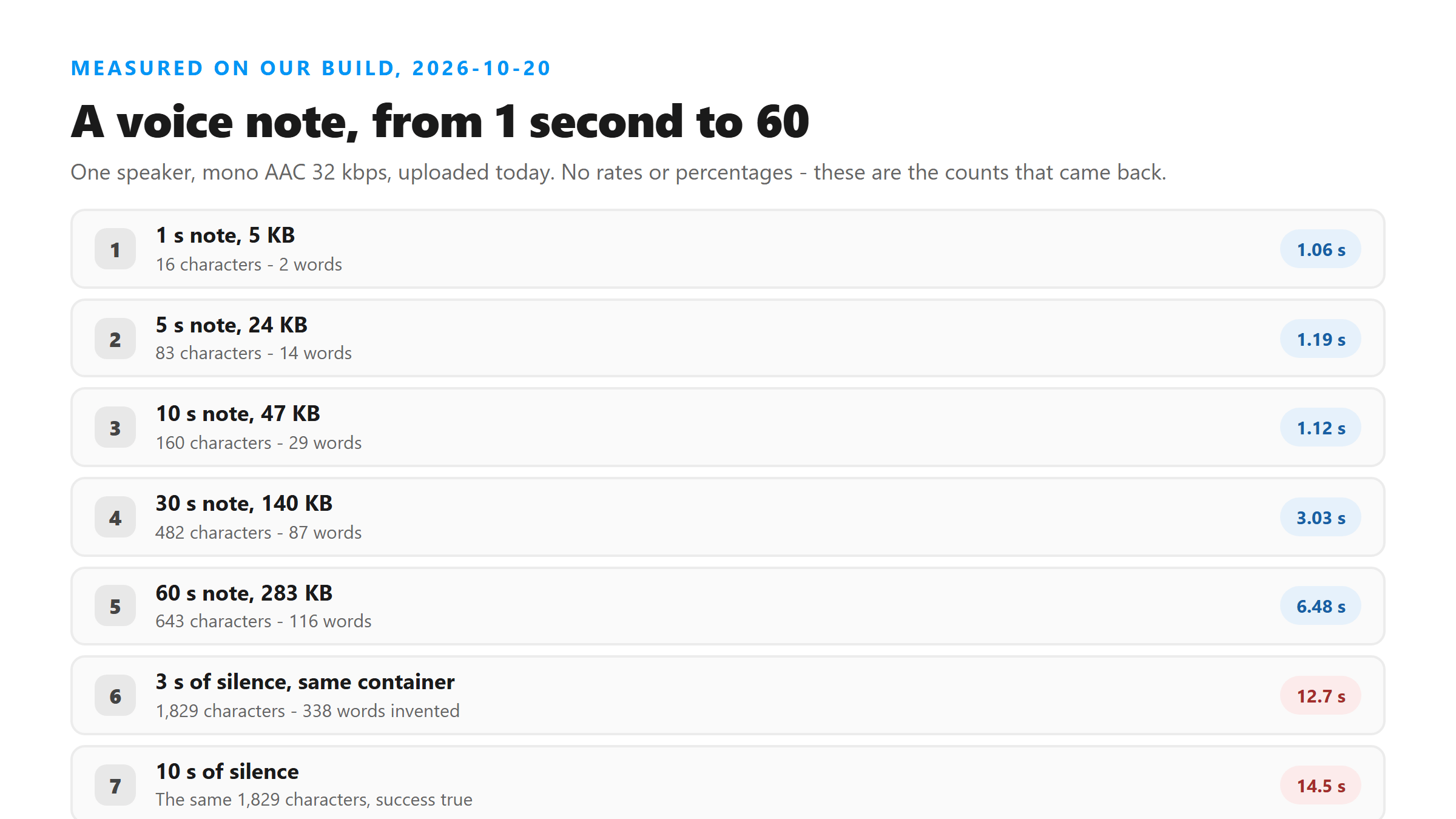
We took one speaker reading a known sentence, encoded it the way a phone hands audio over - mono, AAC, 32 kbps - and cut nine lengths from 1 second to 60 seconds. Every one went to our own endpoint as a real upload. The whole ladder came back 200, and the slowest honest note took 6.5 seconds end to end.
- 1 s / 5 KB - 200 in 1.06 s: 16 characters, 2 words
- 2 s / 9 KB - 200 in 0.89 s: 28 characters, 5 words
- 3 s / 14 KB - 200 in 0.74 s: 48 characters, 9 words
- 5 s / 24 KB - 200 in 1.19 s: 83 characters, 14 words
- 10 s / 47 KB - 200 in 1.12 s: 160 characters, 29 words
- 20 s / 93 KB - 200 in 3.97 s: 321 characters, 58 words
- 30 s / 140 KB - 200 in 3.03 s: 482 characters, 87 words
- 45 s / 210 KB - 200 in 4.75 s: 710 characters, 127 words
- 60 s / 283 KB - 200 in 6.48 s: 643 characters, 116 words
Two things to read off it. The wall clock stays in single digits across the whole range, so if you are waiting, the wait is in getting the file, not in transcribing it. And the curve is not monotonic - 45 seconds returned 127 words, 60 seconds returned 116 - because our source is one sentence looped, not natural speech.
The bottom of the ladder is the part people misread. A one-second clip returned 16 characters and two words, and they were the right two. Short voice notes really are that short, so a transcript of a dozen words is not a failure.
One more thing about the file itself. It is uploaded to /api/transcribe over an encrypted connection, processed in memory once, and discarded when the response goes back to you. No copy is kept afterwards, nothing is used for training, and no account is involved at any point.
A voice message with nothing on it does not come back empty
This is the case that catches people. We encoded 3 seconds of digital silence in the same container and uploaded it: 200, success:true, 1,829 characters and 338 words in 12.7 seconds, every one of them "Thank you very much." A 10-second silent file returned the same 1,829 characters.
So the failure mode is not an error and it is not an empty string. It is a long, fluent, confident transcript of nothing, and no field in the response marks it: success is still true, language still reads unknown, the rest look exactly like a real note. Polite and repetitive is the signature - the microphone picked up nothing.
There is a cheap way to catch it: divide the character count by the length of the note. Our silent file ran at about 610 characters per second; the honest files in the ladder ran between 10.7 and 16.6. Anything far above that range is the model filling dead air, and the fix is at the recording end.
The other half of that test is worth knowing. The same sentence recorded at 2 percent volume - inaudible at a normal listening level, 8 seconds long - came back as 120 characters and 22 words, and they were the right words. The model hears far below the volume a person would call audible; what it cannot do is report that nothing was said.
The container a note arrives in barely matters
We took the same 30 seconds of speech and handed it over in six shapes. The words barely moved; the bytes and the clock did.
- AAC 32 kbps mono, 140 KB - 482 characters, 87 words, 3.03 s
- AAC 64 kbps mono, 269 KB - 482 characters, 87 words, 3.08 s
- AAC 128 kbps mono, 287 KB - 482 characters, 87 words, 3.17 s
- Opus 24 kbps in .ogg, 84 KB - 492 characters, 89 words, 3.74 s
- MP3 32 kbps mono, 121 KB - 492 characters, 89 words, 2.71 s
- WAV 16 kHz mono, 960 KB - 492 characters, 89 words, 5.71 s
The three AAC bitrates produced the same text - paying for more bits bought no extra words. The other three containers landed two words apart, on a duplicated phrase at the tail. What did change is cost: the WAV is eight times the bytes of the MP3 for the same 89 words and took 5.71 seconds against 2.71. Hand over AAC or Opus, not raw PCM.
The wall is getting the audio out, not transcribing it
Here is the part that actually stops people. A 60-second screen recording of a voice note at an ordinary phone bitrate - 720x1280 at 4 Mbps - is 30.5 MB. Uploaded as-is it came back HTTP 503 with a Cloudflare error page in 9.1 seconds; the request never reached our code at all.
The same file with the picture stripped off it is 540 KB. That is roughly 57 times smaller, and it returned 200 in 4.1 seconds with 806 characters and 145 words. One command does it: ffmpeg -i recording.mp4 -vn -c:a aac -b:a 64k -ac 1 note.m4a
So the sequence that works is record, strip the picture, upload the audio. Our size ceiling sits around 3.2 to 3.4 MB - measured on earlier days, not re-measured today - and a screen recording burns through it in seconds, while a stripped note uses a fraction of it.
What you get back, and what you do not
Every response today had the same six fields, and the same gaps.
- Fields: success, transcript, language, engine, fileSize, fileName
- Line breaks: 0 - one unbroken paragraph no matter how long the note is
- Timestamps: none. Speaker labels: none. Confidence score: none
- language read unknown on every file we ran today
- engine names the model in the response itself, so it can be checked rather than believed
For a voice message, most of that is acceptable: one speaker, and you wanted the words, not a timeline. The gap that hurts is the missing paragraphing - a 60-second note arrives as one block you have to split yourself.
The practical consequence is that the file name is your only index: name the audio after the message you recorded, because nothing in the response says which note produced which paragraph. It is also why notes should go up one at a time, not concatenated - the output gives you no boundary to cut on later.
What we did not test today
We never opened Instagram's app - every file here is audio shaped like a voice note: one speaker, mono, phone bitrates. We did not verify where a received voice message is stored on an iPhone or an Android device, we did not test any export path inside Instagram, and we ran no note in a language other than English. Nor did we check whether the platform's own limit on a voice message matches the 60-second top of our ladder.
Got a Reel you want as text? Upload the file and download the transcript as TXT, SRT, or VTT →
What blocks a voice note here is size, not format: a 60-second screen recording is far larger than this endpoint accepts, and the picture has to come off it before anything can be read. Wondershare UniConverter opens that recording on your own machine and writes out an audio-only file in the size range that uploads cleanly. It does not transcribe - the words come back from this page, not from the converter.
FAQ
Can you transcribe an Instagram voice message without downloading it?
No. The page takes a file and nothing else - there is no URL box, and a server-side fetch of an Instagram URL is blocked at the platform end anyway. The audio has to be on your device first, which for a voice message means recording the playback or finding the file the app left behind.
How long does a voice message transcript take?
Under 7 seconds for every real note we ran today, from 1 second to 60 seconds. The slowest runs were the silent files, at 12.7 and 14.5 seconds, and that time went into generating 338 words that were never spoken.
Why did my voice note come back as "Thank you very much" over and over?
That is what our endpoint does with audio that has nothing on it. Three seconds of silence and ten seconds of silence both returned the same 1,829 characters and 338 words, with success:true. Record again with the microphone actually picking something up.
Does the file type matter?
Not much for the words - three AAC bitrates at 30 seconds returned identical text. It matters for size and speed: the same 89 words took 5.71 seconds as a 960 KB WAV and 2.71 seconds as a 121 KB MP3.