How to Transcribe a Video Without a Link
There is no link field
This is not a hidden feature or a setting. The upload page carries one input, and its accept attribute is audio/*,video/*. There is no URL input anywhere in the page, and the endpoint behind it does not read one. We sent an Instagram Reel address at it three different ways to be sure:
- As a form field named url: 400 in 0.09 seconds, with the message Please select a non-empty audio or video file
- As a JSON body with the URL inside: 500, with Transcription failed. Please try another supported file
- A plain GET to the endpoint: 404 Not found
- The same clip as a file, 5,461,607 bytes: 200 in 5.85 seconds, 322 characters, 59 words
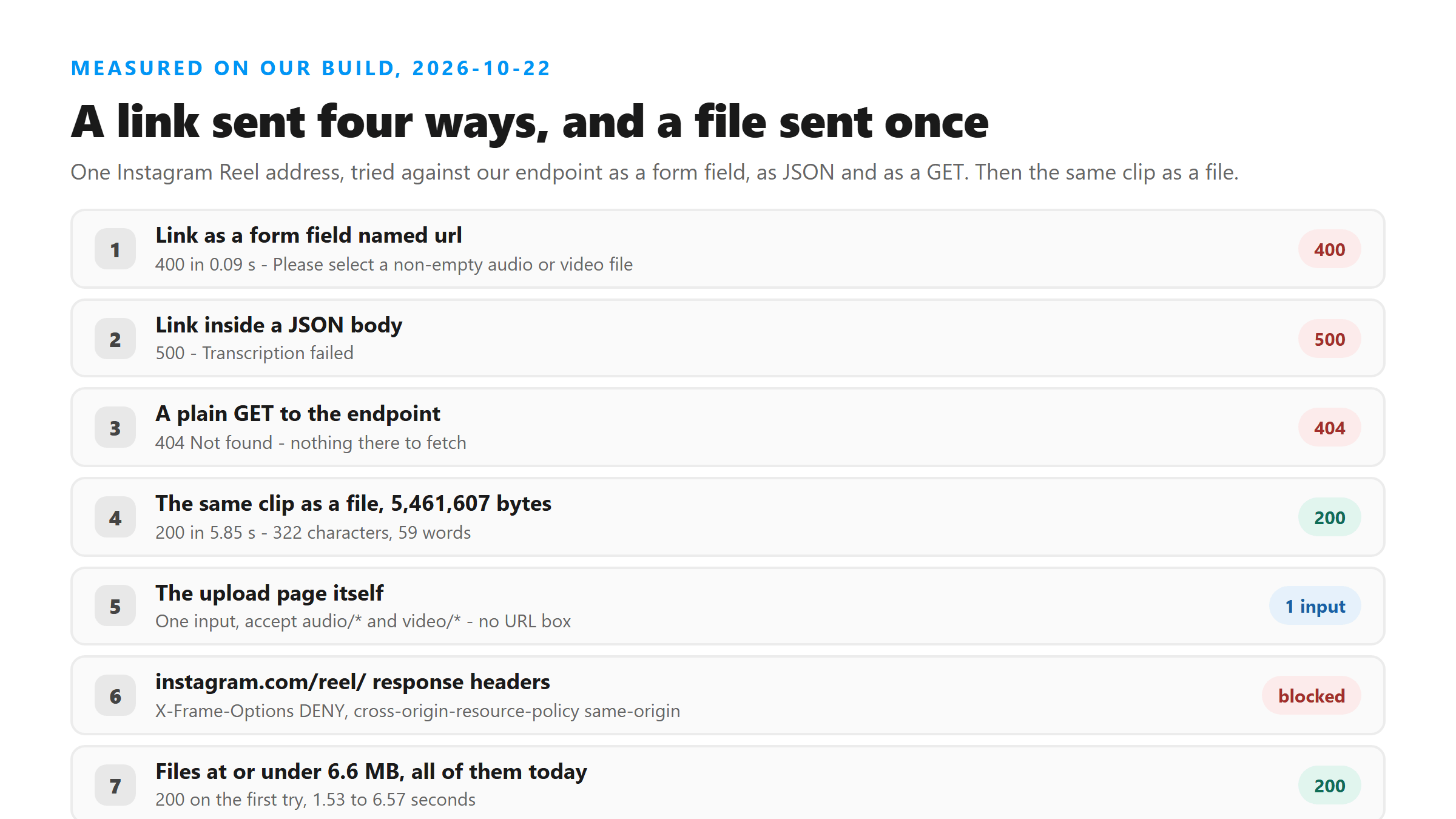
The first two come back fast because nothing was fetched. The request never went to Instagram, never looked at the address, and never queued anything. It read the part of the request where a file should have been, found no file, and stopped.
Why no tool can fetch it for you
People assume the tool is choosing not to fetch. It is not a choice. We requested https://www.instagram.com/reel/ today and got a 200 carrying two headers that close the door: X-Frame-Options: DENY and cross-origin-resource-policy: same-origin. The first keeps the page out of a frame. The second stops a script on another site from reading the media at all. A browser tool sitting on our domain cannot pull that video down, and neither can our server, which is why there is no fetch step in our code to find.
What to send instead
Send the file you already have, or make one. Three routes cover almost everything:
- Save or download the Reel, if the account allows it - you get a video file with the audio track inside
- Screen record it on your phone - you get a bigger file, and the audio is whatever your device captured
- Ask whoever posted it for the original - the cleanest audio you will ever get, and the fastest upload
- For a video you own already, skip all three and upload it as it is
Whatever route you take, the name has to end in one of nine endings: MP3, WAV, M4A, AAC, OGG, FLAC, MP4, MOV or WEBM. Anything else gets refused in under a tenth of a second, and nothing is uploaded when it does. If your phone produced an .opus, a .3gp or an .amr file, rename it to something on that list, or convert it - renaming works when the audio inside is already fine, which it usually is.
Cut the picture off first if the file is big
A Reel file is mostly picture. In the 20-second clip we used for these tests, the file is 16,318,601 bytes and the audio stream inside it is 296,876 bytes, which is 1.82%. The whole file uploads fine when it is small enough - our 5,461,607-byte test came back in 5.85 seconds - but a full-length Reel is tens of megabytes, and that is where uploads get slow and start failing. One command fixes it:
- ffmpeg -i yourfile.mp4 -vn -c:a copy audio.m4a - pulls the audio out untouched, under a second on our clips
- Upload audio.m4a instead - same words, a fraction of the bytes
How big is too big
Across the uploads we ran today, every file at or under 6.6 MB came back 200 on the first attempt, in 1.53 to 6.57 seconds. The 16.3 MB one is where it broke: 503 in 5.63 seconds on the first try, then 200 in 27.31 seconds on the retry, same file. There is no published limit we can point you at, so treat size as the thing that makes uploads slow and flaky rather than a wall you hit at an exact number. The audio out of that same 16.3 MB file is 295,093 bytes, and it came back in 3.10 seconds.
What comes back
The response has six fields: success, transcript, language, engine, fileSize and fileName. The text itself comes back as one block, with no timestamps, no speaker labels and no line breaks. There is no file waiting for you afterwards either - a GET to the same address returns 404 Not found - so hit TXT, SRT or VTT and save it before you close the tab. Our 20-second clip came to 59 words. Count yours against the length of the clip when you read it: about three words a second is what we measured on clean speech, and a transcript noticeably longer than that usually has a repeated block in it.
Got a Reel you want as text? Upload the file and download the transcript as TXT, SRT, or VTT →
The file is the whole input, so the job is getting one you can upload: a screen recording is mostly picture and a saved Reel is the same. Wondershare UniConverter opens either one on your own machine and writes out the audio track on its own, which is the small file that uploads cleanly here. It does not transcribe - the words come back from this page.
FAQ
Can I paste an Instagram link anywhere on the site?
No. There is no URL input on the upload page, and the endpoint returns 400 in 0.09 seconds when a link is sent as a form field and 500 when it is sent as JSON. Send the file instead.
What if I only have the link and no file?
Make a file from it. Save or download the Reel if the account allows it, screen record it on your phone, or ask the poster for the original. Then upload that. Anything your phone saves as .mp4, .mov or .m4a is already on the accepted list.
Does the file have to be audio only?
No. Our 5,461,607-byte video came back 200 with 59 words in 5.85 seconds. Stripping the audio just makes it smaller and faster - worth doing once the file gets into the tens of megabytes, where uploads start to fail.