Why We Don't Offer a Browser Extension
What we ran today
Three groups of requests, all on 2026-10-15. First, we posted URLs at our own endpoint instead of files: a multipart form carrying a url field, a JSON body carrying a url key, and a plain GET. Second, we asked Instagram's own pages and both of its oEmbed endpoints for a post, anonymously, and read the response headers. Third, we timed the file route against the capture route for the same 60 seconds of audio: a 60-second MP3 at 16 kHz mono and 64 kbps uploaded three times, the same 60 seconds as a 720x1280 MP4 uploaded twice, and the audio pulled out of that video three times with ffmpeg. Every number on this page came out of those runs. Two honest caveats before the numbers: the Instagram URLs we requested used a placeholder shortcode rather than a real post, so what we can report is what Instagram's front door returns to an anonymous caller, not the content of any particular Reel; and our timings are single runs on one connection, so read them as a range, not as a service guarantee.
Our endpoint refuses anything that is not a file
This is the part that decides the whole design. The handler does one thing: it reads the file field out of the form and hands the bytes to the model. There is no URL parameter in it anywhere, and when we tried to feed it one anyway it refused in three different ways.
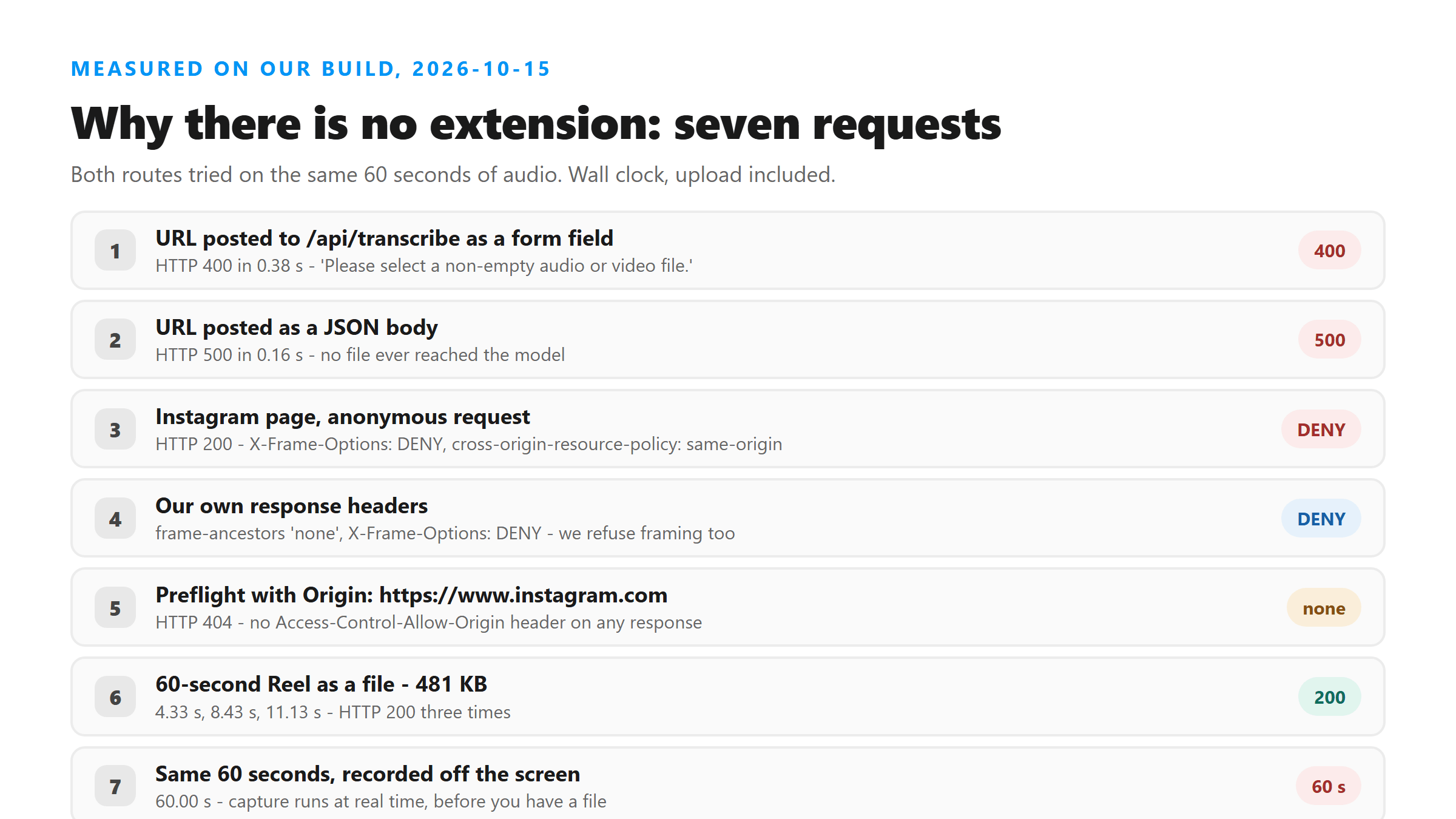
- Multipart form with url=https://www.instagram.com/reel/ABCdefGhijK/ and no file: HTTP 400 in 0.38 s - {"error":"Please select a non-empty audio or video file."}
- JSON body {"url":"..."} with Content-Type: application/json: HTTP 500 in 0.16 s - {"error":"Transcription failed. Please try another supported file."}
- GET on the same path: HTTP 404 - Not found
- The source is short enough to quote: it rejects anything that is not a File with a non-zero size, checks the extension against .mp3 .wav .m4a .aac .ogg .flac .mp4 .mov .webm, and returns 400 otherwise. Only after that does it call the model.
- So an extension could not 'send us the Reel' even if we wanted it to. It would have to turn the Reel into a file first and then upload that file - which is exactly what you can already do yourself, in less time.
Neither page will let the other one embed it
This is the second hard wall, and it runs in both directions. We read the response headers on anonymous requests to Instagram today, and on our own responses.
- https://www.instagram.com/ - HTTP 200 with X-Frame-Options: DENY and cross-origin-resource-policy: same-origin
- https://www.instagram.com/reel/ABCdefGhijK/ - HTTP 200 with the same two headers
- https://www.instagram.com/p/ABCdefGhijK/ - HTTP 200 with the same two headers
- https://www.instagram.com/api/v1/oembed/?url=... - HTTP 404
- https://api.instagram.com/oembed/?url=... - HTTP 302 redirecting to https://www.instagram.com/oembed/?url=...
- Our own responses carry Content-Security-Policy with frame-ancestors 'none' and X-Frame-Options: DENY - we refuse to be framed anywhere too.
- Instagram's own CSP lists exactly one chrome-extension:// origin in its connect-src. Their page is not an open surface to bolt onto, and ours is not either.
The consequence is mundane but decisive. The obvious extension design - inject our uploader into the Instagram page in an iframe - is blocked by our own Content-Security-Policy before it draws a pixel. Getting around that means not embedding at all, but instead running code with privileges inside a page you are logged into.
We send no CORS allowance, on purpose
We sent a preflight at our own endpoint with Origin: https://www.instagram.com and Access-Control-Request-Method: POST. It came back HTTP 404 with no Access-Control-Allow-Origin header at all, and a successful 200 response carries none either. That is worth spelling out, because it is the difference between 'a convenience layer' and 'a privileged component'. A script running on the Instagram page cannot read our responses - the browser will not hand them over. An extension that wanted to talk to us from that page would need its own host permission to bypass that check, and the permission Chrome asks for when an extension requests a host is stated in the install dialog as reading and changing all your data on that host. That is not a measurement - it is what the permission model asks for, and we are not going to ask you for it to save a file dialog.
The extension would be slower, not faster
This is the measurement that settled it for us. Take a 60-second Reel. If you have the file - the original export, a downloader's output, a screen recording you already made - the cost today was small. If you capture it by playing it and recording the tab or the screen, the cost is fixed by the length of the clip: capture runs at real time, so 60 seconds of audio costs 60 seconds of your life, before you have a file to upload.
- 60 seconds of audio, 481,004 bytes, uploaded three times: 4.33 s, 8.43 s, 11.13 s - HTTP 200 every time
- 30 seconds of audio, 241,100 bytes, uploaded three times: 13.34 s, 4.22 s, 6.75 s - HTTP 200 every time
- The same 60 seconds as a 720x1280 MP4, 605,893 bytes, uploaded twice: 9.08 s and 4.59 s - HTTP 200 both times, so you do not even have to strip the audio out at this size
- Pulling the audio out of that video with ffmpeg took 0.89 s, 1.21 s and 1.51 s and produced 481,107 bytes
- File route for a 60-second Reel, end to end: about 5 to 13 seconds. Capture route for the same Reel: 60 seconds, minimum.
- The gap widens with length. A 15-minute recording costs 15 minutes to capture and roughly a minute and a half to upload in five-minute pieces - and on this site a 10-minute file already fails outright, which capture does nothing to fix.
What the one-page route actually costs you
The counter-argument to all of the above is convenience: an extension saves you opening a tab. Here is what the tab costs, measured today.
- The homepage is 21,121 bytes and loaded in 0.14 s in our test.
- It contains one script tag with no external src, and zero external images. The only external origins that appear in the HTML at all are a YouTube link, our own canonical URL, and one affiliate link - nothing is fetched from a third party to make the tool work.
- It has exactly one input element: . There is no URL field and no login field.
- The file is POSTed to /api/transcribe over TLS, held in memory for one pass of the model, and dropped when the response goes out. No account, no storage, nothing retained - which is a promise we can only make because nothing else runs on the page.
An extension would add a second code path with its own permissions, its own update channel and its own access to pages you are logged into - to replace a 21-kilobyte page that loads in a seventh of a second. We do not think that trade is worth making, and we would rather say so than ship it and hope nobody asks.
When recording is still the right move
None of this means recording is wrong. It means recording is a way to get a file, not a way to skip getting one. There are two cases where it is the only route, and one thing to watch in both.
- Someone else's Story or Live: there is no file to download, so a screen recording or a capture is how you get one. Record, then upload the recording.
- A Reel that only exists inside the app: Instagram's Save button keeps it there. A recording gets it out.
- Watch the size. The upload ceiling on this site sits between 3.18 MB and 3.35 MB, and a screen recording burns through that in seconds at phone bitrates. Pull the audio out before you upload - on a 60-second clip that turned 605,893 bytes into 481,107 in about a second.
- Check what the recording caught. Recording mixes in everything the device plays, and a music bed louder than the voice is the most common reason a transcript comes back fluent and wrong.
What would change our mind
We are not dogmatic about this, and the reasons are all measurable, so they can be retired by measurement. If Instagram opened a documented, authenticated route to a post's audio that did not require reading the rest of the page, the permission argument would get much weaker. If capture stopped being tied to real time - meaning the audio could be obtained faster than the clip plays - the speed argument would flip, and an extension would genuinely save time. Neither is true today, on the evidence we have. Until then the honest answer to 'can I do this without installing anything' is that you already can, and the rest of this page is the proof.
Got a Reel you want as text? Upload the file and download the transcript as TXT, SRT, or VTT →
Everything on this page assumes you already have a file, which is the case for not installing anything. When what you have is a recording in a container this tool will not read, Wondershare UniConverter converts it to MP3 or M4A on your own machine first - one pass, no upload to us of anything we can't read.
FAQ
Can I transcribe an Instagram Reel without installing an app or extension?
Yes - that is the whole point of this page. Get the audio into a file on your own device, open one 21,121-byte page, pick the file, and download TXT, SRT or VTT. There is no account and there is nothing to install. We measured the page at 21,121 bytes and 0.14 seconds to load today, with one file input and no URL or login field on it.
Why can't I just paste the Reel's URL?
Because our endpoint only accepts a file, and because Instagram does not hand that file to anyone else. Posting a URL field to /api/transcribe returned HTTP 400 with 'Please select a non-empty audio or video file.' and a JSON body returned HTTP 500. On Instagram's side, anonymous requests came back with cross-origin-resource-policy: same-origin, and both oEmbed endpoints we tried answered 404 and a 302 respectively.
Wouldn't a browser extension be faster than downloading and uploading?
Measured on the same 60 seconds, no. The file route took 4.33 to 11.13 seconds across three uploads of a 481 KB audio file, and the video version went through in 9.08 and 4.59 seconds without any pre-processing. Capturing that audio by recording the screen takes 60 seconds, because capture happens in real time. The longer the clip, the worse capture looks.
If an extension existed, could it send the Reel to you from the Instagram page?
Not directly. Our responses carry no Access-Control-Allow-Origin header - a preflight with Origin: https://www.instagram.com came back 404 with no such header, and successful responses carry none - so a script on that page cannot read what we return. It would need its own host permission to work around it. And our Content-Security-Policy sets frame-ancestors 'none', so our tool cannot be embedded in the page either.
Do you plan to build one later?
Not while these measurements hold. The two arguments against it are both empirical: capture costs real time and the file route does not, and the permission an extension needs is larger than the job requires. If either measurement changes - a documented route to the audio, or capture faster than real time - we would rather publish the new numbers than keep repeating this answer.