Convert Audio to Text: What a Phone-Line Filter Does to the Words
One clip, eight filters
We took the same 10.2-second, 16 kHz mono WAV we use as a control (326,478 bytes) and applied one filter per copy. Nothing else changed. Then we uploaded each copy on its own and read back the exact string.
- The control returned 160 characters, 29 words, in 1.93 seconds.
- Filters: low-pass at 3400, 1500, 800, 400 and 200 Hz; high-pass at 300 Hz; band-pass 300-3400 Hz; band-pass 500-2000 Hz.
- One extra file stitched the clip to itself (20.4 seconds, 652,878 bytes) and got the 300-3400 Hz band.
- We publish no accuracy percentage. Eight files aren't a test set.
The ladder, file by file
- Low-pass 3400 Hz - 160 characters, 29 words, 1.71 s. Identical to the control.
- High-pass 300 Hz - 160 characters, 29 words, 1.68 s. Identical.
- Band-pass 300-3400 Hz - 160 characters, 29 words, 1.71 s. Identical. This is the standard phone band.
- Low-pass 1500 Hz - 160 characters, 29 words, 1.59 s. Identical.
- Low-pass 800 Hz - 160 characters, 29 words, 2.26 s. Identical.
- Low-pass 400 Hz - 160 characters, 29 words, 1.76 s. Identical.
- Low-pass 200 Hz - 162 characters, 29 words, 1.70 s. Two changes: the first period became a comma, and 'a test' became 'the test'.
- Band-pass 500-2000 Hz - 160 characters, 29 words, 1.62 s. Identical.
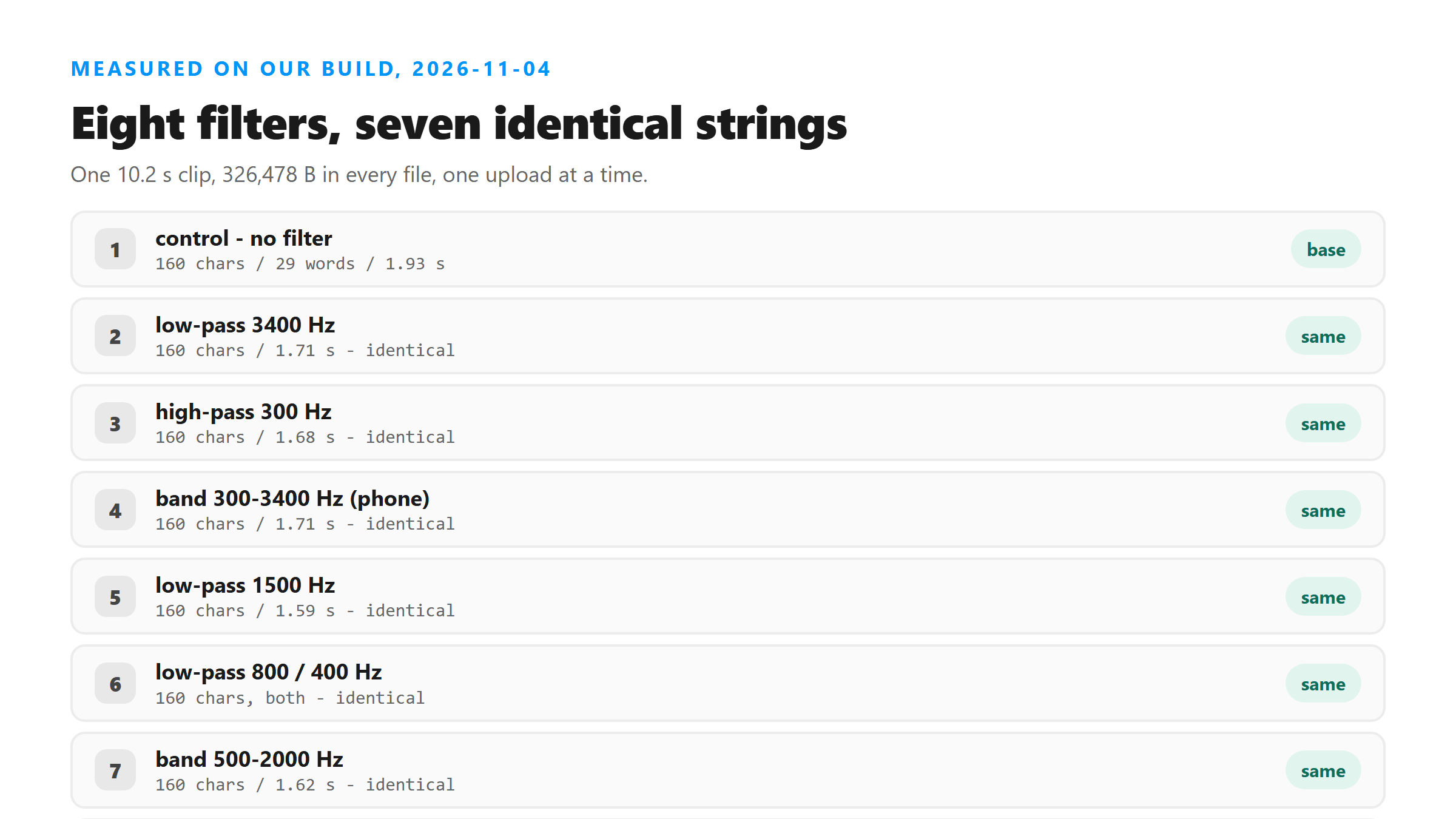
Seven of eight didn't move a comma
That's the whole finding. You can throw away most of the high frequencies and still get every character back. A 400 Hz low-pass leaves you with a dull, muffled signal, but the model still wrote 'The quick brown fox jumps over the lazy dog.' word for word. Only at 200 Hz did anything shift, and even there the word count stayed at 29.
The two changes at 200 Hz are small ones. A period became a comma, and the article 'a' became 'the'. Both are the kind of slip the model makes on a clean file too. We wouldn't build a rule on two edits in one file.
Size and time didn't move either
Every filtered WAV came out at 326,478 bytes - the exact same as the control. A filter changes the samples, not how many samples there are, and PCM WAV doesn't compress. The 20.4-second file was 652,878 bytes, exactly double, as you'd expect. Call times sat between 1.59 and 2.26 seconds, with the control at 1.93. There's no trend across the ladder: the 800 Hz file was the slowest at 2.26 s, and the 1500 Hz file the fastest at 1.59 s.
So filtering doesn't buy you a smaller upload or a faster answer on this page. If you're doing it to save bytes, you're doing it for the wrong reason.
The long file held up too
The 20.4-second clip with a 300-3400 Hz band came back as 321 characters and 58 words in 2.55 seconds. Both halves are the control text, word for word. The only difference anywhere in the 321 characters is capitalization: 'quick brown fox' came back 'Quick Brown Fox'. No line breaks, no dropped sentences, no repeats.
That matters because people assume a longer file gives the model more chances to slip. Here it didn't. Length isn't the thing that hurts a transcript on this page.
Why the high end barely matters
This page runs @cf/openai/whisper on Cloudflare Workers AI, and it reads 16 kHz mono audio. A 16 kHz feed carries content up to 8 kHz, so a 3400 Hz ceiling does cut real information. But the model writes from patterns in the signal that survive well below that ceiling. It doesn't need crisp consonants to place 'the quick brown fox' when it has the whole phrase to work with.
A 200 Hz low-pass is different. At that point you've removed most of what distinguishes one word from another, and the model starts leaning on its own guesses. It still didn't fall apart, but it did start editing.
What actually breaks the words here
Other tests on this page point the same way. A 1,000 ms echo grew a 160-character clip to 248 characters and wrote two phrases twice. A reversed clip came back as 45 words of fluent, unrelated English. Neither of those changed the frequency range at all. They changed the order and the timing of the signal. That's what this model reads.
So if your transcript looks wrong, don't reach for an equalizer first. Check whether the file has a late echo, a reversed section, a long silence, or a second voice. Those are the things we've measured actually moving the text.
How to reproduce it
- ffmpeg -i clean.wav -af "lowpass=f=400" -ar 16000 -ac 1 lp400.wav
- Swap 400 for 3400, 1500, 800 or 200 to walk the ladder.
- For the phone band: -af "highpass=f=300,lowpass=f=3400".
- Upload one file per POST and compare the string against the unfiltered control.
What to do with your own file
Upload what you have. If it came from a phone call or a voice memo, the narrow band isn't the problem. Keep the file you sent, though: the bytes leave your browser over an encrypted connection, get read once in memory, and are dropped when the response is written. We don't save it, don't train on it, and don't ask for an account, so we can't re-run it for you later.
Got a Reel you want as text? Upload the file and download the transcript as TXT, SRT, or VTT →
Filtering won't change what this page writes, and it won't shrink the upload either - our eight WAVs all stayed 326,478 bytes. Wondershare UniConverter does help when the real problem is the container or the size: convert the file, drop it to a bitrate that fits, and see the length before you save. It does not transcribe.
FAQ
Do I need to filter my audio to a phone band before uploading?
No. A 300-3400 Hz band-pass returned the control text character for character, 160 characters and 29 words. Filtering didn't shrink the file or speed up the call either.
How far down can I cut before the words change?
Low-pass at 400 Hz still came back identical. At 200 Hz, one period became a comma and 'a test' became 'the test' - two small edits in 162 characters.
Does filtering make the upload smaller?
No. Every filtered WAV stayed 326,478 bytes, the same as the control. A filter changes sample values, not the PCM byte count.
Will a longer filtered file be worse?
In our test it wasn't. A 20.4-second clip with the phone band returned both halves word for word, 321 characters, with only 'Quick Brown Fox' capitalized differently.
What should I check instead of the frequency range?
Timing. A late echo, a reversed section, a long silence or a second voice are the changes we've measured actually moving the text. An equalizer won't fix any of them.